This review was first published in German on handgetestet.de.
The CalDigit TS5 Plus is our recommendation for a desk with lots of devices. It is expensive, but it offers a huge number of ports and ran without a single crash in our test. We tested it with a Mac Studio with M1 Max and a MacBook Pro with M3. Our verdict: five out of five stars.
Ports galore
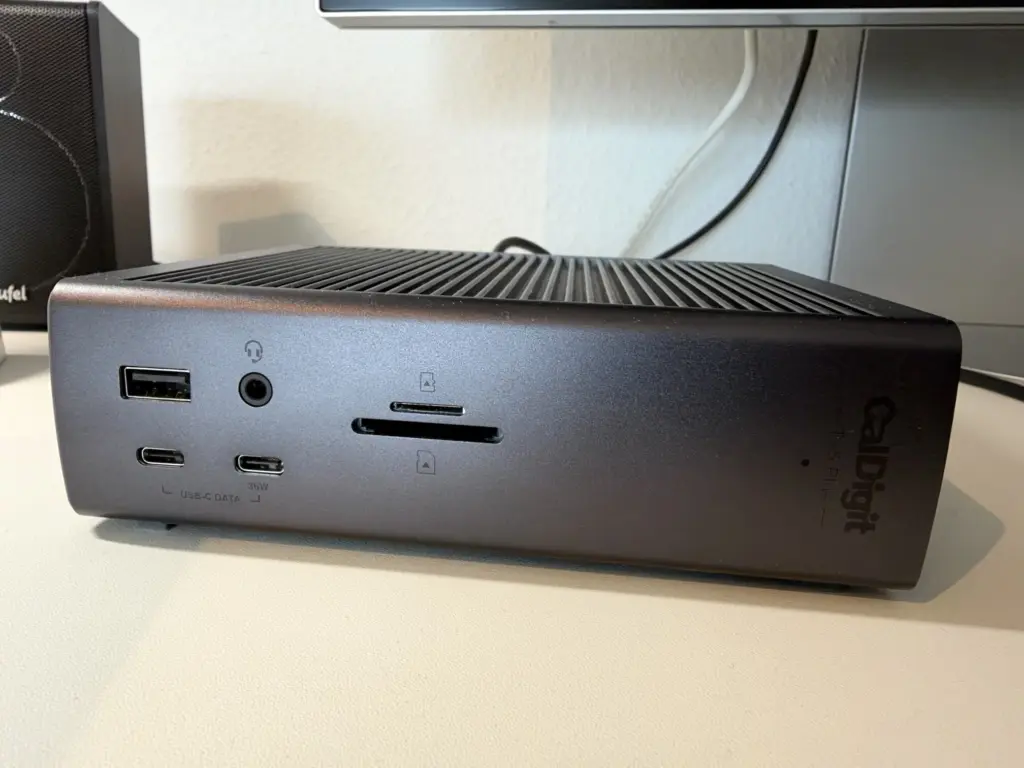
According to a detailed review by MacRumors, the front has one USB-A and two USB-C ports at 10 Gbit/s each, one of which charges at 36 watts, plus SD and microSD card readers and a combo audio jack. On the back, there are two more Thunderbolt 5 ports for devices, three USB-C and four USB-A ports, 10-gigabit Ethernet, DisplayPort 2.1 and audio in and out. There is no HDMI. The dock charges the laptop with up to 140 watts.
On the Mac: just plug it in
Plug and play in the best sense: plug it in and it works. We had no driver problems, and the dock did not crash a single time during our test. It also works with Macs that have Thunderbolt 4, like the Mac Studio we used. How many displays you can run depends on the chip: according to MacRumors, the base M1, M2 and M3 support one display, the Pro and Max chips two. Under load the dock gets warm; it has no fan, which is normal.
The price
The TS5 Plus is not cheap. At its European launch, a price of around €559 was quoted. But if you have lots of devices on your desk and want peace of mind, you get a dock that leaves nothing to be desired.
Technical data
Manufacturer’s specifications as of November 14, 2026. We have not verified them ourselves.
| Host connection | 1 × Thunderbolt 5, up to 120 Gbit/s |
|---|---|
| Thunderbolt 5 for devices | 2 × 80 Gbit/s each |
| USB-C | 5 × 10 Gbit/s each |
| USB-A | 5 × 10 Gbit/s each |
| Display output | 1 × DisplayPort 2.1 |
| Card readers | SD 4.0 and microSD 4.0 (UHS-II) |
| Network | 10 Gigabit Ethernet |
| Audio | front: 3.5 mm combo jack; back: 3.5 mm input and output |
| Host charging | up to 140 W |
| Charging other devices | Thunderbolt outputs and front USB-C 36 W each, other USB ports 7.5 W each |
| Power supply | 330 W, external |
| Dimensions | 155.0 × 47.0 × 127.9 mm (height × width × length) |
| Weight | 0.90 kg |
| Included | Thunderbolt 5 cable 1.0 m, power supply, power cord, rubber feet |
| Mac requirements | macOS 15 or later, Thunderbolt 3 or later |
| Warranty | 2 years |
Our verdict
Lots of ports, absolutely reliable and no detours on the Mac. An unreserved recommendation for anyone who thinks the features are worth the price: five out of five stars. Cheaper solutions are compared in our docking station guide (in German).
Are you a manufacturer or retailer and would like us to review your product? Offer a product for review (in German).
Frequently asked questions
Which ports does the CalDigit TS5 Plus have?
On the front, one USB-A and two USB-C ports at 10 Gbit/s each, SD and microSD readers and a combo audio jack. On the back, two more Thunderbolt 5 ports, three USB-C, four USB-A, 10-gigabit Ethernet, DisplayPort 2.1 and audio in and out. There is no HDMI.
Does the TS5 Plus work with a Thunderbolt 4 Mac?
Yes. It also works with Macs that have Thunderbolt 4, such as the Mac Studio. We had no driver problems in our test; the dock works immediately after plugging it in. It did not crash a single time.
How many monitors can the CalDigit TS5 Plus drive on a MacBook?
That depends on the chip. According to MacRumors, the base M1, M2 and M3 support one display, the Pro and Max chips two. There is no HDMI port; monitors connect via DisplayPort or Thunderbolt.
Does the TS5 Plus get hot?
The dock gets warm under load. It has no fan, so the warmth is normal and not a sign of a fault. On the plus side, it stays silent in operation.
Sources
- MacRumors: CalDigit TS5 Plus review
- iFun (German): TS5 and TS5 Plus, price and launch
- CalDigit: TS5 Plus, technical specifications
Conclusion
A huge number of ports, plug and play on the Mac and not a single crash in our test. The dock is expensive, but in return it leaves nothing to be desired.
Where to buy
- CalDigit TS5 PlusCheck price at Amazon.de