Contents14 sections
This guide was first published in German on handgetestet.de.
Dragging blocks at eight, typing Python at twelve: when you buy a coding robot, you’re really buying a learning path. The device is secondary. For kids aged eight and up who like tinkering, we consider the Makeblock mBot2 the most coherent choice, because blocks and Python live in the same software. Younger children need something else. And sometimes the school simply decides.
From what age does it even make sense?
Earlier than many think. Sphero rates the small indi driving robot for ages four and up; it’s programmed with colored tiles on the floor, without any screen. Wonder Workshop describes Dash as being for children aged 5 to 14. For the mBot2, Makeblock states ages 8 and up and advises adult supervision for younger kids.
The age rating is a lower limit. Not a promise that a device will last until fifth grade. A robot built for four-year-olds ends up on the shelf after two weeks with a ten-year-old.
Scratch blocks or straight to Python?
Blocks first. That applies to almost every child under twelve. What’s more interesting is what comes next. In the mBlock program, Makeblock shows the Python code behind every block at the push of a button, so the child changes the notation, not the system. In 2025, Sphero added Python to the Sphero Edu app, alongside drawing, blocks and JavaScript. With Dash, by contrast, the path ends at JavaScript: Blockly Pro switches between blocks and text in the Chrome browser. If you have Python in mind as a later school language, take this difference seriously.
Kit or ready to go out of the box?
The mBot2 comes in parts. Makeblock estimates around 30 minutes for assembly. That fills an afternoon, and afterward the child knows where the motor, sensor and circuit board sit. The BOLT+ and Dash, on the other hand, are ready-built. According to the manufacturer, Dash arrives assembled and charged, with no small parts that can get lost.
Impatient kids lose the first evening with the kit. Tinkering kids lose exactly the part they were looking forward to with the ready-made ball.
How long does the battery last, and what else do you need?
Battery and device are easily overlooked when buying. According to Makeblock, the mBot2 runs for about five hours. Sphero states six to eight hours for the BOLT+ and charges it wirelessly via Qi. According to the manufacturer, Dash manages around five hours and is full again in less than an hour; its battery can’t be replaced. The Calliope mini needs two AAA batteries or runs on a USB-C cable.
Almost all require a tablet or computer. If you need to get a device first, our kids‘ tablet guide (in German) compares parental controls and ease of use.
Does my child need an account?
Not necessarily. Sphero writes in its help pages that you can drive, program and work through lessons in Sphero Edu without signing up. Accounts for children up to 13 are set up by parents or teachers, and according to Sphero, user data isn’t used for advertising. LEGO Education states for its new computer science line that students don’t need logins and the data stays local. Dash has no camera. On tablets, once the apps are installed, it’s programmed without internet. With Makeblock and Calliope, it’s best to read the editor’s privacy notice before your child signs up anywhere.
Five candidates side by side
| Model | Age according to manufacturer | Programming | Power | Best for |
|---|---|---|---|---|
| Makeblock mBot2 | 8 and up | Blocks and Python in mBlock | Rechargeable battery, about 5 hours | Tinkering kids with stamina |
| Sphero BOLT+ | Grades 3 to 10 | Drawing, blocks, JavaScript, Python | Rechargeable battery with Qi, 6 to 8 hours | Kids who don’t want to screw things together |
| Sphero indi | 4 and up | Color tiles, later blocks in Sphero Edu Jr | Rechargeable battery | Preschool and early school years |
| Calliope mini 3 | Elementary and secondary school | MakeCode, Scratch blocks, Python | 2 AAA batteries or USB-C | Schoolchildren who want to understand electronics |
| Wonder Workshop Dash | 5 to 14 | Blocks, Blockly Pro with JavaScript | Rechargeable battery, about 5 hours | Elementary schoolers with a tablet |
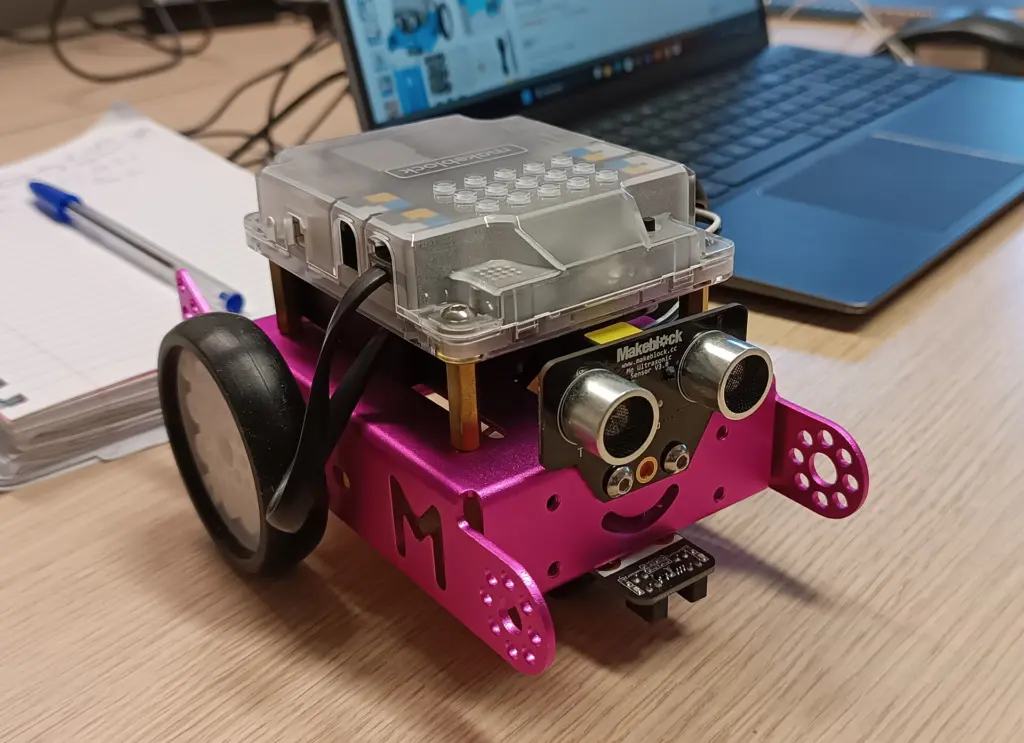
Makeblock mBot2
The heart of the mBot2 is the CyberPi control board, and it’s programmed in mBlock. Makeblock states ages 8 and up, and in stores it sits in the mid-price range. It doesn’t explain itself. But a child who sticks with it can get all the way to real Python without needing a second device. For families with a tinkering kid, this is our pick. We currently can’t find an Amazon listing that clearly identifies the mBot2 (as of November 9, 2026). Clearly available there is the Sphero BOLT+, which according to Sphero is for grades 3 to 10 and programmable all the way to Python, but with no screwing and in a higher price range.
Sphero BOLT+
The transparent ball is the counter-model. Unpack, start the app, roll off. New compared with the old BOLT, according to Sphero, is a 128 × 128 pixel display that shows images and also sensor readings. Sphero targets grades 3 to 10. Nobody learns mechanics here. Price-wise, the ball sits clearly above the mBot2.
Sphero indi
A small car with a color sensor. It drives over colored tiles that children lay on the floor and responds to each color with an action; according to Sphero, the Student Kit includes 20 rubber tiles. The Sphero Edu Jr app with blocks comes later, but it isn’t required. By age eight or nine at the latest, indi has run its course. For preschoolers, it’s the calmest entry point of the five, because no screen is involved.
Calliope mini 3
Strictly speaking, not a robot. The Calliope mini is a star-shaped circuit board from the nonprofit Calliope gGmbH, developed for teaching in German schools. According to the manufacturer, the third version has a 5×5 LED matrix, three RGB LEDs, a speaker, microphone, motion, light and temperature sensors, a compass and Bluetooth 5.1. Via Grove and Jacdac connectors and the pin header with motor driver, it becomes a driving robot with suitable accessories. It’s programmed in MakeCode, with Scratch blocks, in Python or on the iPad.
According to Calliope, class sets are eligible for funding through the DigitalPakt, the German federal program for school digitalization. Ask at the school. If the Calliope is used in class there, it’s the obvious choice at home.
Wonder Workshop Dash
Dash rolls out of the box fully assembled, with wheels, a movable head and no camera. According to the manufacturer, it detects obstacles in front and behind and hears which direction a sound comes from. The Wonder and Blockly apps work with blocks, and for beginning readers there’s a read-aloud function on the learning platform. Wonder Workshop now belongs to MORAVIA Education. Very accessible for elementary schoolers. The wrong turn if Python is planned.
And what about LEGO Spike?
The question comes up often. LEGO Education now lists SPIKE Prime (grades 5 to 8, 528 pieces, Scratch-based blocks and Python) and SPIKE Essential (grades 1 to 4) as „No longer available“. Leftover stock still turns up in stores. If so, check carefully whether it’s new. Its place is being taken by a three-level computer science line for grades 1 to 9, with the Coding Canvas app and a Python package for development environments like VS Code. It’s aimed at schools and sold through specialist dealers. If you simply want to keep building with bricks at home, take a look at our building bricks guide (in German).
Which robot for which child?
- Preschooler, as little screen as possible? Sphero indi.
- Elementary schooler with a tablet who wants to get started right away: Wonder Workshop Dash.
- Eight and up, keen on tinkering and with some stamina: Makeblock mBot2. If it can’t be found, the Sphero BOLT+.
- Eight and up, without a screwdriver and with a bigger budget: Sphero BOLT+.
- The school works with the Calliope mini? Then the same board for home.
And if in doubt? Better one level too challenging than too easy. A child grows into a robot, but only grows out of one that’s too simple.
Frequently asked questions
From what age is a coding robot suitable?
Earlier than many think. Sphero rates the indi driving robot for ages four and up, programmed with colored tiles and no screen. The manufacturer describes Dash for ages 5 to 14, the mBot2 for 8 and up. The age rating is a lower limit, not a promise that a device will last until fifth grade.
Should a child start with Scratch blocks or go straight to Python?
Blocks first; that applies to almost every child under twelve. The exciting part is what comes next: in the mBlock program, Makeblock shows the Python code behind every block at the push of a button. Sphero added Python to Sphero Edu in 2025. With Dash, the path ends at JavaScript, which is the wrong turn if Python is planned later.
Kit or ready-built robot: which fits better?
It depends on the child. The mBot2 comes in parts, and Makeblock estimates around 30 minutes of assembly; afterward, the child knows where the motor, sensor and circuit board sit. The Sphero BOLT+ and Dash are ready-built. Impatient kids lose the first evening with the kit; tinkering kids lose the very part they were looking forward to with the ready-made ball.
Does my child need an account for the coding robot?
Not necessarily. According to Sphero, you can drive and program in Sphero Edu without signing up; accounts for children up to 13 are set up by parents or teachers. LEGO Education states that no logins are needed for its new computer science line. With Makeblock and Calliope, check the editor's privacy notice first.
What else do you need besides the coding robot?
Almost all require a tablet or computer. The battery matters too: according to Makeblock, the mBot2 runs for about five hours; the Sphero BOLT+ for six to eight hours and charges via Qi. Dash's battery can't be replaced. The Calliope mini needs two AAA batteries or a USB-C cable.
Is LEGO Spike still available?
LEGO Education now lists SPIKE Prime and SPIKE Essential as no longer available, though leftover stock still turns up in stores. If so, check carefully whether it's new. Its place is being taken by a computer science line for grades 1 to 9 with a Python package, aimed at schools and sold through specialist dealers.
Sources
- Makeblock: mBot2
- Sphero: BOLT+
- Sphero help: BOLT and BOLT+
- Sphero help: Privacy and security in Sphero Edu
- Sphero: What’s new in 2025
- Sphero: indi Student Kit
- Calliope: Calliope mini overview (German)
- Calliope: Elementary school (German)
- Wonder Workshop: Dash
- LEGO Education: SPIKE Prime
- LEGO Education: SPIKE Essential
- LEGO Education: Computer science line
Where to buy
- Sphero BOLT+Check price at Amazon.de
- Makeblock mBot2Check price at Amazon.de
- Sphero indiCheck price at Amazon.de
- Calliope mini 3Check price at Amazon.de
- Wonder Workshop DashCheck price at Amazon.de