This review was first published in German on handgetestet.de.
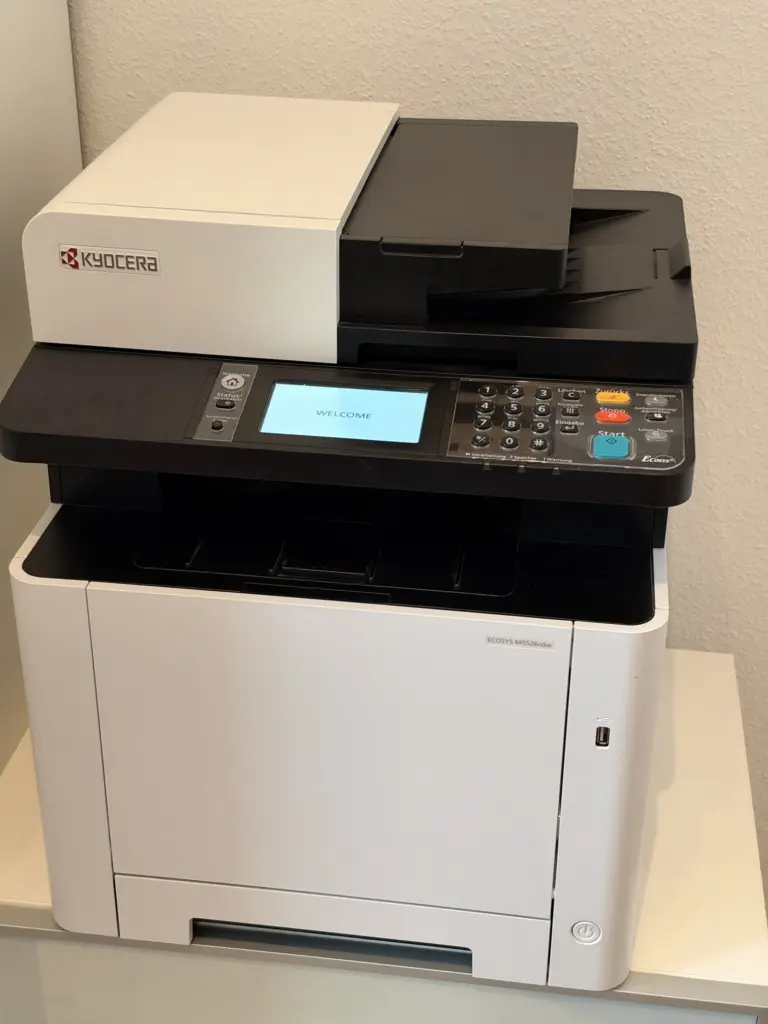
The Kyocera ECOSYS M5526cdw is a color laser with everything a home office needs: print, copy, scan, fax. In our test it did its job reliably, with good print quality and manageable costs. Points off for the operation. Our verdict: four out of five stars.
What it can do
According to Kyocera, it prints up to 26 pages per minute in both color and black and white, and up to 13 pages double-sided. The document feeder holds up to 50 sheets and also scans double-sided originals, which saves a lot of time when digitizing paperwork. It connects via Wi-Fi, network cable or USB.
The print quality is good, in color too. Running costs stay reasonable, especially with compatible toner. The alternatives are considerably cheaper than the original and worked well in our test. For the original toner, Kyocera specifies 4,000 pages in black and 3,000 pages per color.
The weakness: display and menu
The 4.3-inch touchscreen responds sluggishly and is a far cry from what you are used to on a smartphone. The software is slow, the menu deeply nested, with many levels. If you are looking for a setting, you need patience. For everyday use with print jobs sent from a computer, this hardly matters, but on the device itself it is annoying.
Technical data
Manufacturer’s specifications according to the data sheet (as of April 2024), retrieved on November 14, 2026. We have not verified them ourselves.
| Device | A4 color laser multifunction system: print, copy, scan, fax |
|---|---|
| Print speed | up to 26 A4 pages per minute in black and white and color, up to 13 double-sided |
| Print resolution | 1,200 × 1,200 dpi (at reduced speed), 600 × 600 dpi MultiBit |
| First page | approx. 9.5 s (black and white), approx. 10.5 s (color) |
| Warm-up time | approx. 29 s |
| Control panel | 10.9 cm (4.3-inch) touchscreen |
| Paper input | 250-sheet cassette, 50-sheet multipurpose tray, up to 550 sheets with an optional cassette |
| Document feeder | up to 50 sheets, double-sided scanning |
| Scan speed | up to 30 images per minute in black and white, up to 23 in color (300 dpi, single-sided) |
| Interfaces | USB 2.0, network up to 1000BASE-T, Wi-Fi 802.11 b/g/n (2.4 GHz only), Wi-Fi Direct, USB host |
| Fax | ITU-T Super G3 |
| Toner yield | black 4,000 pages, cyan, magenta, yellow 3,000 pages each (ISO/IEC 19798); starter toner 1,200 pages each |
| Power consumption | printing 375 W, ready 41 W, sleep mode 1 W |
| Noise when printing | 46.7 dB(A) |
| Dimensions (H × W × D) | 495 × 417 × 429 mm |
| Weight | approx. 26 kg |
| Warranty | 2 years (bring-in) |
Our verdict
A reliable color laser multifunction device with good print quality, duplex printing and double-sided scanning. Operation on the device is its clear weakness. Four out of five stars. The model has been on the market for several years, and Kyocera now offers the ECOSYS MA2600 series as the successor generation. Current models are compared in our laser printer guide (in German).
Are you a manufacturer or retailer and would like us to review your product? Offer a product for review (in German).
Frequently asked questions
How fast does the Kyocera M5526cdw print?
According to Kyocera, up to 26 pages per minute in both color and black and white, and up to 13 pages double-sided. The document feeder holds up to 50 sheets and also scans double-sided originals, which saves time when digitizing paperwork.
Is compatible toner any good for the M5526cdw?
In our test, the alternatives worked well and are considerably cheaper than the original. For the original toner, Kyocera specifies 4,000 pages in black and 3,000 pages per color. This keeps running costs reasonable.
What is annoying about the Kyocera ECOSYS M5526cdw?
Operating it on the device itself. The 4.3-inch touchscreen responds sluggishly, the software is slow and the menu has many levels. For print jobs from a computer this hardly matters, but if you are looking for settings on the device, you need patience.
Is there a successor to the M5526cdw?
Yes. The model has been on the market for several years, and Kyocera now offers the ECOSYS MA2600 series as the successor generation. Current models are compared in our laser printer guide (in German).
Sources
- Kyocera: ECOSYS M5526cdn/cdw data sheet (German)
- Kyocera Australia: ECOSYS M5526cdn, note on the successor
Conclusion
Reliably prints, copies, scans and faxes in color, with good print quality and manageable costs. The touchscreen and menu are sluggish and deeply nested.
Where to buy
- Kyocera ECOSYS M5526cdwCheck price at Amazon.de