Contents11 sections
This guide was first published in German on handgetestet.de.
An HDMI sync box only sees what runs through its cable. So if you watch Netflix almost exclusively through the TV’s built-in app, you’re buying a device that will never get to see that picture. If you use a game console or streaming box and already have Hue lights in the living room, there’s little way around the Philips Hue Play HDMI Sync Box 8K with a Gradient Lightstrip. Everyone else, we advise, should look at a camera solution first, such as the Govee Envisual T2. It costs a fraction of the price.
How the picture becomes light
There are three technologies to choose from. They differ less in color than in what they capture in the first place.
The HDMI box sits between the source device and the TV. The signal runs through it, and it reads the colors directly from the data stream. It doesn’t get more accurate than that, and room light plays no role. But the apps on the TV itself are left out, and every box has only a limited number of inputs.
The camera works completely differently. It films the screen from above or below and therefore works with any source, including the TV apps. Its color accuracy, however, depends on the viewing angle, on reflections, on calibration.
That leaves the third route. In its Ambilight TVs, Philips builds the LEDs directly into the back panel. Nothing to stick on, nothing to set up. In return, you commit to one manufacturer.
Length, HDMI standard, ecosystem
Only after this fundamental question come the details. Does the strip match the screen size? Most kits are offered in two or three lengths, and too short quickly looks patchy. With consoles, the HDMI standard counts: an older box with HDMI 2.0 can hold back the signal of a PS5 or Xbox Series X.
Then the ecosystem. Hue needs a bridge; Govee and Nanoleaf run via their own app over Wi-Fi. Smart lights already in the room are nice to include; which systems are available is shown in our overview of smart lights (in German).
Six solutions for the light behind the TV
| Model | Principle | Key specs according to manufacturer/retailer | Best for |
|---|---|---|---|
| Philips Hue Play HDMI Sync Box 8K | HDMI box | 4 HDMI 2.1 inputs, 4K/120 Hz, 8K/60 Hz, up to 10 Hue lights, Hue Bridge required | Hue households with a console or streaming box |
| Philips Hue Play Gradient Lightstrip | Light strip | 55, 65 or 75 inches, color gradients within the strip, Bridge and Sync Box required | Add-on to the Sync Box |
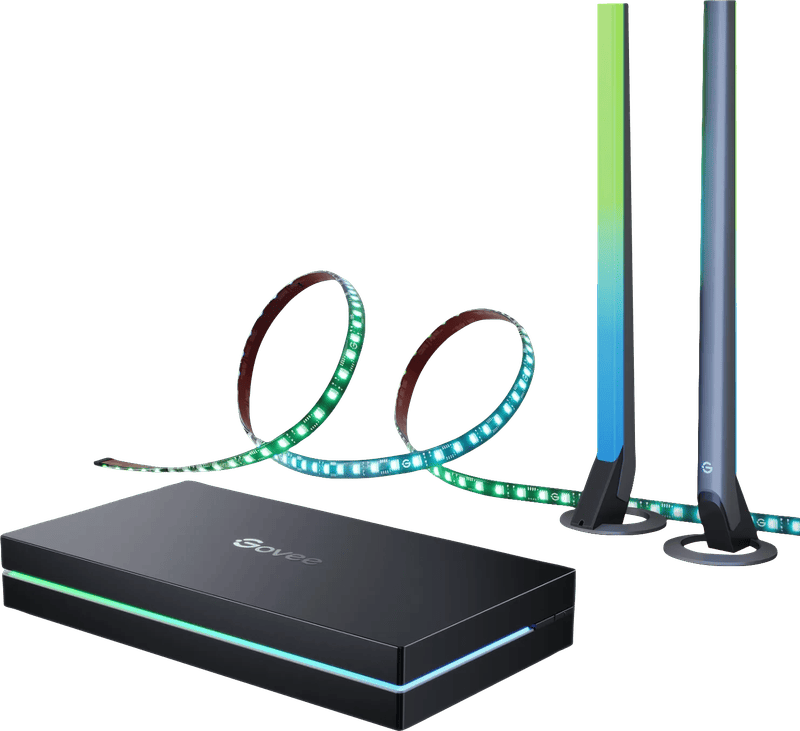
| Govee AI Sync Box Kit 2 | HDMI box with light | HDMI 2.1, 4K/144 Hz, 8K/60 Hz, VRR, ALLM, Matter, kits for 55 to 65 and 75 to 85 inches | Gamers without Hue |
| Govee Envisual TV Backlight T2 | Camera | Dual camera, RGBIC with 60 LEDs/m, 3.6 m or 5.0 m | Those who use TV apps and want to spend little |
| Nanoleaf 4D Screen Mirror V2 Kit | Camera | Zigzag strip, four mirroring modes from 1D to 4D, kit up to 65 inches | Nanoleaf users, camera above or below |
| Philips OLED811 (2026) | Built in | Three-sided Ambilight, 4K OLED, 120 Hz, Dolby Vision, 42 to 77 inches | Those buying a new TV anyway |
Philips Hue Play HDMI Sync Box 8K
The second generation of the Hue box has four HDMI 2.1 inputs, and according to Philips it passes through 4K at 120 Hz and 8K at 60 Hz. That settles the biggest criticism of its predecessor with HDMI 2.0b. Up to ten Hue lights can be controlled, and a Hue Bridge is required. One buyer reports that a Fire TV Stick didn’t deliver a 4K signal through the box. If you use such a stick, check that beforehand. None of this is cheap. Bundled with a Lightstrip, the combination costs several times as much as a camera solution.
Philips Hue Play Gradient Lightstrip
The strip attaches to the back of the TV. It can show several colors at once, blue on the left and orange on the right, if the picture calls for it. Philips offers it for 55, 65 and 75 inches; if the TV falls between two sizes, one retailer recommends the smaller version. The strip still needs its own power supply. If it shares the Sync Box’s power supply, performance suffers, according to Philips.
Govee AI Sync Box Kit 2
At Govee, the box, strip and light bars come in one package. According to the data sheets, this is the strongest solution for gaming: 4K at 144 Hz, plus VRR and ALLM, so the console and TV keep their game modes. Matter is included too. Govee itself notes that some displays with DSC compression are not supported. There’s a separate version for 27- to 34-inch monitors, which goes with our guide to gaming monitors (in German).
Govee Envisual TV Backlight T2
Two cameras instead of one are meant to capture the screen more completely. According to Govee, the counterweighted mount only fits on top of the TV, and curved screens aren’t supported. You can choose between 3.6 meters for 55 to 65 inches and 5.0 meters for 75 to 85 inches, controlled via 2.4 GHz Wi-Fi and Bluetooth. If you mainly use TV apps, this makes more sense than any sync box.
Nanoleaf 4D Screen Mirror V2
New in the second version is the zigzag strip. According to the manufacturer, it’s meant to hit white and colors more accurately and to stick more firmly. The camera can sit above or below the screen, an advantage with wall mounting or a soundbar in front. Four modes determine how closely the light follows the picture. The kit gets interesting in households with Nanoleaf panels that should be synced too.
Philips OLED811 with Ambilight
Three-sided Ambilight, 120 Hz, Dolby Vision: that’s what the 2026 model year of Philips‘ mid-range OLED series brings, in sizes from 42 to 77 inches. It’s of course no use as a retrofit.
But if a new TV is due anyway, Ambilight spares you any sticking, calibrating and extra apps, and it works with all sources, including the built-in apps. How OLED models from other manufacturers compare is shown in our guide to OLED TVs (in German). Whether pairing with Hue lights is included on this model is best checked in the data sheet. Philips doesn’t offer it on all devices.
How we would decide
If you already have Hue lights at home and the picture comes from a console or streaming box, get the Hue Play HDMI Sync Box 8K with a matching Gradient Lightstrip. The living room lights then join in. If you mostly use TV apps and the budget is small, the Govee Envisual T2 is the choice; a box would be expensive and blind here.
- PS5, Xbox or PC with a high frame rate, no Hue: Govee AI Sync Box Kit 2.
- Nanoleaf already at home, camera has to go below the screen: Nanoleaf 4D V2.
- A new TV is due: an Ambilight model like the OLED811. If you’re buying anyway, it’s the cleanest solution.
One more thought about the room. Backlighting is most effective in the dark, with a light-colored wall close behind the TV. A dark wallpaper or half a meter of distance takes away much of the effect of any of these systems.
For task lighting, ceiling coves or the garden, other strips are better suited. Which voltage, how many lumens and which power supply fit is explained in the guide to LED strips (in German).
Frequently asked questions
Does an HDMI sync box also work with the apps on the TV?
No. The box sits between the source device and the TV and reads the colors from the data stream passing through it. Apps running directly on the TV are left out. For this kind of use, a camera solution like the Govee Envisual T2 makes more sense, because it films the screen and works with any source.
What is the difference between an HDMI box, a camera and Ambilight?
The HDMI box reads the colors directly from the signal, accurately and independently of room light, but without TV apps. The camera captures any source, but its color accuracy depends on viewing angle, reflections and calibration. With Philips Ambilight, the LEDs sit in the back panel of the TV, but you commit to one manufacturer.
Which sync box suits a PS5 or Xbox?
The HDMI standard is what matters, because an older box with HDMI 2.0 can hold back the signal of a PS5 or Xbox Series X. Without Hue, the Govee AI Sync Box Kit 2 fits, with HDMI 2.1, 4K at 144 Hz, VRR and ALLM according to the data sheet. However, Govee doesn't support some displays that use DSC compression.
How long should the light strip behind the TV be?
It should match the screen size, because a strip that's too short quickly looks patchy. Philips offers the Hue Gradient Lightstrip for 55, 65 and 75 inches; if the TV falls between two sizes, one retailer recommends the smaller version. The strip still needs its own power supply.
Does the Hue Sync Box need a bridge?
Yes, a Hue Bridge is required. According to Philips, the Sync Box 8K controls up to ten Hue lights and has four HDMI 2.1 inputs that pass through 4K at 120 Hz. Govee and Nanoleaf, on the other hand, run via their own app over Wi-Fi.
When is backlighting most effective?
In the dark and with a light-colored wall close behind the TV. A dark wallpaper or half a meter of distance takes away much of the effect of any of these systems. If a new TV is due anyway, an Ambilight model like the Philips OLED811 spares you sticking, calibrating and extra apps.
Sources
- Philips Hue: Play HDMI Sync Box 8K
- Philips Hue: Play Gradient Lightstrip
- Govee: AI Sync Box Kit 2
- Govee: Envisual TV Backlight T2
- 9to5Mac: Nanoleaf 4D Screen Mirror
- What Hi-Fi: Philips TV models 2026
Where to buy
- Philips Hue Play HDMI Sync Box 8K + Gradient Lightstrip (55 Zoll)Check price at Amazon.de
- Philips Hue Play HDMI Sync Box 8KView at CoolblueCheck price at Amazon.de
- Philips Hue Play Gradient LightstripCheck price at Amazon.de
- Govee Envisual TV Backlight T2Check price at Amazon.de
- Govee AI Sync Box Kit 2Check price at Amazon.deView at Coolblue
- Nanoleaf 4D Screen Mirror V2 KitCheck price at Amazon.de
- Philips OLED811 (2026)Check price at Amazon.de