Contents14 sections
This guide was first published in German on handgetestet.de.
Many E-Ink tablets are supposed to do everything and then disappoint precisely when it comes to writing. If you mainly take notes and mark up PDFs, the reMarkable Paper Pro is your best bet; on a tighter budget, the black-and-white reMarkable Paper Pure. If apps, books and notes should all go into a single device, that leaves Boox or the Kindle Scribe Colorsoft.
An E-Ink tablet isn’t an iPad with a slower screen. It’s more like a notebook that happens to open PDFs. With that picture in mind, you rarely buy the wrong one.
How well does it write?
That’s what matters first. How directly does the line appear under the tip? reMarkable states 12 milliseconds for the Paper Pro Move and 21 milliseconds for the Paper Pure. Many manufacturers say nothing about this figure at all. Then there’s the pen itself. According to the manufacturers, the reMarkable and Amazon models work without a battery, while the Kobo Stylus 2 has to be plugged in. A dead pen in the middle of a meeting is more annoying than it sounds.
Do I need color and a light?
Color E-Ink makes highlights and diagrams easier to read but costs sharpness and contrast. On the Boox Note Air6 C, the resolution halves in color: 2,480 × 1,860 pixels in grayscale, 1,240 × 930 in color. The light question is simpler. Without a front light, you can only write under a lamp in the evening. The Paper Pure lacks one; the Paper Pro and Paper Pro Move have one.
What happens to my PDFs and notes?
All devices here can open PDFs. It gets interesting after that: can you write directly into the document, and do the annotations come back out? The routes to the cloud differ greatly. So does handwriting recognition. reMarkable and Kobo state conversion to typed text; Amazon states export to OneNote as converted text.
And what does it cost per month?
At reMarkable, a subscription called Connect is part of the concept. According to the manufacturer, it brings unlimited cloud storage, notes in the phone and computer apps and sync on up to three devices. New users get 50 days to try it out. Without a subscription, according to the manufacturer, only recently used files remain in the cloud, and the apps no longer show your notes. So factor the running costs in right away; the current amount is on reMarkable’s website. Amazon doesn’t mention a mandatory subscription for the Kindle Scribe’s note functions, but it relies on your Amazon account and on Microsoft or Google services. Boox runs Android with Google Play. Kobo, by its own account, syncs with Google Drive and Dropbox. If your notes are already there, you save yourself another service.
Seven E-Ink writing tablets
| Model | Display | Light and pen | Best for |
|---|---|---|---|
| reMarkable Paper Pro | 11.8-inch, color, 2160 × 1620 | Front light, marker without battery | Heavy writers with PDF work |
| reMarkable Paper Pro Move | 7.3-inch, color, 264 ppi | Front light, 230 g | Notes on the go, jacket pocket |
| reMarkable Paper Pure | 10.3-inch, black and white, 226 ppi | No light, 360 g | Writing without color, smaller budget |
| Kindle Scribe Colorsoft | 11-inch, color | Front light, pen needs no charging | Kindle readers who also take notes |
| Boox Note Air6 C | 10.3-inch, Kaleido 3, 300/150 ppi | Front light, Android 16 | Those who need apps on E-Ink |
| Boox Go 10.3 Gen 2 Lumi | 10.3-inch, black and white, 300 ppi | Front light, 4.8 mm | Android without color, crisp text |
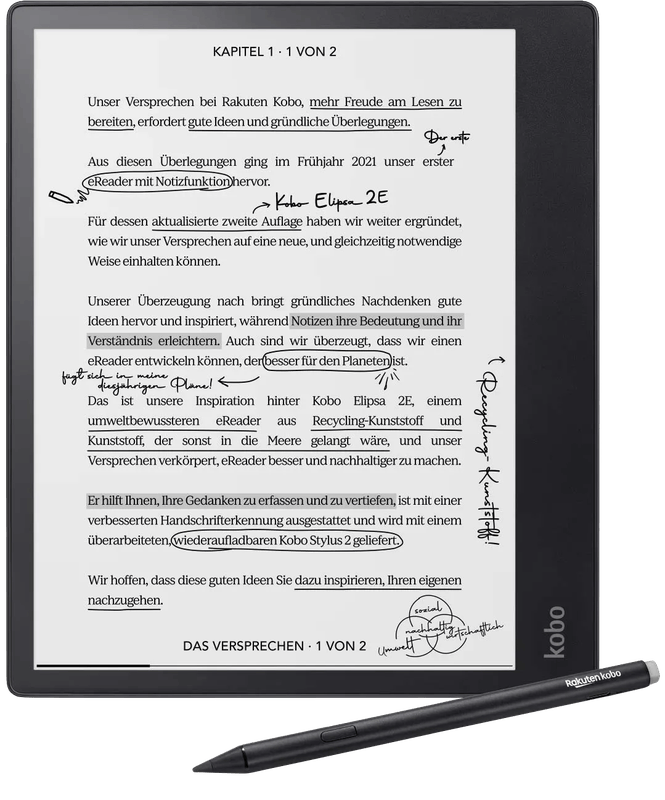
| Kobo Elipsa 2E | 10.3-inch, black and white | Front light, pen with battery | Kobo readers who need notes |
reMarkable Paper Pro
reMarkable’s large color model has an 11.8-inch display with adjustable light. According to the manufacturer, it weighs 525 g and is 5.1 millimeters thin. The battery is said to last up to two weeks. Third-party apps? There are none, and that’s exactly the point. If you write a lot in PDFs, you get the largest surface here. The Type Folio keyboard cover and the Connect subscription cost extra.
reMarkable Paper Pro Move
Small, at 7.3 inches, plus color and a front light. reMarkable states 6.5 millimeters thickness and 230 grams. For taking minutes standing up or notes on the train, the format is pleasant. A4 PDFs, on the other hand, turn into an exercise in zooming and scrolling.
reMarkable Paper Pure
It replaces the reMarkable 2, which the manufacturer now lists as discontinued. The 10.3-inch display remains black and white and without a light, and the battery is said to last up to three weeks, according to the manufacturer. Compared with its predecessor, reMarkable promises more speed and more contrast. Be careful with accessories: according to the manufacturer, the reMarkable 2 markers don’t fit.
Kindle Scribe Colorsoft
Amazon’s writing tablet with a color display measures 11 inches. According to Amazon, the Premium Pen never needs charging. The device pulls documents from Google Drive or OneDrive and sends notes to OneNote as text or image. Amazon also mentions natural-language search and note summaries. Whether every one of these features works in your language is best clarified in advance. And without color? Amazon also offers a black-and-white Kindle Scribe in the same lineup.
Boox Note Air6 C
At its core, this is an Android tablet with E-Ink. Since September 2026, it has replaced the Note Air5 C. On board are Android 16, Google Play, 6 GB of RAM and 64 GB of storage with a microSD slot, plus the Pen3 stylus with 4,096 pressure levels. So OneNote, Notion or a university app can be installed. Compared with its predecessor, Boox mainly cites more speed, up to 40 percent faster page turns in PDFs. In return, you pay with more settings, more distraction and color at only half the resolution.
Boox Go 10.3 Gen 2 Lumi
The black-and-white counterpart: 300 ppi, front light in warm and cool, Android 15. Thickness according to Boox: 4.8 millimeters, weight around 364 grams. With text and sheet music, the full sharpness plays out its advantage over color E-Ink.
Kobo Elipsa 2E
Kobo’s large 10.3-inch reader is more e-book reader than notebook. Still, it can create notebooks, convert handwriting to text and sync with Google Drive and Dropbox. The Stylus 2 has an eraser and needs power. The model isn’t new anymore, so check before ordering whether the retailer is supplying a new unit.
Supernote is missing here. At press time, Amazon.de only had cases and accessories, no new device.
Which device suits whom
If writing comes first, with lots of PDFs, then the reMarkable Paper Pro: large, with a light, without distractions, though the subscription belongs in the calculation. If there’s less money left over, you end up with the reMarkable Paper Pure. According to the manufacturer, it’s in the 400-euro class and thus well below the Paper Pro, but it does without color and light.
On the go, taking notes is easiest on the reMarkable Paper Pro Move. Lots of Kindle reading plus notes? Kindle Scribe Colorsoft. If certain apps are indispensable, the Boox Note Air6 C with color is an option, or the Boox Go 10.3 Gen 2 Lumi for crisp black-and-white text. And if you already have a Kobo library, go for the Kobo Elipsa 2E, provided it’s available new.
If it’s mainly about reading, a classic reader is the more obvious choice; more on that under e-book readers (in German). For drawing in full color, the article on graphics tablets (in German) and the tablet guide (in German) will help. For note-takers, however, a color LCD usually brings more distraction than benefit.
Frequently asked questions
What should I look for when writing on an E-Ink tablet?
First, how directly the line appears under the tip. reMarkable states 12 milliseconds for the Paper Pro Move and 21 for the Paper Pure; many manufacturers say nothing about it. Then the pen: the reMarkable and Amazon models work without a battery, while the Kobo Stylus 2 has to be charged.
Is color E-Ink worth it?
Color makes highlights and diagrams easier to read but costs sharpness and contrast. On the Boox Note Air6 C, the resolution halves in color, from 2,480 × 1,860 to 1,240 × 930 pixels. For crisp text and sheet music, a black-and-white display like the Boox Go 10.3 Gen 2 Lumi plays to its strengths.
Do you need a subscription for reMarkable?
A subscription called Connect is part of reMarkable's concept. According to the manufacturer, it brings unlimited cloud storage, notes in the phone and computer apps and sync on up to three devices; new users get a 50-day trial. Without a subscription, only recently used files remain in the cloud, and the apps no longer show your notes.
Can you install apps on an E-Ink tablet?
On Boox, yes; the devices run Android with Google Play. On the Boox Note Air6 C, you can install OneNote or Notion, for example, but that brings more settings and more distraction. reMarkable deliberately does without third-party apps.
Does every E-Ink tablet have a light?
No. The reMarkable Paper Pure lacks a front light, so in the evening you can only write under a lamp. The Paper Pro and Paper Pro Move have one, as do the Kindle Scribe Colorsoft, the Boox models and the Kobo Elipsa 2E.
What is the difference between an E-Ink tablet and an iPad?
An E-Ink tablet isn't an iPad with a slower screen; it's more like a notebook that can open PDFs. For drawing in full color, a tablet with an LCD is the better fit. For note-takers, however, a color LCD usually brings more distraction than benefit.
Sources
- reMarkable: Paper Pro
- reMarkable: Paper Pro Move compared
- reMarkable: Paper Pure and Connect
- reMarkable: reMarkable 2 (discontinued)
- Amazon: the new Kindle Scribe lineup (German)
- Notebookcheck: Boox Note Air6 C
- Boox: Go 10.3 (Gen II)
- Kobo: Elipsa 2E
Where to buy
- reMarkable Paper ProView at CoolblueCheck price at Amazon.de
- reMarkable Paper Pro MoveView at CoolblueCheck price at Amazon.de
- reMarkable Paper PureView at CoolblueCheck price at Amazon.de
- Kindle Scribe ColorsoftCheck price at Amazon.de
- Boox Note Air6 CCheck price at Amazon.de
- Boox Go 10.3 Gen 2 LumiCheck price at Amazon.de
- Kobo Elipsa 2EView at CoolblueCheck price at Amazon.de