Contents9 sections
This guide was first published in German on handgetestet.de.
„4K“ is printed in big letters on the label, and then the monitor receives 30 frames per second. That is exactly where many USB-C hubs fall short. For almost any laptop, the Anker 555 is our first choice: a small hub with a smooth 4K picture, card reader and charging port that also brings Ethernet and fast 10 Gbps ports. Less money, no need for Ethernet? Then the UGREEN 6-in-1 (model 60384). The other three models have their place, just for a narrower circle of users.
A hub like this is not a docking station. It hangs off the laptop’s cable, draws power from the connected charger and passes it through. A fixed desk with two monitors calls for a different class of device; more on that in our guide to docking stations.
Five small hubs with 4K60 compared
| Model | Ports according to the manufacturer | Cards | Power for the laptop | Best for |
|---|---|---|---|---|
| Anker 555 USB-C Hub (8-in-1) | HDMI 4K60, USB-C and 2× USB-A at 10 Gbps, Ethernet | SD and microSD | up to 85 W | Laptops that need a network port, fast SSDs |
| UGREEN 6-in-1 USB-C Hub (60384) | HDMI 4K60, 2× USB-A at 5 Gbps | SD and microSD, up to 104 MB/s | 100 W input | Small budget, photos and presentations |
| Satechi 6-in-1 Slim Multiport Adapter | HDMI 4K60, USB-A 10 Gbps, USB-A 2.0 | SD and microSD, UHS-I up to 104 MB/s | up to 75 W | MacBook users who like it slim |
| Belkin USB-C 7-in-1 Multiport Hub (4K60) | HDMI 2.0 with 4K60, 2× USB-A, 5 Gbps | SD and microSD | up to 100 W input | Offices with a mix of Windows and Mac |
| Baseus Joystar 7-in-1 | HDMI 4K60, 3× USB-A at 5 Gbps | SD and TF, up to 60 MB/s | 100 W input | Many USB-A devices, very light |
Four specs that make a spec sheet readable
First, the refresh rate. Many inexpensive hubs only manage 4K at 30 Hz, and then the mouse pointer visibly stutters. Even a hub with 4K60 needs a laptop that outputs DisplayPort 1.4 over USB-C, according to Anker and UGREEN. Otherwise you are stuck at 30 Hz.
Then power. „100 W“ almost always refers to the input power, and the hub keeps part of it for itself. Satechi puts its own consumption at around 15 W and states a maximum of 75 W for the laptop; Anker says up to 85 W. A 14-inch notebook under load therefore charges more slowly than when plugged directly into its charger.
With the card reader, speed is what counts. SD and microSD at the same time is handy for photographers, and whether it is 60 or 104 MB/s, you will notice at the latest when copying a full 128 GB card.
Finally, the ports. A mouse, keyboard and USB stick are fine with 5 Gbps. A fast external SSD, however, is held back by a port like that.
The iPad has its own rules. According to Apple, the iPad Air and iPad Pro with an M-series chip show their own windows on an external monitor via Stage Manager. For other models, check the documentation beforehand to see what your device can do on an external display. A hub with a short, fixed cable also dangles freely from the tablet, which gets annoying faster on the couch than at a desk. Which iPad has which ports is shown in our iPad comparison (in German).
Anker 555: the fewest gaps
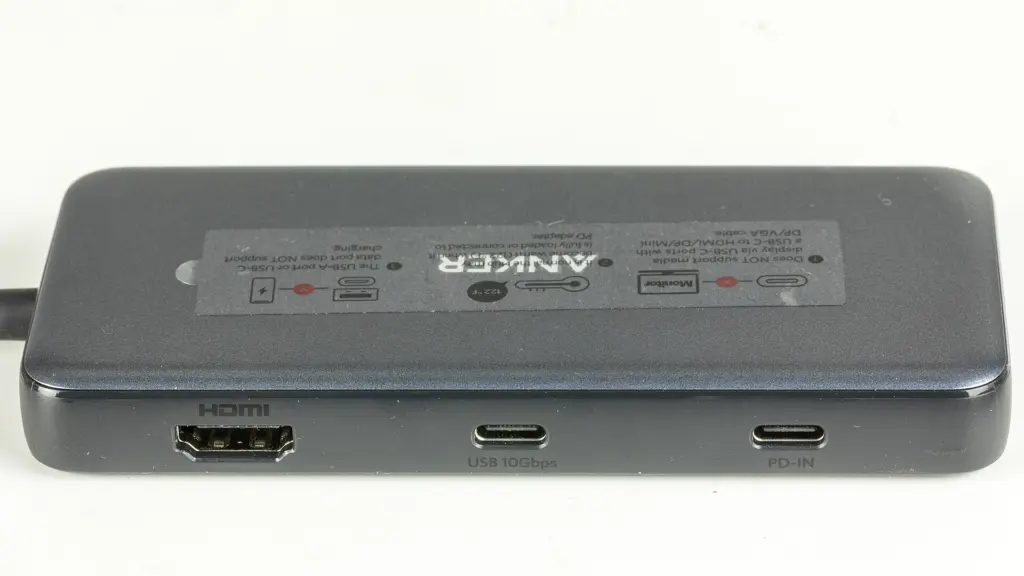
Eight ports on just over 12 centimeters, including Gigabit Ethernet, which you rarely find at this size. According to Anker, the USB ports run at 10 Gbps, and up to 85 W goes to the laptop, provided the charger and cable deliver 100 W. Anker itself names two limitations. Monitors only work via HDMI, not via the USB-C data port, and the hub does not charge phones or tablets from its data ports. At just under 130 grams according to the manufacturer, it is no lightweight.
UGREEN 6-in-1 (60384): the essentials for little money
HDMI with 4K60, two USB-A ports, SD and microSD at up to 104 MB/s, and a 100 W charging input. That is enough for college, presentations and vacation photos. For 4K60, UGREEN requires a laptop with DisplayPort 1.4 and an HDMI cable shorter than three meters. Check the model number carefully: UGREEN sells an almost identical-looking model that only does 4K30.
Satechi 6-in-1 Slim: flat and with the Mac look
Aluminum housing, colors to match the device. Satechi is clearly building for the MacBook. Technically, the Slim sits between Anker and UGREEN, with one 10 Gbps port and one slow USB 2.0 port for a mouse or keyboard. Its weak point is charging power: according to Satechi, at most 75 W reaches the laptop. That is enough for a MacBook Air, but a MacBook Pro under load charges noticeably more slowly. How much power each MacBook draws is listed in our MacBook comparison (in German).
Belkin 7-in-1 (4K60): getting the right version
In its newer version, the Belkin has HDMI 2.0 with 4K60, two USB-A ports, SD and microSD, and a 100 W charging input; data runs at 5 Gbps. Older Belkin hubs with a similar name stay at 4K30. If the description does not explicitly say „4K 60Hz“ and HDMI 2.0, it is the wrong device.
Baseus Joystar 7-in-1: light, three USB-A ports
77 grams according to the manufacturer, the lightest model here. Three USB-A ports help when a mouse, a stick and a printer are connected at the same time. Baseus rates the card reader at up to 60 MB/s, slower than UGREEN and Satechi. Amazon lists several similarly named Baseus hubs, including versions with 4K30. We only mean the model with 4K60 here.
Which hub for which device?
Windows laptop or MacBook, occasionally in a hotel with a network cable: Anker 555. It covers the most and has the fastest ports. If the budget is tight and a monitor and memory card are all you need, the UGREEN 6-in-1 (60384) does just as well for presentations and vacation photos.
For a MacBook Air, if you want a flat housing, the Satechi 6-in-1 Slim is a good match; on a MacBook Pro, the 75 W limit costs charging speed. In a mixed office with lots of devices, go for the Belkin 7-in-1 in the 4K60 version. Lots of old USB-A devices and little weight in your backpack speak for the Baseus Joystar 7-in-1.
For an iPad with USB-C, pick a flat model with a short cable, such as Satechi or UGREEN, and check the manufacturer’s compatibility list beforehand to see whether your iPad model is named. Anker, for example, only lists the iPad Pro.
Two monitors on a single HDMI port? Not possible. That is a job for a docking station.
Frequently asked questions
Why does my USB-C hub only show 4K at 30 Hz?
Many inexpensive hubs only manage 4K at 30 Hz, and the mouse pointer then visibly stutters. Even a hub with 4K60 needs a laptop that outputs DisplayPort 1.4 over USB-C, according to Anker and UGREEN. Also pay attention to the model number; similarly named versions often stay at 4K30.
How much power does the laptop get through a USB-C hub?
"100 W" almost always refers to the input power, and the hub keeps part of it for itself. Satechi states at most 75 W for the laptop, Anker up to 85 W. A 14-inch notebook or MacBook Pro under load therefore charges more slowly than directly on its charger.
What is the difference between a USB-C hub and a docking station?
A hub hangs off the laptop's cable, draws power from the connected charger and passes it through. Two monitors on a single HDMI port are not possible with it. A fixed desk with two monitors calls for a docking station.
Which USB-C hub suits the MacBook Air?
The Satechi 6-in-1 Slim in its aluminum housing is flat and clearly built for the MacBook. It has one 10 Gbps port, one USB 2.0 port and a card reader. With at most 75 W for the laptop, a MacBook Air gets by, while a MacBook Pro under load charges noticeably more slowly.
What should I look for in a hub's card reader?
SD and microSD at the same time is handy for photographers. Speeds differ: UGREEN and Satechi state up to 104 MB/s, the Baseus Joystar up to 60 MB/s. You will notice that at the latest when copying a full 128 GB card.
Does a USB-C hub work with an iPad?
According to Apple, the iPad Air and iPad Pro with an M-series chip show their own windows on an external monitor via Stage Manager; for other models, check the documentation beforehand. A flat model with a short cable, such as Satechi or UGREEN, is a good fit; check the manufacturer's list to see whether your iPad is named.
Sources
- Anker: 555 USB-C Hub (8-in-1), product page
- UGREEN: 6-in-1 USB-C Hub 4K60 (60384)
- Satechi: 6-in-1 USB-C Slim Multiport Adapter
- Belkin: USB-C 7-in-1 Multiport Hub, 4K 60Hz
- Baseus: Joystar 7-in-1 USB-C Hub
- Apple Support: Stage Manager on the iPad
Where to buy
- Anker 555 USB-C Hub 8-in-1Check price at Amazon.de
- UGREEN 6-in-1 USB-C Hub 4K 60Hz 60384Check price at Amazon.de
- Satechi 6-in-1 USB-C Slim Multiport AdapterCheck price at Amazon.de
- Belkin USB-C 7-in-1 Multiport Hub (4K60)Check price at Amazon.de
- Baseus Joystar 7-in-1 USB-C HubCheck price at Amazon.de