Contents14 sections
This guide was first published in German on handgetestet.de.
A network cable between floors often does more than any data sheet. That sounds unspectacular, but it decides half the result. If there is already a FRITZ!Box in the house, FRITZ!Mesh is usually the most sensible route: the FRITZ!Box 7690 with one or two FRITZ!Repeater 2700 units covers many two-story homes.
With fiber or cable connections at very high speeds, or in large houses, the math looks different. That is where systems with three radio bands and fast ports come into play, such as the TP-Link Deco BE65, Netgear Orbi 770 or 970, ASUS ZenWiFi BT10 or eero Pro 7. The reason lies in the technology behind them.
What a mesh does differently from a repeater
A single repeater extends an existing network. Nothing more. A mesh system consists of several devices that coordinate with each other and route every client device to the most favorable point. Across several floors, mesh is therefore almost always the smarter approach.
A lot of trouble comes from the division of roles. FRITZ! repeaters extend the network of a FRITZ!Box. Orbi, Deco, ZenWiFi and eero, on the other hand, usually want to be the router themselves. If they sit behind an existing box, you quickly end up with a double network with two address ranges, and some devices can then no longer find each other. So decide beforehand which device will be in charge of the network.
Wi-Fi 7, MLO and why older devices don’t notice any of it
Wi-Fi 7 (802.11be) brings wider channels and Multi-Link Operation (MLO). With MLO, a device uses several bands at once. However, only client devices that support Wi-Fi 7 and MLO themselves get the full benefit. The notebook from five years ago keeps working. It just won’t get any faster. In everyday use, how many bands a system has often matters more. Dual-band devices transmit on 2.4 and 5 GHz. Tri-band devices additionally use 6 GHz or a second 5 GHz band, and precisely this additional band can carry the connection between the mesh nodes. Experts call this the backhaul. Without a dedicated band, nodes and client devices share the same airtime, and every hop costs speed.
A wired backhaul is even better. Almost all systems here can connect their nodes via LAN. The radio bands then remain entirely for your devices.
6 GHz: lots of room, short range
Germany’s Federal Network Agency (Bundesnetzagentur) opened the range from 5945 to 6425 MHz for Wi-Fi in 2021. That is where tri-band systems with Wi-Fi 6E and Wi-Fi 7 transmit. According to Netgear, the 6 GHz band may only be used indoors. The garden and patio continue to be covered by 2.4 and 5 GHz.
Then there is physics. 6 GHz passes through walls and ceilings less well than 2.4 GHz, and a reinforced concrete ceiling absorbs noticeably more of it.
Three small details that get expensive later
If your connection delivers more than 1 Gbit/s or there is a NAS on the network, the ports should be 2.5 gigabit or faster. Otherwise the port becomes the bottleneck, not the Wi-Fi.
According to retailer information, the FRITZ!Repeater 2400 is a Wi-Fi 5 device. If you are buying new in 2026, the Wi-Fi 7 successors are the more up-to-date choice. And some additional features require a subscription, such as the Armor security service from Netgear. Ask about it before you order.
Seven mesh solutions with their key specs
| Model | Wireless according to the manufacturer | Fastest ports | Best for |
|---|---|---|---|
| FRITZ!Box 7690 | Wi-Fi 7, dual-band (5 GHz up to 5760 Mbit/s) | 2.5 Gbit/s (WAN and LAN) | DSL connection, mesh hub with DECT and Zigbee |
| FRITZ!Mesh Set 2700 | Wi-Fi 7, dual-band (5 GHz up to 5760 Mbit/s) | 2.5 Gbit/s per device | FRITZ!Box households, house with two or more floors |
| TP-Link Deco BE65 | Wi-Fi 7, tri-band with 6 GHz | 4 × 2.5 Gbit/s per device | Large house at a mid-range price |
| Netgear Orbi 770 | Wi-Fi 7, tri-band with 6 GHz | 2.5 Gbit/s | House up to about 360 m² (2-pack) |
| Netgear Orbi 970 | Wi-Fi 7, quad-band with dedicated backhaul | 10 Gbit/s | Very large house, many devices |
| ASUS ZenWiFi BT10 | Wi-Fi 7, tri-band with 6 GHz | 2 × 10 Gbit/s | Fast fiber connection, tech enthusiasts |
| eero Pro 7 | Wi-Fi 7, tri-band with 6 GHz | 2 × 5 Gbit/s | Simple app, smart home with Thread |
FRITZ!Box 7690: the hub for DSL households
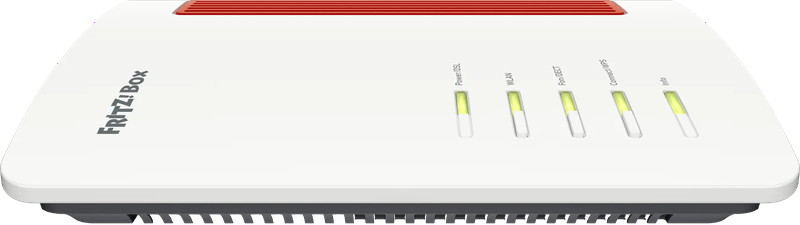
A DSL router with Wi-Fi 7. According to FRITZ!, the 7690 reaches up to 5760 Mbit/s on 5 GHz and has one 2.5-gigabit port each for WAN and LAN. Built in are a DECT base for phones and a Zigbee base for the smart home. In the mesh, it works as the Mesh Master and passes its settings on to the repeaters.
FRITZ!Mesh Set 2700 and FRITZ!Repeater 1700
The Mesh Set 2700 contains two or three FRITZ!Repeater 2700 units with Wi-Fi 7. Each device plugs directly into the outlet and comes with a 2.5-gigabit LAN port. According to the manufacturer, the 2-pack is designed for a maximum of four rooms on one or two floors, the 3-pack for larger apartments and houses. The openness is remarkable. The set works with a FRITZ!Box, but equally with third-party routers or directly on a fiber modem. If you only want to close one gap in a smaller apartment, the compact FRITZ!Repeater 1700 gives you Wi-Fi 7 and gigabit LAN.
TP-Link Deco BE65: a lot of speed for the money
TP-Link specifies three bands: up to 5760 Mbit/s on 6 GHz, 2880 Mbit/s on 5 GHz and 574 Mbit/s on 2.4 GHz. Each device has four 2.5-gigabit ports. The nodes can use cable and wireless as backhaul at the same time. One step up is the Deco BE85 with 10-gigabit ports, in case that isn’t enough.
Netgear Orbi 770: tri-band you can expand
A tri-band system with Wi-Fi 7 in the BE11000 class. For the 2-pack, Netgear specifies coverage of up to 360 m² and up to 100 simultaneous devices. The router has one WAN and three LAN ports at 2.5 Gbit/s, the satellite two. Additional satellites can be purchased later.
Netgear Orbi 970: a band just for the backhaul
Four bands: 6 GHz, two 5 GHz bands and 2.4 GHz. One of the 5 GHz bands is permanently reserved for the link between router and satellite, which is the most thorough solution to the backhaul problem without cables. According to Netgear, the 2-pack covers up to 440 m² and handles up to 200 devices. The router has a 10-gigabit internet port. Clearly premium class. For an apartment, it is simply too much technology.
ASUS ZenWiFi BT10: for people who like to tweak settings
A tri-band system in the BE18000 class. ASUS specifies up to 11529 Mbit/s on 6 GHz and 5764 Mbit/s on 5 GHz. On board are two 10-gigabit ports, one gigabit port and USB 3.0. Via AiMesh, it can be paired with other ASUS routers. The interface has a great many settings, which pleases experts. If you just want Wi-Fi, you’ll be happier elsewhere.
eero Pro 7: an app instead of menus
Amazon’s eero Pro 7 transmits on 2.4, 5 and 6 GHz and has two 5-gigabit ports. According to eero, one device covers up to 190 m². A smart home hub is built in: Thread devices connect directly, and Matter and Zigbee run as controllers. Setup is done exclusively via the app. That suits beginners, less so tinkerers.
Which system suits which home
If there is already a FRITZ!Box in the hallway, go with the FRITZ!Mesh Set 2700 or individual FRITZ!Repeater 2700 units. Then everything stays in one interface. With a DSL connection and the wish for a new router, the FRITZ!Box 7690 is the right hub, with repeaters added as needed. In a small apartment with a single dead spot, the FRITZ!Repeater 1700 is enough. In a large house with several floors and a mid-range budget, the choice is between the TP-Link Deco BE65 and the Netgear Orbi 770. The Netgear Orbi 970 or ASUS ZenWiFi BT10 only justify themselves in very large houses or with a connection above 2.5 Gbit/s. And if you want to combine simple operation with a Thread smart home, you’ll end up with the eero Pro 7.
Is the problem not the device at all, but the line? How to find the right connection and switch providers without an outage is covered in our guide switching internet providers (in German). If fiber is currently being rolled out on your street, the guide fiber connection (in German) helps with the decision.
If your line is permanently too slow, under German law you are entitled to a price reduction or to cancel. How to document it is explained in the guide internet too slow (in German).
If you want to extend the mesh into the garden, you should know our review of the FRITZ!Repeater 1610 Outdoor: outdoors, it only connects via LAN cable.
Frequently asked questions
What is the difference between mesh and a repeater?
A single repeater extends an existing network. A mesh system consists of several devices that coordinate with each other and route every client device to the most favorable point. Across several floors, mesh is therefore almost always the smarter approach.
Can you run a mesh system behind a FRITZ!Box?
FRITZ! repeaters extend the network of a FRITZ!Box. Orbi, Deco, ZenWiFi and eero, on the other hand, usually want to be the router themselves. If they sit behind an existing box, you quickly end up with a double network with two address ranges. Decide beforehand which device will be in charge of the network.
Does Wi-Fi 7 help with older devices?
Hardly. Wi-Fi 7 brings wider channels and Multi-Link Operation, but only client devices that support Wi-Fi 7 and MLO themselves get the full benefit. An older notebook keeps working but won't get faster. In everyday use, how many bands a system has often matters more.
What does a tri-band mesh offer?
Tri-band devices additionally use 6 GHz or a second 5 GHz band, and this band can carry the connection between the nodes, the so-called backhaul. Without a dedicated band, nodes and client devices share the same airtime. A wired backhaul is even better, and almost all systems in the comparison support it.
Does 6 GHz Wi-Fi reach the garden?
No. According to Netgear, the 6 GHz band may only be used indoors; the garden and patio continue to be covered by 2.4 and 5 GHz. In addition, 6 GHz passes through walls and ceilings less well than 2.4 GHz, and a reinforced concrete ceiling absorbs noticeably more of it.
Which ports does a mesh system need with fast internet?
If your connection delivers more than 1 Gbit/s or there is a NAS on the network, the ports should be 2.5 gigabit or faster; otherwise the port becomes the bottleneck. The Netgear Orbi 970 and ASUS ZenWiFi BT10 with 10-gigabit ports only justify themselves in very large houses or with a connection above 2.5 Gbit/s.
Sources
- FRITZ!: FRITZ!Box 7690, technical specifications
- FRITZ!: Which devices support Mesh
- FRITZ!: FRITZ!Mesh Set 2700
- FRITZ!: FRITZ!Repeater 2700
- FRITZ!: FRITZ!Repeater 1700
- TP-Link: Deco BE65
- TP-Link: Deco BE85
- Netgear: Orbi 770
- Netgear: Orbi 970
- ASUS: ZenWiFi BT10, technical specifications
- eero: eero Pro 7
- Federal Network Agency: Wi-Fi in the 6 GHz band
Where to buy
- FRITZ!Box 7690View at CoolblueAvailable in Germany: CoolblueCheck price at Amazon.deAvailable in Germany: Amazon.de
- FRITZ!Mesh Set 2700 (2er-Set)Check price at Amazon.deAvailable in Germany: Amazon.de
- FRITZ!Repeater 2700Check price at Amazon.deAvailable in Germany: Amazon.de
- FRITZ!Repeater 1700Check price at Amazon.deAvailable in Germany: Amazon.de
- TP-Link Deco BE65View at CoolblueAvailable in Germany: CoolblueCheck price at Amazon.deAvailable in Germany: Amazon.de
- TP-Link Deco BE85 (2er-Set)Check price at Amazon.deAvailable in Germany: Amazon.de
- Netgear Orbi 770Check price at Amazon.deAvailable in Germany: Amazon.de
- Netgear Orbi 970Check price at Amazon.deAvailable in Germany: Amazon.de
- ASUS ZenWiFi BT10Check price at Amazon.deAvailable in Germany: Amazon.de
- eero Pro 7Check price at Amazon.deAvailable in Germany: Amazon.de