Contents11 sections
This guide was first published in German on handgetestet.de.
A stylus rarely fails because of its quality. It fails because it does not fit the tablet. If you own a current iPad Air with M2 or later, an iPad Pro with M4 or later, or the iPad mini with A17 Pro, go for the Apple Pencil Pro; for the basic iPad (A16 and 10th generation), the Apple Pencil (USB-C) is the matching Apple stylus, and with the Galaxy Tab S series, the S Pen is usually already in the box. Everything else is fine-tuning.
Which stylus fits my iPad at all?
Apple currently offers four Pencil models, and none of them fits every iPad. You will find the exact model name of your device under Settings › General › About. Take that name to Apple’s compatibility list.
The pitfall lies with the 2nd generation. It attaches magnetically, charges wirelessly and detects pressure, but according to Apple only works with the 12.9-inch iPad Pro of the 3rd to 6th generation, the 11-inch iPad Pro of the 1st to 4th generation, the iPad Air of the 4th and 5th generation and the iPad mini of the 6th generation. An iPad Air with M2 or an iPad Pro with M4 stays silent with this stylus. Conversely, the Apple Pencil Pro works with no iPad released before 2024.
The Apple Pencil (USB-C) has the widest compatibility. Apple lists it as compatible with all iPad Pro models from the 3rd generation (12.9-inch) or the 1st generation (11-inch), with iPad Air from the 4th generation, with the iPad (A16) and the 10th generation, and with the iPad mini from the 6th generation. It requires iPadOS 17.1.1. The 1st-generation Pencil remains for older devices such as the iPad of the 6th to 9th generation; on the iPad (A16) and the 10th generation, it needs a USB-C to Apple Pencil adapter.
What do pressure levels bring, and when are they missing?
Pressure sensitivity means: press harder, and the line gets thicker or darker. When drawing and when writing with a fountain-pen tool, that makes the difference between a lively stroke and a uniform line. For notes, highlighting in PDFs and filling in forms, on the other hand, it hardly matters.
Apple does not give a number of pressure levels for any Pencil. The yes-or-no question matters more. The Pencil Pro, 2nd and 1st generation detect pressure. The Apple Pencil (USB-C) does not; it only responds to tilt. Third-party styluses on the iPad also have no pressure sensitivity; ESR explains in its help pages that pressure sensitivity is a patented feature of the Apple Pencil. Whether an app makes use of pressure also depends on the app itself.
Five styluses for the iPad compared
| Model | Compatible with (according to the manufacturer) | Pressure / tilt | Charging and extras | Who it’s for |
|---|---|---|---|---|
| Apple Pencil Pro | iPad Pro 11/13-inch (M4, M5), iPad Air 11/13-inch (M2, M3, M4), iPad mini (A17 Pro) | yes / yes | magnetic, wireless; squeeze, barrel roll, haptics, Find My | Drawing and notes on new iPads |
| Apple Pencil (USB-C) | almost all iPads with USB-C, including iPad (A16) and 10th generation | no / yes | Cable via USB-C, attaches magnetically for storage | Writing and highlighting on the basic iPad |
| Apple Pencil (2nd generation) | iPad Pro 11-inch (1st–4th gen.), 12.9-inch (3rd–6th gen.), iPad Air (4th/5th gen.), iPad mini (6th gen.) | yes / yes | magnetic, wireless; double-tap | Owners of these older models who draw |
| ESR Geo Digital Pencil | Model list in ESR’s help pages; magnetic attachment only on some iPads | no / only in Apple Notes | USB-C cable; locating via Find My | The forgetful, school, a second stylus |
| ESR Digital Pencil Pro | iPads from 2018 according to ESR | no / only in Apple Notes | Shortcut button after pairing | Handwriting without drawing ambitions |
Apple Pencil Pro: what are you actually paying for?
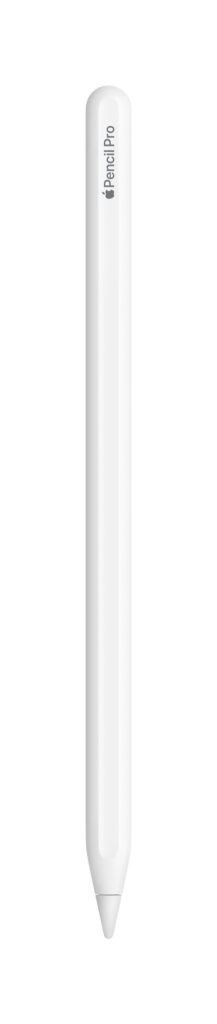
For controls. Like the 2nd generation, the Pro detects pressure and tilt, plus it has a gyroscope that detects the stylus rotating (so a brush tip can rotate along with it, for example), a squeeze on the barrel for the tool palette and noticeable haptic feedback. It pairs and charges magnetically on the side of the iPad and can be located via Find My. According to Apple, it measures 166 mm, weighs 19.15 g and requires iPadOS 17.5. If you draw on an iPad Air with M2 or later, you get the full feature set here.
Is the Apple Pencil with USB-C enough?
For taking notes in a lecture: yes. According to Apple, it works with pixel-perfect precision, low latency and tilt sensitivity, and on newer iPad Pro and Air models also with hover preview. It pairs and charges by cable; the port sits under a sliding cap. It attaches to the iPad magnetically and goes into a sleep state there. It is less suited to serious drawing because pressure is missing.
Is the 2nd generation still worth it?
Only for a specific audience. If you own an iPad Pro up to the 4th or 6th generation, an iPad Air 4 or 5 or an iPad mini 6 and want to draw, it gives you pressure sensitivity, double-tap to switch tools and wireless charging. It does not fit any of the newer devices. If you are planning a new iPad soon, wait with the stylus.
What can the ESR styluses do?
The Geo Digital Pencil has a feature rarely found in third-party styluses: it appears in Apple’s Find My network. It charges via USB-C; if problems occur, ESR recommends leaving it on the cable for 25 minutes. It attaches magnetically only to some iPads, there is no wireless charging, and each stylus can only be linked to one Apple ID.
Both ESR models have a flaw that the manufacturer openly names. Tilt only works in Apple’s Notes app, not in OneNote or GoodNotes. The Digital Pencil Pro even writes without pairing, but then shows neither battery level nor shortcuts. If an Apple Pencil is connected, disconnect it first, otherwise it interferes with the third-party stylus.
And if I have a Galaxy Tab?
Then you have it easier. Samsung includes the S Pen with the Galaxy Tab S12+ and S12 Ultra as well as the affordable Tab S10 Lite. Buying a stylus separately is usually unnecessary with the S series. Only tablets from the Tab S series are on Samsung’s compatibility list. A Galaxy Tab A does not appear there.
Replacements get fiddly. According to Samsung, the S Pen for the Tab S11 series (EJ-PX730) fits the Tab S11, S11 Ultra, S12+ and S12 Ultra, weighs 8 g, is protected to IP68 and has a hexagonal shape. Older S Pens do not accept its tip. This stylus lacks Bluetooth; Samsung does not support Air Actions on the Tab S11 and S12. At Samsung itself, the replacement stylus was recently out of stock, as was the S Pen Creator Edition. Be careful with very cheap knockoffs offered as replacements for the S11 stylus: check the model number and the seller carefully.
What about the Logitech Crayon and Metapen?
The Logitech Crayon is the classic among the alternatives. Logitech lists it as compatible with all iPads from 2018 onward; it charges via the same USB-C cable as the iPad and needs no Bluetooth pairing. In the German Logitech shop, the silver version was recently unavailable, which is why it is missing from our table. It detects tilt; Logitech does not mention pressure sensitivity. With Metapen, check your iPad model against the manufacturer’s list and do not expect pressure sensitivity either. If you only write notes, you will manage with it. If you draw, you will be frustrated.
Which stylus for whom?
- New iPad Air, iPad Pro or iPad mini with A17 Pro: Apple Pencil Pro. Everything is right here, from pressure to locating.
- iPad (A16) or 10th generation: Apple Pencil (USB-C), because the only Apple stylus with pressure for these is the 1st generation via the adapter.
- Older iPad Pro, iPad Air 4/5 or iPad mini 6 for drawing: Apple Pencil 2nd generation.
- Children, school or a second stylus that tends to get lost: ESR Geo Digital Pencil with Find My.
- Galaxy Tab S: use the included S Pen and only buy the matching replacement by model number if you lose it.
No tablet yet? Then settle the stylus question when you buy the device. Our iPad comparison (in German) shows which model suits which purpose; for Android, our guide to Android tablets (in German) helps. If you draw on a computer, take a look at graphics tablets (in German).
Frequently asked questions
Which Apple Pencil fits my iPad?
You will find the exact model name under Settings › General › About; take that to Apple's compatibility list. None of the four Pencils fits every iPad. The Pencil Pro works with no iPad released before 2024, and the 2nd generation stays silent on the iPad Air with M2 and iPad Pro with M4.
What is the difference between the Apple Pencil Pro and the Apple Pencil (USB-C)?
The Pro detects pressure and tilt, plus barrel roll, squeeze and haptic feedback; it charges magnetically and can be located via Find My. The USB-C Pencil only detects tilt, charges by cable and attaches to the iPad magnetically only for storage.
Is the Apple Pencil with USB-C good enough for taking notes?
For notes in a lecture, yes. According to Apple, it works with pixel-perfect precision, low latency and tilt sensitivity. It is less suited to serious drawing because pressure sensitivity is missing. It has the widest compatibility and requires iPadOS 17.1.1.
Do styluses from ESR or Logitech detect pressure?
No, third-party styluses on the iPad have no pressure sensitivity. ESR calls it a patented feature of the Apple Pencil, and Logitech only mentions tilt for the Crayon. With the ESR styluses, tilt also only works in Apple's Notes app. That is enough for notes; if you draw, you will be frustrated.
Do I need to buy an S Pen separately for a Galaxy Tab?
With the S series, usually not: Samsung includes the S Pen with the Galaxy Tab S12+ and S12 Ultra as well as the Tab S10 Lite. A Galaxy Tab A is not on Samsung's compatibility list. When buying a replacement, check the model number carefully; the stylus for the Tab S11 series is called EJ-PX730.
Is the 2nd-generation Apple Pencil still worth it?
Only for owners of older devices: iPad Pro up to the 4th or 6th generation, iPad Air 4 or 5 and iPad mini 6. There, it brings pressure sensitivity, double-tap and wireless charging. It does not work with newer iPads. If a new iPad is coming soon, wait with the stylus.
Sources
- Apple: Apple Pencil compatibility
- Apple: Apple Pencil comparison
- Apple: Apple Pencil Pro, technical specifications
- Apple: Apple Pencil (USB-C), technical specifications
- Apple: Apple Pencil (2nd generation), technical specifications
- Apple Newsroom: Introducing the Apple Pencil (USB-C)
- ESR: Help for the Digital Pencil Pro
- ESR: Help for the Geo Digital Pencil
- Samsung: Overview of S Pen models
- Samsung: S Pen for the Galaxy Tab S11 series
- Samsung Newsroom: Galaxy Tab S12 series
- Samsung Newsroom: Galaxy Tab S10 Lite
- Logitech: Crayon
Where to buy
- Apple Pencil ProView at CoolblueCheck price at Amazon.de
- Apple Pencil (USB-C)Check price at Amazon.deView at Coolblue
- Apple Pencil (2. Generation)Check price at Amazon.de
- ESR Geo Digital PencilCheck price at Amazon.de
- ESR Digital Pencil ProCheck price at Amazon.de