Contents14 sections
This guide was first published in German on handgetestet.de.
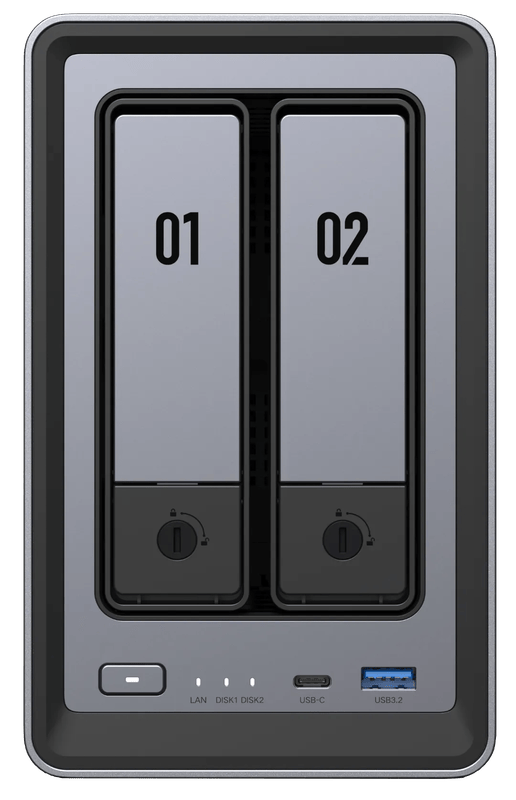
A NAS is rarely bought too small. Much more often, it simply does not fit the task. Backing up phone photos does not require a 10-gigabit port, whereas sending movies to the TV via Plex or Jellyfin requires a processor with a graphics unit, and that is exactly what some expensive models lack. Our assessment up front: for most households, a two-bay device such as the Synology DS225+ is enough. The UGREEN NASync DXP2800 is cheaper and has reserves for transcoding movies.
This article sorts out the device classes. How to back up photos and videos properly according to the 3-2-1 rule is described in detail in our article NAS for photo and video backup (in German).
Five questions before you count drive bays
How much data do you already have today? Two hard drives are enough for mirroring. Four bays cost more but leave room for expansion later, and if you have 6 TB of photos and videos from the start, you are better off planning for four right away.
What should the device do besides storing files? For pure file storage, 2 to 4 GB of RAM is enough. Face recognition, Docker containers or virtual machines need considerably more; Synology requires at least 4 GB for object recognition in Synology Photos.
And the network? 2.5 gigabit is now standard. 10 gigabit only helps if your computers, cables and switch keep up. If a media server is to transcode movies, an Intel processor with Quick Sync matters more than a high core count. That leaves power. A NAS runs around the clock, and every watt in continuous operation adds up to almost 9 kWh a year.
Streaming movies: the graphics unit decides
If the TV cannot play a file directly, the server transcodes it. Without hardware assistance, an energy-efficient NAS processor can hardly manage that with 4K material. Plex uses Intel Quick Sync for this, but requires a paid Plex Pass, and for reliable HEVC output on a NAS, Plex specifies at least Jasper Lake generation processors. Jellyfin is free and supports Intel graphics under Linux via QSV.
Of all brands, Synology is where a trap lies here. The manufacturer does not list hardware transcoding for the DS925+, and according to users in the Plex forum, its AMD Ryzen V1500B has no graphics unit at all. Buyers also report in the Synology forum that the 2025 models no longer offer hardware transcoding even with an Intel processor, because Synology does not ship the necessary driver. If streaming is the priority, UGREEN, QNAP or TerraMaster are the more obvious choice.
Hard drives: two large rather than four small
A NAS needs drives designed for continuous operation, such as WD Red Plus or Seagate IronWolf; Western Digital rates the Red Plus for systems with up to eight bays. Two large drives use less power than four small ones. And they keep bays free.
Synology has relaxed its strict drive compatibility list. According to the manufacturer, with DSM 7.3 the 2025 Plus models also accept hard drives from other brands and can use them as a storage pool. M.2 slots with an SSD cache speed up everyday use, but are dispensable for pure storage. If you only occasionally offload large projects, an external SSD (in German) is often the cheaper option.
Seven NAS systems and their key data
| Model | Bays / RAM | Network | Power according to the manufacturer (access / idle) | Who it suits |
|---|---|---|---|---|
| Synology DS225+ | 2 / 2 GB (up to 6 GB) | 1 × 1 GbE, 1 × 2.5 GbE | 17 W / 6 W | Beginners, families |
| UGREEN NASync DXP2800 | 2 + 2 × M.2 / 8 GB (up to 16 GB) | 1 × 2.5 GbE | 16 W / 5 W* | Budget entry, small media server |
| Synology DS925+ | 4 + 2 × M.2 / 4 GB ECC (up to 32 GB) | 2 × 2.5 GbE | 38 W / 12 W | Families with lots of data, home office |
| UGREEN NASync DXP4800 Plus | 4 + 2 × M.2 / 8 GB (up to 64 GB) | 1 × 10 GbE, 1 × 2.5 GbE | 42 W / 18 W* | Media server, video editing |
| QNAP TS-464 | 4 + 2 × M.2 / 4 or 8 GB (up to 16 GB) | 2 × 2.5 GbE, PCIe for 10 GbE | 41 W / 22 W | Media server, tinkerers |
| TerraMaster F4-425 Pro | 4 + 3 × M.2 / 16 GB | 2 × 5 GbE | no figure found | Media server, Docker |
| ASUSTOR Lockerstor 4 Gen3 (AS6804T) | 4 + 4 × M.2 / 16 GB ECC (up to 64 GB) | 2 × 10 GbE, 2 × 5 GbE | 34 W / 2.3 W | Professionals, small offices |
* UGREEN measures with a single 2 TB hard drive, Synology and QNAP with fully populated bays. The values are therefore only roughly comparable. Rounded according to the data sheets.
Synology DS225+
The most straightforward device for households that want to back up phone photos and share files. DSM and the Synology Photos app are considered mature, and Synology states that power consumption is low. The 2 GB of RAM is tight. For object recognition in Photos, Synology requires an upgrade to at least 4 GB, and according to buyer reports, the device is not suitable as a transcoding media server.
UGREEN NASync DXP2800
More hardware for less money. The Intel N100 brings Quick Sync, plus 8 GB of DDR5 and two M.2 slots, enough for a decent small Plex or Jellyfin server. UGOS is younger than DSM. One of UGREEN’s country websites lists the model as discontinued; Amazon.de still offers it new.
Synology DS925+
Four bays, two M.2 slots, ECC memory and, with the DX525, expansion to nine bays. Large family archives and home offices with snapshots and backup jobs are in good hands with this device. Movie collections that need transcoding are not. It lacks hardware transcoding for that.
UGREEN NASync DXP4800 Plus
Pentium Gold 8505 with Quick Sync plus a 10-gigabit port: this makes the device equally suitable for a media server and for video editing over the network. According to UGREEN, the RAM can be expanded to 64 GB. The price for this is higher idle power consumption than the Synology devices.
QNAP TS-464
Older, but still on sale. The classic has an Intel Celeron N5095, an HDMI output and a PCIe slot for a 10-gigabit card, and QNAP explicitly lists hardware transcoding. QTS offers a great many features and accordingly requires some learning. At 22 W with the hard drives in standby, it is at the upper end for idle power consumption.
TerraMaster F4-425 Pro
Eight cores (Intel N350), 16 GB of DDR5, three M.2 slots and two 5-gigabit ports. According to the data sheet, there is plenty of power for Docker and media servers. However, the memory sits in a single slot. TerraMaster states 7 W for the processor and a 90-watt power supply, but not the power consumption of the whole device. If idle power matters to you, wait for measured values.
ASUSTOR Lockerstor 4 Gen3 (AS6804T)
Built for offices and professionals who move a lot of data quickly: two 10-gigabit and two 5-gigabit ports, four M.2 slots, 16 GB of ECC memory and USB4. ASUSTOR states 34 W in operation and a 3-year warranty; the data sheet does not list hardware transcoding. As a pure family archive, the money would be misspent here.
Which path leads to which device
If your family mainly backs up phone photos, take the Synology DS225+ and upgrade the RAM to 6 GB. If two bays will clearly not be enough, the DS925+ is the next step.
If the budget is small and you still want to play movies now and then, the UGREEN NASync DXP2800 is a good fit.
For a real media server with Plex or Jellyfin, the UGREEN NASync DXP4800 Plus is suitable. The QNAP TS-464 or the TerraMaster F4-425 Pro are options if you like to set things up yourself.
Home office or business with a fast network? Then the ASUSTOR Lockerstor 4 Gen3. But check beforehand whether your network can actually handle those speeds; our article on mesh Wi-Fi (in German) helps you assess this.
For longer power outages at the NAS, our guide portable power station as a UPS (in German) shows which setup works.
Black Friday: calculate enclosure and hard drives separately
Around Black Friday on November 27, NAS systems are often sold in bundles with hard drives. That can make sense. Still, calculate the enclosure and drives separately: what capacity do you really need, and are NAS-grade drives in the box? As described above, you are usually better off with two large drives than with four small ones. Also pay attention to the model name, because a plus sign or a different number often means a different generation with a different processor.
If a retailer in Germany advertises a price reduction, it must state the lowest price of the last 30 days (§ 11 of the German Price Indication Ordinance, PAngV). For our pick, the Synology DS225+, you can set a price alert above. And 10 gigabit? We have tested two devices with 10-gigabit Ethernet ourselves, the Mac Studio M1 Max and the CalDigit TS5 Plus dock. Only with a counterpart like that on your desk does a 10-gigabit port on the NAS make a difference. Deals from our partner retailers are collected on our Black Friday 2026 (in German) page.
A cheap replacement power supply is not always a good idea: in our review of the KFD power supply for Synology NAS, voltage problems appeared after 25 months.
Frequently asked questions
How many drive bays does a home NAS need?
Two hard drives are enough for mirroring. Four bays cost more but leave room for expansion later. If you already have 6 TB of photos and videos from the start, it is better to plan for four right away. Two large drives use less power than four small ones and keep bays free.
Which NAS is suitable as a Plex or Jellyfin server?
One with an Intel processor and Quick Sync, because without hardware assistance an energy-efficient NAS processor can hardly handle 4K material. The UGREEN DXP2800 with Intel N100 is enough for a small server, the DXP4800 Plus for a real media server. The QNAP TS-464 and TerraMaster F4-425 Pro are options for tinkerers.
Can the Synology DS925+ transcode movies in hardware?
No. Synology does not list hardware transcoding for the DS925+, and according to the Plex forum its AMD Ryzen V1500B has no graphics unit. Buyers also report that the 2025 models no longer offer hardware transcoding even with an Intel processor. It is well suited to large archives and working from home.
How much RAM does a NAS need?
For pure file storage, 2 to 4 GB is enough. Face recognition, Docker containers or virtual machines need considerably more. Synology requires at least 4 GB for object recognition in Synology Photos, so you should upgrade the DS225+ with its 2 GB for that.
Is a NAS with 10 gigabit worth it?
Only if your computers, cables and switch keep up. 2.5 gigabit is now standard. The ASUSTOR Lockerstor 4 Gen3 with two 10-gigabit ports is built for offices and professionals; as a pure family archive, the money would be misspent there.
Which hard drives belong in a NAS?
Drives designed for continuous operation, such as WD Red Plus or Seagate IronWolf. Synology has relaxed its drive list: according to the manufacturer, with DSM 7.3 the 2025 Plus models also accept drives from other brands. A NAS runs around the clock, and every watt adds up to almost 9 kWh a year.
Which NAS is suitable for beginners?
For most households, a two-bay device such as the Synology DS225+ is enough. If you also want Plex or Jellyfin to transcode movies, you need a processor with a graphics unit; the cheaper UGREEN NASync DXP2800 has that reserve. Two large hard drives are usually a better choice than four small ones.
Sources
- Synology: DS225+ data sheet
- Synology: DS925+ data sheet
- Synology: DSM 7.3 and third-party drives
- Synology Community: Hardware transcoding on DS225+/DS425+
- UGREEN: NASync DXP2800
- UGREEN: NASync DXP4800 Plus
- QNAP: TS-464 hardware
- TerraMaster: F4-425 Pro
- ASUSTOR: Lockerstor 4 Gen3 (AS6804T)
- Plex: Hardware-accelerated streaming
- Jellyfin: Hardware acceleration
- Western Digital: NAS hard drives
- German Price Indication Ordinance § 11: Price reductions
Where to buy
- Synology DS225+View at CoolblueCheck price at Amazon.de
- UGREEN NASync DXP2800View at CoolblueCheck price at Amazon.de
- Synology DS925+View at CoolblueCheck price at Amazon.de
- UGREEN NASync DXP4800 PlusView at CoolblueCheck price at Amazon.de
- QNAP TS-464View at CoolblueCheck price at Amazon.de
- TerraMaster F4-425 ProCheck price at Amazon.de
- ASUSTOR Lockerstor 4 Gen3 AS6804TCheck price at Amazon.de