Contents12 sections
This guide was first published in German on handgetestet.de.
At the start of the semester, the laptop that ends up in the shopping cart is often one that looks strong on the spec sheet and feels heavy in the backpack. Eight hours between lecture hall, library and train call for something else: low weight and a battery that gets you through the day without a charger. That is why our first choice for students is the MacBook Air 13 with M5. The MacBook Neo costs less. And if you need Windows, you will find four lightweight alternatives below.
Mac or Windows: who actually decides?
Your program. Before you compare weight and battery hours, find out which software your studies require. Many universities list the programs that need to run on the pages of their IT center or department. A teacher training program gets by with Office, a browser and PDF tools. In mechanical engineering, electrical engineering or architecture, on the other hand, you will come across programs that only exist for Windows on Intel or AMD processors.
In that case, a Mac is out. Windows devices with a Snapdragon chip also deserve a second look then.
Why? According to Microsoft, drivers on Windows PCs with ARM processors only work if they were developed specifically for them. This affects some games with anti-cheat protection, certain antivirus programs and software that hooks deeply into Windows. The difference between Intel and Snapdragon is explained in detail in our guide to Windows laptops.
What matters more in everyday use than the processor?
Weight first. Under 1.3 kg, you will hardly notice the laptop in your backpack; from around 1.5 kg, the device tends to stay on the desk. When it comes to battery figures, skepticism helps. Manufacturer figures are based on video playback at a dimmed screen; the figure for web browsing or office work is more realistic, if the manufacturer provides one. As for RAM, 16 GB is comfortably enough for studying and a side job. In almost all thin devices it is soldered on. So upgrading is not an option. And the ports? An HDMI output saves you an adapter in the seminar room, and a USB-A port helps with a classmate’s flash drive.
What is the education discount really worth?
Apple sells at reduced prices in its education store. According to Apple, eligible buyers are enrolled and newly admitted students at universities in Germany, parents buying for them, and teachers and university staff. The education price applies to one MacBook per year. According to Apple’s price list, the savings on the MacBook Air are somewhat higher than on the Neo.
With neither of the two is it a miracle. According to Apple, it can end limited-time additional promotions at any time.
Lenovo and HP also run their own stores for students. According to Lenovo, it verifies student status through the Lenovo account. Both manufacturers state the discount differently on different pages, so it is better to compare the final price in the student store with the retail price before you commit.
Six lightweight laptops for lecture hall and library
| Model | Weight according to the manufacturer | Battery according to the manufacturer | Best for |
|---|---|---|---|
| Apple MacBook Air 13 (M5) | 1.23 kg | Up to 18 hrs video, 15 hrs web browsing | Most programs without a Windows requirement |
| Apple MacBook Neo | 1.23 kg | Up to 16 hrs video, 11 hrs web browsing | Tight budget, writing and research |
| ASUS Zenbook A14 (UX3407) | 0.98 to 0.99 kg | 70 Wh battery, no hours stated | Anyone who counts every gram and uses Windows |
| Acer Swift Air 16 | 0.99 kg (IPS), 1.1 kg (AMOLED) | Up to 13 hrs video | Large screen without extra weight |
| HP OmniBook 5 14 (Snapdragon X Plus) | 1.29 kg | Up to 26.5 hrs video | Long days without an outlet |
| Lenovo IdeaPad Slim 5 14 (14AKP10) | 1.39 kg (OLED), 1.47 kg (IPS) | 10.5 hrs office benchmark, up to 18.5 hrs video | Windows software without ARM questions, upgradeable |
Apple MacBook Air 13 (M5)
Apple specifies 1.23 kg, 16 GB of RAM and a 512 GB SSD as standard. According to Apple, up to 15 hours of wireless web browsing are possible, an unusually high figure for this type of measurement. Two Thunderbolt ports plus the magnetic charging cable leave both USB-C ports free. Equipped like this, in our assessment the device will last through a master’s program as well. If you are torn between the Air and the Pro, our MacBook comparison (in German) will help.
Apple MacBook Neo
Several price tiers below the Air, same weight. There are reasons for the price. The Neo runs on the A18 Pro from the iPhone with a fixed 8 GB of RAM, and one of the two USB-C ports only transfers at USB 2 speed. According to Apple, only one configuration has Touch ID. The Neo handles term papers, literature research and video calls.
If you are planning several years with large amounts of data or programming environments, you are better off buying the Air right away.
ASUS Zenbook A14 (UX3407)
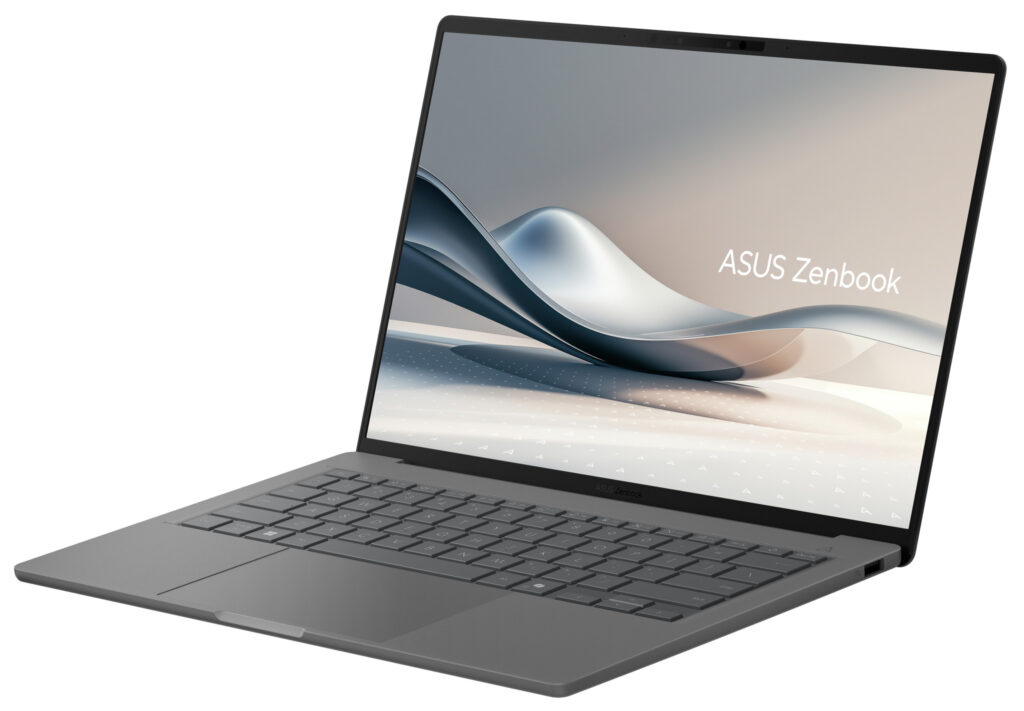
Under one kilogram at 14 inches, and yet according to ASUS it holds a 70 Wh battery. Unusually large for this weight class. On top of that come an OLED screen, two USB4 ports, USB-A and HDMI. ASUS does not state a battery life in hours. Depending on the configuration, it runs on a Snapdragon X, X Elite or X2 Elite, so check beforehand whether your course software runs on Windows on ARM.
Acer Swift Air 16
16 inches, and according to Acer the IPS version still weighs just 0.99 kg. Source on the left, term paper on the right: if you often work with two windows side by side, you gain space here without extra weight. The battery is smaller at 50 Wh; according to Acer, it lasts up to 13 hours of video playback. Inside are AMD processors from the Ryzen AI 300 series. The ARM question does not arise.
HP OmniBook 5 14 (Snapdragon X Plus)
HP specifies up to 26.5 hours of video playback from a 59 Wh battery for the Snapdragon X Plus version, at 1.29 kg. At 300 nits, the OLED screen is on the dim side according to the data sheet, a compromise in lectures by the window. There are two USB-C ports and one USB-A port. The data sheet does not list an HDMI output. If you consistently plan your day without a charger, this is a no-nonsense option.
Lenovo IdeaPad Slim 5 14 (14AKP10)
The heaviest of the six. In return, according to Lenovo, it is the only one with two memory slots and a free second SSD slot, so if you start with 16 GB today, you can upgrade later. Lenovo specifies a 60 Wh battery and 10.5 hours in the MobileMark 30 office benchmark. More honest than any video figure. An AMD processor, HDMI, two USB-A ports and a microSD reader make it the straightforward choice for technical programs.
If 3D software comes into play there, gaming laptops with a dedicated graphics card are the better choice.
So which one is right for me?
If your program does not require Windows, get the MacBook Air 13 with M5: enough memory for your entire studies, long battery life, low weight. On a tight budget and with mostly writing and research, the MacBook Neo is enough. Its 8 GB of RAM is the limit you should be aware of. Windows at the lowest possible weight? The ASUS Zenbook A14, provided your software runs on ARM. Without compatibility risk, that leaves the Lenovo IdeaPad Slim 5 or, with a larger screen, the Acer Swift Air 16. The longest manufacturer battery figure belongs to the HP OmniBook 5 14.
One more thing about carrying it around. The device alone is rarely enough; a sleeve or a suitable backpack protects the screen on a crowded bus. You will find tips in our guide to the laptop backpack (in German).
If you are buying during the sale weeks, our Black Friday laptop (in German) guide helps you check memory, color and keyboard.
An affordable alternative for school and university is the Chromebook; what the Plus label means and how long updates last is covered in our Chromebook guide (in German).
Frequently asked questions
Mac or Windows for college?
Your program decides. Teacher training gets by with Office, a browser and PDF tools. In mechanical engineering, electrical engineering or architecture, you will come across programs that only exist for Windows on Intel or AMD processors. Many universities list the required software on their IT center's pages.
How heavy can a student laptop be?
Under 1.3 kg, you will hardly notice the laptop in your backpack; from around 1.5 kg, it tends to stay on the desk. The ASUS Zenbook A14 and the Acer Swift Air 16 weigh under one kilogram, and the two MacBooks come in at 1.23 kg.
How much RAM does a laptop for college need?
16 GB is comfortably enough for studying and a side job. In almost all thin devices, the memory is soldered on, so it cannot be upgraded. The exception in this comparison is the Lenovo IdeaPad Slim 5 14 with two memory slots.
What is Apple's education discount worth?
According to Apple, enrolled and newly admitted students, parents buying for them, and teachers are eligible. The education price applies to one MacBook per year. The savings are no miracle. Also compare the final price in the Lenovo and HP student stores with regular retailers.
What should you keep in mind with Snapdragon Windows laptops?
According to Microsoft, drivers on Windows PCs with ARM processors only work if they were developed for them. This affects some games with anti-cheat protection, certain antivirus programs and software that hooks deeply into the system. Check beforehand whether your course software runs.
Which laptop lasts longest away from an outlet?
The longest manufacturer figure belongs to the HP OmniBook 5 14, with up to 26.5 hours of video playback. However, manufacturer figures are based on video at a dimmed screen. Figures for web browsing or office work are more realistic, for example 10.5 hours in an office benchmark for the Lenovo IdeaPad Slim 5.
Sources
- Apple: MacBook Air, technical specifications
- Apple: MacBook Neo, technical specifications
- Apple: Education pricing and student discounts
- Apple: Education store sales policies
- ASUS: Zenbook A14 (UX3407), technical specifications
- Acer: Swift Air 16 announcement
- HP: OmniBook 5 14 with Snapdragon X Plus, data sheet
- Lenovo PSREF: IdeaPad Slim 5 14AKP10
- Lenovo: Education discounts
- Microsoft: FAQ about Windows PCs with ARM processors
Where to buy
- Apple MacBook Air 13 (M5)View at CoolblueAvailable in Germany: CoolblueCheck price at Amazon.deCheck price at Amazon.co.ukCheck price at Amazon.nlCheck price at Amazon.com.beCheck price at Amazon.frCheck price at Amazon.itCheck price at Amazon.esCheck price at Amazon.plCheck price at Amazon.seAvailable in Germany: Amazon.de
- Apple MacBook NeoCheck price at Amazon.deCheck price at Amazon.co.ukCheck price at Amazon.nlCheck price at Amazon.com.beCheck price at Amazon.frCheck price at Amazon.itCheck price at Amazon.esCheck price at Amazon.plCheck price at Amazon.seAvailable in Germany: Amazon.de
- ASUS Zenbook A14 UX3407Check price at Amazon.deCheck price at Amazon.co.ukCheck price at Amazon.nlCheck price at Amazon.com.beCheck price at Amazon.frCheck price at Amazon.itCheck price at Amazon.esCheck price at Amazon.plCheck price at Amazon.seAvailable in Germany: Amazon.de
- Acer Swift Air 16 SFA16-61MCheck price at Amazon.deCheck price at Amazon.co.ukCheck price at Amazon.nlCheck price at Amazon.com.beCheck price at Amazon.frCheck price at Amazon.itCheck price at Amazon.esCheck price at Amazon.plCheck price at Amazon.seAvailable in Germany: Amazon.de
- HP OmniBook 5 14 Snapdragon X PlusCheck price at Amazon.deCheck price at Amazon.co.ukCheck price at Amazon.nlCheck price at Amazon.com.beCheck price at Amazon.frCheck price at Amazon.itCheck price at Amazon.esCheck price at Amazon.plCheck price at Amazon.seAvailable in Germany: Amazon.de
- Lenovo IdeaPad Slim 5 14 (14AKP10)Check price at Amazon.deCheck price at Amazon.co.ukCheck price at Amazon.nlCheck price at Amazon.com.beCheck price at Amazon.frCheck price at Amazon.itCheck price at Amazon.esCheck price at Amazon.plCheck price at Amazon.seAvailable in Germany: Amazon.de