Contents11 sections
This guide was first published in German on handgetestet.de.
The most expensive mistake with Chromebooks happens in the fine print: you buy an inexpensive device that has already been on the market for two years and are surprised when the updates end sooner than expected. For school and college, we therefore recommend a current Chromebook Plus with an update end date in 2035. If you take the screen and battery seriously, you will end up with the Lenovo Chromebook Plus 14; if you need to save, with the ASUS Chromebook Plus CX14.
How long does a Chromebook actually get updates?
Ten years. That is what Google’s Auto Update policy says. However, the count starts from the market launch of the platform, not from your date of purchase. A model that came out in 2024 and is now on clearance has therefore already used up part of its lifespan.
Google keeps a fixed end date for every device. For the newer models in our list, that is June 2035. Older convertibles with a 360-degree hinge, such as the HP Chromebook Plus x360 14b with a Core i3-N305, are already listed with June 2033. Two years‘ difference sounds like little. For a child in fifth grade, it means the device may stop receiving security updates before the Abitur (German university-entrance exam). So check the list before buying and compare the exact model designation, because one letter in the model code can mean a different platform.
What makes a Chromebook a Chromebook Plus?
Google only awards the Plus label when a minimum specification is met. According to Google, that includes a processor from 12th-generation Intel Core i3 or AMD Ryzen 3 5000 series, at least 8 GB of RAM, at least 128 GB of storage, a Full HD IPS display or better and a 1080p camera with noise reduction. In practice, manufacturers now also use chips such as the Intel Core 3 N355 or the MediaTek Kompanio Ultra 910.
Why does the label matter so much to us? Because it rules out the typical budget traps. A Chromebook with 4 GB of RAM and an HD screen with 1366 × 768 pixels is simply too limited for twenty open tabs, a video call and a learning platform. The Plus label rules out such devices.
One trap remains, though. Under the same model designation CX1505CTA, ASUS sells both the Chromebook Plus CX15 with a Core 3 N355 and a basic version with an Intel N50 and 4 GB, according to retailer listings. So check the listing for the word Plus and for the processor.
Do Android apps run on a Chromebook too?
Mostly, yes, but with limitations. Google itself writes that the Play Store is only available on some Chromebooks and that some apps do not work with certain devices. Apps from your phone do not move over automatically; they have to be downloaded again. And on devices managed by a school, the administrator can block the Play Store.
In class, that rarely matters, because learning platforms, browser-based Office and Google Docs run in the browser anyway. It gets critical with specialized software. If you need SPSS, CAD programs or a specific exam software for your studies, you should check with your university beforehand. In that case, a Windows laptop is often the safer route, as we describe in our guide to laptops for college and our overview of Windows laptops.
Which models are worth considering in 2026?
| Model | Processor and memory | Display | Updates until | Best for |
|---|---|---|---|---|
| Lenovo Chromebook Plus 14 (Gen 10) | MediaTek Kompanio Ultra 910, up to 16 GB, up to 256 GB | 14-inch OLED, 1920 × 1200, 400 nits | June 2035 | College, lots of time on the go |
| Acer Chromebook Plus 514 (CB514-6H) | Intel Core 3 N355, 8 GB | 14-inch, 1920 × 1200 | June 2035 | School and college, mid-range class |
| ASUS Chromebook Plus CX14 | Intel Core 3 N355, 8 GB, 128 GB eMMC | 14-inch Full HD, touch, 250 nits | June 2035 | School on a tight budget |
| ASUS Chromebook Plus CX15 | Intel Core 3 N355, 8 GB | 15.6-inch Full HD | June 2035 | Desk at home |
| Lenovo Chromebook Duet 11 | MediaTek Kompanio 838, 4 or 8 GB, 64 or 128 GB | 10.95-inch, 1920 × 1200, 400 nits | June 2034 | Elementary school, notes with a stylus |
Lenovo Chromebook Plus 14
The OLED display with 1920 × 1200 pixels and 400 nits clearly sets the Lenovo apart from the rest. Lenovo states up to 17 hours of battery life from 60 Wh and a weight starting at 1.17 kg. The manufacturer’s list of ports includes two USB-C ports and one USB-A port, but no HDMI. If you need to connect to the projector in the lecture hall, you will need an adapter.
Acer Chromebook Plus 514
The solid middle ground. Acer combines the Core 3 N355 with 8 GB and a 14-inch screen in 16:10 format, plus HDMI as well as USB-A and USB-C according to the manufacturer. Watch for the CB514-6H generation: according to Google, older 514 models with the designation CB514-5H only get updates until June 2033.
ASUS Chromebook Plus CX14
You will hardly find a cheaper way to a Plus device with an update end date of 2035. ASUS states 1.39 kg, a 42 Wh battery and HDMI 1.4. The compromise lies in the display: 250 nits are enough in the classroom, but by the window or outdoors it gets tight. And 128 GB of eMMC is slower than an SSD, but sufficient for browser work.
ASUS Chromebook Plus CX15
Technically the big brother of the CX14, with a 15.6-inch screen and, according to Google, up to 10 hours of battery life. That is pleasant on a desk at home, but rather bulky in a school bag. Check especially carefully here whether the Core 3 N355 is really inside.
Lenovo Chromebook Duet 11
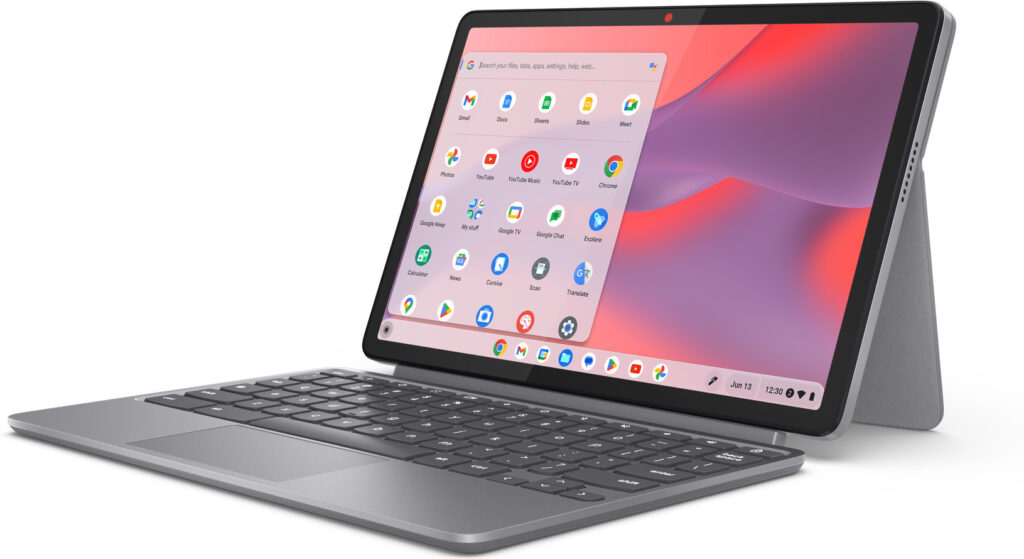
A tablet with a detachable keyboard, not a Plus model. Lenovo states 510 g for the tablet and 288 g for the folio keyboard, plus a battery life of up to 12 hours and support for the USI Pen 2. That suits elementary school and handwritten notes well. But take the 8 GB version; the 4 GB version gets sluggish with many tabs.
So which Chromebook suits whom?
- College and long days on the go: Lenovo Chromebook Plus 14. The most expensive device here, but with the brightest screen and the longest battery life according to the manufacturer.
- Secondary school on a fixed budget: ASUS Chromebook Plus CX14, as long as you rarely work outdoors.
- A little more equipment without paying extra for OLED: Acer Chromebook Plus 514 from the CB514-6H generation.
- Elementary school and stylus: Lenovo Chromebook Duet 11 with 8 GB.
Google does not currently offer a Chromebook of its own. Google’s Chromebook shop only lists partner devices, but Google sets the rules for the Plus label and for the update period. Before you order a device for school, also check whether the school specifies a particular model or a management license. For carrying it around, take a look at our guide to laptop backpacks.
Frequently asked questions
How long does a Chromebook get updates?
Ten years according to Google's Auto Update policy, counted from the market launch of the platform, not from the date of purchase. For newer models, that period ends in June 2035; older ones such as the HP Chromebook Plus x360 14b are already listed with June 2033.
What does Chromebook Plus mean?
Google only awards the Plus label for a minimum specification: a processor from 12th-generation Intel Core i3 or AMD Ryzen 3 5000 series, at least 8 GB of RAM and 128 GB of storage, a Full HD IPS display and a 1080p camera. That rules out budget traps with 4 GB and an HD screen.
Do Android apps run on a Chromebook?
Mostly, yes. According to Google, however, the Play Store is only available on some Chromebooks, and some apps do not work with certain devices. Apps from your phone have to be downloaded again. On school-managed devices, the administrator can block the Play Store.
Is a Chromebook enough for college?
For learning platforms, browser-based Office and Google Docs, yes. If you need SPSS, CAD programs or a specific exam software, check with your university beforehand. In that case, a Windows laptop is often the safer route.
Which Chromebook is right for elementary school?
The Lenovo Chromebook Duet 11, a tablet with a detachable keyboard and support for the USI Pen 2. It is not a Plus model. Take the 8 GB version; the 4 GB version gets sluggish with many tabs. Updates are provided until June 2034.
What should I watch out for with the ASUS Chromebook Plus CX15?
Under the same model designation CX1505CTA, ASUS also sells a basic version with an Intel N50 and 4 GB, according to retailer listings. So check the listing for the word Plus and make sure the Core 3 N355 is really inside.
Sources
- Google: Auto Update policy and end dates by model
- Google: Chromebook Plus requirements
- Google: Installing Android apps on your Chromebook
- Google: Shop Chromebooks (model overview for Germany)
- Lenovo: Chromebook Plus 14 (10), technical data
- Lenovo: Chromebook Duet (11″, 9)
- ASUS: Chromebook Plus CX14, technical data
- Acer: Chromebook Plus 514 (CB514-6H)
- HP: Maintenance and service guide Chromebook x360 14 (14b-cd0xxx)
Where to buy
- Lenovo Chromebook Plus 14 (Gen 10)Check price at Amazon.deCheck price at Amazon.co.ukCheck price at Amazon.nlCheck price at Amazon.com.beCheck price at Amazon.frCheck price at Amazon.itCheck price at Amazon.esCheck price at Amazon.plCheck price at Amazon.seAvailable in Germany: Amazon.de
- ASUS Chromebook Plus CX14Check price at Amazon.deCheck price at Amazon.co.ukCheck price at Amazon.nlCheck price at Amazon.com.beCheck price at Amazon.frCheck price at Amazon.itCheck price at Amazon.esCheck price at Amazon.plCheck price at Amazon.seAvailable in Germany: Amazon.de
- Acer Chromebook Plus 514Check price at Amazon.deCheck price at Amazon.co.ukCheck price at Amazon.nlCheck price at Amazon.com.beCheck price at Amazon.frCheck price at Amazon.itCheck price at Amazon.esCheck price at Amazon.plCheck price at Amazon.seAvailable in Germany: Amazon.de
- ASUS Chromebook Plus CX15Check price at Amazon.deCheck price at Amazon.co.ukCheck price at Amazon.nlCheck price at Amazon.com.beCheck price at Amazon.frCheck price at Amazon.itCheck price at Amazon.esCheck price at Amazon.plCheck price at Amazon.seAvailable in Germany: Amazon.de
- Lenovo Chromebook Duet 11Check price at Amazon.deCheck price at Amazon.co.ukCheck price at Amazon.nlCheck price at Amazon.com.beCheck price at Amazon.frCheck price at Amazon.itCheck price at Amazon.esCheck price at Amazon.plCheck price at Amazon.seAvailable in Germany: Amazon.de