Contents12 sections
This guide was first published in German on handgetestet.de.
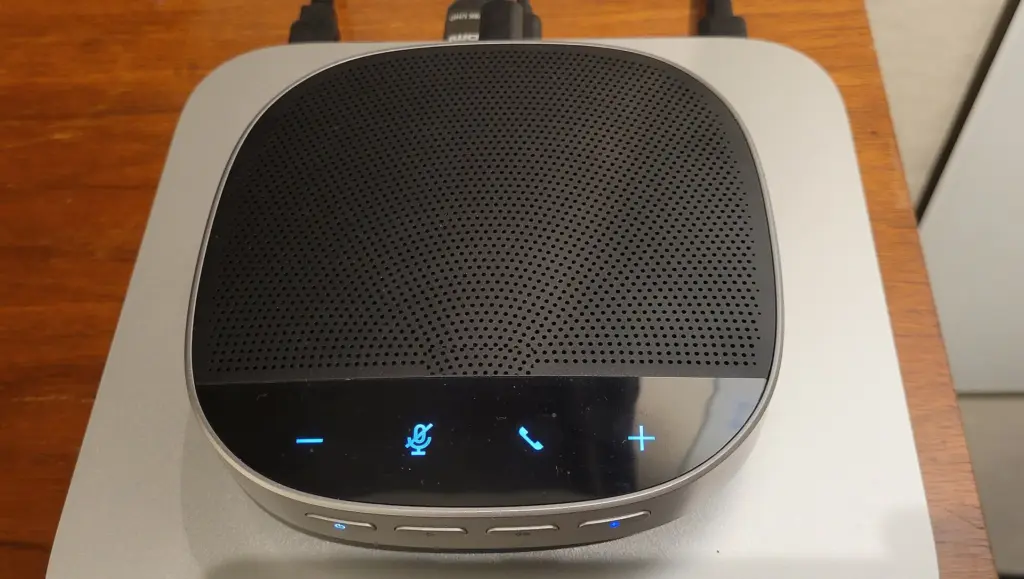
Three people are sitting around a laptop, and at the other end of the line, only the person sitting right in front of the screen can be understood. That is exactly what conference speakerphones are for. For a meeting room up to about 4.5 by 4.5 meters, the Jabra Speak2 75 is the most coherent choice on paper, because it neatly combines microphone range, battery and Teams certification. If you talk alone from your home office, you do not need that much. There, the Speak2 55 or the Poly Sync 20+ is enough.
Measure the table first, then choose the device
The most important number on any data sheet is the pickup range of the microphones. For both Speak2 models, Jabra states up to 2.3 meters and a room of 4.5 by 4.5 meters. If the unit sits in the middle of a 2.40-meter table, every seat is at most a little over a meter away. That works. For a long table seating twelve, the math looks different: the seats at the ends are outside the radius, and colleagues there sound quiet and echoey. In that case, a device with a longer range helps, such as the Yealink SP96 with up to 5 meters according to the manufacturer, or two linked speakerphones.
Manufacturer figures are not measured in your meeting room. Glass walls, tiles and an empty room without carpet absorb little sound. Plan with some reserve rather than with the maximum value.
Bluetooth on a laptop is not the same as Bluetooth on a phone
Here the fine print decides. In the data sheets of both Speak2 models, Jabra explicitly states that Bluetooth is intended only for smartphones and tablets. On a computer, the device runs via its permanently attached USB cable or wirelessly via the Link 390 adapter, which is included in the box only with certain versions. For the Speak2 55, according to Jabra, the certification even applies only to the USB connection. So if you want to make wireless calls from your laptop, buy the version with the adapter.
The other manufacturers handle this in a similar way. The Poly Sync 20+ comes with the BT700 adapter, and according to its data sheet, Yealink includes the BT51C dongle with the SP92. For the SP96, on the other hand, it is marked as optional.
Teams, Zoom or both?
Almost all devices come in two versions. At Jabra they are called „MS Teams“ and „UC.“ According to the data sheet, the Teams version of the Speak2 75 is certified for Microsoft Teams and Teams Rooms, while the UC version is aimed at Zoom, Google Meet and other services. According to Jabra, the Teams version also works with Zoom, Google Meet and other services. If your office relies on Teams, still take the certified version.
Check quickly with your company which software is standard. That saves you an exchange.
- Room size: Compare the microphone range with the distance to the farthest seat.
- Connection: For wireless use with a PC, choose the version with a USB adapter.
- Platform: Teams version or UC version, depending on the software in your office.
- Battery: If the device stays connected to the computer, battery life hardly matters. For hot desks and travel, it does.
Six conference speakerphones side by side
| Model | Microphones | Range / room according to manufacturer | Talk time | Best for |
|---|---|---|---|---|
| Jabra Speak2 75 | 4 | up to 2.3 m, room up to 4.5 × 4.5 m | up to 32 h | Meeting rooms, Teams offices |
| Jabra Speak2 55 | 4 | up to 2.3 m, room up to 4.5 × 4.5 m | up to 12 h | Home office, small groups |
| Poly Sync 20+ | 3 | not specified | up to 20 h | Individual desks and on the go |
| EPOS Expand 40+ | 3 | up to 8 people | not specified | Medium-sized meetings |
| Yealink SP96 | 6 | up to 5 m, two units up to 20 people | up to 26 h | Large tables |
| Yealink SP92 | 1 | up to 4 m | up to 20 h | Single speakers |
Jabra Speak2 75: the all-purpose speakerphone for the office
Four beamforming microphones, a 65-millimeter speaker and up to 32 hours of battery life are listed on the data sheet. Add to that a light ring that shows whether your own voice is coming across well. Two Speak2 75 units can be linked at the push of a button if the room grows. The housing is protected against dust and splashing water according to IP64, but it weighs 466 grams. You will notice that in a laptop bag; in the meeting room it does not matter.
Jabra Speak2 55: enough for the desk
Same number of microphones, same range, but only 280 grams and a 50-millimeter speaker. According to Jabra, the battery lasts up to twelve hours. That is enough for a working day at your desk. Only the larger model has the light ring for microphone quality.
Poly Sync 20+: with adapter and charging port
HP lists three microphones, up to 20 hours of talk time, Bluetooth 5.1 and IP64 protection. The BT700 adapter is included. A practical touch is the USB-A port of the Sync 20 series, which according to HP can charge a smartphone on the go. HP does not state a microphone range on the product page, which is why we see the Sync 20+ more at an individual desk than in a meeting room.
EPOS Expand 40+: for groups of up to eight
EPOS relies on three beamforming microphones and states up to eight participants in the room in its comparison table. It connects via Bluetooth or USB-C. A Teams-certified version is also available. The product page gives no battery life; if you work a lot without a cable, check the manual before buying.
Yealink SP96: range for the long table
Six microphones, a 65-millimeter speaker and, according to Yealink, pickup from up to 5 meters. Two units connect wirelessly and then cover up to 20 people. A small display shows the connection status, and there is a dedicated Teams button. Talk time is up to 26 hours, and the weight is 400 grams.
Yealink SP92: one voice, four meters
The SP92 works with just one microphone and AI noise suppression that, according to Yealink, filters out background noise from all directions. The manufacturer states the range as up to 4 meters and the battery as up to 20 hours. For one person who occasionally gets up from the desk and walks around the room, that can be enough. For a group around a table, we would rather go for devices with several microphones.
How we would decide
- Small meeting room with Teams: Jabra Speak2 75 in the Teams version, with the Link 390 adapter for wireless PC use.
- Alone in the home office: Jabra Speak2 55 or Poly Sync 20+. The Poly already comes with the adapter.
- Table for ten or more: two Yealink SP96 or two linked Speak2 75 units.
- Meetings with up to eight people and Zoom: EPOS Expand 40+ or the UC version of the Speak2 75.
A conference speakerphone does not replace a headset if you make calls in an open-plan office. There, a speakerphone disturbs your colleagues. Suitable models are in our guide to office headsets. If you are also upgrading the meeting room for video, you will find the right camera in our webcam guide (in German).
Frequently asked questions
How large can the room be for a conference speakerphone?
What matters is the pickup range of the microphones. For the Speak2 models, Jabra states up to 2.3 meters and a room of 4.5 by 4.5 meters. Compare this value with the distance to the farthest seat and plan with some reserve, because glass and tiles absorb little sound.
Can I connect the conference speakerphone to my laptop via Bluetooth?
According to Jabra's data sheet, Bluetooth is intended only for smartphones and tablets. On a computer, the Speak2 runs via USB cable or wirelessly via the Link 390 adapter, which is included only with certain versions. The Poly Sync 20+ comes with the BT700 adapter.
What is the difference between the Teams version and the UC version?
The Teams version of the Jabra Speak2 75 is certified for Microsoft Teams and Teams Rooms; the UC version is aimed at Zoom, Google Meet and other services. According to Jabra, the Teams version also works with Zoom. Check beforehand which software your company has standardized on.
Which conference speakerphone is enough for a long table?
According to the manufacturer, the Yealink SP96 picks up sound from up to 5 meters, and two linked units cover up to 20 people. Alternatively, two Jabra Speak2 75 units can be linked at the push of a button. A single unit with a 2.3-meter range will not capture the seats at the ends.
How important is the battery in a conference speakerphone?
If the unit stays connected to the computer, battery life hardly matters; for hot desks and travel, it does. Jabra states up to 32 hours for the Speak2 75 and up to twelve hours for the Speak2 55. The product page for the EPOS Expand 40+ gives no figure.
Does a conference speakerphone replace a headset?
Not in an open-plan office. There, a speakerphone disturbs your colleagues, and a headset is the better choice. The conference speakerphone belongs in the meeting room or at a desk where the sound will not bother anyone.
Sources
- Jabra: Speak2 75 data sheet
- Jabra: Speak2 55 technical data sheet
- HP: Poly Sync 20+ specifications
- HP: Poly Sync 20 USB-C
- EPOS: Expand 40
- EPOS: speakerphone comparison
- Yealink: SP96
- Yealink: SP96 data sheet
- Yealink: SP92
- Yealink: SP92 data sheet
Where to buy
- Jabra Speak2 75 (MS Teams, USB-A-Adapter)Check price at Amazon.deCheck price at Amazon.co.ukCheck price at Amazon.nlCheck price at Amazon.com.beCheck price at Amazon.frCheck price at Amazon.itCheck price at Amazon.esCheck price at Amazon.plCheck price at Amazon.seAvailable in Germany: Amazon.de
- Jabra Speak2 55Check price at Amazon.deCheck price at Amazon.co.ukCheck price at Amazon.nlCheck price at Amazon.com.beCheck price at Amazon.frCheck price at Amazon.itCheck price at Amazon.esCheck price at Amazon.plCheck price at Amazon.seAvailable in Germany: Amazon.de
- Poly Sync 20+Check price at Amazon.deCheck price at Amazon.co.ukCheck price at Amazon.nlCheck price at Amazon.com.beCheck price at Amazon.frCheck price at Amazon.itCheck price at Amazon.esCheck price at Amazon.plCheck price at Amazon.seAvailable in Germany: Amazon.de
- EPOS Expand 40+Check price at Amazon.deCheck price at Amazon.co.ukCheck price at Amazon.nlCheck price at Amazon.com.beCheck price at Amazon.frCheck price at Amazon.itCheck price at Amazon.esCheck price at Amazon.plCheck price at Amazon.seAvailable in Germany: Amazon.de
- Yealink SP96Check price at Amazon.deCheck price at Amazon.co.ukCheck price at Amazon.nlCheck price at Amazon.com.beCheck price at Amazon.frCheck price at Amazon.itCheck price at Amazon.esCheck price at Amazon.plCheck price at Amazon.seAvailable in Germany: Amazon.de
- Yealink SP92Check price at Amazon.deCheck price at Amazon.co.ukCheck price at Amazon.nlCheck price at Amazon.com.beCheck price at Amazon.frCheck price at Amazon.itCheck price at Amazon.esCheck price at Amazon.plCheck price at Amazon.seAvailable in Germany: Amazon.de