Contents11 sections
This guide was first published in German on handgetestet.de.
Eight hours of typing a day, with the hands lying flat, bent outward and tilted slightly upward. That is how the ergonomics literature describes the posture at an ordinary office keyboard. For touch typists who have room on the desk, a split, curved keyboard with a backward tilt is the most sensible step, such as the Logitech Ergo K860 with a German layout. If you look at the keys while typing or would rather not spend long getting used to something new, a gently curved keyboard like the Logitech Wave Keys will serve you better.
What a flat keyboard does to your wrist
The most thorough German-language review of the subject comes from the Institute for Occupational Safety and Health of the German Social Accident Insurance (BGIA Report 3/2008, commissioned by the VBG, a German statutory accident insurer). The authors compiled international studies. According to them, at a conventional keyboard the hand is bent upward by 8 to 20 degrees and angled 10 to 20 degrees toward the little finger. At around 80 degrees, the forearm is turned almost completely inward. In the literature, such deviations from the neutral position are considered one cause of the reported complaints.
There is a design for each of the three problem positions. A keyboard that slopes down toward the screen reduces the upward bend: when switching from plus 7.5 to minus 15 degrees, wrist extension in one study dropped from 12 to 3 degrees. Test subjects who were allowed to choose found around minus 7.5 degrees comfortable. Two key halves rotated outward, by about 25 degrees in total, brought the sideways bend close to zero. And if you raise the halves in the middle like a tent roof, the forearm rotates inward less. Here, preferences vary widely. The report therefore recommends an adjustable angle.
None of this is a cure. The authors cautiously write that ergonomically shaped keyboards could bring improvements, especially for touch typing and heavy text input. One of the studies evaluated found only small differences. If you already have pain in your wrist or forearm, check with your occupational physician or family doctor first. The keyboard comes after that.
Wrist rest, number pad, layout: the real stumbling blocks
When it comes to wrist rests, the packaging and occupational safety seem to contradict each other. DGUV Information 215-410 on display screen workstations, a German occupational safety guideline, considers an additional rest unnecessary with flat keyboards and potentially a hindrance. Instead, it calls for 100 to 150 millimeters of free space in front of the keyboard where hands and forearms can rest. The BGIA report found rather unfavorable results for pure wrist rests. If you do use a rest, it should match the keyboard exactly: same height, same angle, at least 70 and preferably 80 millimeters deep. A permanently attached rest like those on Logitech and Cherry models is more likely to meet this than a loose gel pad in front of a tall keyboard.
The number pad is often forgotten. It pushes the letter keys to the left, and if you sit centered in front of the screen, you twist your upper body slightly. The checklist in the BGIA report advises anyone who rarely types numbers to use a keyboard without a number pad or with a separate one. That also brings the mouse closer. On that note, it is worth reading our guide to the ergonomic mouse by hand size (in German).
That leaves the layout. With Kinesis and Logitech, the German version has its own item number in each case, and a US layout without umlauts, angle brackets and the hash key is a nuisance in everyday German office work. Look for the designation QWERTZ or „German,“ and with Logitech, for the variant: the Business models connect via the Logi Bolt receiver, which according to the manufacturer does not work with older Logitech receivers.
Five keyboards with a German layout
| Model | Design and tilt | Connection and power | Best for |
|---|---|---|---|
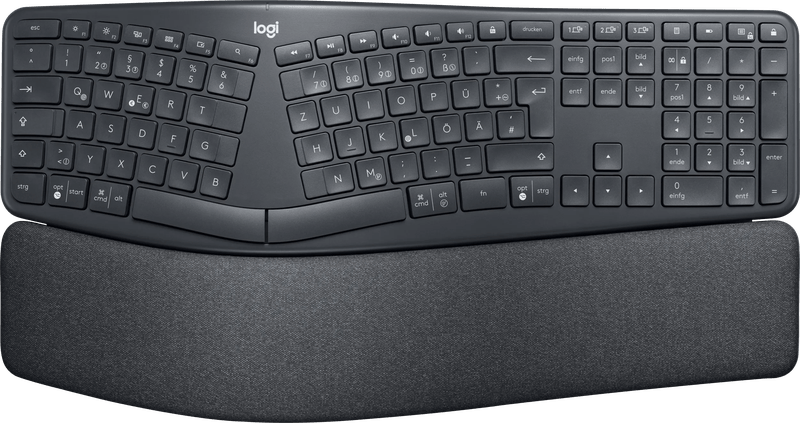
| Logitech Ergo K860 | split and curved, feet for 0, −4 or −7 degrees, fixed rest, with number pad | Bluetooth or Unifying receiver, 2 × AAA for up to 24 months, 3 devices | touch typists who write a lot |
| Logitech Wave Keys | one-piece, wave-shaped, feet for +4 degrees, memory foam rest, compact with number pad | Bluetooth or Logi Bolt, 2 × AAA for up to 3 years, 3 devices | people switching over and small desks |
| Logitech Wave Keys for Mac | like the Wave Keys, with Mac keys | Bluetooth, 2 × AAA for up to 3 years | Mac and iPad |
| Kinesis Freestyle2 (DE) | two separate halves, 0 degrees, tenting 5 to 15 degrees with accessory, no built-in number pad | USB cable, 1.8 m | if you want to set distance and angle yourself |
| Cherry KC 4500 Ergo | one-piece, curved key field, fold-out feet, memory foam rest, full size | USB-A cable, 1.8 m | fixed workstations with Windows |
Logitech Ergo K860: tenting that folds out
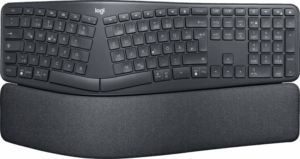
The K860 combines what the BGIA report describes in a single housing: a split, slightly raised key field and feet that lift the front edge so that the key field slopes down toward the screen by 4 or 7 degrees. According to Logitech, the rest consists of three layers. At 456 millimeters wide and 1,160 grams, it is a big piece of hardware. The figures of 54 percent more wrist support and 25 percent less wrist bending are manufacturer claims, and Logitech does not explain on the product page how they were measured.
One note from the report belongs here. If only the front edge is raised for the negative tilt, the wrists sit higher. The chair then has to go up a little or the desktop down a little so that elbows and wrists are level again. With a height-adjustable desk, that takes a moment.
Logitech Wave Keys: a small wave, a short adjustment
The Wave Keys is not split. The key field rises slightly in the middle, and the feet raise the back by 4 degrees, which is the opposite of a negative tilt. If you are coming from a normal keyboard, you will therefore find your way quickly. At 376 millimeters, it is considerably narrower than the K860, and according to Logitech it is certified by United States Ergonomics.
Logitech Wave Keys for Mac
The same shape with Command and Option keys, intended for macOS, iPadOS and iOS. Here, Logitech lists only the Bluetooth connection. For a Mac at the desk, the obvious variant.
Kinesis Freestyle2: truly separate
On the Freestyle2, the two halves are connected only by a cable and, depending on the version, can be placed up to about 23 or 51 centimeters apart. According to Kinesis, the European versions have the familiar ISO arrangement; the German one is sold as KB800PB-DE. Out of the box, it lies flat at 0 degrees. With the V3 or VIP3 accessories, the latter with palm rests, it can be tented at 5, 10 or 15 degrees. According to the report, however, typing with the halves shoulder-width apart is difficult for some people. Start with a small gap.
Cherry KC 4500 Ergo: the smallest risk
Cherry curves the key field but does not split it. Add to that a padded faux leather rest and a USB cable. No batteries, no pairing, Windows as the target system. That suits open-plan offices with changing desks. If you rarely need a number pad, though, the full-size format takes up space that could go to the mouse.
And the Microsoft Sculpt?
Microsoft ended its own keyboard and mouse production in 2023. According to heise, a German tech publication, Incase has been producing some of the designs again since 2024 with the label „Designed by Microsoft,“ including the Sculpt Ergonomic Keyboard. Whether it is available with a German layout is unclear. That is why it is missing above.
How we would decide
- You type a lot and touch-type: Logitech Ergo K860, feet set to −4 degrees, and expect a few days of adjustment. In the studies, typing performance was back at up to 90 percent after eight to ten hours.
- You look at the keys while typing or share the desk: Logitech Wave Keys, and on a Mac the Mac variant.
- You want to set the distance and tenting angle yourself: Kinesis Freestyle2 with accessory.
- You need a cable and the full number pad: Cherry KC 4500 Ergo.
If you would rather type on mechanical switches, you will find the basics in our guide to the mechanical keyboard (in German).
Frequently asked questions
What does an ergonomic keyboard do?
It reduces the awkward hand positions that come with a flat keyboard. It is not a cure: the BGIA report cautiously states that shaped keyboards could bring improvements, especially for touch typing. If you already have pain, check with your occupational physician or family doctor first.
Do I need a wrist rest?
Not necessarily. DGUV Information 215-410, a German occupational safety guideline, considers an additional rest unnecessary with flat keyboards and calls for 100 to 150 millimeters of free space in front of the keyboard. If you do use a rest, choose one that matches, with the same height and angle, at least 70 and preferably 80 millimeters deep.
Keyboard with or without a number pad?
The number pad pushes the letter keys to the left, and if you sit centered in front of the screen, you twist your upper body slightly. The checklist in the BGIA report recommends a keyboard without a number pad, or with a separate one, if you rarely enter numbers. That also brings the mouse closer.
How long does it take to get used to a split keyboard?
Expect a few days. In the studies evaluated, typing performance was back at up to 90 percent after eight to ten hours. For the Logitech Ergo K860, this guide recommends setting the feet to −4 degrees.
What should I look for in the keyboard layout?
Look for the designation QWERTZ or German, because with Kinesis and Logitech the German version has its own item number. With Logitech, the variant also matters: the Business models use the Logi Bolt receiver, which according to the manufacturer does not work with older Logitech receivers.
What is the difference between the Logitech Ergo K860 and the Wave Keys?
The K860 is split and curved, and its feet let the key field slope down toward the screen by 4 or 7 degrees. The Wave Keys is a one-piece board with a small wave, and its feet raise the back by 4 degrees. At 376 millimeters, it is considerably narrower.
Sources
- IFA of the DGUV: BGIA Report 3/2008, ergonomic requirements for input devices
- DGUV Information 215-410, keyboard section (BGN)
- Logitech: Ergo K860
- Logitech: Ergo K860 for Business data sheet
- Logitech: Wave Keys for Business data sheet
- Logitech: Wave Keys
- Logitech: Wave Keys for Mac
- Kinesis: Freestyle2 International
- Kinesis: Freestyle2 for PC
- Cherry: KC 4500 Ergo
- heise: Microsoft’s discontinued peripherals are being produced again
Where to buy
- Logitech Ergo K860View at CoolblueAvailable in Germany: CoolblueCheck price at Amazon.deAvailable in Germany: Amazon.de
- Logitech Wave Keys (graphit, QWERTZ)Check price at Amazon.deAvailable in Germany: Amazon.de
- Logitech Wave Keys for MacCheck price at Amazon.deAvailable in Germany: Amazon.de
- Kinesis Freestyle2 (DE)Check price at Amazon.deAvailable in Germany: Amazon.de
- Cherry KC 4500 Ergo (schwarz, QWERTZ)Check price at Amazon.deAvailable in Germany: Amazon.de