Contents10 sections
This guide was first published in German on handgetestet.de.
You can land an Airbus with a mouse and gamepad, but not with any finesse. Anyone who flies Microsoft Flight Simulator, X-Plane or DCS seriously will sooner or later end up with dedicated controls. The first question is not „which brand“ but „which aircraft“. For most hobby pilots who fly airliners on PC or Xbox, we consider the Thrustmaster TCA Captain Pack X Airbus Edition the most sensible way to get started: an Airbus-style sidestick and throttle, for both platforms. If you first want to find out whether the hobby sticks, go for the inexpensive Thrustmaster T.Flight Hotas One.
Yoke, sidestick or HOTAS?
Three designs have become established, and each suits a different way of flying.
A yoke, the control column with a handwheel, is found in Boeing jets and many propeller planes. You hold it with both hands, with the throttle levers next to it. It needs a lot of space and a sturdy desk edge. The sidestick is its counterpart from the Airbus cockpit: small, mounted to the side and operated with one hand. HOTAS, finally, stands for „Hands on Throttle and Stick“. It refers to a center stick with a separate throttle full of buttons, as in a fighter jet or in space games.
If you mainly recreate airline flights, you will be happier with a yoke or a sidestick. For DCS, Star Citizen or Elite Dangerous, a HOTAS is the obvious choice.
What to settle before buying
First, the platform. All five controllers here work on PC. According to the manufacturers, three of them also work on the Xbox Series X|S: the Captain Pack, the Yoke Pack and the T.Flight Hotas One. The T.16000M Flight Pack and Turtle Beach’s VelocityOne Flightdeck are PC-only devices. None of the five is suitable for the PlayStation.
Next, the sensors. Contactless magnetic sensors, often called Hall sensors, work without sliding contacts, which can wear out over time. Thrustmaster calls its version H.E.A.R.T and, according to the data sheet, uses it on the main axes of the Yoke Pack and on the pitch and roll axes of the T.16000M. Turtle Beach also lists Hall sensors for the main axes of the Flightdeck. For the T.Flight Hotas One, Thrustmaster states 10-bit resolution but no sensor type.
And finally, your feet. In a real aircraft, you control the rudder with pedals. Many sticks handle this with a twist axis on the grip; that works, but it is a compromise. Only the T.16000M Flight Pack comes with pedals.
A word about space. The yoke of the Yoke Pack alone weighs 6.7 kilograms and is fastened with the included desk clamp. On a wobbly desk, that is no fun. If you are thinking about a fixed rig anyway, you will find ideas in our guide to sim racing cockpits.
Five flight simulator controllers compared
| Model | Design | Platform according to the manufacturer | Features | Best for |
|---|---|---|---|---|
| Thrustmaster TCA Captain Pack X Airbus Edition | Sidestick and throttle | PC, Xbox Series X|S | Reverse thrust, 2 add-on modules | Airbus fans, ambitious beginners |
| Thrustmaster T.Flight Hotas One MSFS Edition | HOTAS, detachable throttle | PC, Xbox Series X|S | 5 axes, 14 buttons | Trying it out, small budget |
| Thrustmaster TCA Yoke Pack Boeing Edition | Yoke and throttle quadrant | PC, Xbox | Autopilot rotary knob, 2 to 4 springs | Boeing and propeller planes, lots of space |
| Thrustmaster T.16000M FCS Hotas Flight Pack | HOTAS with pedals | PC | Stick, throttle, pedals | Military and space simulations |
| Turtle Beach Velocity One Flightdeck | HOTAS with touch display | PC (Windows 10 and 11) | 15 axes, OLED display | Frequent flyers on PC |
Thrustmaster TCA Captain Pack X Airbus Edition
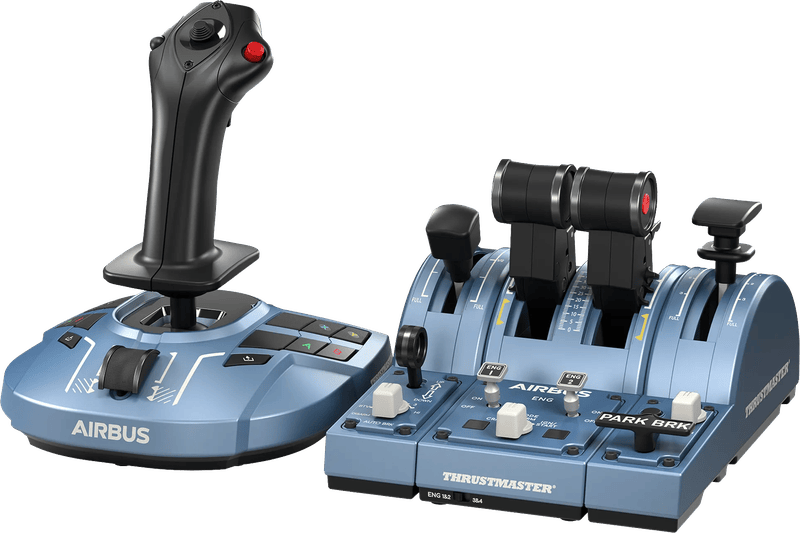
The box contains the Sidestick X and a throttle quadrant with two add-on modules for flaps and spoilers. According to Thrustmaster, the stick is designed for left- and right-handed users, and four interchangeable button modules for the stick head are included. The quadrant has four axes and reverse thrust. You switch between Xbox and PC with a switch. According to the data sheet, the stick weighs 787 grams and each quadrant module 530 grams. That is a fraction of the Yoke Pack. For Airbus flights, it is a well-matched combination without excess.
Thrustmaster T.Flight Hotas One
The least expensive set here. Five axes, 14 buttons, a fire button and a hat switch. The throttle can be detached and set up separately. You control the rudder either by twisting the grip or with a rocker. Thrustmaster states the precision as 10 bits, and the whole set weighs 2,060 grams. That is enough to get started. If you get deeper into it later, you will upgrade sooner or later.
Thrustmaster TCA Yoke Pack Boeing Edition
According to Thrustmaster, the yoke has 21 centimeters of travel, and the resistance can be adjusted with two to four springs. The main axes use magnetic sensors with 16-bit resolution. The quadrant comes with four interchangeable levers and a rotary knob for the autopilot’s altitude, speed and heading. With a footprint of 30 by 39 centimeters and 6.7 kilograms, it is the largest device in the comparison. For flights in a Cessna or a 737, the yoke is the natural design.
Thrustmaster T.16000M FCS Hotas Flight Pack
A classic for fighter jets and spaceships, and the only set with pedals. The stick has four axes and 16 buttons and, according to Thrustmaster, is designed for right- and left-handed users. The TWCS throttle brings five axes and 14 buttons, and the TFRP pedals three axes on sliding rails. Programming is done with the free T.A.R.G.E.T software. Works on PC only.
Turtle Beach VelocityOne Flightdeck
Turtle Beach packs a total of 15 axes and, by its own count, 139 programmable functions into the stick and throttle. On top of that come a touch display and an OLED display in the style of a head-up display. The two units each weigh around one and a half kilograms and can be firmly mounted with the included screws. The manufacturer lists full support for Microsoft Flight Simulator 2020, X-Plane and DCS, among others. It only runs on Windows 10 and 11.
How we would decide
- Airliners on PC or Xbox, limited space: TCA Captain Pack X Airbus Edition.
- Just getting a taste first: T.Flight Hotas One.
- Boeing, Cessna, sturdy desk: TCA Yoke Pack Boeing Edition.
- Fighter jets or space, pedals wanted: T.16000M FCS Flight Pack.
- Lots of buttons, PC only, a display on the device welcome: VelocityOne Flightdeck.
A note on games. Turtle Beach itself writes that the buttons have to be mapped first, even in fully supported simulators, and that functionality is limited in Star Wars Squadrons and Elite Dangerous. Set aside an evening for the setup. If you also play games without flight controls on your PC, you will find suitable gamepads in our guide to PC controllers.
Frequently asked questions
Yoke or sidestick: which is the better fit?
That depends on the aircraft. A yoke is found in Boeing jets and many propeller planes; you hold it with both hands, and it needs a lot of space. The sidestick comes from the Airbus cockpit and is operated with one hand. For DCS or Elite Dangerous, a HOTAS is the obvious choice.
Which flight simulator controls work on the Xbox?
According to the manufacturer, the TCA Captain Pack, the TCA Yoke Pack and the T.Flight Hotas One. The T.16000M Flight Pack and the VelocityOne Flightdeck only work on PC. None of the five controllers in this comparison is suitable for the PlayStation.
Do I need pedals for a flight simulator?
In a real aircraft, you control the rudder with pedals. Many sticks handle this with a twist axis on the grip; that works, but it is a compromise. Of the five controllers, only the T.16000M FCS Flight Pack comes with pedals, the TFRP with three axes.
What do Hall sensors in a joystick do?
Contactless magnetic sensors work without sliding contacts, which can wear out over time. Thrustmaster uses them as H.E.A.R.T on the main axes of the Yoke Pack and on the pitch and roll axes of the T.16000M. Turtle Beach lists Hall sensors for the main axes of the Flightdeck.
How much space does the TCA Yoke Pack need?
A lot. With a footprint of 30 by 39 centimeters and a weight of 6.7 kilograms, it is the largest device in the comparison and is fastened with a desk clamp. On a wobbly desk, that is no fun. The yoke has 21 centimeters of travel, and the resistance can be adjusted with springs.
Sources
- Thrustmaster: TCA Captain Pack X Airbus Edition
- Thrustmaster: T.Flight Hotas One Microsoft Flight Simulator Edition
- Thrustmaster: TCA Yoke Pack Boeing Edition
- Thrustmaster: T.16000M FCS Flight Pack
- Turtle Beach: VelocityOne Flightdeck
Where to buy
- Thrustmaster TCA Captain Pack X Airbus EditionView at CoolblueAvailable in Germany: Coolblue
- Thrustmaster T.Flight Hotas One MSFS EditionView at CoolblueAvailable in Germany: Coolblue
- Thrustmaster TCA Yoke Pack Boeing EditionView at CoolblueAvailable in Germany: Coolblue
- Thrustmaster T.16000M FCS Hotas Flight PackView at CoolblueAvailable in Germany: Coolblue
- Turtle Beach Velocity One FlightdeckView at CoolblueAvailable in Germany: Coolblue