Contents11 sections
This guide was first published in German on handgetestet.de.
On a PC, there is hardly any way around one device. The Xbox Wireless Controller is the default choice, because Windows and most PC games are set up for its button layout, and according to Microsoft it also connects to Android and iPhone. If you want to spend less and care about sticks with magnetic sensors, go for the 8BitDo Ultimate 2C. For a phone, a clip-on controller works better than a large gamepad with a clamp.
Beyond that, many people do not actually pick a bad controller. They pick a good one with the wrong connection.
Before you decide: wireless, sticks, power
On a PC, Bluetooth is enough for the vast majority of games. Many third-party controllers also include their own 2.4 GHz receiver; 8BitDo and GameSir state a polling rate of 1,000 Hz for it, meaning one report per millisecond. Check the platform, though. On many third-party controllers, this 2.4 GHz mode only works on Windows; different rules often apply on the iPhone or the Xbox. Sometimes nothing works there at all.
Hall and TMR sticks detect the stick position using magnetic fields instead of rubbing contacts. Manufacturers promise less stick drift, meaning unwanted movement after extended use. TMR is a newer variant of these magnetic sensors.
When it comes to power, the approaches diverge. Microsoft still relies on AA batteries for the Xbox controller, while Sony and most third-party manufacturers use a built-in rechargeable battery. Batteries can be swapped, a rechargeable battery saves you buying new ones. Both have something going for them.
Clip-on controllers for phones plug directly into the USB-C port. In that case, you need a pass-through charging port, otherwise the phone battery is drained after a long session. Back buttons, a charging dock and switchable triggers are nice, but secondary. If you mostly play racing games, sports games or platformers on the TV, you need little of that.
Seven controllers for PC and phone side by side
| Model | Connection according to manufacturer | Sticks and power | Best for |
|---|---|---|---|
| Xbox Wireless Controller | Bluetooth, USB-C cable, Xbox Wireless (console) | conventional sticks, AA batteries | most PC gamers, also Android and iPhone |
| Sony DualSense | Bluetooth, USB-C cable | conventional sticks, built-in battery | PS5 owners who want one controller for both |
| 8BitDo Ultimate 2 | 2.4 GHz and cable (Windows), Bluetooth (Android, Apple) | TMR sticks, rechargeable battery, charging dock | PC gamers who want back buttons |
| 8BitDo Ultimate 2C | 2.4 GHz and cable (Windows), Bluetooth (Android) | Hall sticks, 480 mAh battery | small budget, Windows and Android only |
| GameSir G7 Pro | 2.4 GHz and cable (PC), cable (Xbox), Bluetooth (Android) | TMR sticks, 1,200 mAh battery, charging dock | anyone who wants to use one device for PC and Xbox |
| Backbone One USB-C (2nd gen.) | USB-C on the phone, pass-through charging | no information on stick technology, no battery needed | casual gamers with an iPhone or Android |
| Razer Kishi V3 Pro | USB-C on the phone or PC, pass-through charging | TMR sticks, no battery needed | heavy mobile gamers on phone and iPad mini |
You just want to start playing on your PC: Xbox Wireless Controller
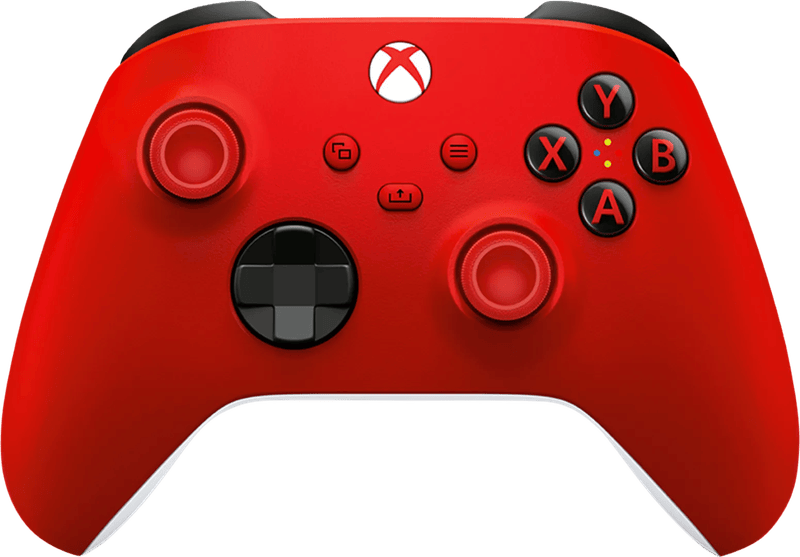
Microsoft lists Windows 10 and 11, Android and iOS. On a PC, it connects via Bluetooth or with a USB-C cable. According to Microsoft, AA batteries should last up to 40 hours, and it also has a headphone jack and a Share button. Back buttons and magnetic sticks are missing. In return, there is nothing to set up, and almost every PC game shows the matching button icons automatically.
There is already a PS5 in the living room: Sony DualSense
Sony explicitly lists Windows PCs, Macs and Android and iOS devices as supported, via cable or Bluetooth. The fine print is where it gets interesting. According to Sony, haptic feedback and adaptive triggers may require a USB connection and only work if the game supports them. There is no cable in the box. If you own a PS5, take it to your PC. We would not buy one specifically for that.
You want back buttons and a charging dock: 8BitDo Ultimate 2
The more expensive 8BitDo model brings TMR sticks, Hall triggers that switch between linear and tactile, two back buttons and two extra shoulder buttons. On Windows, the charging dock also serves as the wireless receiver, according to the manufacturer. Via Bluetooth, it works with Android and, according to 8BitDo, with Apple devices running version 26 or later. On Amazon, several color variants and special editions show up, some through third-party sellers. So check who is selling.
The budget is tight: 8BitDo Ultimate 2C
The little brother costs roughly half as much as an Xbox controller on Amazon. Even so, it has Hall sticks and Hall triggers. 8BitDo specifies a 480 mAh battery with 19 hours over 2.4 GHz and 32 hours over Bluetooth. Officially, however, it only supports Windows 10 or later and Android 9 or later. There is also a wired-only version and a Bluetooth version for the Switch under the same name, so the listing has to say „Wireless for Windows and Android“.
PC and Xbox with one device: GameSir G7 Pro
A crossover. On a PC, it connects wirelessly over 2.4 GHz; on Xbox Series X|S and Xbox One, it only works via cable; on an Android phone, via Bluetooth. GameSir lists TMR sticks, Hall triggers with trigger stops, two back buttons, a headphone jack, a 1,200 mAh battery and a charging dock. At 272 grams, it is heavier than any other model here. Do not confuse it with the „G7 Pro 8K“ models, a separate line tailored to the PC.
An occasional session on your phone: Backbone One USB-C (2nd generation)
You slide the Backbone One onto the phone, where it plugs directly into the USB-C port. Backbone lists iPhones with USB-C running iOS 15 or later, plus Android devices running version 10 or later that support USB OTG. Through its own USB-C port, the phone keeps charging while you play, and headphones go into the headphone jack. There is a separate version for older iPhones with Lightning. After switching phones, it will no longer fit.
Every day on your phone or iPad mini: Razer Kishi V3 Pro
Razer builds in full-size TMR sticks with swappable caps and four freely assignable extra buttons. Phones and tablets up to 8 inches fit, including the iPad mini, and according to Razer even with a case up to 16 millimeters thick. The Sensa HD haptics only work on Android 12 or later and Windows 11, not on the iPhone. For occasional play, it is too expensive. If, on the other hand, you use cloud gaming or Remote Play on your phone every day, you get the larger grips for it.
The quick route to a decision
On a PC with no appetite for setup, stick with the Xbox Wireless Controller, which also works on phones and on the Xbox. If money is tight and no iPhone is involved, the 8BitDo Ultimate 2C fits. If you want back buttons and a charging dock as well, it is the 8BitDo Ultimate 2, and if an Xbox also needs to join in via cable, the GameSir G7 Pro.
If there is a PS5 in the house, connect the DualSense you already have to your PC instead of buying a new one. On a phone, the Backbone One USB-C is enough for occasional sessions. If you play on your phone or iPad mini every day, the Razer Kishi V3 Pro is the right choice. Which controller makes a good gift for each console is sorted by budget and platform in our guide Gifts for gamers.
Still missing the right computer? Our gaming PC guide (in German) explains the basics. We cover console accessories separately for the PS5 and the Switch 2 (in German).
Frequently asked questions
Which controller is right for a PC?
The Xbox Wireless Controller, because almost every PC game shows its button icons automatically, with nothing to set up. It connects via Bluetooth or USB-C cable and, according to Microsoft, runs for up to 40 hours on AA batteries. It has no back buttons and no magnetic sticks.
What do Hall and TMR sticks offer?
They detect the stick position using magnetic fields instead of rubbing contacts. Manufacturers promise less stick drift, meaning unwanted movement after extended use. TMR is a newer variant of these magnetic sensors, found for example in the 8BitDo Ultimate 2, the GameSir G7 Pro and the Razer Kishi V3 Pro.
Is Bluetooth enough for a PC controller?
For the vast majority of games, Bluetooth is enough. Many third-party controllers also include a 2.4 GHz receiver with a 1,000 Hz polling rate. However, this mode often only works on Windows; different rules apply on the iPhone or the Xbox. So check the platform.
Is a PS5 controller worth it on a PC?
If you own a PS5, take the DualSense to your PC; Sony lists Windows PCs and Macs as supported devices. We would not buy one specifically for that. Haptic feedback and adaptive triggers may require a USB connection, and there is no cable in the box.
What should you look for in a phone controller?
Clip-on controllers plug directly into the USB-C port, so they need a pass-through charging port, otherwise the phone battery is drained after a long session. For occasional sessions, the Backbone One USB-C is enough; if you play on your phone or iPad mini every day, go for the Razer Kishi V3 Pro.
Sources
- Microsoft: Xbox Wireless Controller
- Sony: DualSense wireless controller
- 8BitDo: Ultimate 2 Wireless Controller
- 8BitDo: Ultimate 2C Wireless Controller
- GameSir: G7 Pro
- Backbone: One USB-C
- Backbone Help: compatible Android phones
- Backbone Help: headphones with the Backbone One
- Razer: Kishi V3 Pro
Where to buy
- Xbox Wireless ControllerView at CoolblueAvailable in Germany: CoolblueCheck price at Amazon.deCheck price at Amazon.co.ukCheck price at Amazon.nlCheck price at Amazon.com.beCheck price at Amazon.frCheck price at Amazon.itCheck price at Amazon.esCheck price at Amazon.plCheck price at Amazon.seAvailable in Germany: Amazon.de
- 8BitDo Ultimate 2C WirelessCheck price at Amazon.deCheck price at Amazon.co.ukCheck price at Amazon.nlCheck price at Amazon.com.beCheck price at Amazon.frCheck price at Amazon.itCheck price at Amazon.esCheck price at Amazon.plCheck price at Amazon.seAvailable in Germany: Amazon.de
- 8BitDo Ultimate 2 WirelessCheck price at Amazon.deCheck price at Amazon.co.ukCheck price at Amazon.nlCheck price at Amazon.com.beCheck price at Amazon.frCheck price at Amazon.itCheck price at Amazon.esCheck price at Amazon.plCheck price at Amazon.seAvailable in Germany: Amazon.de
- GameSir G7 ProCheck price at Amazon.deCheck price at Amazon.co.ukCheck price at Amazon.nlCheck price at Amazon.com.beCheck price at Amazon.frCheck price at Amazon.itCheck price at Amazon.esCheck price at Amazon.plCheck price at Amazon.seAvailable in Germany: Amazon.de
- Sony DualSense Wireless-ControllerView at CoolblueAvailable in Germany: CoolblueCheck price at Amazon.deCheck price at Amazon.co.ukCheck price at Amazon.nlCheck price at Amazon.com.beCheck price at Amazon.frCheck price at Amazon.itCheck price at Amazon.esCheck price at Amazon.plCheck price at Amazon.seAvailable in Germany: Amazon.de
- Backbone One USB-C (2. Gen.)View at CoolblueAvailable in Germany: CoolblueCheck price at Amazon.deCheck price at Amazon.co.ukCheck price at Amazon.nlCheck price at Amazon.com.beCheck price at Amazon.frCheck price at Amazon.itCheck price at Amazon.esCheck price at Amazon.plCheck price at Amazon.seAvailable in Germany: Amazon.de
- Razer Kishi V3 ProCheck price at Amazon.deCheck price at Amazon.co.ukCheck price at Amazon.nlCheck price at Amazon.com.beCheck price at Amazon.frCheck price at Amazon.itCheck price at Amazon.esCheck price at Amazon.plCheck price at Amazon.seAvailable in Germany: Amazon.de