Contents11 sections
This guide was first published in German on handgetestet.de.
Deleting yet another game to make room for the new one. That is where it pinches for many PS5 owners, and long before the controller reaches its limits. As a first purchase, we therefore usually recommend an additional M.2 SSD such as the WD_BLACK SN850P for PS5. A pro controller or the PlayStation Portal comes after that. Whether the console suits you at all is covered in our game console comparison (in German).
What really bothers you day to day?
If someone mainly plays story games and constantly has to free up space, an expensive controller misses the problem. First the gap, then the accessory.
The storage requirements are strict. For the expansion slot, Sony requires an M.2 NVMe SSD with PCIe 4.0 x4, 250 GB to 8 TB, and recommends at least 5,500 MB/s read speed. Cooling is mandatory, and the total height must not exceed 11.25 mm. M.2 SATA SSDs are not supported.
Cooling deserves a second thought as well. If a model already has a heatsink, Sony says no additional one should be fitted. In addition, the PS5 does not support Host Memory Buffer (HMB). Very cheap SSDs without their own cache may therefore run slower than the spec sheet suggests.
Back buttons and profiles on the controller mainly help in fast-paced multiplayer titles. Third-party manufacturers often leave out DualSense features for this, such as the adaptive triggers. If you want to play without a TV, you should know that the PlayStation Portal only streams from your own PS5 and needs stable Wi-Fi to do so. And the audio? If it should also reach the Portal or your smartphone, the headset has to handle both.
Seven accessories side by side
| Model | Type | Key specs according to the manufacturer | Best for |
|---|---|---|---|
| WD_BLACK SN850P for PS5 | M.2 SSD with heatsink | 1, 2 or 4 TB, up to 7,300 MB/s read, officially licensed for PS5, 5-year warranty | Anyone running out of storage |
| Samsung 990 PRO with heatsink | M.2 SSD with heatsink | up to 7,450 MB/s read, 8.2 mm high, RGB lighting | If you want to use the SSD in a PC later |
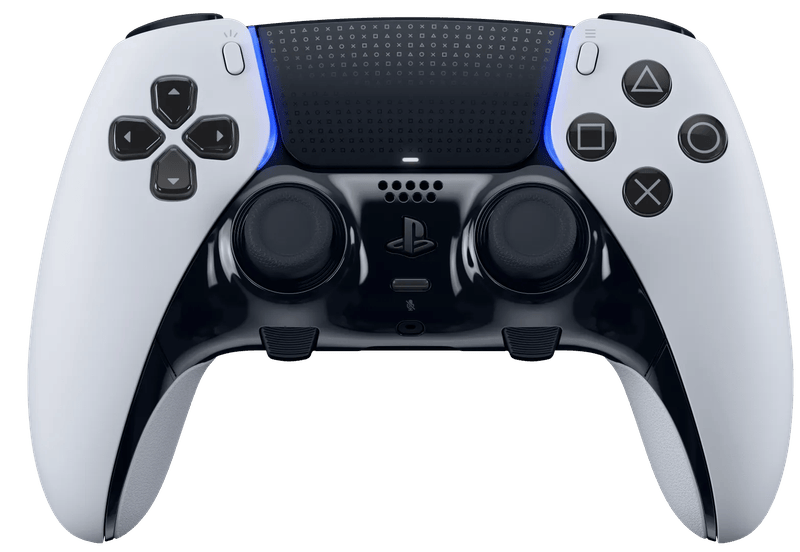
| Sony DualSense Edge | Pro controller | 4 back buttons, profiles stored in the controller, swappable stick caps, case | Ambitious multiplayer fans |
| Nacon Revolution 5 Pro | Pro controller | Hall effect sticks and triggers, 4 back buttons, over 10 hours of battery | If you worry about stick drift |
| Sony PlayStation Portal | Remote player | 8-inch LCD, 1080p, up to 60 fps, Wi-Fi from 5 Mbps | If you want to play around the house without a TV |
| Sony PULSE Elite | Wireless headset | up to 30 hours of battery, PlayStation Link plus Bluetooth, charging hanger | PS5 and Portal users with a smartphone |
| Sony DualSense charging station | Charging station | 2 controllers at once, its own power adapter | Households with two controllers |
WD_BLACK SN850P for PS5
According to Western Digital, the SN850P is officially licensed for the PS5, and its heatsink is tailored specifically to the console’s M.2 slot. So you do not have to measure whether the height and cooling fit. With up to 7,300 MB/s read speed, it is well above Sony’s recommendation according to WD. The 2 TB version is enough in most cases. Only go for 4 TB if you want to keep a lot of large titles installed at the same time.
Samsung 990 PRO with heatsink
Slightly faster on paper. Samsung specifies up to 7,450 MB/s read and 6,900 MB/s write. At 8.2 mm high, it fits in the PS5 and in many desktop PCs according to the trade press. In the console, you will hardly notice the difference from the WD. It becomes interesting if the SSD is meant to move into a PC at some point. Incidentally, nobody sees its RGB lighting inside the closed PS5.
Sony DualSense Edge
Sony’s own pro controller. On the back, there are two semicircular and two lever-shaped buttons, plus stick caps in three shapes. You set the button mapping, stick sensitivity, trigger dead zones and vibration and save them as profiles directly in the controller. Haptics and adaptive triggers are fully retained. Sony does not, however, say how long the battery lasts. Casual players pay a lot here for features they will hardly use.
Nacon Revolution 5 Pro
Officially licensed, with Hall effect sensors in the sticks and triggers. According to Nacon, this reduces the risk of stick drift and premature wear. It connects via a wireless adapter or the 3-meter cable, and according to the manufacturer one battery charge lasts for more than 10 hours. There are still trade-offs. Retailers point out that vibration is missing in some games in PS5 mode, and it is customized via an app on a PC or Mac. Razer’s Wolverine V2 Pro PS5 controller was most recently unavailable at Amazon.de (Germany) and is therefore not included here.
Sony PlayStation Portal
This is not a handheld in the classic sense. On its 8-inch display, the Portal shows what your PS5 renders, at 1080p and up to 60 frames per second. For that, the console has to be running or waiting in rest mode. Sony specifies at least 5 Mbps over Wi-Fi and recommends 15. With PS Plus Premium, selected games can also be streamed from the cloud. VR games do not work, nor do titles that require accessories other than a controller. On the couch in the next room, that works fine. On a train with a weak connection, not so much.
Sony PULSE Elite
Two wireless connections at once: PlayStation Link via the included USB adapter and Bluetooth to your smartphone. According to Sony, it runs for up to 30 hours, and ten minutes on the cable should be good for about two hours. Planar magnetic drivers, a retractable microphone with noise suppression and a charging hanger for wall or desk are included. The direct connection to the Portal, which many other headsets do not offer, is practical. Some buyers do, however, report occasional connection dropouts.
Sony DualSense charging station
Boring, and precisely for that reason often the purchase you regret least. Two DualSense or DualSense Edge controllers charge here at the same time. Because the station runs on its own power adapter, the PS5 does not have to stay in rest mode. With only one controller, a USB-C cable does the job just as well.
Which accessory for which annoyance
If you constantly have to delete games, get the 2 TB WD_BLACK SN850P for PS5: officially licensed, and the cooling fits straight out of the box. If the SSD is meant to move into a PC later, the Samsung 990 PRO with heatsink makes more sense.
The DualSense Edge is made for competitive shooters with all DualSense features. If stick drift is the bigger worry and vibration is secondary, the Nacon Revolution 5 Pro is the right fit.
If the TV is often occupied, the PlayStation Portal helps, provided the Wi-Fi is good. Two controllers in the household? Then the DualSense charging station.
An external USB SSD, by the way, does not replace the internal expansion. It serves more as storage for games and recordings. What matters there is explained in our article on the external SSD (in German). Whether adding the disc drive to the Digital Edition is worth it is worked out in our Black Friday game console guide (in German).
Which HDMI port really matters is explained in our guide to the TV for PS5 and Xbox (in German).
Whether the PS VR2 is the right accessory and what standalone headsets do differently is shown in our VR headset guide (in German), with six models compared by their specs.
Frequently asked questions
Which SSD fits in the PS5?
For the expansion slot, Sony requires an M.2 NVMe SSD with PCIe 4.0 x4, 250 GB to 8 TB, and recommends at least 5,500 MB/s read speed. Cooling is mandatory, and the total height must not exceed 11.25 mm. M.2 SATA SSDs are not supported.
Does a cheap SSD without a cache work in the PS5?
The PS5 does not support Host Memory Buffer (HMB). Very cheap SSDs without their own cache may therefore run slower than the spec sheet suggests. If a model already has a heatsink, Sony says no additional one should be fitted.
What is the difference between the WD_BLACK SN850P and the Samsung 990 PRO?
The WD_BLACK SN850P is officially licensed for the PS5, and its heatsink is tailored to the slot. On paper, the Samsung 990 PRO with heatsink is slightly faster and, at 8.2 mm high, also fits many desktop PCs according to the trade press. In the console, you will hardly notice the difference.
What can the PlayStation Portal do?
The Portal only streams from your own PS5 to its 8-inch display, at 1080p and up to 60 frames per second. Sony specifies at least 5 Mbps over Wi-Fi and recommends 15. VR games do not work. On the couch in the next room, that works fine; on a train with a weak connection, not so much.
Who is the DualSense Edge worth it for?
For ambitious multiplayer fans. Four back buttons, swappable stick caps and profiles stored in the controller mainly help in fast-paced multiplayer titles, while haptics and adaptive triggers are fully retained. Sony does not say how long the battery lasts. Casual players pay a lot for features they will hardly use.
Which PS5 controller helps against stick drift?
The Nacon Revolution 5 Pro has Hall effect sensors in its sticks and triggers; according to Nacon, this reduces the risk of stick drift and premature wear. Retailers point out that vibration is missing in some games in PS5 mode. It is customized via an app on a PC or Mac.
Sources
- PlayStation: Installing an M.2 SSD in the PS5
- PlayStation: DualSense Edge
- PlayStation: PlayStation Portal
- PlayStation: PULSE Elite
- PlayStation: DualSense charging station
- Western Digital: WD_BLACK SN850P for PS5 data sheet (PDF)
- Notebookcheck: Samsung 990 Pro Heatsink
- Nacon: Revolution 5 Pro press release
Where to buy
- WD_BLACK SN850P for PS5Check price at Amazon.deAvailable in Germany: Amazon.de
- Samsung 990 PRO mit KühlkörperView at CoolblueAvailable in Germany: CoolblueCheck price at Amazon.deAvailable in Germany: Amazon.de
- Sony DualSense EdgeView at CoolblueAvailable in Germany: CoolblueCheck price at Amazon.deAvailable in Germany: Amazon.de
- Nacon Revolution 5 ProCheck price at Amazon.deAvailable in Germany: Amazon.de
- Sony PlayStation PortalView at CoolblueAvailable in Germany: CoolblueCheck price at Amazon.deAvailable in Germany: Amazon.de
- Sony PULSE EliteCheck price at Amazon.deAvailable in Germany: Amazon.deView at CoolblueAvailable in Germany: Coolblue
- Sony DualSense-LadestationCheck price at Amazon.deAvailable in Germany: Amazon.de