Contents13 sections
This guide was first published in German on handgetestet.de.
In 2026, you no longer buy a gaming keyboard for fast shooters by switch color. What matters is whether the switch can measure key travel, because only then can the actuation point and Rapid Trigger be freely adjusted. If you want to play wirelessly and need a German layout, you end up with the SteelSeries Apex Pro TKL Wireless Gen 3; with a cable, Razer, Logitech, Corsair and the small Apex Pro Mini are options.
What Hall effect actually measures
A classic mechanical switch knows two states. Two metal contacts either touch or they don’t, and the point at which that happens is fixed at the factory. In a Hall effect switch, a magnet sits in the stem and a sensor sits on the circuit board below. The sensor continuously measures the distance. Corsair describes it like this for its MGX switches: the key counts as pressed as soon as the magnet reaches a set distance. You define this distance in the software, for each key individually. Razer takes a different approach and measures with light. The analog optical switches of the Huntsman V3 Pro also capture key depth. For you as a buyer, the result is comparable.
Rapid Trigger builds on this. Normally, a key has to travel back past its actuation point before it can trigger again. With Rapid Trigger, it resets as soon as your finger lifts slightly; Razer specifies an upward movement of 0.1 mm for this. In a shooter, that means: when you release the movement key, your character stops sooner. That helps with counter-strafing, the quick counter-movement to stop dead.
Rapid Trigger yes, Snap Tap with caution
This is the trap that is easiest to fall into right after unboxing. Alongside Rapid Trigger, five of the six models below come with a second feature that, when opposing directions are pressed at the same time (such as A and D), automatically lets only one direction count. The technical term is SOCD. Razer calls it Snap Tap, Corsair FlashTap, SteelSeries Rapid Tap, and Logitech, on newer models, Key Priority.
On August 19, 2024, Valve drew a clear line for Counter-Strike 2. Automation via script or hardware that turns a single input into multiple player actions is no longer tolerated. Anyone suspected of it can be kicked from the match, initially on the official Valve servers. Valve explicitly advises turning off features such as a „Snap Tap Mode“ before the match. The announcement does not mention Rapid Trigger.
In practice, that means: check how quickly the SOCD feature can be switched off. On Razer keyboards, Snap Tap is off by default and can be toggled with Fn and the left Shift key. Corsair also ships FlashTap switched off and toggles it with Fn and the right Shift key. For other games and for tournaments, the respective rules apply. Corsair itself writes that the technology may be banned in tournaments. So before a league match, read the rulebook, not the datasheet.
60, 75 or without a number pad?
Format is the decision you will feel the longest. A 60 percent keyboard does without function keys, arrow keys and the block with Delete and Home. According to the manufacturer, the SteelSeries Apex Pro Mini Gen 3 measures 293 × 103 mm and weighs 543 g. Next to it, the TKL version of the same series, at 355 × 129 mm and 1,038 g, is almost twice as heavy.
More room for the mouse is the reason for the small format. With low mouse sensitivity and large arm movements, your hand otherwise bumps into the keyboard. But if you also type, work on spreadsheets or assign F keys in strategy games, a 60 percent board will annoy you with every Fn combination.
For these users, a keyboard without a number pad (TKL, tenkeyless) is the cleaner compromise.
The 75 percent format sits in between. It keeps the F row and arrow keys but squeezes everything closer together. Our selection below is limited to TKL and 60 percent. For a classic 75 percent board with conventional switches, take a look at our mechanical keyboard guide (in German).
Wireless, polling rate and the German layout
When it comes to wireless, the options get slim. Of the six models below, only the SteelSeries Apex Pro TKL Wireless Gen 3 transmits via a 2.4 GHz receiver and Bluetooth. SteelSeries states 37.5 hours via the receiver and 45 hours via Bluetooth, each with default lighting. At five hours of gaming a day, one charge mathematically lasts a good week.
The polling rate indicates how often the computer checks in. At 1,000 Hz, that is every millisecond; at 8,000 Hz, every 0.125 ms. Corsair advertises up to 8,000 Hz for the K70 Pro TKL, while Logitech states 1,000 Hz for the Pro X TKL Rapid.
That leaves the layout. Almost every model below also comes with a US layout. That layout lacks Ä, Ö, Ü and the key with < and > next to the left Shift key. Look for „QWERTZ“ (the German layout) or „DE“ in the product name. According to Wooting, the Wooting 80HE is available in ANSI, ISO and JIS; whether a variant with German keycaps is among them is not stated there. That is why we do not include it in the table.
Six gaming keyboards with Rapid Trigger and QWERTZ
| Model | Format and connection | Switch, actuation point | Best for |
|---|---|---|---|
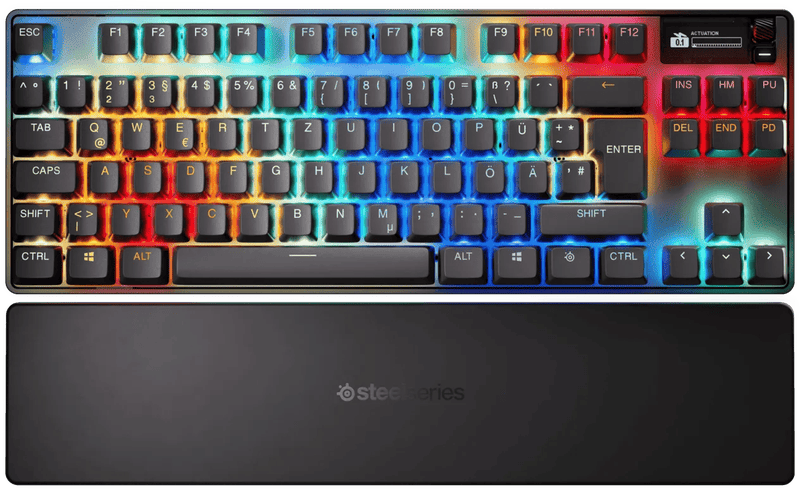
| SteelSeries Apex Pro TKL Wireless Gen 3 | TKL; 2.4 GHz, Bluetooth, cable | Hall effect (OmniPoint 3.0), 0.1–4.0 mm | Wireless gaming, OLED display |
| SteelSeries Apex Pro Mini Gen 3 | 60%; cable | Hall effect (OmniPoint 3.0), 0.1–4.0 mm | Little space, lots of mouse travel |
| Razer Huntsman V3 Pro Mini | 60%; USB-C cable, detachable | analog optical, 0.1–4.0 mm, 40 g | Compact, Snap Tap off by default |
| Razer Huntsman V3 Pro Tenkeyless | TKL; USB-C cable, detachable | analog optical, 0.1–4.0 mm, 40 g | With wrist rest and dial |
| Logitech G Pro X TKL Rapid | TKL; cable, 1,000 Hz | Hall effect, 35 g, two actuation levels | Getting started with analog keyboards |
| Corsair K70 Pro TKL | TKL; cable, up to 8,000 Hz | Hall effect (MGX Hyperdrive), 0.1–4.0 mm | Those who want fine steps and a high polling rate |
SteelSeries Apex Pro TKL Wireless Gen 3
The only wireless keyboard in this selection. Hall effect switches with 0.1 to 4.0 mm, Rapid Trigger, Rapid Tap and a protection mode against accidentally triggering neighboring keys. Settings can be changed directly on the device via the OLED display, and it stores five profiles itself. At 1,038 g, it is not a keyboard to carry around.
SteelSeries Apex Pro Mini Gen 3
The same switch generation in a 60 percent case, but wired only. At 543 g, it fits in any backpack. For LAN parties and cramped desks, a very well-rounded package.
Razer Huntsman V3 Pro Mini
Razer measures optically instead of magnetically, and the actuation point also ranges from 0.1 to 4.0 mm. Rapid Trigger is off in the factory profile and has to be activated first. Well handled: Snap Tap starts switched off, so you cannot accidentally go into a match with the feature banned in Counter-Strike 2. Six profiles, four of which are freely assignable.
Razer Huntsman V3 Pro Tenkeyless
The bigger sibling with the same switches, plus a dial for volume and other commands, a media key and a magnetic faux-leather wrist rest. Razer states a 1,000 Hz polling rate and a lifespan of 100 million keystrokes. If you play long sessions and would buy the wrist rest anyway, you get it included here.
Logitech G Pro X TKL Rapid
Logitech explicitly offers this model with German and Swiss QWERTZ layouts. According to the manufacturer, the magnetic switches actuate at 35 g, and each key can carry two actuation levels with different commands. Less pleasing: the polling rate is 1,000 Hz, and the switches are not swappable. Logitech does not state an actuation distance in millimeters on the product page.
Corsair K70 Pro TKL
Corsair relies on pre-lubed MGX Hyperdrive switches with a Hall sensor, adjustable from 0.1 to 4.0 mm in 0.1 mm steps. Remarkably honest: Corsair itself recommends the range of 0.3 to 3.6 mm, because the extreme values respond more sensitively and less consistently. According to the manual, variants outside North America have coated ABS keycaps instead of PBT, which is worth knowing for the QWERTZ version.
Which keyboard suits which player
Wireless with a German layout leaves the SteelSeries Apex Pro TKL Wireless Gen 3. If you mainly play Counter-Strike 2 or Valorant and need plenty of room for the mouse, one of the two 60 percent keyboards, i.e. the Apex Pro Mini Gen 3 or the Huntsman V3 Pro Mini, is an option. If you also work on the side, stick with TKL.
One final piece of advice. Do not set the actuation point straight to 0.1 mm. Then even light touches can trigger a key. SteelSeries builds in a dedicated protection mode for this, and Corsair recommends at least 0.3 mm. It is better to work your way down from the top. If you want to complete your desk setup, you will find advice on the gaming mouse (in German) and the gaming monitor (in German) in separate guides.
Frequently asked questions
What is Rapid Trigger on a keyboard?
Normally, a key has to travel back past its actuation point before it can trigger again. With Rapid Trigger, it resets as soon as your finger lifts slightly; Razer states 0.1 mm. In a shooter, your character therefore stops sooner when you release the movement key. That helps with counter-strafing.
Is Snap Tap allowed in Counter-Strike 2?
No. On August 19, 2024, Valve banned automation that turns one input into several actions in Counter-Strike 2 and advises turning off features such as a Snap Tap mode before a match. The announcement does not mention Rapid Trigger. On Razer and Corsair keyboards, the feature is off by default.
Hall effect or optical switch: what is the difference?
With Hall effect, a magnet sits in the stem and a sensor continuously measures the distance. In the Huntsman V3 Pro, Razer measures with light instead and also captures key depth. For buyers, the result is comparable: the actuation point can be set individually for each key in the software.
60 percent or TKL: which format fits?
A 60 percent keyboard does without F keys, arrow keys and the block with Delete and Home, but leaves plenty of room for the mouse. The Apex Pro Mini Gen 3 weighs 543 g. If you also type, work on spreadsheets or assign F keys, a keyboard without a number pad (TKL) serves you better.
What should I look for with a German keyboard layout?
Almost every model also comes with a US layout, which lacks Ä, Ö, Ü and the angle bracket key next to the left Shift key. Look for QWERTZ or DE in the product name. For the Wooting 80HE, no variant with German keycaps is listed, so it is not included in the comparison.
Which actuation point should I set?
Do not go straight to 0.1 mm, or even light touches can trigger a key. Corsair itself recommends the range of 0.3 to 3.6 mm, because the extreme values respond more sensitively and less consistently. SteelSeries builds in a dedicated protection mode. It is better to work your way down from the top.
Sources
- Valve: Counter-Strike 2, „Side-stepping Skill“ (August 19, 2024)
- SteelSeries: Apex Pro TKL Wireless Gen 3, technical specifications
- SteelSeries: Apex Pro Mini Gen 3, technical specifications
- Razer: Huntsman V3 Pro Mini
- Razer: Huntsman V3 Pro Tenkeyless
- Logitech G: Pro X TKL Rapid
- Logitech G: G512 X and Pro X TKL Rapid compared
- Corsair: K70 Pro TKL, technical specifications
- Corsair: K70 Pro TKL, manual
- Corsair: MGX magnetic switches explained
- Corsair: What is SOCD?
- Wooting: 80HE
Where to buy
- SteelSeries Apex Pro TKL Wireless Gen 3Check price at Amazon.deCheck price at Amazon.co.ukCheck price at Amazon.nlCheck price at Amazon.com.beCheck price at Amazon.frCheck price at Amazon.itCheck price at Amazon.esCheck price at Amazon.plCheck price at Amazon.seAvailable in Germany: Amazon.deView at CoolblueAvailable in Germany: Coolblue
- SteelSeries Apex Pro Mini Gen 3Check price at Amazon.deCheck price at Amazon.co.ukCheck price at Amazon.nlCheck price at Amazon.com.beCheck price at Amazon.frCheck price at Amazon.itCheck price at Amazon.esCheck price at Amazon.plCheck price at Amazon.seAvailable in Germany: Amazon.deView at CoolblueAvailable in Germany: Coolblue
- Razer Huntsman V3 Pro MiniCheck price at Amazon.deCheck price at Amazon.co.ukCheck price at Amazon.nlCheck price at Amazon.com.beCheck price at Amazon.frCheck price at Amazon.itCheck price at Amazon.esCheck price at Amazon.plCheck price at Amazon.seAvailable in Germany: Amazon.de
- Razer Huntsman V3 Pro TenkeylessCheck price at Amazon.deCheck price at Amazon.co.ukCheck price at Amazon.nlCheck price at Amazon.com.beCheck price at Amazon.frCheck price at Amazon.itCheck price at Amazon.esCheck price at Amazon.plCheck price at Amazon.seAvailable in Germany: Amazon.de
- Logitech G Pro X TKL RapidCheck price at Amazon.deCheck price at Amazon.co.ukCheck price at Amazon.nlCheck price at Amazon.com.beCheck price at Amazon.frCheck price at Amazon.itCheck price at Amazon.esCheck price at Amazon.plCheck price at Amazon.seAvailable in Germany: Amazon.deView at CoolblueAvailable in Germany: Coolblue
- Corsair K70 Pro TKLCheck price at Amazon.deCheck price at Amazon.co.ukCheck price at Amazon.nlCheck price at Amazon.com.beCheck price at Amazon.frCheck price at Amazon.itCheck price at Amazon.esCheck price at Amazon.plCheck price at Amazon.seAvailable in Germany: Amazon.de