Contents11 sections
This guide was first published in German on handgetestet.de.
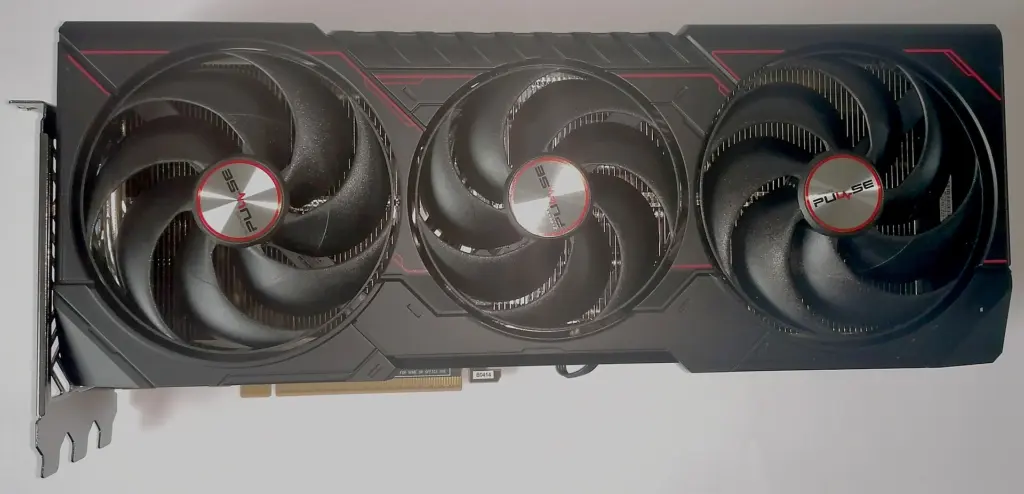
Many graphics cards fail before the first game even launches. Inside the case, that is. The card is too long, the power supply has the wrong connector, or the memory runs short after just a year. If you play in WQHD, build your decision around 16 GB of video memory. Among current models, we consider the Sapphire Pulse Radeon RX 9070 XT the most balanced buy, as long as your case and power supply can handle it.
The monitor sets the pace. Nobody needs a high-end card for Full HD, whereas on a fast 4K screen you should not skimp on the graphics card. Which monitor suits which card is covered in our gaming monitor guide.
Four specs you need to settle before you buy
- Video memory: On new cards, 8 GB is only acceptable for undemanding games in Full HD. We recommend 12 GB as the minimum and 16 GB for WQHD and above. According to its data sheet, Nvidia sells the RTX 5060 Ti with both 8 and 16 GB, so read the product name carefully.
- Power supply: Nvidia’s own minimum ratings range from 550 W (RTX 5060) to 1,000 W (RTX 5090). Partner cards are often higher: for the Gigabyte RTX 5070 Windforce, the retailer’s data sheet lists 750 W, while Nvidia specifies only 650 W for the RTX 5070.
- Power connector: From the RTX 5070 upward, many cards use the 16-pin connector (12V-2×6). According to Nvidia, its own cards come with an adapter for several 8-pin cables. AMD and Intel stick with the classic 8-pin connector on the models featured here.
That leaves the form factor. The cards here range from 227 mm to just under 330 mm, and you measure inside the case up to the front fans, not up to the front panel. Thickness counts just as much, because a 3.5-slot card covers the slots below it.
One more word on the 16-pin connector. Before installing, get the power supply’s manual out on the table. This is not a formality. The connector has to be pushed all the way in before the computer starts for the first time.
Seven current graphics cards side by side
Sorted from entry level to high end, specifications according to the manufacturer or the retailer’s data sheet.
| Model | Memory | Power and PSU | Length | Best for |
|---|---|---|---|---|
| ASRock Intel Arc B580 Challenger 12GB OC | 12 GB GDDR6 | 190 W (Intel reference), 8-pin, 650 W PSU | 249 mm, 2 slots | Full HD on a tight budget |
| Sapphire Pulse Radeon RX 9060 XT 16GB | 16 GB GDDR6 | 170 W, 1 × 8-pin, at least 450 W | 240 mm, 2.3 slots | Full HD and WQHD, upgraders with a small PSU |
| MSI GeForce RTX 5060 Ti 16G Ventus 2X OC Plus | 16 GB GDDR7 | 180 W, 1 × 8-pin, 600 W PSU | 227 mm | Compact cases, Nvidia features |
| Gigabyte GeForce RTX 5070 Windforce OC SFF 12G | 12 GB GDDR7 | 250 W (Nvidia), 1 × 16-pin, 750 W PSU | 282 mm | WQHD with Nvidia, smaller cases |
| Sapphire Pulse Radeon RX 9070 XT | 16 GB GDDR6 | 304 W, 2 × 8-pin, at least 750 W | 320 mm, 3 slots | WQHD at high detail |
| ASUS Prime GeForce RTX 5070 Ti OC 16GB | 16 GB GDDR7 | 300 W (Nvidia), 1 × 16-pin, 750 W PSU | 304 mm, 2.5 slots | WQHD and 4K with ray tracing |
| Zotac Gaming GeForce RTX 5080 Solid OC | 16 GB GDDR7 | 360 W (Nvidia), 1 × 16-pin, 850 W PSU (Nvidia) | 329.7 mm | 4K, large cases |
ASRock Intel Arc B580 Challenger: the entry point with 12 GB
According to the retailer’s data sheet, the Challenger packs 12 GB onto a 2-slot card that is 249 mm long, with power coming in over an 8-pin connector. 650 W is recommended, while Intel lists 600 W as the minimum for the reference card. It is priced well below every other card here. Its performance is lower as well, though.
Sapphire Pulse Radeon RX 9060 XT 16GB: lots of memory, little thirst
With a typical power draw of 170 W and a minimum power supply of 450 W, the Pulse is the obvious pick when you want to upgrade an older prebuilt PC. Sapphire specifies a length of 240 mm. In this class, the 16 GB are a real argument. The card is also available with 8 GB; we would not buy that one.
MSI GeForce RTX 5060 Ti 16G Ventus 2X OC Plus: the shortest card
227 mm long according to the data sheet, two fans, one 8-pin connector and a recommended 600 W power supply. That lets it fit into almost any case. For DLSS and the other Nvidia features, you get 16 GB of GDDR7 here without the new 16-pin connector. The memory interface, however, is narrow at 128 bits.
Gigabyte GeForce RTX 5070 Windforce OC SFF 12G: slim, but only 12 GB
The data sheet lists 282 × 110 × 50 mm, and the SFF label indicates suitability for smaller cases. Power comes in over a 16-pin connector; without a matching power supply cable, the card runs via the included adapter on two 8-pin cables. The weak point is the 12 GB. In our assessment, that is the tightest solution in this class for WQHD over several years, and it costs extra compared with the RTX 5060 Ti on top of that.
Sapphire Pulse Radeon RX 9070 XT: our pick for WQHD
16 GB of GDDR6 on a 256-bit bus, a typical power draw of 304 W and two standard 8-pin connectors, no adapter needed. According to Sapphire, the power supply should deliver at least 750 W. The price you pay is size. 320 mm long, three slots thick, and in compact mid-tower cases things get tight.
ASUS Prime GeForce RTX 5070 Ti OC 16GB: the step up
ASUS lists 304 × 126 × 50 mm at 2.5 slots and recommends 750 W, calculated for a fully overclocked system. On board are 16 GB of GDDR7 and Nvidia’s ray tracing and DLSS features. For 4K or heavy ray tracing, it is the more sensible starting point than the RTX 5080. For WQHD alone, the premium over the RX 9070 XT remains hard to justify.
Zotac Gaming GeForce RTX 5080 Solid OC: for large cases only
329.7 mm long, plus, according to Nvidia, a power draw of up to 360 W and an 850 W power supply for the RTX 5080. A card for 4K and for large cases. Zotac also sells the RTX 5080 as the Solid Core OC with a different design, so check the exact part number when buying. Compared with the RTX 5070 Ti, most people pay a large premium here for little extra benefit.
How we would decide
- WQHD, case with room for 320 mm or more: Sapphire Pulse Radeon RX 9070 XT.
- Upgrading a prebuilt PC with a small power supply: Sapphire Pulse RX 9060 XT 16GB.
- If it has to be Nvidia and space is tight, go for the MSI RTX 5060 Ti 16G Ventus 2X OC Plus, or with a bigger budget the Gigabyte RTX 5070 Windforce OC SFF.
- For 4K or heavy ray tracing, the ASUS Prime RTX 5070 Ti; the RTX 5080 only with a large case and an 850 W power supply.
- Full HD on a small budget? ASRock Arc B580 Challenger.
Rather buy a ready-made computer than build one yourself? Suitable configurations are listed in the gaming PC guide (in German), and the processor guide explains which CPU goes with your new card.
Frequently asked questions
How much video memory does a graphics card need?
On new cards, 8 GB is only acceptable for undemanding games in Full HD. 12 GB is considered the minimum, and 16 GB for WQHD and above. Nvidia sells the RTX 5060 Ti with both 8 and 16 GB, so read the product name carefully.
What power supply does my new graphics card need?
Nvidia's minimum ratings range from 550 W for the RTX 5060 to 1,000 W for the RTX 5090. Partner cards are often higher: for the Gigabyte RTX 5070 Windforce, the retailer's data sheet lists 750 W, while Nvidia specifies only 650 W for the RTX 5070. Sapphire's RX 9070 XT requires at least 750 W.
Will the graphics card fit in my case?
The cards compared range from 227 mm to just under 330 mm in length. Measure inside the case up to the front fans, not up to the front panel. Thickness matters too, because a 3.5-slot card covers the slots below it. The shortest card is the MSI RTX 5060 Ti Ventus 2X at 227 mm.
What should I know about the 16-pin power connector?
From the RTX 5070 upward, many cards use the 16-pin 12V-2×6 connector, and Nvidia includes an adapter for several 8-pin cables. Before installing, read the power supply's manual and push the connector all the way in before the computer starts for the first time. AMD and Intel stick with the 8-pin connector on the models mentioned.
Is the RTX 5080 worth it over the RTX 5070 Ti?
For most people, no: compared with the RTX 5070 Ti, you pay a large premium for little extra benefit. For 4K or heavy ray tracing, the ASUS Prime RTX 5070 Ti is the more sensible starting point. The Zotac RTX 5080 Solid OC is 329.7 mm long and, according to Nvidia, needs an 850 W power supply.
Which graphics card for Full HD on a tight budget?
The ASRock Intel Arc B580 Challenger offers 12 GB on a 2-slot card that is 249 mm long, with 650 W recommended. It is priced well below the other cards in the comparison, though its performance is lower as well. Nobody needs a high-end card for Full HD.
Sources
- Nvidia: GeForce graphics card comparison (memory, power, power supply, connectors)
- AMD: Radeon RX 9070 XT
- AMD: Radeon RX 9060 XT
- Intel: Arc B580, specifications
- ASRock: Arc B580 Challenger 12GB OC
- Sapphire: Pulse Radeon RX 9060 XT 16GB
- Sapphire: Pulse Radeon RX 9070 XT
- MSI: GeForce RTX 5060 Ti 16G Ventus 2X OC Plus
- Gigabyte: GeForce RTX 5070 Windforce OC SFF 12G
- ASUS: Prime GeForce RTX 5070 Ti OC Edition 16GB
- Alternate (German retailer): data sheet ASRock Arc B580 Challenger 12GB OC
- Alternate: data sheet MSI RTX 5060 Ti Ventus 2X OC Plus 16G
- Alternate: data sheet Gigabyte RTX 5070 Windforce OC SFF 12G
- Zotac: Gaming GeForce RTX 5080 Solid OC
Where to buy
- Sapphire Pulse Radeon RX 9070 XTCheck price at Amazon.deCheck price at Amazon.co.ukCheck price at Amazon.nlCheck price at Amazon.com.beCheck price at Amazon.frCheck price at Amazon.itCheck price at Amazon.esCheck price at Amazon.plCheck price at Amazon.seAvailable in Germany: Amazon.de
- ASRock Intel Arc B580 Challenger 12GB OCCheck price at Amazon.deCheck price at Amazon.co.ukCheck price at Amazon.nlCheck price at Amazon.com.beCheck price at Amazon.frCheck price at Amazon.itCheck price at Amazon.esCheck price at Amazon.plCheck price at Amazon.seAvailable in Germany: Amazon.de
- Sapphire Pulse Radeon RX 9060 XT 16GBCheck price at Amazon.deCheck price at Amazon.co.ukCheck price at Amazon.nlCheck price at Amazon.com.beCheck price at Amazon.frCheck price at Amazon.itCheck price at Amazon.esCheck price at Amazon.plCheck price at Amazon.seAvailable in Germany: Amazon.de
- MSI GeForce RTX 5060 Ti 16G Ventus 2X OC PlusCheck price at Amazon.deCheck price at Amazon.co.ukCheck price at Amazon.nlCheck price at Amazon.com.beCheck price at Amazon.frCheck price at Amazon.itCheck price at Amazon.esCheck price at Amazon.plCheck price at Amazon.seAvailable in Germany: Amazon.de
- Gigabyte GeForce RTX 5070 Windforce OC SFF 12GCheck price at Amazon.deCheck price at Amazon.co.ukCheck price at Amazon.nlCheck price at Amazon.com.beCheck price at Amazon.frCheck price at Amazon.itCheck price at Amazon.esCheck price at Amazon.plCheck price at Amazon.seAvailable in Germany: Amazon.de
- ASUS Prime GeForce RTX 5070 Ti OC 16GBCheck price at Amazon.deCheck price at Amazon.co.ukCheck price at Amazon.nlCheck price at Amazon.com.beCheck price at Amazon.frCheck price at Amazon.itCheck price at Amazon.esCheck price at Amazon.plCheck price at Amazon.seAvailable in Germany: Amazon.de
- Zotac Gaming GeForce RTX 5080 Solid OCCheck price at Amazon.deCheck price at Amazon.co.ukCheck price at Amazon.nlCheck price at Amazon.com.beCheck price at Amazon.frCheck price at Amazon.itCheck price at Amazon.esCheck price at Amazon.plCheck price at Amazon.seAvailable in Germany: Amazon.de