Contents8 sections
This guide was first published in German on handgetestet.de.
The CCU3 is still listed in the shop, but it is no longer a hub for a fresh start. eQ-3 announced its discontinuation on July 8, 2025. If you are starting today, choose the Home Control Unit if rules should run without the cloud or the house will be large, and the Access Point 2 for a few thermostats. The question behind it is simply: are rules and data allowed to go to the cloud?
Three hubs, three philosophies
| Hub | Data and rules | Operation | Remote access | Devices according to manufacturer |
|---|---|---|---|---|
| Homematic IP Home Control Unit HmIP-HCU1 | local, cloud optional | app and HCUweb | app, online mode only | 350, 120 of them wireless |
| Homematic IP Access Point 2 HmIP-HAP2 | cloud | app | app, free of charge | 120 |
| Smart Home Zentrale CCU3 HmIP-CCU3 | local | WebUI in the browser | VPN or add-on service | 250 |
All three transmit in the 868 MHz band and, according to the manufacturer, typically reach 400 meters in open space. The Home Control Unit connects to the router via LAN or Wi-Fi, the other two by cable only. It draws 2 watts in standby, the Access Point under 1 watt, the CCU3 1.7 watts.
What works with which?
Wireless Homematic IP works with all three. Beyond that, they diverge. Only the CCU3 understands old Homematic devices without IP; neither the Access Point nor the Home Control Unit addresses them directly. The Home Control Unit can only reach them if a CCU3 remains in between as a gateway. For Homematic IP Wired, all three need the Wired Access Point; see the guide to Homematic IP Wired.
The new cameras are where the CCU3 visibly falls behind. For the Innenkamera basic and plus (indoor cameras), Außenkamera (outdoor camera), Akku-Außenkamera (battery-powered outdoor camera) and Video-Türklingel (video doorbell), ELV (German retailer) states verbatim that use with the CCU3 is excluded. That does not apply across the board to everything new, though: for the Universal Dimmereinsatz (universal dimmer insert) and the Glasdisplay plus (glass display), ELV continues to list the CCU3 as a possible hub. With few exceptions, eQ-3 intends to integrate new products until the end of 2026; from 2027 that ends, and further development passes to the community as OpenCCU. So before every new purchase for a CCU3, read the note on the product page.
Openness has also changed hands. The Home Control Unit integrates Philips Hue and EEBUS via plugins, and according to eQ-3, since the update of October 27, 2026, also MQTT and Modbus, plus partner plugins. Plugins remain exclusive to it, although according to ELV, Hue lamps can also be used with the Access Point 2. A word on energy management: the LPC and LPP throttling functions are only free of charge until December 31, 2027, and are to become part of a paid package later. How third-party hubs compare is shown in the guide to smart home hubs.
Remote access and data sovereignty: who sees what?
With the Access Point 2, there is no way around the cloud. It stores the installation on German servers but does not require an account; according to the manufacturer, nothing personal is collected apart from the IP address. Rules there always need internet. Heating profiles and direct links do not, as the guide to smart home starter kits also describes.
The Home Control Unit stores everything locally and runs automations itself. In online mode, remote access, voice assistants and automatic updates via the cloud are added; in offline mode, nothing is transmitted, and the app only works on your home network. It still needs internet once, for initial setup. The HCUweb interface can only be accessed locally. For remote access without the manufacturer’s cloud, ELV describes a WireGuard tunnel via the FRITZ!Box, which also reaches the CCU3’s WebUI.
The CCU3 has no cloud connection and does not work with the Homematic IP app. On the go, you connect via VPN or an add-on service; ELV includes twelve months of CloudMatic. Tinkerers like exactly that.
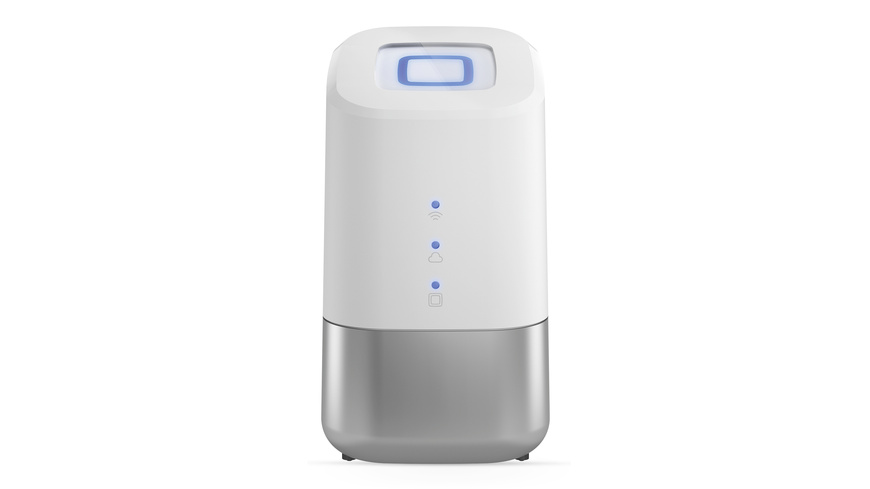
Homematic IP Home Control Unit HmIP-HCU1
The only one of the three that combines app convenience with local logic. According to the data sheet, a USB stick for measurement data and backups is included. In customer reviews at ELV, users switching from the CCU3 miss the configuration options of the WebUI. If you are used to scripts, you should know that beforehand. According to the manufacturer’s recommended retail price, it also costs five times as much as the Access Point 2. As a bundle with four thermostats, there is the Set Heizen Easy.
Homematic IP Access Point 2 HmIP-HAP2
Small, energy-efficient, quickly connected to the router. For heating, a few roller shutters and an alarm, it is enough, as long as you accept the cloud. The risk of making the wrong decision is low: the wizard in the app later transfers devices, groups, automations and twelve months of measurement data to the Home Control Unit. You then set up users, access rights and additional services again and reset the old Access Point.
Smart Home Zentrale CCU3 HmIP-CCU3
A case for existing installations. If you have old Homematic devices or need a CCU3 as a gateway for the Home Control Unit, you can still get it from ELV, where it is to be sold exclusively after a transition period. If you want to move over, you choose for each device in the CCU3 plugin: migrating deletes the old programs, operating leaves everything on the CCU3, ignoring hides the device. For a fresh start, we advise against it.
Which hub for which home?
- Few devices, the cloud is fine: Access Point 2.
- Rules should run without internet, or third-party devices are added via MQTT or Modbus: Home Control Unit.
- More than 120 devices: Home Control Unit, although with wireless devices it, too, is limited to 120.
- Existing installation with Homematic without IP: keep the CCU3 and connect it to the Home Control Unit via plugin.
Frequently asked questions
What is the difference between the Access Point 2 and the Home Control Unit?
On the Access Point 2, rules always run via the cloud, except for heating profiles and direct links. The Home Control Unit stores everything locally and runs automations itself; the cloud is optional. According to the manufacturer, it manages 350 devices, 120 of them wireless, and integrates Philips Hue, MQTT and Modbus, for example, via plugins.
Is the CCU3 still worth it?
For a fresh start, we advise against it. eQ-3 intends to integrate new products only until the end of 2026; after that, further development passes to the community as OpenCCU. According to ELV, the CCU3 is excluded from the new cameras and the video doorbell. It remains useful for existing installations with old Homematic devices without IP.
Does the Home Control Unit work without internet?
Yes. In offline mode, nothing is transmitted, and the app only works on your home network. It needs internet once, for initial setup. Remote access, voice assistants and automatic updates are only available in online mode. The HCUweb interface can only be accessed locally.
Can I switch from the Access Point 2 to the Home Control Unit later?
Yes, the risk of making the wrong decision is low. The wizard in the app transfers devices, groups, automations and twelve months of measurement data to the Home Control Unit. You set up users, access rights and additional services again and reset the old Access Point.
Which hub understands old Homematic devices without IP?
Only the CCU3. Neither the Access Point 2 nor the Home Control Unit addresses them directly. The Home Control Unit can only reach them if a CCU3 remains in between as a gateway. In the CCU3 plugin, you choose for each device between migrating, operating and ignoring.
Sources
- Homematic IP: Comparison of hubs (PDF)
- Homematic IP: The future of the CCU3
- Homematic IP: Home Control Unit
- Homematic IP: Questions and answers
- Homematic IP: Plugins
- Homematic IP: Modbus and MQTT plugins
- Homematic IP: EEBUS with LPC and LPP
- Homematic IP: System transfer
- Home Control Unit data sheet (PDF)
- Access Point 2 data sheet (PDF)
- CCU3 data sheet (PDF)
- CCU3 plugin guide (PDF)
- ELV: Home Control Unit (retailer information)
- ELV: Access Point 2 (retailer information)
- ELV: CCU3 (retailer information)
- ELV: Innenkamera basic (retailer information)
- ELV: Video-Türklingel (retailer information)
- ELV: Universal Dimmereinsatz (retailer information)
Where to buy
- Homematic IP Home Control Unit HmIP-HCU1View at ELVAvailable in Germany: ELVCheck price at Amazon.deCheck price at Amazon.co.ukCheck price at Amazon.nlCheck price at Amazon.com.beCheck price at Amazon.frCheck price at Amazon.itCheck price at Amazon.esCheck price at Amazon.plCheck price at Amazon.seAvailable in Germany: Amazon.de
- Homematic IP Access Point 2 HmIP-HAP2View at ELVAvailable in Germany: ELVCheck price at Amazon.deCheck price at Amazon.co.ukCheck price at Amazon.nlCheck price at Amazon.com.beCheck price at Amazon.frCheck price at Amazon.itCheck price at Amazon.esCheck price at Amazon.plCheck price at Amazon.seAvailable in Germany: Amazon.de
- Smart Home Zentrale CCU3 HmIP-CCU3View at ELVAvailable in Germany: ELVCheck price at Amazon.deCheck price at Amazon.co.ukCheck price at Amazon.nlCheck price at Amazon.com.beCheck price at Amazon.frCheck price at Amazon.itCheck price at Amazon.esCheck price at Amazon.plCheck price at Amazon.seAvailable in Germany: Amazon.de
- Homematic IP Set Heizen Easy mit Home Control UnitView at ELVAvailable in Germany: ELV