Contents12 sections
This guide was first published in German on handgetestet.de.
You buy laptop sleeves by centimeters, not by inches. According to Apple, the 13-inch MacBook Air is 30.41 cm wide and the 14-inch MacBook Pro 31.26 cm: one inch more on the label, not even nine millimeters more on the device. If the laptop goes into a backpack with a padded compartment anyway, a simple sleeve in the right width is enough. If, on the other hand, the case is to be carried on its own, you are better off going straight for a bag; at 15.6 inches, the HP Renew Business comes out on top for us.
Why is the inch size so rarely accurate?
Inches describe the screen diagonal. The number says nothing about the bezel, hinge and chassis. Two devices with the same label can therefore sit differently in a sleeve, and a thin model slides around where a thicker one gets stuck. In height alone, the two Apple examples are 1.13 and 1.55 cm.
So measure the closed laptop with a ruler: width, depth, height. Five minutes at the kitchen table save you a return. Only then is it the listing’s turn. With sleeves sold by width, clarify one thing above all: is that the inside or the outside measurement? A device measuring 30.41 cm won’t fit into a compartment with an inside width of 30 cm, let alone into a sleeve with an outside measurement of 30 cm.
Sleeve or bag: what do you really need?
A sleeve is scratch protection. The design doesn’t promise more, and if you slip it into an unpadded tote, you can’t expect miracles from it in a fall. It weighs little, takes up hardly any space in the backpack and protects the chassis from keys, pens and the zipper next to it. The power adapter and mouse stay outside.
The bag is the bigger package, literally. It comes with a handle or strap, compartments for accessories and usually a loop for a suitcase handle. If you commute every day with a laptop, charger and documents and don’t own a suitable laptop backpack, it is the more sensible purchase, even if the device looks less elegant inside it.
For MacBooks, there are sleeves tailored to exactly one model. We have put that selection together in the guide to MacBook sleeves. This guide is about Windows devices and everyone else who buys by measurement.
Six sleeves and bags compared
| Model | Type | Size according to the listing or manufacturer | Price range | Best for |
|---|---|---|---|---|
| BlueBuilt Laptophülle 30 cm 12–13 Zoll | Sleeve | Width 30 cm, 12 to 13 inches | low | Small, slim devices in a backpack |
| BlueBuilt Laptophülle 33 cm 14 Zoll M | Sleeve | Width 33 cm, 14 inches | low | 14-inch models with a wider chassis |
| BlueBuilt Laptophülle 36 cm 15–16 Zoll M | Sleeve | Width 36 cm, 15 to 16 inches | low | Devices around 15.6 inches in a backpack |
| BlueBuilt Laptophülle 40 cm 17 Zoll | Sleeve | Width 40 cm, 17 inches | low | Large notebooks that rarely travel |
| HP Renew Business 15,6 Zoll | Bag | Outside 39 × 6.5 × 29 cm, 0.61 kg | low to mid | Commuters without a backpack |
| Lenovo Casual Toploader T210 15,6 Zoll | Bag | Laptop compartment 36.2 × 25 × 2.2 cm, about 435 g | low | Occasional users on a small budget |
BlueBuilt Laptophülle 30 cm 12–13 Zoll
The smallest size of the BlueBuilt Laptophülle (laptop sleeve) from Coolblue’s own brand. This is where the sizing problem shows most clearly, because a device just over 30 cm wide sits exactly on the limit. The retailer also carries a 31 cm version for 13 inches, which is likely the safer choice if your measurement is tight.
BlueBuilt Laptophülle 33 cm 14 Zoll M
At 14 inches, things get confusing: 32 and 33 cm are on offer, along with the suffixes S and M. Check the item description for what exactly the letters mean before you order. Besides black, there are blue, yellow, green and red.
BlueBuilt Laptophülle 36 cm 15–16 Zoll M
The size for the classic 15.6-inch notebook. Here, too, there are two widths to choose from, 36 and 37 cm, depending on the chassis. Because many of these devices are thicker than a slim ultrabook, height counts as well: a sleeve that is right in width can still jam at the zipper.
BlueBuilt Laptophülle 40 cm 17 Zoll
For 17 inches, the choice is narrow, only black and blue. Even larger devices have a 41 cm version for 18 inches. If you really carry a notebook like that every day, ask yourself honestly whether a thin sleeve does justice to the weight. We think: probably not.
HP Renew Business 15,6 Zoll
If you don’t want to carry a second bag, this is the right choice in our view. HP specifies 39 × 6.5 × 29 cm at 0.61 kg, plus a laptop compartment, main compartment and accessory compartment, a pass-through for the trolley and a pocket with RFID protection. Lockable zippers at least slow down unwanted fingers at the train station. According to the manufacturer, the bag is designed for most 15.6-inch laptops, and the warranty runs for one year. HP says nothing in the specifications about padding or water resistance, so in steady rain it belongs under cover.
Lenovo Casual Toploader T210 15,6 Zoll
The budget alternative. Lenovo describes a padded laptop compartment measuring 36.2 × 25 × 2.2 cm in a water-repellent polyester shell, with a total weight of about 435 g. The number 2.2 is the interesting one: thicker gaming notebooks have to sit this one out. For a normal office device, that is enough, and the compartment nicely shows why the inside dimensions reveal more than the „15.6 inches“ label.
Heat, charging cables and summer in the car
A sleeve is a means of transport, not a workspace. Apple advises taking a device out of its case if it gets hot while charging. For MacBooks, the manufacturer specifies an ambient temperature of 10 to 35 °C as the comfort zone and −20 to 45 °C for storage.
In practice, that means: shut the laptop down, or at least make sure it is really asleep, before you close the zipper. And don’t leave the bag in the trunk in midsummer.
How we would decide
- You already have a backpack with a padded compartment: BlueBuilt in the measured width, if in doubt one size up.
- 15.6 inches, daily commute, no other bag: HP Renew Business.
- Rarely on the go and spending as little as possible: Lenovo T210, provided the device is no thicker than 2.2 cm.
- MacBook: better a tailored sleeve from the MacBook guide.
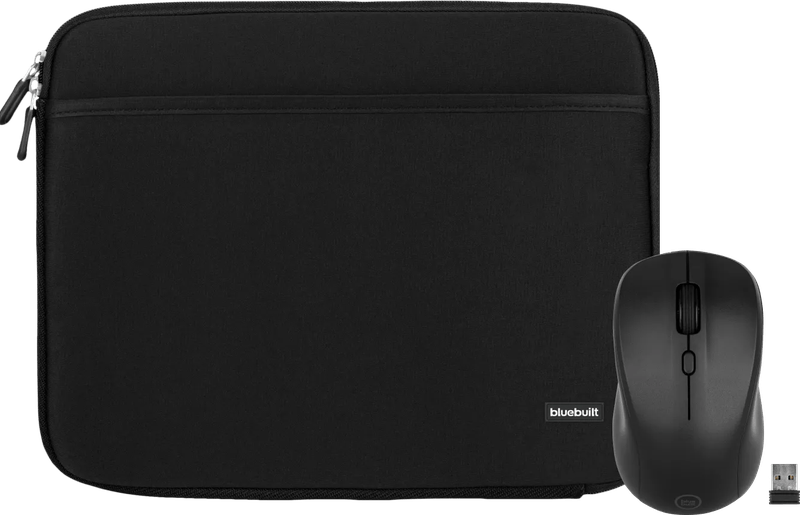
The sleeve-and-mouse bundles that also turn up in stores don’t change anything about the sleeve. They only make sense if a new mouse is due anyway.
Frequently asked questions
Why doesn't a sleeve fit despite the right inch size?
Inches only describe the screen diagonal; the number says nothing about the bezel and chassis. According to Apple, the 13-inch MacBook Air is 30.41 cm wide, the 14-inch MacBook Pro 31.26 cm. One inch more on the label, not even nine millimeters more on the device.
How do I measure my laptop for a sleeve?
Measure the closed laptop with a ruler: width, depth, height. Then find out whether the sleeve's dimensions are inside or outside measurements. A device measuring 30.41 cm won't fit into a compartment with an inside width of 30 cm; if in doubt, go one size up.
Sleeve or laptop bag?
A sleeve is scratch protection; it weighs little and protects the chassis in your backpack from keys and zippers. The power adapter and mouse stay outside. A bag adds a handle or strap, compartments for accessories and usually a loop for a suitcase handle, which makes sense for commuters without a laptop backpack.
How good is the Lenovo T210 as an inexpensive bag?
Lenovo describes a padded laptop compartment measuring 36.2 × 25 × 2.2 cm in a water-repellent shell at about 435 g. That is enough for a normal office device. Thicker gaming notebooks over 2.2 cm high won't fit.
Can the laptop go into the sleeve while warm?
A sleeve is a means of transport, not a workspace. Apple advises taking a device out of its case if it gets hot while charging. Shut the laptop down or make sure it is really asleep before you close the zipper, and don't leave the bag in the car in summer.
Sources
- HP: Renew Business 15.6-inch Laptop Bag, specifications
- Lenovo: 15.6″ Casual Topload notebook bag T210
- Apple: MacBook Air 13-inch (M4), technical specifications
- Apple: MacBook Pro 14-inch (M5), technical specifications
- Apple: Notes on battery, cases and temperature
Where to buy
- HP Renew Business 15,6 ZollView at CoolblueAvailable in Germany: Coolblue
- Lenovo Casual Toploader T210 15,6 ZollView at CoolblueAvailable in Germany: Coolblue
- BlueBuilt Laptophülle 30 cm 12–13 ZollView at CoolblueAvailable in Germany: Coolblue
- BlueBuilt Laptophülle 33 cm 14 Zoll MView at CoolblueAvailable in Germany: Coolblue
- BlueBuilt Laptophülle 36 cm 15–16 Zoll MView at CoolblueAvailable in Germany: Coolblue
- BlueBuilt Laptophülle 40 cm 17 ZollView at CoolblueAvailable in Germany: Coolblue