Contents9 sections
This guide was first published in German on handgetestet.de.
Many bad Raspberry Pi purchases do not start with the board but with the phone charger from the kitchen drawer. The Raspberry Pi 5 with 4 GB of RAM covers smart home, retro gaming and most DIY projects, but it needs the matching 27-watt power supply and active cooling. If you are looking for a ready-made learning computer for kids, the Raspberry Pi 500, which is built entirely into a keyboard, is the better pick.
That sets the direction. The finer points depend on what the little computer is supposed to do later on.
Power, heat, storage: three things every Pi 5 needs
Raspberry Pi requires a power supply with 5 volts and 5 amps via USB-C for the Pi 5. A typical 3-amp power supply does boot the board, but according to the official documentation, the Pi 5 then limits the current for connected USB devices to 600 mA instead of 1.6 A. An external hard drive or a wireless dongle then tends to drop out during operation. The official 27 W power supply delivers 5.1 V at 5 A, has a 1.2-meter cable and, according to the manufacturer, will be produced until at least January 2035.
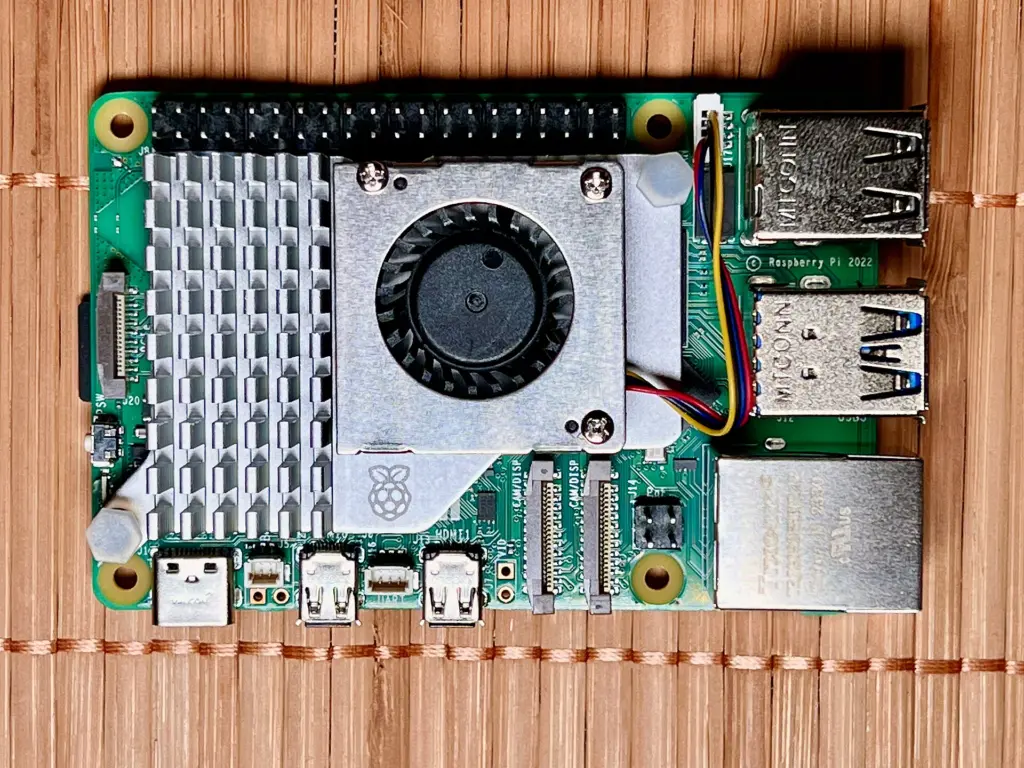
On heat: Raspberry Pi itself writes that the Pi 5 works best with active cooling. The Active Cooler clips on with spring-loaded pins and comes with thermal pads; its fan is temperature-controlled. Once fitted, it should not be removed again according to the manufacturer, because the pins and pads suffer. If you prefer an enclosed case, take the official Pi 5 case, which already comes with a temperature-controlled fan and a small heatsink. Using both together is unnecessary.
For storage, a microSD card is enough to start with. Choose one with an A2 rating and at least 32 GB, because such cards handle small read and write operations, like those generated by databases, much better. More speed comes from an NVMe SSD on the Pi 5’s PCIe connector. For that, you need an adapter such as the M.2 HAT+ from Raspberry Pi: one PCIe 2.0 lane with up to 500 MB/s, room for SSDs in the 2230 and 2242 formats. The official SSD Kit bundles the HAT+ with a 256 or 512 GB SSD. Longer 2280 SSDs only fit adapters from other manufacturers, such as the NVMe Base from Pimoroni, which according to retailer information sits underneath the board.
And the starter kit? Ready-made kits from retailers combine board, case, power supply and card, but their contents vary widely. Some include a 45 W power supply, others a passive aluminum case. Before buying, check whether a 5 A power supply, cooling with a fan and an A2 card are included. If so, the kit only saves you the hassle of ordering. If something is missing, you are better off buying the parts individually.
Six Raspberry Pi models side by side
| Model | Processor and memory | Power supply | Produced until at least | Best for |
|---|---|---|---|---|
| Raspberry Pi 5 (4 GB) | 4 × Cortex-A76, 2.4 GHz; 4 GB LPDDR4X | USB-C, 5 V / 5 A | January 2036 | Home Assistant, retro gaming, servers |
| Raspberry Pi 5 (8 GB) | as above, 8 GB | USB-C, 5 V / 5 A | January 2036 | desktop use, several services in parallel |
| Raspberry Pi 500 | Pi 5 hardware in the keyboard, 8 GB, 32 GB card | USB-C, 5 V / 5 A | January 2034 | kids, school, beginners |
| Raspberry Pi 500+ | 16 GB, 256 GB SSD, mechanical keys | USB-C, 5 V / 5 A | January 2035 | hobby workstation at the desk |
| Raspberry Pi Zero 2 W | 4 × Cortex-A53, 1 GHz; 512 MB | Micro-USB | January 2030 | sensors, small DIY projects |
| Raspberry Pi 4 Model B | 4 × Cortex-A72, 1.8 GHz; 1 to 8 GB | USB-C, 5 V / 3 A | January 2034 | replacement for existing Pi 4 projects |
All specifications according to Raspberry Pi. The Pi 5 is also available with 1, 2 and 16 GB.
Smart home with Home Assistant
In its installation guide, Home Assistant lists the Raspberry Pi 5 or 4 with at least 2 GB of RAM, a card of 32 GB or more, ideally class A2, and a suitable power supply. A USB port on a computer is explicitly ruled out as a power source. The guide requires a network cable for installation, and even afterward it recommends Ethernet instead of Wi-Fi.
Our choice would be a Pi 5 with 4 GB. That is double the minimum and leaves headroom for add-ons such as a database or camera integration. If the hub runs around the clock, an SSD on the M.2 HAT+ is a sensible second upgrade step. If you do not want to tinker at all, you will find ready-made devices in our guide to the smart home hub.
Retro console for the living room and the workbench
The emulation front end Batocera offers images in version 43.1 for the Pi 5, the Pi 4, older Pi 3 models and the Zero 2 W. The range is wide. Raspberry Pi states two to three times the processor and graphics performance of the Pi 4 for the Pi 5, and later console generations need exactly that headroom. For games from the 8-bit and 16-bit era, 4 GB is enough. Two gamepads, a case with a fan and a micro-HDMI to HDMI cable belong on the shopping list, because the board has no full-size HDMI ports.
A popular case for this is the aluminum Argon ONE V3 with its own fan, which according to retailer information is also available in a version with an M.2 slot. Our guide to the retro console compares ready-made retro devices that need no tinkering.
Media server: playback yes, transcoding not really
As a player connected to the TV, the Pi works well. LibreELEC, a lean system built around Kodi, provides dedicated images for the Pi 5 and Pi 4 in version 12.2.1. It is a different story for a server that transcodes movies for phones and tablets. The Jellyfin project has classified hardware acceleration for the Raspberry Pi as deprecated, because the Pi 5 lacks hardware encoders entirely. If you want to stream videos at a lower resolution on the go, a mini PC (in German) serves you better.
Beginners, school and kids: the Pi 500
For ten-year-olds, a bare board, loose cables and a memory card are more frustration than learning aid. The Raspberry Pi 500 puts the same hardware as the Pi 5 into a compact keyboard, with 8 GB of RAM and an included 32 GB class A2 card. The manufacturer’s Desktop Kit adds a mouse, a 27 W power supply, a micro-HDMI cable and the official beginner’s book. It is also offered as a DE version with a German keyboard layout. You only have to provide a monitor yourself.
The Pi 500+ is aimed at adults who want their own work machine. It has 16 GB, a replaceable 256 GB SSD and mechanical keys with Gateron KS-33 switches. That is too much equipment for kids.
Tinkerers: Zero 2 W, and what becomes of the Pi 4
The Zero 2 W measures 65 × 30 mm and fits where a Pi 5 is too big and too power-hungry, for example in a weather station or a door sensor. It has 512 MB of memory, Wi-Fi only in the 2.4 GHz band, Bluetooth 4.2, plus mini-HDMI and micro-USB. The GPIO header is not populated on the basic version; if you do not want to solder, choose the version with a pre-fitted header. It is not suitable as a desktop computer or for Home Assistant.
And the Pi 4? According to the manufacturer, it will still be produced until at least 2034 and is still supported by Home Assistant. It makes sense if the case, 3 A power supply and accessories for an existing project are already there or a broken unit needs replacing. If you are starting fresh, buy the Pi 5.
How we would decide
- Home Assistant: Pi 5 with 4 GB, 27 W power supply, case with fan, A2 card of 32 GB or more, and a network cable.
- Retro gaming: Pi 5 with 4 GB, case with fan, two gamepads, micro-HDMI cable.
- Kids and beginners: Pi 500 in the Desktop Kit, DE version.
- Desktop computer for adults: Pi 500+ or Pi 5 with 8 GB and an SSD.
- Small sensor projects: Zero 2 W with header.
- Existing Pi 4 project: stick with the Pi 4, start new projects on the Pi 5.
Frequently asked questions
Is a regular phone charger enough for the Raspberry Pi 5?
Only with limitations. Raspberry Pi requires 5 volts and 5 amps via USB-C. With a typical 3-amp power supply, the board does boot, but according to the documentation it limits the current for USB devices to 600 mA instead of 1.6 A. External hard drives or wireless dongles then tend to drop out during operation.
Which Raspberry Pi is suitable for Home Assistant?
Home Assistant lists the Pi 5 or Pi 4 with at least 2 GB, a card of 32 GB or more, ideally class A2, and a suitable power supply. A Pi 5 with 4 GB leaves headroom for a database or camera integration. For installation and operation, the guide recommends a network cable instead of Wi-Fi.
Does the Raspberry Pi 5 need a fan?
Raspberry Pi explicitly recommends active cooling for the Pi 5. Options are the clip-on Active Cooler with a temperature-controlled fan or the official Pi 5 case, which already comes with a fan and a small heatsink. Using both together is unnecessary.
Which memory card or SSD suits the Raspberry Pi 5?
To start with, a microSD card with an A2 rating and at least 32 GB is enough. More speed comes from an NVMe SSD via an adapter such as the M.2 HAT+, which takes SSDs in the 2230 and 2242 formats. Longer 2280 SSDs only fit adapters from other manufacturers.
Is the Raspberry Pi any good as a media server?
As a player connected to the TV, yes, for example with LibreELEC and Kodi. For a server that transcodes movies for phones and tablets, not really: the Pi 5 lacks hardware encoders, and Jellyfin classifies hardware acceleration for the Raspberry Pi as deprecated. A mini PC is better suited for that.
Is the Raspberry Pi 4 still worth it?
For existing projects, yes. According to the manufacturer, it will be produced until at least 2034 and is still supported by Home Assistant. It makes sense if the case, 3 A power supply and accessories are already there or a broken unit needs replacing. New projects should start on the Pi 5.
Sources
- Raspberry Pi 5: product page
- Raspberry Pi: Introducing Raspberry Pi 5
- Raspberry Pi documentation: power supplies
- Raspberry Pi 27W USB-C Power Supply
- Raspberry Pi Active Cooler
- Raspberry Pi Case for Raspberry Pi 5
- Raspberry Pi M.2 HAT+
- Raspberry Pi SSD Kit
- Raspberry Pi 500 and Raspberry Pi 500 Desktop Kit
- Raspberry Pi 500+
- Raspberry Pi Zero 2 W
- Raspberry Pi 4 Model B
- Home Assistant: installation on the Raspberry Pi
- Batocera: download
- LibreELEC: downloads for Raspberry Pi
- Jellyfin: hardware acceleration
Where to buy
- Raspberry Pi 5 (4 GB)Check price at Amazon.deAvailable in Germany: Amazon.de
- Raspberry Pi 5 (8 GB)Check price at Amazon.deAvailable in Germany: Amazon.de
- Raspberry Pi 500 (DE)Check price at Amazon.deAvailable in Germany: Amazon.de
- Raspberry Pi 500+Check price at Amazon.deAvailable in Germany: Amazon.de
- Raspberry Pi Zero 2 WCheck price at Amazon.deAvailable in Germany: Amazon.de
- Raspberry Pi 4 Model BCheck price at Amazon.deAvailable in Germany: Amazon.de
- Raspberry Pi 27W USB-C NetzteilCheck price at Amazon.deAvailable in Germany: Amazon.de
- Raspberry Pi Active CoolerCheck price at Amazon.deAvailable in Germany: Amazon.de
- Raspberry Pi 5 Gehäuse (offiziell)Check price at Amazon.deAvailable in Germany: Amazon.de
- Raspberry Pi SSD KitCheck price at Amazon.deAvailable in Germany: Amazon.de
- Argon ONE V3 GehäuseCheck price at Amazon.deAvailable in Germany: Amazon.de