Contents14 sections
This guide was first published in German on handgetestet.de.
From 120 m² up, the pascal rating is not what decides a robot vacuum. What counts is what happens when the battery runs low or the water tank empties in the middle of a run. That is why we consider the Ecovacs Deebot T90 Max Pro Omni the most sensible buy: 5,200 mAh, a runtime of 257 minutes according to the manufacturer and 4 liters of fresh water in the station, all one price class below the top models. If you regularly mop a very large area with lots of hard flooring and are willing to spend more, take a look at the X12S, which makes use of short charging breaks.
How long does a robot really take for 150 m²?
Longer than the brochures suggest. In its own FAQ, Ecovacs gives a sober example: 23 m² in less than 45 minutes. Extrapolated, 150 m² would take just under five hours. The X11S page, on the other hand, says „up to 500 m²“ per run. Both figures come from the same manufacturer, and both come without precise conditions.
The contradiction partly resolves itself. The 500 m² appear in the same sentence as recharging during mop washing, so they do not describe a single battery charge. Go with the cautious figure. For planning, that means a run through the whole home can take half a day, and in between the robot sits at the station.
The T90’s 257 minutes are only a guideline, too. Ecovacs does not state a mode for them. For the T30e, the manufacturer breaks it down in more detail: 220 minutes of quiet vacuuming, 200 minutes in standard mode, 180 minutes of vacuuming and mopping. That gap shows quite well what mopping and higher power levels cost.
Recharging: where large homes get stuck
Almost all devices in this class return to the station when the battery is low and carry on afterward. The difference lies in the speed and the conditions. According to the store page, the X12S recharges 13 percent in 3 minutes while the mops are being washed, the X11S 10 percent. The X12S manual speaks of about 5 minutes of fast charging, after which normal charging continues until the battery is full. A full charge takes around 2.5 hours; for the T90 approx. 3.5 hours, and for the T30e and Dreame as much as 4.5 hours. A 4,000 mAh battery with fast interim charging can therefore make more sense than a large one that pauses for a long time.
With the competition, the pitfalls are in the settings. Dreame requires resume to be switched on in the app and warns that if the robot is too far from the station, it may not find its way back on its own. Roborock’s Saros 20 does not resume if you send it to the station manually or with the button, and Do Not Disturb mode prevents automatic recharging. If you start it in the evening, you should know that. For large living spaces, eufy advises enabling automatic return to cleaning in the app.
Tank and dust container: what is enough for how many runs?
On the robot itself, the capacities are small. The large Ecovacs models carry 110 ml of water and 250 ml of dust, and the eufy E28 has 120 ml of fresh water. So the station is what matters. Ecovacs states the mopping area per tank fill: 400 m² for the X12S and X11S, 356 m² for the T90, 300 m² for the T30e. With 150 m² of hard flooring, the T90 gets you a good two runs before you refill, the X12S a good two and a half. If you mop daily, you carry a tank to the sink every second or third day.
Take a look at the dirty water tank, too. On the T90 it holds 2.2 liters versus 4 liters of fresh water; on the T30e both are 4 liters. Ecovacs does not reveal which container triggers the alert first.
For dust, it is bags versus containers. The T90 collects in a 2.5-liter bag, the T30e in 3 liters. The X11S and X12S work bagless; for the X11S, Ecovacs cites 1.6 liters and up to 48 days. No living area is given. In 180 m² with a dog, you are unlikely to reach that many days.
Zones and maps: what matters on a single floor
If you live on one floor, you need exactly one map. The number of maps many devices advertise is a side issue here. Zones matter more, so that not everything is cleaned every time: kitchen and hallway daily, bedrooms twice a week. That does more than a bigger battery.
Ecovacs sets up restricted areas as virtual boundaries in the app. eufy points out that no-go zones are meant for dividing up the cleaning, not for sealing off hazardous spots. Also check the Wi-Fi at the farthest point: according to its manual, the X12S needs a 2.4 GHz network, and in long floor plans an additional access point helps. If the mopping system is your main concern, you will find more in our guide to robot vacuums with a mopping function (in German).
Seven models for large areas
| Model | Battery and charging time according to the manufacturer | Station: fresh water / dirty water | Best for |
|---|---|---|---|
| DEEBOT T90 MAX PRO OMNI | 5,200 mAh, approx. 3.5 h | 4 l / 2.2 l | 120 to 200 m² with mixed flooring |
| DEEBOT X12S OmniCyclone | 4,000 mAh, approx. 2.5 h | 3.5 l / 2.4 l | lots of hard flooring, frequent mopping |
| DEEBOT X11S OmniCyclone | 4,000 mAh, charging time n/a | 3.5 l / 2.7 l | bagless, thresholds up to 24 mm |
| DEEBOT T30e OMNI | 5,200 mAh, approx. 4.5 h | 4 l / 4 l | large home, tight budget |
| Roborock Saros 20 | 6,400 mAh, charging time n/a | n/a, optional water hookup | households with a hookup for the station |
| Dreame X50 Ultra Complete | n/a, approx. 4.5 h | n/a | if you can plan around the breaks |
| eufy Omni E28 | 5,200 mAh, approx. 3.5 h | Robot 120 ml / 180 ml | also upholstery and carpet stains |
DEEBOT T90 MAX PRO OMNI
Plenty of battery, 4 liters of fresh water and one price class below the X12S. There are also weaknesses you should know about: according to the spec sheet, the main brush cannot be lifted, it detects obstacles using structured light without the more elaborate sensors of the X12S, and it only handles thresholds up to 20 mm. The bag remains an ongoing cost.
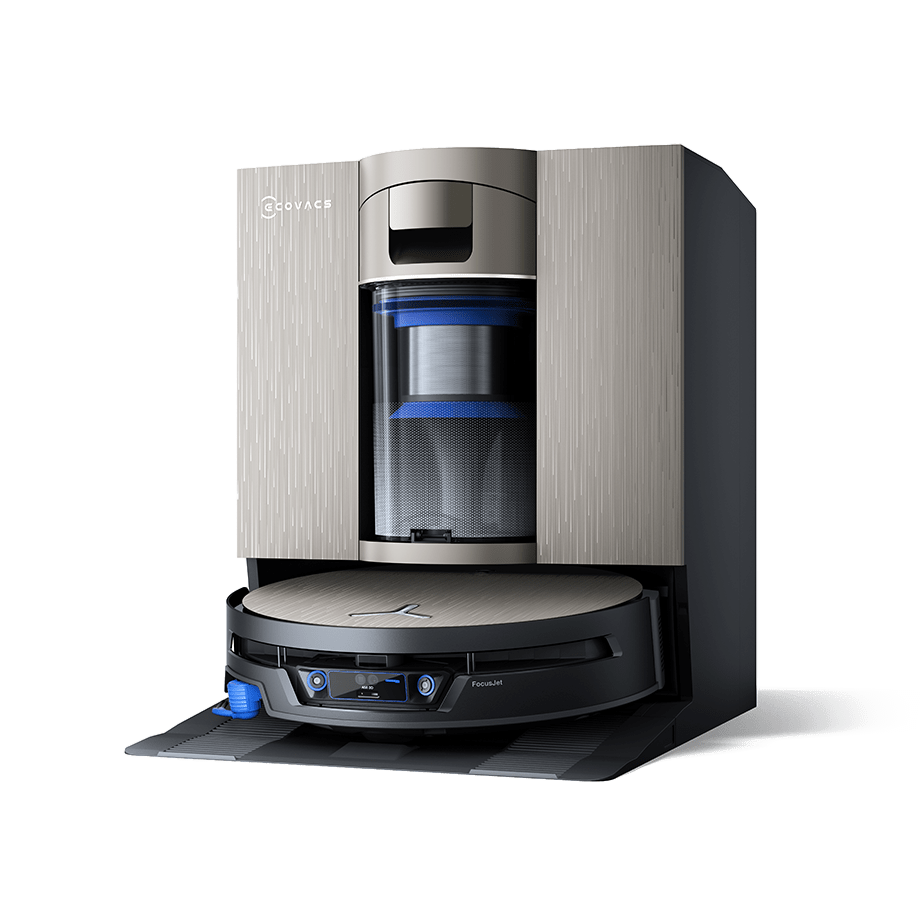
DEEBOT X12S OmniCyclone
Its advantages are recharging during the mopping breaks and bagless emptying, and according to Ecovacs it also clears thresholds 25 mm high. The store page does not give a usable runtime in minutes, and the fast-charging figures differ between the store and the manual. For most homes, the extra cost is only justifiable with daily mopping.
DEEBOT X11S OmniCyclone
The conditions behind „500 m² per run“ remain unclear. Technically, it is close to the X12S, but according to the spec sheet it navigates with mini ToF instead of dToF, and its price class is hardly lower. We would only buy it if it is on sale well below that.
DEEBOT T30e OMNI
The budget solution with a large battery, 4 liters in both tanks and a 3-liter bag. You do without warm water for mop washing. With a charging time of 4.5 hours, it pauses for a long time, and 300 m² of mopping area per tank is the lowest Ecovacs figure here.
Roborock Saros 20
According to the manual, it runs on 14.4 V and 6,400 mAh, considerably more than the T90. Of interest for households is the version with a water inlet and drain, because it eliminates carrying tanks altogether. That requires a hookup where the station stands. We were unable to reliably confirm the runtime and tank sizes.
Dreame X50 Ultra Complete
Dreame specifies a charging time of around 4.5 hours. So at 150 m² with interim charging, a run drags on, especially if resume is not switched on. We could not verify the battery capacity and tank sizes from the manual, which is why the device is listed here only as an option.
eufy Omni E28
The robot weighs 5.2 kg, is 111 mm tall and has 5,200 mAh. As a special feature, it comes with a detachable deep cleaner for textiles. That changes nothing for the floor area, but it can still be useful in a household with a sofa and rugs. At 37 × 48 × 46 cm, the station is on the bulky side.
How we would decide
- 120 to 200 m², a mix of carpets and hard flooring: T90 Max Pro Omni, with zones instead of whole-home cleaning.
- Mostly hard flooring, daily mopping, money is less of a concern: X12S.
- Permanent water hookup available where the station stands: look into the Roborock Saros 20.
- Large floor plan, tight budget: T30e Omni, and schedule the run for the morning.
No robot replaces everything in a large home. Once a week, a canister vacuum (in German) gets more out of corners and carpets, and for in between, a cordless vacuum (in German) is enough.
Our guide to battery life (in German) puts the runtime figures into context.
For fixed plumbing at the station, read our guide to the permanent water hookup; for the model lines, see the Deebot comparison (in German).
Frequently asked questions
How long does a robot vacuum take for 150 m²?
Longer than the brochures suggest. Ecovacs itself gives the example of 23 m² in less than 45 minutes; extrapolated, 150 m² would take just under five hours. A run through the whole home can take half a day, with the robot sitting at the station to recharge in between.
Which robot vacuum recharges the fastest?
According to the store page, the X12S recharges 13 percent in 3 minutes while the mops are being washed, and a full charge takes around 2.5 hours. The T90 takes approx. 3.5 hours, the T30e and Dreame 4.5. A smaller battery with fast interim charging can make more sense than a large one that pauses for a long time.
How often do I need to refill the water tank in a large home?
Ecovacs states the mopping area per tank fill: 400 m² for the X12S, 356 m² for the T90, 300 m² for the T30e. With 150 m² of hard flooring, the T90 is enough for a good two runs, the X12S for a good two and a half. If you mop daily, you refill every two to three days.
Why doesn't my robot vacuum resume after charging?
It is often down to the settings. Dreame requires resume to be switched on in the app. Roborock's Saros 20 does not resume if you send it to the station manually, and Do Not Disturb mode prevents recharging. eufy advises enabling automatic return to cleaning.
What do zones do for a robot vacuum in a large home?
More than a bigger battery. With zones, not everything is cleaned every time: kitchen and hallway daily, bedrooms twice a week. On a single floor, you need exactly one map. Also check the Wi-Fi at the farthest point; according to its manual, the X12S needs a 2.4 GHz network.
Sources
- Ecovacs: Deebot T90 Max Pro Omni
- Ecovacs: T90 Max Pro user manual (PDF)
- Ecovacs: Deebot X12S OmniCyclone
- Ecovacs: X12S user manual (PDF)
- Ecovacs: Deebot X11S OmniCyclone
- Ecovacs: Deebot T30e Omni
- Ecovacs: Robot vacuums for large areas
- Roborock: Saros 20 manual (ManualsLib)
- Dreame: X50 Ultra manual (ManualsLib)
- eufy: Omni E28 manual (ManualsLib)
- Anker: eufy Omni E28
Where to buy
- DEEBOT T90 MAX PRO OMNIView at EcovacsAvailable in Germany: EcovacsCheck price at Amazon.deAvailable in Germany: Amazon.de
- DEEBOT X12S OmniCycloneView at EcovacsAvailable in Germany: EcovacsCheck price at Amazon.deAvailable in Germany: Amazon.de
- DEEBOT X11S OmniCycloneView at EcovacsAvailable in Germany: EcovacsCheck price at Amazon.deAvailable in Germany: Amazon.de
- DEEBOT T30e OMNIView at CoolblueAvailable in Germany: CoolblueView at EcovacsAvailable in Germany: EcovacsCheck price at Amazon.deAvailable in Germany: Amazon.de
- Roborock Saros 20Check price at Amazon.deAvailable in Germany: Amazon.de
- Dreame X50 Ultra CompleteView at CoolblueAvailable in Germany: CoolblueCheck price at Amazon.deAvailable in Germany: Amazon.de
- eufy Omni E28View at CoolblueAvailable in Germany: CoolblueCheck price at Amazon.deAvailable in Germany: Amazon.de