Contents12 sections
This guide was first published in German on handgetestet.de.
“100 W” is printed on the front, the laptop and smartphone are plugged in at the same time, and the notebook still barely makes progress. That is how many bad buys of USB-C chargers begin. The big number almost always applies to just a single port. So buy based on how the power is split, not on the total output: for a MacBook Air plus an iPhone, a good 70-watt charger is enough; for a large notebook with companion devices, 140 to 160 W is the sensible class.
Why does the laptop charge so slowly even though it says 70 W?
Because a multi-port charger distributes a fixed budget. Every manufacturer handles this differently, and the tables for it are in the small print of the data sheet. Anker’s Nano Charger with 70 W shows the principle. According to Anker, a single USB-C port alone gets up to 70 W. With two devices, it is 45 and 22.5 W, and with three devices 45, 7.5 and 7.5 W. The smartphone on the third port then charges at a rather leisurely pace.
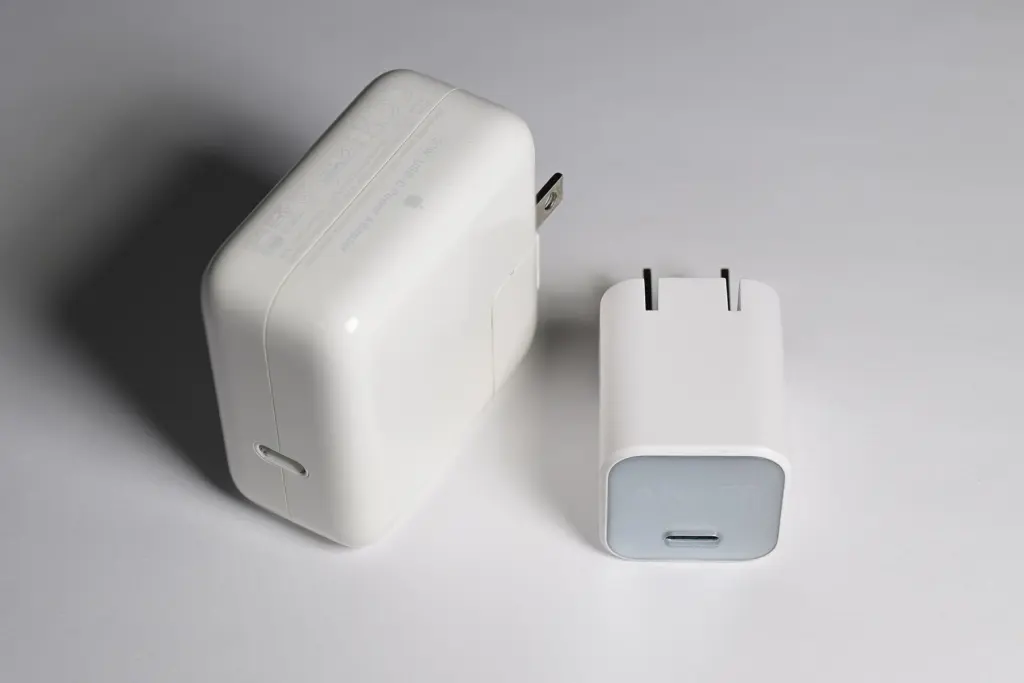
It is even more pronounced with Apple’s 35 W power adapter with two ports. According to Apple, a Mac laptop and an iPhone together each get up to 17.5 W. That is not much for a MacBook Air in use. As a travel adapter overnight, it is still enough.
Which specs belong on your list before you buy?
First, the number that almost never appears on the front: what the laptop port delivers while the phone is charging at the same time. Then the port mix. USB-A is handy for older cables but takes up a slot that a second USB-C device might need more urgently. When it comes to design, bag and desk part ways: a plug with folding prongs travels with you, while a desktop unit with a power cord is better left on the desk. And when traveling? The Anker devices mentioned here specify 100 to 240 V as their input voltage, so abroad a plug adapter is enough instead of a voltage converter.
Does the cable really matter?
Above 100 W, yes. Up to that point, USB Power Delivery works with a maximum of 20 V and 5 A. Beyond that begins the extended range from the USB PD 3.1 specification, which the USB-IF describes with levels of 28, 36 and 48 V. 140 W requires 28 V, 240 W the full 48 V. That only works if the charger, cable and laptop all support this level; an old 60 W cable from the drawer reliably throttles any 140 W power adapter. If a large MacBook Pro is supposed to charge quickly, put a cable rated for 240 W in your cart right away. Our MacBook comparison helps you figure out which MacBook is right for you.
Smartphones hardly care about this range. An iPhone draws considerably less over a cable. More watts do nothing for it.
Six multi-port chargers from 35 to 200 W
| Model | Ports and total output | Maximum on a single port | Best for |
|---|---|---|---|
| Anker Prime Charger 160 W | 3 × USB-C, 160 W | 140 W | Large notebook plus two companion devices |
| Belkin BoostCharge Pro 4-Port 200 W | 4 × USB-C, 200 W | 140 W (two ports), 60 W (two ports) | Desk with two laptops |
| UGREEN Nexode 100 W 4-Port | 3 × USB-C, 1 × USB-A, 100 W | 100 W | Laptop, phone and small gadgets |
| Baseus EnerFill FE11 100 W | 2 × USB-C, 1 × USB-A, 100 W | Distributed dynamically according to the manufacturer | Tight budget |
| Anker Nano Charger 70 W | 2 × USB-C, 1 × USB-A, 70 W | 70 W | MacBook Air or tablet when traveling |
| Apple 35 W Dual USB-C kompakt (compact dual USB-C power adapter) | 2 × USB-C, 35 W | 35 W | Light travel bags in the Apple ecosystem |
Anker Prime Charger 160 W
160 W in a housing measuring 65 × 52 × 35 mm and weighing 220 g, according to the data sheet. On top of that come folding prongs and a small display showing the output per port. On its own, one port delivers up to 140 W; across several devices, the power adapter distributes power dynamically, according to Anker. If you own a 16-inch notebook, it can replace the original adapter and still leave room for your phone and headphones. In terms of price, it sits at the top end.
Belkin BoostCharge Pro 4-Port 200 W
Explicitly not a travel device. According to Belkin, the unit measures around 118 × 92 × 36 mm and hangs on a 1.5 m power cord. Two ports deliver up to 140 W, two more up to 60 W, for a maximum of 200 W combined. That covers two notebooks on the same desk. No USB-C cable is included in the box.
UGREEN Nexode 100 W 4-Port
A mid-range classic. According to UGREEN, the first or second USB-C port alone delivers up to 100 W, or 65 and 30 W when used together. The third USB-C port and USB-A are each limited to around 22.5 W. That works for a 14-inch notebook with a smartphone. Be careful when ordering, though, because there are versions with a different port mix under similar names.
Baseus EnerFill FE11 100 W
Baseus cites 100 W, two USB-C ports and one USB-A port for three devices at once. According to the manufacturer, the power is distributed as needed by its in-house BPS 3.0 technology. Baseus does not publish an exact table of how it is split. If your budget is tight and exact figures are not that important, you get a lot of total output for little money here.
Anker Nano Charger 70 W
120 g, 53 × 43 × 32 mm, folding prongs. For a MacBook Air or an iPad with a smartphone, we consider this the most sensible travel size. The power split is openly documented, so you know where you stand: with two devices, the laptop gets 45 W. According to the product page, Anker includes a USB-C cable.
Apple 35 W Dual USB-C Netzteil, kompakt
Apple recommends this power adapter for the MacBook Air and MacBook Neo when a second port is needed. According to Apple, with an iPhone and Apple Watch it splits 27.5 and 7.5 W, and with a laptop and iPhone 17.5 W each. That is expensive for 35 W. If only the Air, iPhone and Watch travel with you and the adapter needs to be small, it is still a good fit. The cable costs extra.
So which charger is right for me?
One large notebook and one charger for everything: Anker Prime Charger 160 W, plus a cable rated for 240 W. At a desk with two laptops, the Belkin BoostCharge Pro 200 W. For a 14-inch notebook and a phone on a mid-range budget, the UGREEN Nexode 100 W 4-Port; as cheaply as possible, the Baseus EnerFill FE11 100 W.
In carry-on luggage with a MacBook Air or iPad, the Anker Nano Charger 70 W is in good hands. And if you only charge an iPhone and Watch, and occasionally the Air, go for Apple’s 35 W power adapter.
Hardly anyone needs 240 W. Almost no notebook draws that much power, and the desktop units in this class are large and expensive. Stations for wireless iPhone charging along with matching power adapters are covered in our guide to MagSafe chargers.
Frequently asked questions
Why does my laptop charge so slowly on a 70 W charger?
A multi-port charger distributes a fixed budget. On the Anker Nano Charger 70 W, a single port alone gets up to 70 W; with two devices, it is 45 and 22.5 W, and with three devices 45, 7.5 and 7.5 W. The big number on the package almost always applies to just one port.
Does a 140 W charger need a special cable?
Yes. Above 100 W, the extended range of USB PD 3.1 begins, and 140 W requires 28 V. That only works if the charger, cable and laptop all support this level. An old 60 W cable throttles any 140 W power adapter, which is why a cable rated for 240 W belongs with it.
What should I look for when buying a USB-C multi-port charger?
First, the output at the laptop port while the phone is charging at the same time. Then the port mix, because USB-A takes up a slot that a second USB-C device might need. As for the design, a plug with folding prongs travels with you, while a desktop unit with a power cord stays on the desk.
Can I use a USB-C charger abroad?
The Anker devices mentioned specify 100 to 240 V as their input voltage. Abroad, a plug adapter is then enough instead of a voltage converter. Check the specification on your model's data sheet.
Does a more powerful charger help an iPhone?
No. An iPhone draws considerably less over a cable than large power adapters deliver, so more watts do nothing for it. The extended range above 100 W is used mainly by large notebooks. For an iPhone and Apple Watch, a compact device such as Apple's 35 W power adapter is enough.
Which charger suits two laptops on one desk?
The Belkin BoostCharge Pro 4-Port 200 W. Two ports deliver up to 140 W, two more up to 60 W, for a maximum of 200 W combined. It is not a travel device: the unit hangs on a 1.5 m power cord, and no USB-C cable is included in the box.
Can you charge a laptop with a phone charger and vice versa?
With USB-C and USB Power Delivery, usually yes, just at different speeds. A notebook's power adapter may charge a smartphone because both negotiate the power; for the iPhone, Apple explicitly lists a Mac's USB-C power adapter as well. Conversely, a small phone charger is often not enough for full speed on a laptop. From macOS Tahoe 26.4, the Mac then shows that it is charging slowly, and Apple recommends a power adapter with more watts.
Sources
- Anker: Prime Charger 160 W, 3 Ports
- Anker EU: Prime Charger 160 W
- Anker: Nano Charger 70 W, 3 Ports
- Belkin: BoostCharge Pro 200 W 4-Port (WCH015), technical specifications
- UGREEN: Details on the Nexode 100 W 4-Port
- UGREEN: Nexode 100 W 3C1A
- Baseus: EnerFill FE11 100 W
- Apple Support: 35W Dual USB-C Port Power Adapter
- Apple: 35W Dual USB-C Port Compact Power Adapter
- USB-IF: USB Charger (USB Power Delivery)
Where to buy
- Anker Prime Charger 160 WCheck price at Amazon.deCheck price at Amazon.co.ukCheck price at Amazon.nlCheck price at Amazon.com.beCheck price at Amazon.frCheck price at Amazon.itCheck price at Amazon.esCheck price at Amazon.plCheck price at Amazon.seCheck price at Amazon.comAvailable in Germany: Amazon.de
- Belkin BoostCharge Pro 4-Port GaN 200 WCheck price at Amazon.deCheck price at Amazon.co.ukCheck price at Amazon.nlCheck price at Amazon.com.beCheck price at Amazon.frCheck price at Amazon.itCheck price at Amazon.esCheck price at Amazon.plCheck price at Amazon.seAvailable in Germany: Amazon.de
- UGREEN Nexode 100 W 4-PortCheck price at Amazon.deCheck price at Amazon.co.ukCheck price at Amazon.nlCheck price at Amazon.com.beCheck price at Amazon.frCheck price at Amazon.itCheck price at Amazon.esCheck price at Amazon.plCheck price at Amazon.seCheck price at Amazon.comAvailable in Germany: Amazon.de
- Baseus EnerFill FE11 100 WCheck price at Amazon.deCheck price at Amazon.co.ukCheck price at Amazon.nlCheck price at Amazon.com.beCheck price at Amazon.frCheck price at Amazon.itCheck price at Amazon.esCheck price at Amazon.plCheck price at Amazon.seAvailable in Germany: Amazon.de
- Anker Nano Charger 70 WCheck price at Amazon.deCheck price at Amazon.co.ukCheck price at Amazon.nlCheck price at Amazon.com.beCheck price at Amazon.frCheck price at Amazon.itCheck price at Amazon.esCheck price at Amazon.plCheck price at Amazon.seCheck price at Amazon.comAvailable in Germany: Amazon.de
- Apple 35 W Dual USB-C Netzteil kompaktCheck price at Amazon.deCheck price at Amazon.co.ukCheck price at Amazon.nlCheck price at Amazon.com.beCheck price at Amazon.frCheck price at Amazon.itCheck price at Amazon.esCheck price at Amazon.plCheck price at Amazon.seAvailable in Germany: Amazon.de