Contents11 sections
This guide was first published in German on handgetestet.de.
If you want to run Home Assistant at home, you buy a small computer first and a radio stick second. That order is right. For getting started, we consider Home Assistant Green with the Connect ZBT-2 radio stick the safest route, because the recommended operating system is already installed on the Green and the stick is detected without any tinkering. Raspberry Pi and a mini PC are good alternatives but require more decisions. And the software itself? Costs nothing.
One thing up front, because it overturns buying decisions: Home Assistant does not need a cloud. According to the official documentation, the system works fully without the Nabu Casa subscription; the service only adds remote access when you are away and the connection to Alexa and Google Assistant. Everything else runs on your own hardware at home.
Three questions before you order
First, the installation type. Home Assistant recommends its own operating system, Home Assistant OS, because updates and extensions (the so-called apps) run most conveniently there. The „Container“ version, for example on a NAS, does without these apps. According to the documentation, however, Thread and Z-Wave depend on exactly such apps and do not work in Container without extra work. So if you are planning Matter devices with Thread, Home Assistant OS makes life much easier.
Second, the wireless standards. The computer reaches devices on your home network, including Matter over Wi-Fi, through the network cable. For Zigbee, Thread or Z-Wave, it needs a radio adapter. An obvious mistake: a single stick for Zigbee and Thread at the same time. Nabu Casa explicitly approves the Connect ZBT-2 for only one of the two protocols and recommends one adapter per network.
Third, where the stick goes. Home Assistant’s Zigbee documentation names USB 3 ports and devices as known sources of interference and recommends a USB 2.0 port plus a well-shielded extension cable. The stick belongs as close to the center of your home as possible, away from walls, power supplies and household appliances. At the back of the equipment cabinet, between power supplies and cables, is therefore the wrong place for it.
Whether it has to be Home Assistant at all is covered in our article on buying a smart home hub, which compares Homey, Homematic IP and other systems.
Computers and radio sticks for Home Assistant
| Model | Role | Key specs according to the manufacturer | Best for |
|---|---|---|---|
| Home Assistant Green | Computer, ready to use | 4 cores at 1.8 GHz, 4 GB RAM, 32 GB eMMC, gigabit LAN, 2 × USB 2.0, about 1.7 W at idle | Beginners who want to get started right away |
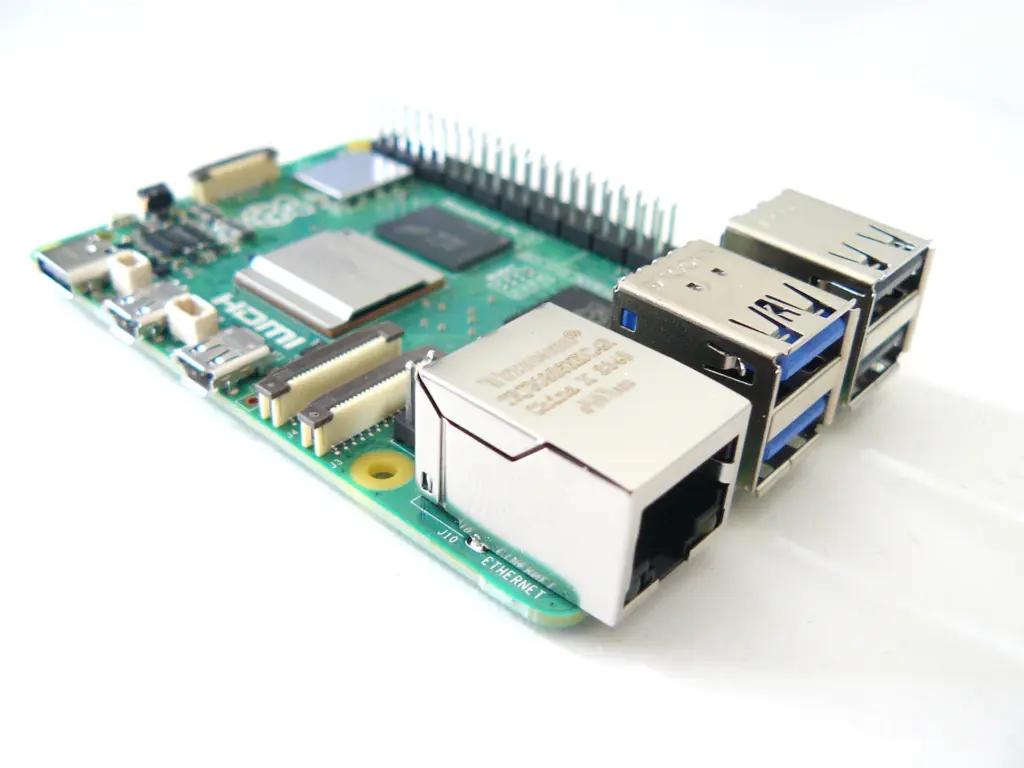
| Raspberry Pi 5 | Computer to build yourself | 4 cores at 2.4 GHz, 1 to 16 GB RAM, gigabit LAN, 2 × USB 3.0 and 2 × USB 2.0, PCIe connector | Tinkerers with a power supply and storage on hand |
| ASUS NUC 14 Essential | Mini PC (x86) | Intel N97 to Core 3 N355, up to 16 GB DDR5, M.2 SSD, 2.5 Gbit LAN, 1 × USB 2.0 at the back | Large installations, compute-heavy plans |
| Home Assistant Connect ZBT-2 | Radio stick for Zigbee or Thread | Silicon Labs MG24, antenna with 4.16 dBi, USB-C, 1.5 m cable | New Zigbee or Thread networks |
| SONOFF ZBDongle-E | Radio stick for Zigbee | Silicon Labs EFR32MG21, external antenna | Second stick next to a Thread adapter |
| Home Assistant Connect ZWA-2 | Radio stick for Z-Wave | Z-Wave 800 with Long Range, EU frequency 868 MHz, USB-C | Households with Z-Wave devices |
Home Assistant Green: unbox, plug in, done
The Green comes with Home Assistant OS preinstalled. Connect power and a network cable; Nabu Casa asks for nothing more. Inside, a Rockchip RK3566 works with 4 GB of RAM, and data is stored on 32 GB of eMMC; the microSD slot is only there for recovery. According to the manufacturer, power consumption is about 1.7 W at idle and 3 W under load, and the case measures 112 × 112 × 32 mm.
The Green has no radio module of its own. On the product page, Nabu Casa still lists Thread support as „in development.“ If you want to build a Thread network today, you should know that. For Zigbee and Matter over Wi-Fi, on the other hand, the device is ready to go as soon as a stick is plugged in.
And what about the Yellow?
Nabu Casa ended production of the Home Assistant Yellow in October 2025. Software updates are to continue, but there will be no new stock for retailers. The manufacturer itself refers new customers to the Green, which is why the Yellow is missing from our table.
Raspberry Pi 5: lots of power, more do-it-yourself
The Pi 5 clocks its four Cortex-A76 cores at 2.4 GHz; the Green reaches 1.8 GHz. Home Assistant supports the Pi 4 and Pi 5 from 2 GB of RAM. On top of that, you need a power supply, a microSD card with at least 32 GB and the A2 rating, and a network cable, which is mandatory for installation. According to the documentation, phone chargers may be unsuitable; the Raspberry Pi Foundation specifies a 5 V, 5 A supply for the Pi 5 and recommends its 27 W power supply.
Our advice: plan for an SSD later on. Home Assistant OS can move its data to an external drive, and according to the documentation a fast storage device makes the whole system noticeably snappier. A plus for long-term planners: according to the manufacturer, the Pi 5 will remain in production until at least January 2036. Which version suits which project is explained in our Raspberry Pi guide (in German).
Mini PC: ASUS NUC 14 Essential
The NUC line comes from Intel. Since October 2023, ASUS has been building and selling these devices. The NUC 14 Essential is an x86 computer with Intel processors from the N97 to the Core 3 N355, up to 16 GB of DDR5 and slots for one NVMe and one SATA SSD. Interesting for Zigbee: there is a USB 2.0 port at the back, exactly the port type Home Assistant recommends for the radio stick.
The installation instructions for x86 computers name two pitfalls. Secure Boot must be disabled in the BIOS. And SSDs that work only with 4K sectors refuse to boot; the drive must support 512-byte sectors. You do not need versions with Windows 11 preinstalled for this; kits without an operating system are enough. General information on form factor and noise levels is in the mini PC guide (in German). Is the extra effort worth it? Our assessment: more likely for compute-heavy plans such as analyzing camera images. Not for lights, heating and smart plugs.
Connect ZBT-2: the stick from the manufacturer itself
Home Assistant’s Zigbee integration names the ZBT-2 as the first choice for new Zigbee networks; its predecessor, the ZBT-1, has been discontinued. Inside the stick is a Silicon Labs MG24 chip, and according to Nabu Casa the antenna reaches 4.16 dBi and, in Europe, 10 dBm of transmit power. It handles Zigbee 3.0 or Thread. Not both at once.
SONOFF ZBDongle-E: Zigbee with an external antenna
Home Assistant lists the ZBDongle-E with its EFR32MG21 chip among tested adapters, and Zigbee2MQTT supports it as well. It works well as a second stick: ZBT-2 for Thread, SONOFF for Zigbee. When buying, look for the „E“ in the name. Under an almost identical title, SONOFF also sells the ZBDongle-P with a Texas Instruments chip, which runs on a different driver in Zigbee2MQTT. Zigbee2MQTT advises against multiprotocol firmware and recommends one adapter per protocol.
Connect ZWA-2: for Z-Wave households
In Europe, Z-Wave transmits around 868 MHz, outside the 2.4 GHz band used by Zigbee and Thread. According to Nabu Casa, the ZWA-2 supports the 800 series including Long Range and automatically sets the region in Home Assistant based on your location. It is mainly of interest for households with existing Z-Wave devices.
How we would decide
- You want Home Assistant without tinkering: Green plus ZBT-2 for Zigbee. Enough for lights, heating, sensors and Matter over Wi-Fi.
- Thread and Zigbee in parallel: ZBT-2 as the Thread adapter, plus a ZBDongle-E for Zigbee. With Home Assistant OS, not in Container.
- A Raspberry Pi is already sitting in a drawer: Pi 5 with at least 2 GB, an A2 card, a suitable power supply and a network cable, and an SSD later.
- Large installation with camera images and dozens of integrations: a mini PC such as the NUC 14 Essential, with the radio stick on the rear USB 2.0 port via an extension.
- Existing Z-Wave devices: add the ZWA-2.
Whichever computer you choose: according to Home Assistant, backups should not live only on the device itself. As an example, the documentation names the Green of all devices, whose backups should be kept in Home Assistant Cloud or another location, such as a NAS on the network. What such a device can look like is shown in our NAS comparison.
A permanent dashboard in the hallway or kitchen is covered in our guide to a wall-mounted tablet, from the power connection to the battery in continuous operation.
Frequently asked questions
Does Home Assistant need a cloud or a subscription?
No. According to the official documentation, the system works fully without the Nabu Casa subscription. The service only adds remote access when you are away and the connection to Alexa and Google Assistant. Everything else runs on your own hardware at home.
Home Assistant OS or Container: what is the difference?
Home Assistant recommends its own operating system, Home Assistant OS, because updates and extensions, the so-called apps, run most conveniently there. The Container version, for example on a NAS, does without these apps. According to the documentation, however, Thread and Z-Wave depend on such apps and do not work in Container without extra work.
Can a radio stick handle Zigbee and Thread at the same time?
Manufacturers advise against it. Nabu Casa explicitly approves the Connect ZBT-2 for only one of the two protocols and recommends one adapter per network. Zigbee2MQTT also recommends one adapter per protocol. For both networks, use the ZBT-2 for Thread and a SONOFF ZBDongle-E alongside it for Zigbee.
Where should the Zigbee stick be placed?
As close to the center of your home as possible, away from walls, power supplies and household appliances. The Zigbee documentation names USB 3 ports as a known source of interference and recommends a USB 2.0 port with a well-shielded extension cable. At the back of the equipment cabinet between power supplies is the wrong place for the stick.
What do you need for Home Assistant on the Raspberry Pi 5?
At least 2 GB of RAM, a microSD card with at least 32 GB and the A2 rating, a network cable for installation and a suitable power supply. The Raspberry Pi Foundation specifies 5 V and 5 A and recommends its 27 W power supply; phone chargers may be unsuitable. Later on, an SSD speeds up the system.
Is the Home Assistant Yellow still available?
Nabu Casa ended production of the Yellow in October 2025. Software updates are to continue, but there will be no new stock for retailers. The manufacturer refers new customers to the Green, which comes with Home Assistant OS preinstalled and, according to the manufacturer, uses about 1.7 W at idle.
Sources
- Home Assistant: Green, technical specifications
- Home Assistant: Connect ZBT-2
- Home Assistant: Connect ZWA-2
- Home Assistant Blog: end of production for the Yellow
- Home Assistant: installation types
- Home Assistant: installation on the Raspberry Pi
- Home Assistant: installation on x86-64 computers
- Home Assistant: data disk and backups
- Home Assistant: Zigbee integration, adapters and placement
- Home Assistant: Thread
- Home Assistant Cloud
- Zigbee2MQTT: adapters with Silicon Labs chips
- Raspberry Pi 5, product page
- ASUS NUC 14 Essential, technical specifications
- ASUS: takeover of the NUC line
Where to buy
- Home Assistant GreenCheck price at Amazon.deCheck price at Amazon.co.ukCheck price at Amazon.nlCheck price at Amazon.com.beCheck price at Amazon.frCheck price at Amazon.itCheck price at Amazon.esCheck price at Amazon.plCheck price at Amazon.seAvailable in Germany: Amazon.de
- Home Assistant Connect ZBT-2Check price at Amazon.deCheck price at Amazon.co.ukCheck price at Amazon.nlCheck price at Amazon.com.beCheck price at Amazon.frCheck price at Amazon.itCheck price at Amazon.esCheck price at Amazon.plCheck price at Amazon.seAvailable in Germany: Amazon.de
- Raspberry Pi 5Check price at Amazon.deCheck price at Amazon.co.ukCheck price at Amazon.nlCheck price at Amazon.com.beCheck price at Amazon.frCheck price at Amazon.itCheck price at Amazon.esCheck price at Amazon.plCheck price at Amazon.seAvailable in Germany: Amazon.de
- ASUS NUC 14 EssentialCheck price at Amazon.deCheck price at Amazon.co.ukCheck price at Amazon.nlCheck price at Amazon.com.beCheck price at Amazon.frCheck price at Amazon.itCheck price at Amazon.esCheck price at Amazon.plCheck price at Amazon.seAvailable in Germany: Amazon.de
- SONOFF ZBDongle-ECheck price at Amazon.deCheck price at Amazon.co.ukCheck price at Amazon.nlCheck price at Amazon.com.beCheck price at Amazon.frCheck price at Amazon.itCheck price at Amazon.esCheck price at Amazon.plCheck price at Amazon.seAvailable in Germany: Amazon.de
- Home Assistant Connect ZWA-2Check price at Amazon.deCheck price at Amazon.co.ukCheck price at Amazon.nlCheck price at Amazon.com.beCheck price at Amazon.frCheck price at Amazon.itCheck price at Amazon.esCheck price at Amazon.plCheck price at Amazon.seAvailable in Germany: Amazon.de