Contents10 sections
This guide was first published in German on handgetestet.de.
A laptop stand alone does not make a good workstation. Without a separate keyboard, your hands creep upward as you type, and your shoulders follow. For the desk at home, we therefore recommend an adjustable aluminum stand such as the Twelve South Curve Flex, plus an external keyboard and mouse. On the go, a light folding stand such as the Roost or Nexstand is enough.
Six laptop stands available on Amazon.de
| Model | Design and material | Key specs according to manufacturer or listing | Best for |
|---|---|---|---|
| Twelve South Curve Flex | adjustable, aluminum, folds flat | stand up to 274 mm high, 30 mm flat when folded | desks with an occasional change of location |
| Rain Design mStand | fixed, single-piece aluminum | raises by around 15 cm | fixed workstation, matching body height |
| Roost V3 | foldable, composite plastic | 178 g, 7 height settings | frequent travelers with a thin laptop |
| Nexstand K2 | foldable, reinforced nylon | 234 g, 8 settings, up to 32 cm | travelers on a smaller budget |
| UGREEN Laptopständer Aluminium (5 Stufen) (aluminum laptop stand, 5 settings) | foldable, aluminum | 46.5 to 136.5 mm, with pouch | inexpensive entry point, small lift |
| BoYata Laptopständer (höhenverstellbar) (height-adjustable laptop stand) | articulated arm, aluminum | adjustable height and angle, up to 17 inches | fixed workstations with a large device |
How high the screen should be
The German statutory accident insurance (Deutsche Gesetzliche Unfallversicherung, DGUV) describes the basic rule for built-in and external screens alike: your gaze should be slightly lowered, the top line sits below eye level, and the distance between your eyes and the screen is 50 to 80 centimeters. For longer work on a notebook, the DGUV explicitly recommends an external keyboard and mouse. The Arbeiterkammer Wien (Vienna Chamber of Labor) puts it even more clearly for Austrian workplaces: if a laptop is used regularly at a fixed workstation, it needs a separate keyboard and a riser so that the screen reaches an ergonomically acceptable height.
The math behind it is simple. The top edge of the screen belongs just below your eye level. Shorter people at a normal table often need only 12 to 15 centimeters for that; tall people with a 16-inch device need considerably more. With fixed stands, that remains guesswork.
Adjustable stands take the guesswork away. What matters is how high the screen ends up, not the stand, especially since manufacturers measure differently. For a backpack, folded length and grams are what count: travel stands come in at around 180 to 240 grams, while aluminum desk stands often weigh more than a kilo. Aluminum feels sturdy and heavy. Plastic and nylon save weight but tend to flex when you tap the touchscreen. Open undersides and ventilation slots let air reach the bottom of the laptop. Whether a device actually stays noticeably cooler as a result depends on the laptop; we could not find any independent measurements on this. And the support has to fit. Clamp stands such as the Roost need a thin front edge, flat-platform stands a suitable support depth.
From our hands-on test: the Lamicall aluminum laptop stand can be adjusted for tilt, rotation and height, and it clicks noticeably into place as it rotates. That lets you quickly turn the screen toward the person across from you and back again.
Twelve South Curve Flex
The adjustable version of the well-known Curve. According to the manufacturer, the stand extends up to 274 mm; with a 16-inch MacBook Pro, the top edge of the screen then sits around 56 centimeters above the table. Folded, it is 30 mm flat, and a neoprene sleeve is included. It is still too heavy for travel. Between the office and a home office, it fits well.
Rain Design mStand
Among fixed aluminum stands, the mStand has been considered a classic for years. Retailers state a lift of about 15 centimeters, and there is a cable opening at the back. It stands like a piece of furniture. That is also exactly its weakness: if the height does not match your seating position, nothing can be adjusted. If you want to rotate the screen, Rain Design also offers the mStand360.
Roost V3
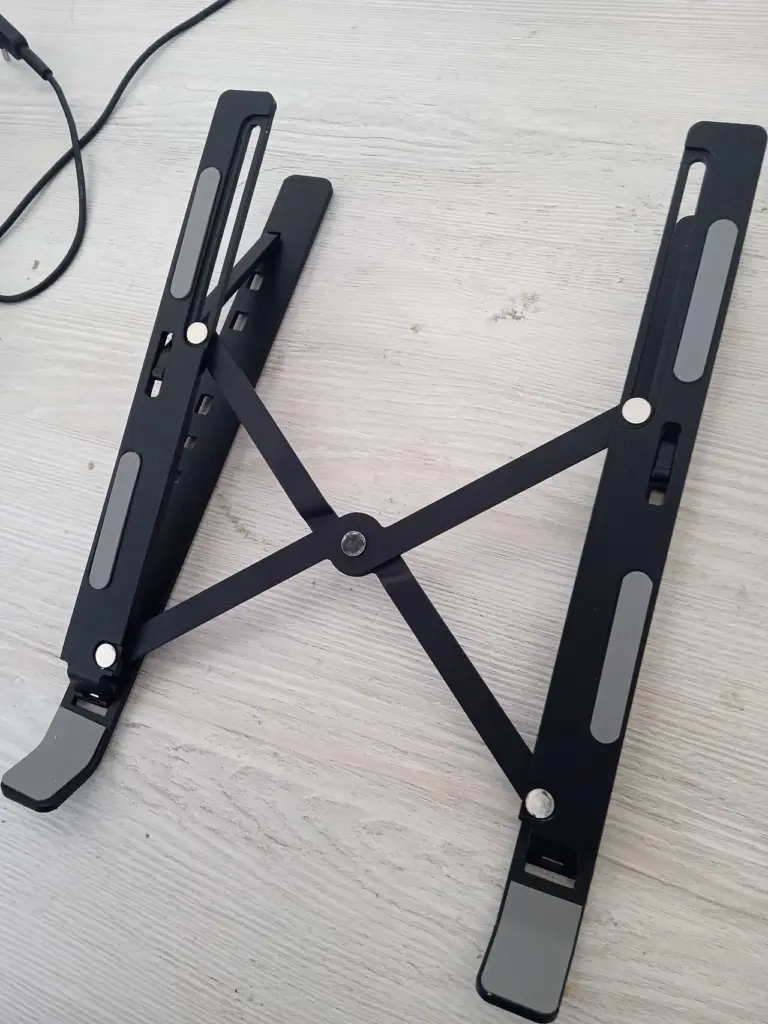
The Roost clamps the laptop at its front edge and stands it up almost vertically. Roost states 178 grams, seven height settings and a screen lift of 6.5 to 12.5 inches, or roughly 16 to 32 centimeters. Folded, it is around 33 centimeters long. According to the manufacturer, the laptop’s front edge may be no more than 1.9 centimeters thick, so thick gaming laptops are ruled out. In terms of price, it sits clearly above the competition.
Nexstand K2
A similar principle, but made of reinforced nylon. Retailers state 234 grams, eight settings and a height of up to 32 centimeters; folded, it measures about 35 centimeters. Buyers describe it as stable, although some find the plastic basic.
If you only work in a hotel now and then, that is often enough.
UGREEN Laptopständer Aluminium
Five settings, foldable, aluminum. According to the listing, however, it only raises the laptop by between 46.5 and 136.5 millimeters, which is usually too little for true eye level. With a few books under the base or a higher table, it can still be enough. As an inexpensive entry point with ventilation slots and a pouch, it is a sensible choice as long as your expectations match.
BoYata Laptopständer
BoYata makes aluminum stands with an articulated arm on which height and tilt can be set separately; they are suitable for laptops up to 17 inches. The specifications for height and load capacity vary depending on the variant and listing, so read the product description carefully. Buyers praise the stability and criticize the weight. A stand for the desk. Not for the bag.
Which stand suits which routine
If the laptop is your main computer at a fixed desk, we would take the Twelve South Curve Flex with an external keyboard and an ergonomic mouse. If you know your height and never change it, the mStand will do the job as well.
Often on the road, thin laptop, every gram counts: Roost V3. The Nexstand K2 is the cheaper version of the same principle, and both fit into any compartment of a laptop backpack. If it has to be inexpensive, that leaves the UGREEN, provided a small lift is enough for you. For a large device and lots of typing at a standing workstation, combine an articulated stand such as the BoYata with a height-adjustable desk.
One more word on Satechi: the brand’s foldable aluminum stand was most recently unavailable on Amazon.de, and the other Satechi models are vertical holders for a closed laptop. They solve a different problem and are therefore not on the list.
Which Windows laptop goes on the stand, from a light ultrabook to a business machine, is compared in our guide to the Windows laptop.
Frequently asked questions
How high should a laptop screen be?
According to the German statutory accident insurance (DGUV), your gaze should be slightly lowered, the top line of the screen should sit below eye level, and the distance to your eyes should be 50 to 80 centimeters. Shorter people at a normal table often need only 12 to 15 centimeters of lift; tall people with a 16-inch device need considerably more.
Do you need an external keyboard with a laptop stand?
Yes. For longer work sessions, the DGUV explicitly recommends an external keyboard and mouse. The Arbeiterkammer Wien (Vienna Chamber of Labor) calls for a separate keyboard and a riser when a laptop is used regularly at a fixed workstation. Without a keyboard, your hands creep upward as you type, and your shoulders follow.
Fixed or adjustable laptop stand?
With fixed stands such as the Rain Design mStand, finding the right height remains guesswork: retailers state a lift of about 15 centimeters, and nothing can be adjusted. Adjustable stands such as the Twelve South Curve Flex extend up to 274 mm according to the manufacturer and fold down to 30 mm flat.
Which laptop stand is suitable for travel?
For a backpack, folded length and weight are what count. According to the manufacturer, the Roost V3 weighs 178 grams and has seven height settings; according to retailers, the Nexstand K2 weighs 234 grams and has eight settings. Aluminum desk stands often weigh more than a kilo, whereas plastic and nylon tend to flex when you tap the touchscreen.
Does the Roost also fit thick laptops?
No. The Roost clamps the laptop at its front edge, which according to the manufacturer may be no more than 1.9 centimeters thick. That rules out thick gaming laptops. Flat-platform stands, by contrast, need a suitable support depth. For large devices up to 17 inches, there are articulated stands such as the BoYata.
Is the UGREEN laptop stand enough to reach eye level?
Usually not. According to the listing, it only raises the laptop by between 46.5 and 136.5 millimeters. With a few books under the base or a higher table, it can still be enough. As an inexpensive entry point with ventilation slots and a carrying pouch, it is a sensible choice as long as your expectations match.
Sources
- DGUV PlusPunkt: Notebooks, tablets and more
- Arbeiterkammer Wien: Working ergonomically with notebooks and tablet PCs
- Twelve South: Curve Flex
- Roost: Roost V3
- Rain Design: mStand
- PB Tech: Nexstand K2 data sheet
Where to buy
- Twelve South Curve FlexCheck price at Amazon.deCheck price at Amazon.co.ukCheck price at Amazon.nlCheck price at Amazon.com.beCheck price at Amazon.frCheck price at Amazon.itCheck price at Amazon.esCheck price at Amazon.plCheck price at Amazon.seAvailable in Germany: Amazon.de
- Rain Design mStandCheck price at Amazon.deCheck price at Amazon.co.ukCheck price at Amazon.nlCheck price at Amazon.com.beCheck price at Amazon.frCheck price at Amazon.itCheck price at Amazon.esCheck price at Amazon.plCheck price at Amazon.seAvailable in Germany: Amazon.de
- Roost V3Check price at Amazon.deCheck price at Amazon.co.ukCheck price at Amazon.nlCheck price at Amazon.com.beCheck price at Amazon.frCheck price at Amazon.itCheck price at Amazon.esCheck price at Amazon.plCheck price at Amazon.seAvailable in Germany: Amazon.de
- Nexstand K2Check price at Amazon.deCheck price at Amazon.co.ukCheck price at Amazon.nlCheck price at Amazon.com.beCheck price at Amazon.frCheck price at Amazon.itCheck price at Amazon.esCheck price at Amazon.plCheck price at Amazon.seAvailable in Germany: Amazon.de
- UGREEN Laptopständer Aluminium (5 Stufen)Check price at Amazon.deCheck price at Amazon.co.ukCheck price at Amazon.nlCheck price at Amazon.com.beCheck price at Amazon.frCheck price at Amazon.itCheck price at Amazon.esCheck price at Amazon.plCheck price at Amazon.seAvailable in Germany: Amazon.de
- BoYata LaptopständerCheck price at Amazon.deCheck price at Amazon.co.ukCheck price at Amazon.nlCheck price at Amazon.com.beCheck price at Amazon.frCheck price at Amazon.itCheck price at Amazon.esCheck price at Amazon.plCheck price at Amazon.seAvailable in Germany: Amazon.de