Contents11 sections
This guide was first published in German on handgetestet.de.
With ergonomic mice, it is less often about the model than about the size. A large vertical mouse in a small hand is no gain. There is a reason the German statutory accident insurers require that the mouse fit the size of your hand. At the typical office workstation, a vertical mouse in the right size is the sensible first step; for small to medium hands, for example the Logitech Lift, also available in a version for the left hand. The second choice is a trackball if space is tight or your arm should stop moving around altogether.
What occupational safety experts mean by “ergonomic”
The word appears on almost every package these days. More reliable is what the German Social Accident Insurance requires in its guideline for screen and office workstations (DGUV Information 215-410, section 7.2.3). The mouse should fit the size of your hand, be usable in a normal hand and body posture and not slip when you click. The buttons should press easily and give clear feedback. Separate mice should be provided for left-handed users if a model cannot be used with both hands.
What is striking is what it does not say. The DGUV does not prescribe a particular design. Above all, a vertical mouse changes the position of your wrist; it is not a cure. If symptoms persist, the question belongs with your company doctor or your family physician, not in your shopping cart.
From hand length to design
Start with a ruler. Measure from your wrist to the tip of your middle finger. Manufacturers roughly classify their models as small to medium or medium to large, and that information counts for more than sensor resolution.
Then the design. A vertical mouse turns your hand upright, as in a handshake. A trackball stays in place, and only your thumb or fingers move. A contoured mouse is a classic mouse with a thumb rest and belongs more to the comfort category. Left-handed users need to look more closely, because vertical mice and thumb trackballs are almost always asymmetrical. If there is no dedicated left-handed version, a symmetrical finger trackball remains.
When it comes to power and connectivity, the differences are smaller. An AA battery with very long runtime or a rechargeable battery with USB-C: both work, rechargeables just need a bit more attention. With a USB receiver and Bluetooth, you can switch between a work computer and a personal laptop.
A period of adjustment is part of it. With a trackball in particular, not every click lands in the first few days. And if you only game, you are looking for something else: light, fast models like those in our gaming mouse (in German) guide.
Six mice and trackballs side by side
| Model | Design | Key specs according to manufacturer | Best for | Offer (affiliate link) |
|---|---|---|---|---|
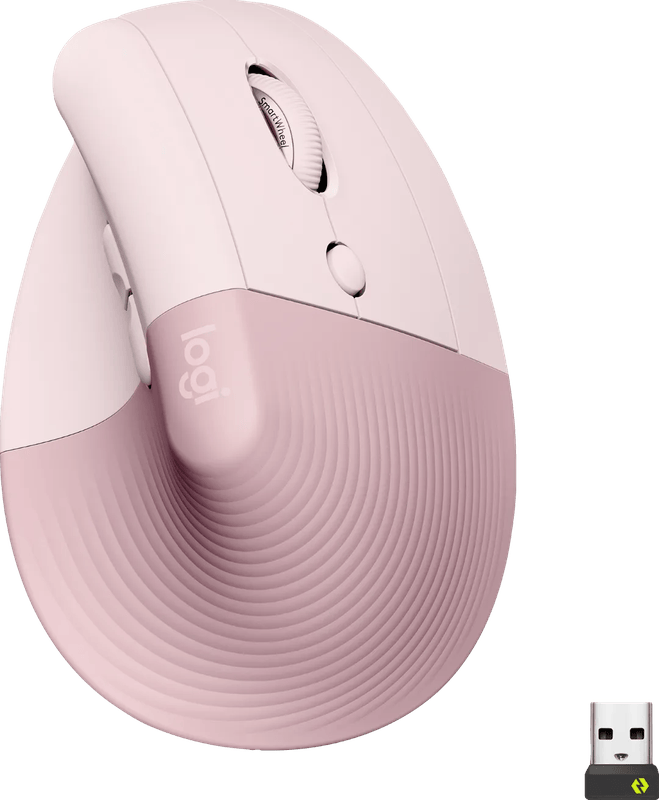
| Logitech Lift | Vertical, 57 degrees | AA battery up to 24 months, Logi Bolt and Bluetooth, 125 g | Small to medium hands, also left-handed users | View at CoolblueAvailable in Germany: Coolblue€51.90≈ £43.23≈ CHF 47.97≈ PLN 228.97≈ SEK 578.32≈ DKK 387.92≈ NOK 550.37≈ CZK 1,265.63≈ HUF 19,120≈ RON 277.49≈ ISK 7,110≈ $56.92≈ CA$81.43 at Coolblue · As of 19.11. |
| Logitech MX Vertical | Vertical, 57 degrees | Rechargeable battery up to 4 months, Unifying receiver and Bluetooth | Medium to large hands, right-handed only | Check price at Amazon.deCheck price at Amazon.co.ukCheck price at Amazon.nlCheck price at Amazon.com.beCheck price at Amazon.frCheck price at Amazon.itCheck price at Amazon.esCheck price at Amazon.plCheck price at Amazon.seAvailable in Germany: Amazon.de |
| Logitech MX Master 4 | Contoured mouse | Rechargeable battery up to 70 days, 8,000 dpi, haptic feedback, 150 g | Those who want to keep the classic posture | View at CoolblueAvailable in Germany: CoolblueCheck price at Amazon.deCheck price at Amazon.co.ukCheck price at Amazon.nlCheck price at Amazon.com.beCheck price at Amazon.frCheck price at Amazon.itCheck price at Amazon.esCheck price at Amazon.plCheck price at Amazon.seAvailable in Germany: Amazon.de€94.00≈ £78.29≈ CHF 86.88≈ PLN 414.71≈ SEK 1,047.44≈ DKK 702.59≈ NOK 996.82≈ CZK 2,292.28≈ HUF 34,630≈ RON 502.59≈ ISK 12,878≈ $103.10≈ CA$147.49 at Coolblue · As of 19.11. |
| Logitech MX Ergo S | Thumb trackball | 20-degree tilt, rechargeable battery with USB-C, Logi Bolt | Little space, lots of clicking, right-handed only | View at CoolblueAvailable in Germany: CoolblueCheck price at Amazon.deCheck price at Amazon.co.ukCheck price at Amazon.nlCheck price at Amazon.com.beCheck price at Amazon.frCheck price at Amazon.itCheck price at Amazon.esCheck price at Amazon.plCheck price at Amazon.seAvailable in Germany: Amazon.de€80.90≈ £67.38≈ CHF 74.78≈ PLN 356.91≈ SEK 901.47≈ DKK 604.68≈ NOK 857.90≈ CZK 1,972.83≈ HUF 29,804≈ RON 432.55≈ ISK 11,083≈ $88.73≈ CA$126.93 at Coolblue · As of 19.11. |
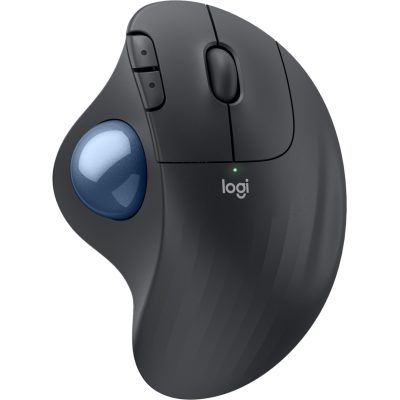
| Logitech Ergo M575S | Thumb trackball | AA battery 18 to 20 months, Logi Bolt and Bluetooth | Getting started with trackballs, right-handed only | View at CoolblueAvailable in Germany: CoolblueCheck price at Amazon.deCheck price at Amazon.co.ukCheck price at Amazon.nlCheck price at Amazon.com.beCheck price at Amazon.frCheck price at Amazon.itCheck price at Amazon.esCheck price at Amazon.plCheck price at Amazon.seAvailable in Germany: Amazon.de€38.99≈ £32.47≈ CHF 36.04≈ PLN 172.02≈ SEK 434.47≈ DKK 291.43≈ NOK 413.47≈ CZK 950.81≈ HUF 14,364≈ RON 208.47≈ ISK 5,342≈ $42.76≈ CA$61.18 at Coolblue · As of 19.11. |
| Kensington Expert Mouse TB800 EQ | Finger trackball, 55 mm ball | Rechargeable battery up to 4 months, 2.4 GHz, Bluetooth, USB-C cable | Left- and right-handed users, medium to large hands | Check price at Amazon.deCheck price at Amazon.co.ukCheck price at Amazon.nlCheck price at Amazon.com.beCheck price at Amazon.frCheck price at Amazon.itCheck price at Amazon.esCheck price at Amazon.plCheck price at Amazon.seAvailable in Germany: Amazon.de |
Logitech Lift
According to Logitech, the Lift sets your hand upright at a 57-degree angle and is expressly designed for small to medium-sized hands. An AA battery is said to last up to two years. It connects via the Logi Bolt receiver or Bluetooth, with up to three devices. There is a dedicated left-handed version called “Lift Left,” a rarity among vertical mice. For the normal office workstation, it is our starting point.
Logitech MX Vertical
Same angle, bigger body. Logitech itself points people with large hands from the Lift to the MX Vertical. Charging is handled by a USB-C port, and according to Logitech one charge lasts four months at best. It still connects via the older Unifying receiver or Bluetooth. There is no left-handed version. Small hands will find it too big.
Logitech MX Master 4
Not a vertical mouse, but a heavily contoured right-handed mouse with a thumb rest. New are a motor for haptic feedback and a sensor up to 8,000 dpi. 150 grams. That is heavy. According to Logitech, one charge lasts up to 70 days. If you do a lot of work with spreadsheets, video editing or graphics and want to keep your usual posture, it offers plenty of buttons. As a step against wrist pain, it is the weaker choice, because your hand stays flat.
Logitech MX Ergo S
A thumb trackball that tilts by 20 degrees so your hand does not lie completely flat. It also charges via USB-C. According to Logitech, one minute on the cable is enough for a working day. The clicks are quieter than on its predecessor. For right-handed users with a cramped desk, it is a well-thought-out solution; there is no version for left-handed users.
Logitech Ergo M575S
The same principle without tilt and without a rechargeable battery. According to Logitech, an AA battery should last 18 months with the receiver and 20 months via Bluetooth. The trackball is priced well below the MX Ergo S and is a good way to try out the design first. It, too, is built for the right hand only.
Kensington Expert Mouse TB800 EQ
A 55-millimeter ball sits in the center, moved with your fingers rather than your thumb. The shape is symmetrical, so left- and right-handed users can handle it equally well. Kensington states up to four connections (two via Bluetooth, one via wireless receiver, one via cable), 16 programmable buttons and a battery that lasts four months at best. The device is large and takes some getting used to. According to Kensington, it is intended for medium to large hands.
Our recommendations
- Small to medium hand, first switch: Logitech Lift. Left-handed users choose the Lift Left.
- Large hand: Logitech MX Vertical.
- Little space, arm should stay put: MX Ergo S; for a more affordable start, the Ergo M575S.
- Left-handed users who want a trackball: Kensington Expert Mouse TB800 EQ.
- Usual posture, many buttons: MX Master 4. For the pure ergonomic effect, it costs a lot and changes little compared with a normal mouse.
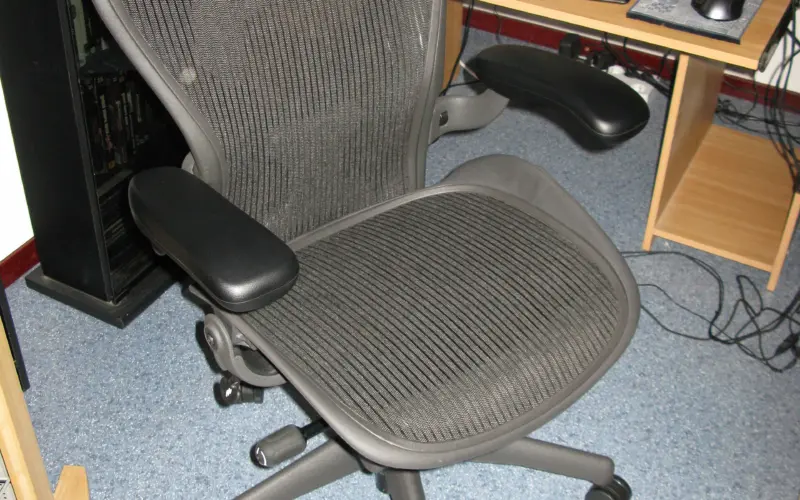
The mouse is only one part of the workstation. If your forearm has no support or your shoulder is hunched up, even the best-fitting shape will not help much. Seat height and armrests are covered in our guide to the ergonomic office chair, and switching between sitting and standing in the one on the height-adjustable desk.
A note on Microsoft: the well-known Sculpt Ergonomic Mouse is currently listed as unavailable on Amazon.de. That is why it is missing here.
Frequently asked questions
What makes a mouse ergonomic?
In its guideline for office workstations, the DGUV (German Social Accident Insurance) requires that the mouse fit the size of your hand, can be operated in a normal posture and does not slip when you click. The buttons should press easily and give clear feedback. The DGUV does not prescribe a particular design.
Does a vertical mouse help against wrist pain?
Above all, it changes the position of your wrist; it is not a cure. As preventive measures, the BAuA (German Federal Institute for Occupational Safety and Health) names varying the strain and avoiding highly repetitive movements. If symptoms persist, the question belongs with your company doctor or your family physician.
Which ergonomic mouse suits large hands?
Logitech itself points people with large hands from the Lift to the MX Vertical. It has the same 57-degree angle, a larger body and a rechargeable battery with USB-C. There is no left-handed version, and small hands will find it too big.
Which ergonomic mice are available for left-handed users?
Vertical mice and thumb trackballs are almost always asymmetrical. The Logitech Lift comes as the Lift Left in a dedicated left-handed version. For a trackball, that leaves the symmetrical Kensington Expert Mouse TB800 EQ with a finger-operated ball, which left- and right-handed users can handle equally well.
What is the difference between a vertical mouse and a trackball?
A vertical mouse turns your hand upright, as in a handshake, and your arm still moves the mouse. With a trackball, the device stays in place and only your thumb or fingers move. That saves space but takes getting used to; in the first few days, not every click lands.
How do I find the right mouse size?
Start with a ruler. Measure from your wrist to the tip of your middle finger. Manufacturers roughly classify their models as small to medium or medium to large, and that information counts for more than sensor resolution.
Sources
- Logitech: Lift vertical ergonomic mouse
- Logitech: MX Vertical
- Logitech: MX Master 4
- Logitech: MX Ergo S
- Logitech: Introduction of the MX Ergo S and Ergo M575S
- Logitech: Ergo M575S
- Kensington: Expert Mouse TB800 EQ
- KomNet NRW: Requirements for computer mice under DGUV Information 215-410 and the German Workplace Ordinance (ArbStättV)
Where to buy
- Logitech Lift (Graphit)Check price at Amazon.deCheck price at Amazon.co.ukCheck price at Amazon.nlCheck price at Amazon.com.beCheck price at Amazon.frCheck price at Amazon.itCheck price at Amazon.esCheck price at Amazon.plCheck price at Amazon.seAvailable in Germany: Amazon.de
- Logitech Lift Left (Linkshänder)Check price at Amazon.deCheck price at Amazon.co.ukCheck price at Amazon.nlCheck price at Amazon.com.beCheck price at Amazon.frCheck price at Amazon.itCheck price at Amazon.esCheck price at Amazon.plCheck price at Amazon.seAvailable in Germany: Amazon.de
- Logitech MX VerticalCheck price at Amazon.deCheck price at Amazon.co.ukCheck price at Amazon.nlCheck price at Amazon.com.beCheck price at Amazon.frCheck price at Amazon.itCheck price at Amazon.esCheck price at Amazon.plCheck price at Amazon.seAvailable in Germany: Amazon.de
- Logitech MX Master 4€94.00≈ £78.29≈ CHF 86.88≈ PLN 414.71≈ SEK 1,047.44≈ DKK 702.59≈ NOK 996.82≈ CZK 2,292.28≈ HUF 34,630≈ RON 502.59≈ ISK 12,878≈ $103.10≈ CA$147.49 at Coolblue · As of 19.11.View at CoolblueAvailable in Germany: CoolblueCheck price at Amazon.deCheck price at Amazon.co.ukCheck price at Amazon.nlCheck price at Amazon.com.beCheck price at Amazon.frCheck price at Amazon.itCheck price at Amazon.esCheck price at Amazon.plCheck price at Amazon.seAvailable in Germany: Amazon.de
- Logitech MX Ergo S€80.90≈ £67.38≈ CHF 74.78≈ PLN 356.91≈ SEK 901.47≈ DKK 604.68≈ NOK 857.90≈ CZK 1,972.83≈ HUF 29,804≈ RON 432.55≈ ISK 11,083≈ $88.73≈ CA$126.93 at Coolblue · As of 19.11.View at CoolblueAvailable in Germany: CoolblueCheck price at Amazon.deCheck price at Amazon.co.ukCheck price at Amazon.nlCheck price at Amazon.com.beCheck price at Amazon.frCheck price at Amazon.itCheck price at Amazon.esCheck price at Amazon.plCheck price at Amazon.seAvailable in Germany: Amazon.de
 Logitech Ergo M575S€38.99≈ £32.47≈ CHF 36.04≈ PLN 172.02≈ SEK 434.47≈ DKK 291.43≈ NOK 413.47≈ CZK 950.81≈ HUF 14,364≈ RON 208.47≈ ISK 5,342≈ $42.76≈ CA$61.18 at Coolblue · As of 19.11.View at CoolblueAvailable in Germany: CoolblueCheck price at Amazon.deCheck price at Amazon.co.ukCheck price at Amazon.nlCheck price at Amazon.com.beCheck price at Amazon.frCheck price at Amazon.itCheck price at Amazon.esCheck price at Amazon.plCheck price at Amazon.seAvailable in Germany: Amazon.de
- Kensington Expert Mouse TB800 EQCheck price at Amazon.deCheck price at Amazon.co.ukCheck price at Amazon.nlCheck price at Amazon.com.beCheck price at Amazon.frCheck price at Amazon.itCheck price at Amazon.esCheck price at Amazon.plCheck price at Amazon.seAvailable in Germany: Amazon.de
- Logitech Lift€51.90≈ £43.23≈ CHF 47.97≈ PLN 228.97≈ SEK 578.32≈ DKK 387.92≈ NOK 550.37≈ CZK 1,265.63≈ HUF 19,120≈ RON 277.49≈ ISK 7,110≈ $56.92≈ CA$81.43 at Coolblue · As of 19.11.View at CoolblueAvailable in Germany: Coolblue
Still undecided?
Keep comparing at your own pace – every article in this category is checked monthly for new and discontinued models.