Contents12 sections
This guide was first published in German on handgetestet.de.
A laptop, a work computer and a tablet, all on one desk. This is exactly where you find out whether a set is any good. Very few of these devices are bad; what usually goes wrong is the choice of wireless technology. If you work like this, you need a set that handles both Bluetooth and a USB receiver and switches between several devices at the press of a key. We see the safest route in the Logitech MX Keys S Combo; with just one Windows PC and a small budget, you can get by with a simple receiver set such as the Logitech MK295 Silent.
Wireless first, typing feel later
A USB receiver works from the moment you plug it in, without pairing and without drivers. Bluetooth saves the port, is often the only option for tablets and smartphones and allows switching between devices. Both routes have their pitfalls.
Logitech names one of them on its own combo page. If FileVault disk encryption is active on the Mac, a Bluetooth-only keyboard can prevent password entry at restart, and the manufacturer then recommends the Logi Bolt receiver. Bluetooth plus a receiver is therefore the most flexible solution. For that, however, you need a free USB port of the right type; some receivers are only available as USB-A.
Several devices in play? Then the keyboard needs a switch key. According to Logitech, the MX Keys S connects to a maximum of three devices.
That leaves three small details that are often overlooked. Rechargeable batteries are charged via a USB-C cable, but with backlighting some last only days, while sets with disposable batteries often run for years according to the manufacturers. Many listings on Amazon.de are US or UK versions, so before ordering, check whether QWERTZ (German) appears in the title. And the operating system: Apple keyboards are tailored to the Mac, and for the Cherry set the manufacturer lists Windows only.
Buy a set or separately?
A set is usually less expensive than two separate pieces and shares one receiver. You should buy separately if keyboard and mouse have to meet different demands. If there is already a good mouse on the desk, with a set you pay for a piece that ends up lying around unused.
The second fork in the road: flat or ergonomic. Flat keyboards with scissor switches resemble a laptop keyboard and need little space. Curved models with a palm rest take up more space but change the posture of your wrists. If your forearms hurt after long days, take a look at the ergonomic mouse (in German). If you raise your laptop to eye level, you need an external keyboard anyway; more on that under laptop stands (in German).
Six keyboard and mouse combinations currently available
| Model | Connection | Power (according to the manufacturer) | For whom | Offer (affiliate link) |
|---|---|---|---|---|
| Logitech MX Keys S Combo | Bluetooth LE or Logi Bolt receiver, keyboard for up to three devices | Rechargeable, USB-C; keyboard up to 10 days with, up to 5 months without backlighting | Offices with several computers, Windows and Mac | Check price at Amazon.deCheck price at Amazon.co.ukCheck price at Amazon.nlCheck price at Amazon.com.beCheck price at Amazon.frCheck price at Amazon.itCheck price at Amazon.esCheck price at Amazon.plCheck price at Amazon.seAvailable in Germany: Amazon.de |
| Logitech MX Keys S + MX Master 4 (separately) | Bluetooth LE or Logi Bolt, mouse with USB-C receiver | Rechargeable; mouse up to 70 days | Creatives and spreadsheet users with high demands on the mouse | |
| Apple Magic Keyboard with Touch ID + Magic Mouse (USB-C) | Bluetooth, no receiver | Rechargeable, USB-C; about one month each | Mac with Apple silicon | |
| Cherry DW 9500 Slim | Bluetooth or 2.4 GHz receiver, selectable by switch | Lithium rechargeable batteries, USB-C; „for weeks“ | Windows users who want to type on a flat keyboard | Check price at Amazon.deCheck price at Amazon.co.ukCheck price at Amazon.nlCheck price at Amazon.com.beCheck price at Amazon.frCheck price at Amazon.itCheck price at Amazon.esCheck price at Amazon.plCheck price at Amazon.seAvailable in Germany: Amazon.de |
| Logitech Wave Keys MK670 Combo | Bluetooth 5.1 or Logi Bolt | Disposable batteries; keyboard up to 3 years, mouse up to 24 months | Heavy typists looking for a curved keyboard | Check price at Amazon.deCheck price at Amazon.co.ukCheck price at Amazon.nlCheck price at Amazon.com.beCheck price at Amazon.frCheck price at Amazon.itCheck price at Amazon.esCheck price at Amazon.plCheck price at Amazon.seAvailable in Germany: Amazon.de |
| Logitech MK295 Silent | USB receiver, 2.4 GHz | Disposable batteries (2 × AAA, 1 × AA) | One Windows PC, small budget, quiet office | Check price at Amazon.deCheck price at Amazon.co.ukCheck price at Amazon.nlCheck price at Amazon.com.beCheck price at Amazon.frCheck price at Amazon.itCheck price at Amazon.esCheck price at Amazon.plCheck price at Amazon.seAvailable in Germany: Amazon.de |
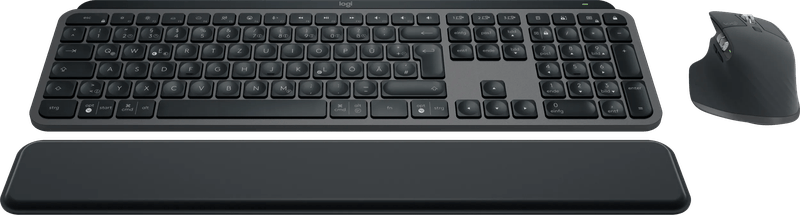
Logitech MX Keys S Combo
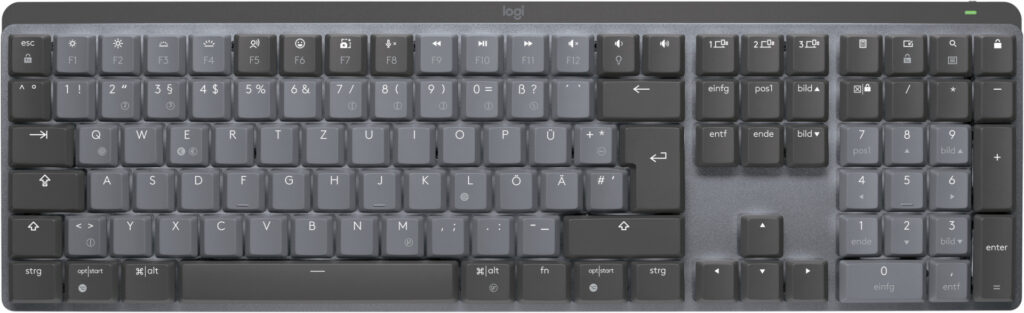
MX Keys S keyboard, MX Master 3S mouse, palm rest, Logi Bolt receiver and charging cable: that is what is in the box. According to Logitech, the keyboard is just over 43 centimeters wide, weighs 810 grams and switches on its backlighting via a proximity sensor as soon as your hands approach. It switches between three devices at the press of a key, even across operating systems.
One detail is annoying. The Bolt receiver is not compatible with older Logitech receivers, so if you still use a Unifying device, you occupy two ports. Price-wise, the set belongs to the upper range.
MX Keys S with MX Master 4, bought separately
The MX Master 4 is the newer sister of the mouse from the combo, and if you want to pair it with the MX Keys S, you buy two separate pieces. According to the manufacturer, it tracks at up to 8,000 dpi, even on glass at least four millimeters thick, has eight buttons and a pad with haptic feedback that can be assigned in the Logi Options+ software. A USB-C receiver is included. It weighs 150 grams; the 3S is lighter. Pure office work hardly justifies the extra cost; if you scroll a lot in spreadsheets or editing programs, you get more controls.
Apple Magic Keyboard with Touch ID and Magic Mouse
Apple does not offer a set; both are sold separately. According to Apple, the Magic Keyboard with Touch ID requires a Mac with Apple silicon and macOS 15.1; then your fingerprint unlocks the computer. It also works with many iPads and iPhones; Apple does not mention Windows support. Instead of a wheel, the Magic Mouse has a multi-touch surface for gestures, and it weighs 99 grams. Both are charged via the USB-C port and, according to the manufacturer, last about a month.
On a Mac, this is the most straightforward choice. If you want an ergonomic grip, however, you will not be happy with the flat mouse, and then there is nothing wrong with pairing the Apple keyboard with a shaped mouse from another manufacturer.
Cherry DW 9500 Slim
Bluetooth or 2.4 GHz wireless, encrypted with AES-128: that is how the set from Germany connects, according to the manufacturer. The flat keyboard uses Cherry’s SX scissor mechanism, and the right-handed mouse has a thumb rest and four resolution levels up to 3,000 dpi. Both pieces have a USB-C charging port. Cherry lists only Windows as the system. Left-handers should look elsewhere.
Logitech Wave Keys MK670 Combo
A gentle wave shape and a padded memory foam palm rest: according to the data sheet, this keyboard is certified by United States Ergonomics. The Signature M550 L mouse is shaped for either hand and, according to Logitech, 90 percent quieter when clicking. Disposable batteries instead of rechargeables are an advantage here, because according to Logitech the keyboard runs for up to three years. It is not split or strongly curved. More of a gentle introduction.
Logitech MK295 Silent
One receiver, no app. It does not get simpler in this comparison. According to Logitech, the SilentTouch technology reduces noise by 90 percent; the keyboard is full-size with a number pad and eight special keys, and the range is ten meters. At a fixed workstation with a single computer, that is entirely sufficient. If you alternate between tablet and laptop, this set falls short.
And Microsoft?
Sets such as the Microsoft Bluetooth Desktop still show up on Amazon.de, but some versions are listed there as currently unavailable. The current status at the manufacturer could not be reliably clarified, which is why Microsoft is missing from the table. When ordering, make sure you get new stock and a German layout.
Which set for which desk
Several computers, a mix of Windows and Mac: that is the case for the Logitech MX Keys S Combo. Expensive, but the switching saves steps every day. If you have high demands on the mouse, buy the MX Keys S and MX Master 4 separately. If there is only a Mac with Apple silicon on the desk, take the Magic Keyboard with Touch ID and choose the mouse according to your hand shape.
Flat typing under Windows without changing batteries works with the Cherry DW 9500 Slim, provided you are right-handed. For lots of text and tense wrists, the Wave Keys MK670 Combo is an introduction to the curved form. And for one PC and little money, there is the Logitech MK295 Silent.
None of these keyboards offers distinctly tactile keystrokes. If that is exactly what you are looking for, you are better off starting with the mechanical keyboard (in German).
Frequently asked questions
USB receiver or Bluetooth: which is better for keyboard and mouse?
A USB receiver works from the moment you plug it in, without pairing or drivers. Bluetooth saves the port, is often the only option for tablets and allows switching between devices. Bluetooth plus a receiver is the most flexible solution, but it needs a free USB port of the right type.
Why does a Bluetooth keyboard not work when restarting a Mac?
If FileVault disk encryption is active on the Mac, a Bluetooth-only keyboard can prevent password entry at restart, according to Logitech. The manufacturer then recommends the Logi Bolt receiver. However, it is not compatible with older Unifying receivers.
Rechargeable battery or disposable batteries for a wireless keyboard?
Rechargeable batteries are charged via a USB-C cable; with backlighting, some last only days, the MX Keys S up to 10 days according to Logitech. Sets with disposable batteries often run for years according to the manufacturers, the keyboard of the Wave Keys MK670 Combo up to three years according to Logitech.
Buy a set, or keyboard and mouse separately?
A set is usually less expensive than two separate pieces and shares one receiver. Buying separately is worthwhile if keyboard and mouse have to meet different demands or you already have a good mouse. Apple only sells the Magic Keyboard and Magic Mouse separately anyway.
What should you look for in keyboard sets on Amazon?
Many listings are US or UK versions, so before ordering, check whether QWERTZ or German appears in the title. The operating system matters too: Apple keyboards are tailored to the Mac, for the Cherry DW 9500 Slim the manufacturer only lists Windows, and the mouse is shaped for right-handers.
Which set suits tense wrists?
Curved models with a palm rest take up more space but change the posture of your wrists. The Logitech Wave Keys MK670 Combo has a gentle wave shape and a padded rest, and according to the data sheet it is certified by United States Ergonomics. It is not strongly curved, more of a gentle introduction.
Sources
- Logitech: MX Keys S Combo
- Logitech: MX Keys S, technical specifications
- Logitech: MX Master 4
- Logitech: Wave Keys MK670 Combo data sheet (PDF)
- Logitech: MK295 Silent
- Apple: Magic Keyboard with Touch ID (USB-C), technical specifications
- Apple: Magic Mouse (USB-C), technical specifications
- Cherry: DW 9500 Slim
Where to buy
- Logitech MX Keys S ComboCheck price at Amazon.deCheck price at Amazon.co.ukCheck price at Amazon.nlCheck price at Amazon.com.beCheck price at Amazon.frCheck price at Amazon.itCheck price at Amazon.esCheck price at Amazon.plCheck price at Amazon.seAvailable in Germany: Amazon.deView at CoolblueAvailable in Germany: Coolblue
- Logitech MX Keys S€91.90≈ £76.54≈ CHF 84.94≈ PLN 405.44≈ SEK 1,024.04≈ DKK 686.90≈ NOK 974.55≈ CZK 2,241.07≈ HUF 33,856≈ RON 491.36≈ ISK 12,590≈ $100.80≈ CA$144.19 at Coolblue · As of 18.11.View at CoolblueAvailable in Germany: CoolblueCheck price at Amazon.deCheck price at Amazon.co.ukCheck price at Amazon.nlCheck price at Amazon.com.beCheck price at Amazon.frCheck price at Amazon.itCheck price at Amazon.esCheck price at Amazon.plCheck price at Amazon.seAvailable in Germany: Amazon.de
- Logitech MX Master 4€94.00≈ £78.29≈ CHF 86.88≈ PLN 414.71≈ SEK 1,047.44≈ DKK 702.59≈ NOK 996.82≈ CZK 2,292.28≈ HUF 34,630≈ RON 502.59≈ ISK 12,878≈ $103.10≈ CA$147.49 at Coolblue · As of 18.11.View at CoolblueAvailable in Germany: CoolblueCheck price at Amazon.deCheck price at Amazon.co.ukCheck price at Amazon.nlCheck price at Amazon.com.beCheck price at Amazon.frCheck price at Amazon.itCheck price at Amazon.esCheck price at Amazon.plCheck price at Amazon.seAvailable in Germany: Amazon.de
- Apple Magic Keyboard mit Touch ID (USB-C)Check price at Amazon.deCheck price at Amazon.co.ukCheck price at Amazon.nlCheck price at Amazon.com.beCheck price at Amazon.frCheck price at Amazon.itCheck price at Amazon.esCheck price at Amazon.plCheck price at Amazon.seAvailable in Germany: Amazon.de
- Apple Magic Mouse (USB-C)Check price at Amazon.deCheck price at Amazon.co.ukCheck price at Amazon.nlCheck price at Amazon.com.beCheck price at Amazon.frCheck price at Amazon.itCheck price at Amazon.esCheck price at Amazon.plCheck price at Amazon.seAvailable in Germany: Amazon.deView at CoolblueAvailable in Germany: Coolblue
- Cherry DW 9500 SlimCheck price at Amazon.deCheck price at Amazon.co.ukCheck price at Amazon.nlCheck price at Amazon.com.beCheck price at Amazon.frCheck price at Amazon.itCheck price at Amazon.esCheck price at Amazon.plCheck price at Amazon.seAvailable in Germany: Amazon.de
- Logitech Wave Keys MK670 ComboCheck price at Amazon.deCheck price at Amazon.co.ukCheck price at Amazon.nlCheck price at Amazon.com.beCheck price at Amazon.frCheck price at Amazon.itCheck price at Amazon.esCheck price at Amazon.plCheck price at Amazon.seAvailable in Germany: Amazon.de
- Logitech MK295 SilentCheck price at Amazon.deCheck price at Amazon.co.ukCheck price at Amazon.nlCheck price at Amazon.com.beCheck price at Amazon.frCheck price at Amazon.itCheck price at Amazon.esCheck price at Amazon.plCheck price at Amazon.seAvailable in Germany: Amazon.de
Still undecided?
Keep comparing at your own pace – every article in this category is checked monthly for new and discontinued models.