Contents10 sections
This guide was first published in German on handgetestet.de.
An open-plan office, or in the evening next to a sleeping partner. And under your fingers, every letter clicks. Anyone who opted for clicky switches regrets it after three days. That bad call has little to do with the brand. For the typical office desk, the editors therefore recommend quiet tactile or quiet linear switches: wireless, the Logitech MX Mechanical; wired and on a small budget, the Cherry KC 200 MX.
What happens under the key
Under every key sits its own switch. It determines how typing feels and how loud it gets. Three basic types have become established.
- Linear (often „Red“ or „Yellow“): The key glides down without a noticeable resistance point. Popular with gamers, pleasant for heavy typists with a light touch.
- Tactile (often „Brown“): A small bump signals that the key has actuated. That helps when writing, without being loud.
- Clicky (often „Blue“ or „Green“): bump plus an audible click. Lovely for enthusiasts, an imposition on your colleagues in a shared office.
- Quiet variants („Silent“, „Quiet“): dampened switches whose keystroke sounds less harsh. The safest choice for the office and for working from home in the evening.
One simple tip before ordering: electronics stores often have switch testers on display. Two minutes of pressing tell you more than a spec sheet.
Where ordering gets tricky
ISO-DE instead of US. Many keyboards, especially in the gaming segment, are also sold in Germany with a US layout. Then Ä, Ö, Ü and ß are missing as dedicated keys, the Enter key is narrow and horizontal, and the key for < and > to the left of the Shift key is missing. If you need the German layout, look for „QWERTZ“, „DE“ or „DE-ISO“ in the product name. „Intl. US“ or „ISO US“ is explicitly not a German layout, even though ISO is in the name.
Wireless is not always just wireless. Bluetooth is enough for the office and usually lets you switch between several devices. Gamers tend to look for a dedicated 2.4 GHz wireless connection with a receiver, because according to the manufacturers it is polled faster. On battery life, the fine print helps. The big numbers almost always apply with the backlight switched off.
Hot-swap means the switches can be pulled out and replaced without soldering. If you are unsure about the switch, it buys you a way to correct your choice. A socket that takes 3- and 5-pin MX-style switches makes sense. Low-profile keyboards like Logitech’s usually do not offer it.
Do your keyboard and mouse bump into the monitor stand? Then a monitor arm frees up space on the desk.
5 models, all with a German layout
| Model | Switches | Connection and battery | Hot-swap | Best for |
|---|---|---|---|---|
| Logitech MX Mechanical | low-profile; Tactile Quiet, Linear or Clicky | Bluetooth, Logi Bolt, up to 3 devices; up to 15 days with, up to 10 months without backlight | not specified | Office, home office, multi-device users |
| Cherry KC 200 MX | MX2A Silent Red or MX2A Brown | USB cable | not specified | quiet office desk on a small budget |
| Keychron Q1 Max (DE-ISO) | Gateron Jupiter Red, Brown or Banana | 2.4 GHz, Bluetooth 5.1, cable; up to 180 hrs without backlight | yes, 3- and 5-pin | Writers, tinkerers, aluminum lovers |
| Corsair K65 Plus Wireless (DE) | MLX Red linear, alternatively MLX Fusion tactile | 2.4 GHz, Bluetooth, cable; up to 266 hrs without backlight | yes | Gamers with little space |
| Razer BlackWidow V4 Pro (QWERTZ) | Green clicky or Yellow linear | USB cable | not specified | Gamers at a fixed desk, macro users |
Logitech MX Mechanical: the office keyboard with a mechanical keystroke
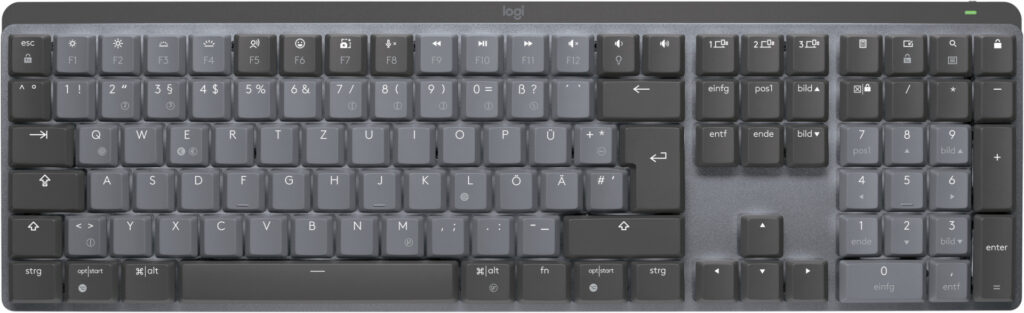
Logitech offers the MX Mechanical in a German QWERTZ layout with three switches: Tactile Quiet, Linear and Clicky. It connects via Bluetooth or the Logi Bolt receiver and switches between up to three devices at the press of a key. According to the manufacturer, one battery charge lasts up to 15 days with the backlight and up to 10 months without. The low-profile keys are closer to a laptop keyboard than classic models. Hot-swap or a powerful hub? Not here. If you simply want typing to be quieter and more precise, the Tactile Quiet variant fits. It is also available as the compact Mini without a number pad.
Cherry KC 200 MX: quiet switches from the inventor of the MX switch
Cherry shaped the MX format that almost every manufacturer copies today. The KC 200 MX is a plain full-size keyboard with a number pad, an anodized metal plate and a cable. You can choose between MX2A Brown (tactile) and MX2A Silent Red (linear and quiet). For the Silent Red switches, Cherry quotes more than 50 million keystrokes, for Brown more than 100 million. Wireless, backlighting and software are absent. That is exactly what makes it the uncomplicated choice for the office desk.
Keychron Q1 Max: heavy, solid and made for modding
The Q1 Max is a 75 percent keyboard with an aluminum case and gasket mount. At a good 1.7 kilograms according to the manufacturer, it does not slide around. It connects via 2.4 GHz or Bluetooth and also runs on a cable. The switches sit in hot-swap sockets for 3- and 5-pin switches, and everything can be programmed via QMK and VIA. Amazon.de carries dedicated DE-ISO versions, but also many US variants. For plain typing in the office, that is more keyboard than you would need. If you like to fine-tune, you get plenty of room to do so.
Corsair K65 Plus Wireless: compact for gamers
The K65 Plus Wireless is also a 75 percent keyboard and is available in a German layout. According to Corsair, the pre-lubricated MLX Red switches actuate at 45 grams and after 1.9 millimeters. There is also a tactile version with MLX Fusion switches. Two layers of dampening are meant to reduce hollow sounds in the case. The PCB is hot-swappable. Without backlighting, the spec sheet lists up to 266 hours of battery life. If the mouse next to it needs a lot of room, you will find the counterpart in our gaming mouse (in German) guide.
Razer BlackWidow V4 Pro: lots of features, potentially lots of noise
The BlackWidow V4 Pro is a large wired keyboard with a Command Dial, eight macro keys, media controls and a magnetic wrist rest. Razer offers it with green clicky and yellow linear switches. The green version? Not for the office. For gamers at a fixed desk who really use macros, the features can pay off. Be careful when ordering: the compact sibling BlackWidow V4 Pro 75% is offered on Amazon.de mainly with a US layout.
Who should pick which one
Office and home office with several devices: Logitech MX Mechanical with Tactile Quiet. Quiet, wireless, German layout out of the box. For a quiet workspace on a small budget, the Cherry KC 200 MX with MX2A Silent Red is enough. No wireless, but nothing that can fail or needs charging.
If you like to swap and customize, go for the Keychron Q1 Max in DE-ISO. Expensive, but every switch stays replaceable.
That leaves the gamers. With little desk space, the Corsair K65 Plus Wireless in the German layout fits; with macros and a fixed spot, the Razer BlackWidow V4 Pro, and with yellow switches if someone else is in the room.
A good keyboard is of little use if the desk is too high or too shallow. Which dimensions matter when planning a new setup is covered in our gaming desk guide.
Frequently asked questions
Which switches are suitable for a mechanical keyboard in the office?
Quiet variants labeled Silent or Quiet are the safe choice for the office and for working from home in the evening. Linear switches glide down without a resistance point; tactile ones signal actuation with a small bump. Clicky switches, often Blue or Green, are an imposition on your colleagues in a shared office.
How do I recognize a keyboard with a German layout?
Look for QWERTZ, DE or DE-ISO in the product name. With a US layout, Ä, Ö, Ü and ß are missing as dedicated keys, the Enter key is narrow and horizontal, and the angle bracket key is missing. Intl. US or ISO US is explicitly not a German layout.
What does hot-swap mean on keyboards?
Hot-swap means the switches can be pulled out and replaced without soldering. If you are unsure about the switch, it buys you a way to correct your choice. A socket for 3- and 5-pin MX-style switches makes sense, as on the Keychron Q1 Max. Low-profile keyboards like Logitech's usually do not offer it.
Bluetooth or 2.4 GHz wireless for cordless keyboards?
Bluetooth is enough for the office and usually lets you switch between several devices. Gamers tend to look for a dedicated 2.4 GHz wireless connection with a receiver, which according to the manufacturers is polled faster. When it comes to battery life, the big numbers almost always apply with the backlight switched off.
Which mechanical keyboard suits gamers?
With little desk space, the Corsair K65 Plus Wireless in the German layout fits, a 75 percent keyboard with hot-swap. If you really use macros and have a fixed spot, the Razer BlackWidow V4 Pro offers eight macro keys, with yellow linear switches if someone else is in the room.
Sources
- Logitech: MX Mechanical (shop, layout and switches)
- Logitech: MX Mechanical (battery and connection)
- Cherry: KC 200 MX
- Keychron: Q1 Max
- Corsair: K65 Plus Wireless (DE)
- Razer: BlackWidow V4 Pro
Where to buy
- Logitech MX MechanicalCheck price at Amazon.deCheck price at Amazon.co.ukCheck price at Amazon.nlCheck price at Amazon.com.beCheck price at Amazon.frCheck price at Amazon.itCheck price at Amazon.esCheck price at Amazon.plCheck price at Amazon.seAvailable in Germany: Amazon.de
- Cherry KC 200 MXCheck price at Amazon.deCheck price at Amazon.co.ukCheck price at Amazon.nlCheck price at Amazon.com.beCheck price at Amazon.frCheck price at Amazon.itCheck price at Amazon.esCheck price at Amazon.plCheck price at Amazon.seAvailable in Germany: Amazon.de
- Keychron Q1 Max DE-ISOCheck price at Amazon.deCheck price at Amazon.co.ukCheck price at Amazon.nlCheck price at Amazon.com.beCheck price at Amazon.frCheck price at Amazon.itCheck price at Amazon.esCheck price at Amazon.plCheck price at Amazon.seAvailable in Germany: Amazon.de
- Corsair K65 Plus WirelessCheck price at Amazon.deCheck price at Amazon.co.ukCheck price at Amazon.nlCheck price at Amazon.com.beCheck price at Amazon.frCheck price at Amazon.itCheck price at Amazon.esCheck price at Amazon.plCheck price at Amazon.seAvailable in Germany: Amazon.de
- Razer BlackWidow V4 ProCheck price at Amazon.deCheck price at Amazon.co.ukCheck price at Amazon.nlCheck price at Amazon.com.beCheck price at Amazon.frCheck price at Amazon.itCheck price at Amazon.esCheck price at Amazon.plCheck price at Amazon.seAvailable in Germany: Amazon.de