Contents8 sections
This guide was first published in German on handgetestet.de.
Most people buy too many keys. If you control OBS, you can get very far with the 15 keys of the Elgato Stream Deck MK.2, because folders and pages multiply the space. If, on the other hand, you edit photos and videos, you don’t need a bigger wall of keys but dials. The Stream Deck + or the Logitech MX Creative Console are the better fit then.
That is why we don’t sort this guide by size but by the work you do: streaming, editing, office.
Three questions before you order
First: press or turn? Switching scenes, muting the microphone and leaving a Zoom meeting are yes-or-no commands. A key is enough for those. Volume, exposure, brush size or the position in the timeline are continuous values. With keys, that becomes tedious plus-minus tapping; a dial handles it with one movement of the hand.
Second: which computer? For all current Elgato devices, the manufacturer requires Windows 11 or macOS 13 and later. For the MX Creative Console, Logitech lists Windows 10 and later as well as macOS 13, but explicitly excludes Windows computers with ARM processors. iPads are not supported. If you own a new Windows laptop with a Snapdragon chip, you should know this before buying.
Third: how many commands do you need to see at the same time? Not in total. At the same time. A streamer with twelve scenes and four audio sources has everything on one level on an XL; on the MK.2, it is spread across two pages. That costs one extra key press. For many people that is no problem, but in the middle of a hectic show it is.
Seven controllers side by side
| Model | Controls | Connection and system | For whom |
|---|---|---|---|
| Elgato Stream Deck Mini | 6 LCD keys | Fixed cable (1.5 m); Windows 11, macOS 13 | Small desk, a few fixed commands |
| Elgato Stream Deck Neo | 8 LCD keys, 2 touch points, info bar | Fixed USB-C cable (0.9 m); Windows 11, macOS 13 | Office, video calls, getting started |
| Elgato Stream Deck MK.2 | 15 LCD keys | USB-C cable (1.5 m), detachable magnetic stand; Windows 11, macOS 13 | Streaming with OBS and Twitch |
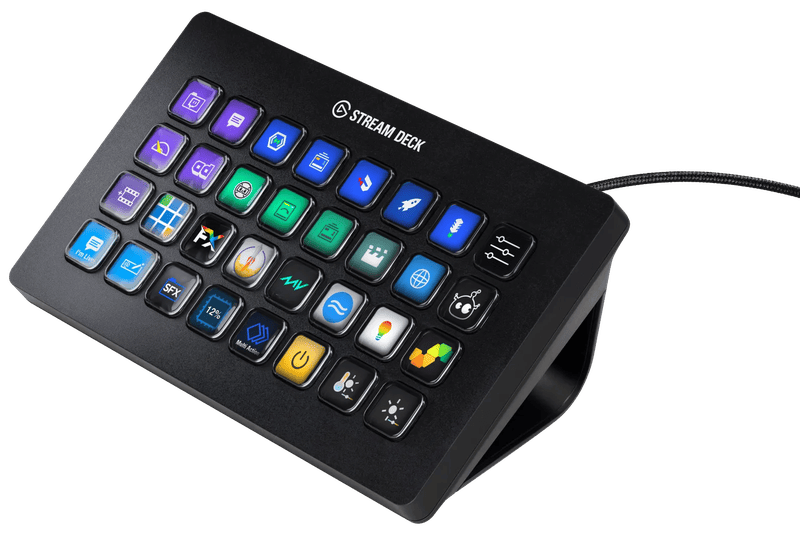
| Elgato Stream Deck XL | 32 LCD keys (8 × 4) | USB-C cable (1.5 m); Windows 11, macOS 13 | Big shows, many scenes |
| Elgato Stream Deck + | 8 LCD keys, 4 dials, touch strip | USB-C, USB 3 port recommended; Windows 11, macOS 13 | Mixing audio, photo and video |
| Elgato Stream Deck + XL | 36 LCD keys, 6 dials, touch strip | USB-C, USB 3 port recommended; Windows 11, macOS 13 | Productions with many sources |
| Logitech MX Creative Console | Keypad with display keys, wireless dial pad | Keypad via USB-C, pad via Bluetooth; Windows 10 (no ARM), macOS 13 | Adobe apps, editing |
Path 1: You stream on Twitch or YouTube
Here, Elgato is hard to get around. According to the manufacturer, the free OBS plugin from the Elgato Marketplace comes with 16 actions, from switching scenes, showing and hiding sources and muting to the replay buffer and chapter markers in the recording. The Twitch plugin starts ad breaks, sets stream markers, changes the title and category and cuts a clip of the last 90 seconds. Both run on Mac and Windows and can be combined in multi actions: one press, and the ad, the break scene and the music all start together.
Elgato Stream Deck MK.2
The classic with 15 keys in three rows. On its own website, Elgato now simply lists it as „Stream Deck“ and offers it with scissor-switch keys in addition to the classic ones. The cable is detachable, the stand attaches magnetically, and the faceplate can be swapped. At 145 grams without the stand, it stays small enough for any desk.
Elgato Stream Deck XL
32 keys in an 8 × 4 grid, 182 millimeters wide. It makes sense when several cameras, guests and inserts are in play at the same time and flipping between pages would be too slow. For a show with three scenes, it is too big, and that is exactly the bad buy that happens often.
Path 2: You edit videos or photos
In editing software, keyboard shortcuts are fast anyway. Dials are what make the difference. If you adjust exposure, contrast and white balance in Lightroom or move color wheels in DaVinci Resolve, you notice how much time the mouse costs you.
Elgato Stream Deck +
Eight keys, below them a 108-millimeter-wide touch strip and four endlessly rotating dials that can also be pressed. Elgato explicitly names the color panel in DaVinci Resolve, tools in Photoshop and mixing audio sources with Wave Link as uses. Streamers benefit too, because microphone, game and music each get their own dial. At 465 grams with a fixed stand, it sits firmly but needs more depth on the desk.
Elgato Stream Deck + XL
36 keys, six dials, a 161-millimeter-wide touch strip and a weight of just over one kilogram. Designed for live productions with many sources. If you sit alone at an editing desk, the smaller Plus has almost everything you need.
Logitech MX Creative Console
Two separate parts: a keypad with display keys on a USB-C cable and a wireless pad with a dial, scroll wheel and keys, which connects via Bluetooth or a Logi Bolt receiver and runs on two AAA batteries. Up to 15 pages of keys are possible per application. Logitech lists Photoshop, Premiere Pro, Illustrator, Lightroom, Final Cut Pro, DaVinci Resolve and Figma. For photographers and editors who live in the Adobe world, this is the more coherent choice. Streamers are better off with Elgato, because Elgato maintains its own plugins for OBS and Twitch.
Path 3: You want to save time at the office
Muting the microphone in Teams, locking the screen, creating the folder structure for a new project, inserting a text snippet signature. Those are the classics. Eight keys are almost always enough for them.
Elgato Stream Deck Neo
Eight LCD keys, two touch points for flipping pages and, between them, a freely assignable info bar. According to Elgato, a single key can trigger different commands depending on a short, double or long press. The stand is built in, but the USB-C cable is fixed and, at 90 centimeters, rather short. For an office desk, the most sensible size.
Elgato Stream Deck Mini
Six keys on 84 × 60 millimeters, with a permanently attached cable. It is enough for a handful of fixed commands. If you want more later, you quickly hit the limit. In that case, the Neo, with two more keys and the touch points for flipping pages, is the better choice.
What no longer belongs on the shortlist
Loupedeck stopped selling its devices on March 28, 2025 and has since been developing for the MX Creative Console. Retailers still have leftover stock. The Razer Stream Controller depends on the Loupedeck software; in May 2026, Loupedeck announced it would no longer support Razer devices, then reversed the decision in August. For a new purchase, that is too shaky for us. Mountain, maker of the Everest keyboards and the Displaypad, has also shut down its business; according to the company, the remaining stock is sold out.
One more note on the connection. For the Plus models, Elgato recommends a USB-C port with USB 3. On a MacBook with two ports, that gets tight; a good hub from our guide to USB-C hubs helps then.
How we would decide
- Streaming with OBS and Twitch: Stream Deck MK.2. Only if you are constantly flipping pages is the step up to the XL worth it.
- Streaming with a lot of audio: Stream Deck +, because each dial handles one audio source. To go with it, see our guide to USB microphones for streaming (in German) and the webcam guide (in German).
- Photos in Lightroom, editing in Premiere: MX Creative Console, as long as the computer does not run Windows on ARM.
- DaVinci Resolve and occasional streaming: Stream Deck +.
- Office and video calls: Stream Deck Neo.
- Very little space: Stream Deck Mini.
For audio at the streaming desk, we listened to the RØDE PodMic USB in our review against a studio microphone.
Frequently asked questions
How many keys does a Stream Deck need?
What matters is how many commands you need to see at the same time, not in total. The 15 keys of the MK.2 are enough for many streams; additional commands go on extra pages. Only if you are constantly flipping pages do you need the XL with 32 keys. For a show with three scenes, it is too big.
When is a Stream Deck with dials worth it?
For continuous values such as volume, exposure, brush size or the position in the timeline. With keys, that becomes tedious plus-minus tapping. The Stream Deck + has four pressable dials and a touch strip; Elgato cites, for example, the color panel in DaVinci Resolve and mixing audio sources.
What is the difference between the Stream Deck + and the Logitech MX Creative Console?
The MX Creative Console consists of a corded keypad and a wireless pad with a dial, and it is aimed at Adobe apps, Final Cut Pro, DaVinci Resolve and Figma. For streamers, Elgato is the better fit, because Elgato maintains its own plugins for OBS and Twitch.
Which systems support the Stream Deck and the MX Creative Console?
Elgato requires Windows 11 or macOS 13 and later. For the MX Creative Console, Logitech lists Windows 10 and macOS 13 but explicitly excludes Windows computers with ARM processors. iPads are not supported. Owners of a laptop with a Snapdragon chip should know this before buying.
What can the Stream Deck do with OBS and Twitch?
According to Elgato, the free OBS plugin comes with 16 actions, from switching scenes to the replay buffer and chapter markers. The Twitch plugin starts ad breaks, sets markers and cuts a clip of the last 90 seconds. Both can be combined in multi actions.
Can you still buy Loupedeck or Razer controllers?
Loupedeck stopped sales on March 28, 2025; only leftover stock remains. The Razer Stream Controller depends on the Loupedeck software, whose support was in question for a while. That is too shaky for a new purchase. Mountain, maker of the Displaypad, has also shut down its business.
Sources
- Elgato: Stream Deck device comparison
- Elgato: Stream Deck (15 keys)
- Elgato: Stream Deck Mini
- Elgato: Stream Deck Neo
- Elgato: Stream Deck XL
- Elgato: Stream Deck +
- Elgato: Stream Deck + XL
- Elgato Marketplace: OBS Studio plugin
- Elgato Marketplace: Twitch plugin
- Logitech: MX Creative Console
- Logitech Support: MX Creative Console system requirements
- Logitech: MX Creative Console setup guide (PDF)
- Loupedeck: End of sales
- Loupedeck: Support for Razer devices
- Mountain: Announcement on the end of business
Where to buy
- Elgato Stream Deck MK.2Check price at Amazon.deCheck price at Amazon.co.ukCheck price at Amazon.nlCheck price at Amazon.com.beCheck price at Amazon.frCheck price at Amazon.itCheck price at Amazon.esCheck price at Amazon.plCheck price at Amazon.seAvailable in Germany: Amazon.de
- Elgato Stream Deck NeoView at CoolblueAvailable in Germany: CoolblueCheck price at Amazon.deCheck price at Amazon.co.ukCheck price at Amazon.nlCheck price at Amazon.com.beCheck price at Amazon.frCheck price at Amazon.itCheck price at Amazon.esCheck price at Amazon.plCheck price at Amazon.seAvailable in Germany: Amazon.de
- Elgato Stream Deck MiniCheck price at Amazon.deCheck price at Amazon.co.ukCheck price at Amazon.nlCheck price at Amazon.com.beCheck price at Amazon.frCheck price at Amazon.itCheck price at Amazon.esCheck price at Amazon.plCheck price at Amazon.seAvailable in Germany: Amazon.deTry a sample at CoolblueTry a sample at Coolblue
- Elgato Stream Deck XLView at CoolblueAvailable in Germany: CoolblueCheck price at Amazon.deCheck price at Amazon.co.ukCheck price at Amazon.nlCheck price at Amazon.com.beCheck price at Amazon.frCheck price at Amazon.itCheck price at Amazon.esCheck price at Amazon.plCheck price at Amazon.seAvailable in Germany: Amazon.de
- Elgato Stream Deck +View at CoolblueAvailable in Germany: CoolblueCheck price at Amazon.deCheck price at Amazon.co.ukCheck price at Amazon.nlCheck price at Amazon.com.beCheck price at Amazon.frCheck price at Amazon.itCheck price at Amazon.esCheck price at Amazon.plCheck price at Amazon.seAvailable in Germany: Amazon.de
- Elgato Stream Deck + XLCheck price at Amazon.deCheck price at Amazon.co.ukCheck price at Amazon.nlCheck price at Amazon.com.beCheck price at Amazon.frCheck price at Amazon.itCheck price at Amazon.esCheck price at Amazon.plCheck price at Amazon.seAvailable in Germany: Amazon.de
- Logitech MX Creative ConsoleCheck price at Amazon.deCheck price at Amazon.co.ukCheck price at Amazon.nlCheck price at Amazon.com.beCheck price at Amazon.frCheck price at Amazon.itCheck price at Amazon.esCheck price at Amazon.plCheck price at Amazon.seAvailable in Germany: Amazon.de