Contents12 sections
This guide was first published in German on handgetestet.de.
If you are buying a hard drive for your NAS, look at two specs in the data sheet first and only then at the capacity: the recording method and the workload rating. For a typical home NAS with two to four bays, a CMR drive in the 180 TB class such as the WD Red Plus or the Toshiba N300 is enough. Spending more only pays off with many bays, continuous load or very large capacities.
The selection is still confusing. Manufacturers sort their drives by intended use, not by quality. A surveillance drive is not a worse NAS drive, it is a different one.
CMR or SMR: the question to settle first
With conventional recording (CMR), the tracks sit side by side. With SMR, they overlap like roof shingles, which fits more data on a platter but slows down rewriting. Seagate itself describes SMR as a method for predominantly sequential write workloads such as archives and backup tiers, one that requires suitable software control. Toshiba calls CMR the more reliable choice for multi-bay systems and for RAID rebuilds, because write behavior stays predictable under load.
For a NAS, that means: CMR only. According to the manufacturers, all seven models below use this method. With inexpensive desktop drives, it is worth checking the data sheet, because the packaging does not always say.
What the numbers in the data sheet really mean
- The workload rating states how many terabytes per year may be read and written. 180 TB per year works out to roughly half a terabyte a day, 550 TB to about one and a half. A family NAS with photos and a nightly backup usually stays far below that.
- The number of bays a drive is approved for has to do with vibration. Many drives in one enclosure shake each other; pro models have rotational vibration sensors for this.
- The warranty is three or five years. For a drive that runs around the clock, a two-year difference is a real argument.
- The spindle speed determines speed, heat and noise. 5,400 rpm is more pleasant in the living room than 7,200.
For capacity, a simple calculation helps. Four drives of 8 TB each give you around 24 TB of usable space in RAID 5; in RAID 1 with two drives, only 8 of 16 TB remain. And the larger the individual drive, the longer the rebuild takes after a failure. At 20 TB and 250 MB/s, that is a good 22 hours on paper during which the array is vulnerable. If you want to know more about the enclosures, our NAS comparison for home and office covers suitable devices.
Seven internal hard drives and their key specs
| Model | Capacities according to manufacturer | Workload / warranty | Bays | Best for |
|---|---|---|---|---|
| WD Red Plus | 1 to 12 TB, CMR | 180 TB/year, 3 years | up to 8 | Home NAS with 2 to 4 bays |
| Toshiba N300 | 4 to 22 TB, CMR | 180 TB/year, 3 years | up to 8, large models up to 12 | Home NAS, large single drives |
| WD Red Pro | 2 to 26 TB, CMR | 550 TB/year, 5 years | unlimited | Office NAS, many users |
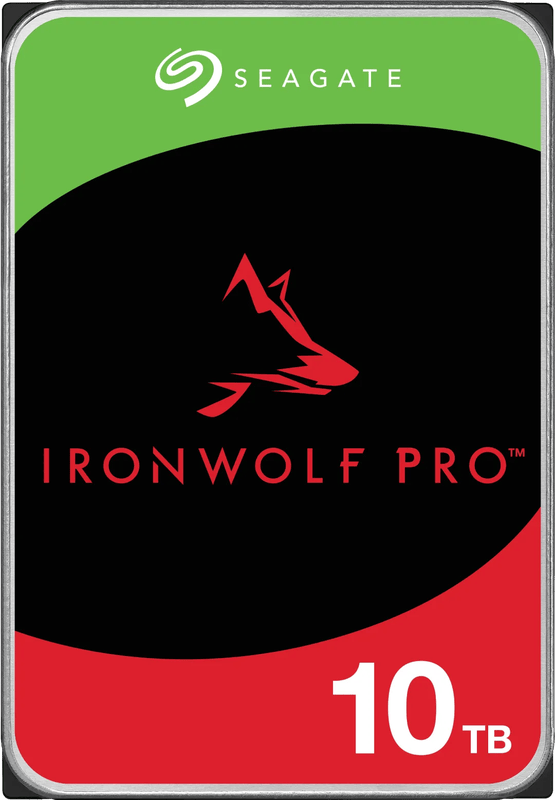
| Seagate IronWolf Pro | up to 32 TB, CMR | 550 TB/year, 5 years | unlimited | Large arrays, data recovery included |
| WD Gold | up to 26 TB, CMR | Enterprise, 5 years | Servers and racks | Servers under continuous load |
| Seagate Exos | 2 to 32 TB, CMR | Enterprise, 5 years | Servers and racks | Data centers, DIY servers |
| Seagate SkyHawk | 1 to 8 TB, CMR | 180 TB/year, 3 years | up to 16 | Video recorders for cameras |
WD Red Plus
Western Digital approves the Red Plus for NAS systems with up to eight bays, with a workload of 180 TB per year and a three-year warranty. The smaller capacities spin at 5,400 rpm, the 10 and 12 TB models at 7,200. For a two- or four-bay NAS in the home office, it is our first choice. Widely used, rather leisurely in the smaller capacities and without features nobody needs at home.
Toshiba N300
The N300 spins at 7,200 rpm in all capacities and goes up to 22 TB. From 12 TB, it is helium-filled; according to Toshiba, the largest models are approved for up to twelve bays, and the manufacturer quotes a typical 20 dB at idle. If you would rather use a few large drives than many small ones in your home NAS, you get more headroom here than with the Red Plus.
WD Red Pro
According to WD, the Pro version handles 550 TB per year, has rotational vibration sensors and a five-year warranty. It is approved for NAS systems with any number of bays. In an office with ten people accessing project folders at the same time, that makes sense. In a two-bay NAS at home, you are mainly paying for the longer warranty.
Seagate IronWolf Pro
Seagate’s counterpart goes up to 32 TB and likewise quotes a 550 TB workload, 2.5 million hours MTBF and a five-year warranty. According to Seagate, it also includes three years of data recovery in the company’s own lab. For the large helium models, the data sheet lists 28 dB at idle and 32 dB during access. You can hear that in the bedroom. The plain IronWolf without the Pro comes in up to 12 TB for up to eight bays, with a 180 TB workload and a three-year warranty.
WD Gold
The Gold series targets servers and mixed read and write loads around the clock. WD quotes up to 26 TB, 2.5 million hours MTBF and a five-year warranty. In a home NAS, it offers hardly any advantage over the Red Pro. For a server in the basement that runs databases or virtual machines, on the other hand, it is exactly right.
Seagate Exos
Exos is Seagate’s data center line, with 7,200 rpm, CMR and a five-year warranty. The current generation goes up to 32 TB. One pitfall when buying: many Exos models come with a SAS interface, and that fits neither a normal motherboard nor a home NAS. Check the model designation for SATA. At idle, Seagate quotes 6.9 watts for the large models; according to Toshiba, the large N300 drives get by with a little over 4 watts.
Seagate SkyHawk
The SkyHawk is built for a network video recorder. Its firmware is designed for steady, continuous writing of many video streams; Seagate quotes up to 64 HD cameras, a 180 TB workload and a three-year warranty. It does not go beyond 8 TB. As a NAS drive for files, it is the wrong choice. Which cameras go with it is covered in our guide to outdoor security cameras.
How we would decide
- Home NAS with two to four bays: WD Red Plus; if you need more than 12 TB per drive, the Toshiba N300.
- NAS in the office or with more than eight bays: WD Red Pro or Seagate IronWolf Pro. The IronWolf Pro if data recovery is worth something to you.
- Server under continuous load: WD Gold or Seagate Exos, but then the SATA model.
- Camera recorder: Seagate SkyHawk, not the NAS drive.
- Data storage in a desktop PC: any of the NAS drives will work. For the system and programs, the computer needs an SSD; more on that in our guide to internal SSDs (in German).
One more practical tip. For a RAID, do not buy all drives on the same day from the same batch if you can avoid it. And do not replace your backup with RAID. A deleted folder is gone from all drives at the same time.
Frequently asked questions
CMR or SMR: which hard drive belongs in a NAS?
Only CMR. With SMR, the tracks overlap like roof shingles; that fits more data on the platter but slows down rewriting. Toshiba calls CMR the more reliable choice for multi-bay systems and RAID rebuilds. With inexpensive desktop drives, it is worth checking the data sheet.
What does a hard drive's workload rating mean?
It states how many terabytes per year may be read and written. 180 TB per year works out to roughly half a terabyte a day, 550 TB to about one and a half. A family NAS with photos and a nightly backup usually stays far below that.
Is a pro-class NAS hard drive worth it at home?
Usually not. The WD Red Pro and Seagate IronWolf Pro handle 550 TB per year, have rotational vibration sensors and a five-year warranty. That makes sense in an office with many simultaneous users. In a two-bay NAS at home, you are mainly paying for the longer warranty.
Can I put a Seagate Exos in a home NAS?
Only the SATA model. Many Exos drives come with a SAS interface, which fits neither a normal motherboard nor a home NAS. So check the model designation for SATA. Exos is really Seagate's data center line.
Is a surveillance hard drive suitable for a NAS?
No. The firmware of the Seagate SkyHawk is designed for steady, continuous writing of many video streams for a network video recorder. As a NAS drive for files, it is the wrong choice. A surveillance drive is not a worse NAS drive, it is a different one.
Does RAID replace a backup?
No. A deleted folder is gone from all drives at the same time. On top of that, rebuilding after a failure takes a long time with large drives: with 20 TB, a good 22 hours on paper. If possible, do not buy all drives on the same day from the same batch.
Sources
- Western Digital: WD Red Plus
- Western Digital: WD Red Pro
- Western Digital: WD Gold
- Seagate: IronWolf Pro data sheet
- Seagate: IronWolf data sheet
- Seagate: Exos data sheet
- Seagate: SkyHawk data sheet
- Seagate: hard drives with CMR and SMR
- Toshiba: N300 NAS Hard Drive
- Toshiba: N300 data sheet
Where to buy
- WD Red PlusView at CoolblueAvailable in Germany: CoolblueCheck price at Amazon.deCheck price at Amazon.co.ukCheck price at Amazon.nlCheck price at Amazon.com.beCheck price at Amazon.frCheck price at Amazon.itCheck price at Amazon.esCheck price at Amazon.plCheck price at Amazon.seAvailable in Germany: Amazon.de
- Toshiba N300Check price at Amazon.deCheck price at Amazon.co.ukCheck price at Amazon.nlCheck price at Amazon.com.beCheck price at Amazon.frCheck price at Amazon.itCheck price at Amazon.esCheck price at Amazon.plCheck price at Amazon.seAvailable in Germany: Amazon.de
- WD Red ProCheck price at Amazon.deCheck price at Amazon.co.ukCheck price at Amazon.nlCheck price at Amazon.com.beCheck price at Amazon.frCheck price at Amazon.itCheck price at Amazon.esCheck price at Amazon.plCheck price at Amazon.seAvailable in Germany: Amazon.de
- Seagate IronWolf ProView at CoolblueAvailable in Germany: CoolblueCheck price at Amazon.deCheck price at Amazon.co.ukCheck price at Amazon.nlCheck price at Amazon.com.beCheck price at Amazon.frCheck price at Amazon.itCheck price at Amazon.esCheck price at Amazon.plCheck price at Amazon.seAvailable in Germany: Amazon.de
- WD GoldCheck price at Amazon.deCheck price at Amazon.co.ukCheck price at Amazon.nlCheck price at Amazon.com.beCheck price at Amazon.frCheck price at Amazon.itCheck price at Amazon.esCheck price at Amazon.plCheck price at Amazon.seAvailable in Germany: Amazon.de
- Seagate Exos SATACheck price at Amazon.deCheck price at Amazon.co.ukCheck price at Amazon.nlCheck price at Amazon.com.beCheck price at Amazon.frCheck price at Amazon.itCheck price at Amazon.esCheck price at Amazon.plCheck price at Amazon.seAvailable in Germany: Amazon.de
- Seagate SkyHawkCheck price at Amazon.deCheck price at Amazon.co.ukCheck price at Amazon.nlCheck price at Amazon.com.beCheck price at Amazon.frCheck price at Amazon.itCheck price at Amazon.esCheck price at Amazon.plCheck price at Amazon.seAvailable in Germany: Amazon.de