Contents14 sections
This guide was first published in German on handgetestet.de.
A PCIe 5.0 SSD in a computer that only supports PCIe 4.0 is expensively bought speed that the slot never uses. This exact mistake happens all the time with internal SSDs. For the vast majority of PCs and for the PS5, a good PCIe 4.0 SSD with a DRAM cache such as the Samsung 990 Pro is enough; for the console, get the version with a heatsink. Gen5 only becomes interesting when the motherboard and the work call for it.
How an M.2 SSD connects to the computer in the first place
All models here are M.2 SSDs in the 2280 form factor using the NVMe protocol. So the little card itself is the same size for all of them. What it is allowed to deliver is determined by the motherboard. The manual states which M.2 slot is connected via PCIe 5.0 and which only via 4.0. According to the manufacturers, newer SSDs also run in older slots, but then at those slots‘ speed.
According to their data sheets, Gen4 SSDs read at around 7,000 to 7,450 MB/s, and Gen5 models reach up to 14,900 MB/s. Both are the manufacturers‘ peak figures. In everyday use, you rarely see them.
A second difference lies inside. SSDs with their own DRAM cache manage their data themselves, while models with a Host Memory Buffer (HMB) borrow system memory from the computer for this. On a PC, you usually do not notice any difference. On the PS5, things can look different; more on that in a moment.
That leaves capacity. Below 2 TB, things quickly get tight with current game libraries; if you edit video, plan for 4 TB instead. And the warranty ends after a set time or amount of data written, whichever comes first.
The PS5 has its own rules
Sony lists clear requirements on its support page: an M.2 NVMe SSD with PCIe Gen4 x4 and an M key, 250 GB to 8 TB, lengths from 2230 to 22110. With cooling, the module may be no more than 25 mm wide and 11.25 mm thick in total, of which no more than 8.0 mm above and 2.45 mm below the circuit board. At least 5,500 MB/s read speed is recommended. According to Sony, cooling such as a heatsink is mandatory. If one is already fitted, no second one should be added. One sentence further down is easy to overlook. The console does not support HMB, which according to Sony can lead to lower performance with such SSDs. A Gen5 SSD does not help in the PS5 either: it runs in the Gen4 slot and still costs more. Everything else that goes with the console is collected in our overview of PS5 accessories.
What TBW is all about
TBW stands for terabytes written. It means the amount of data the manufacturer covers over the warranty period. Samsung and WD specify 600 TBW per terabyte. Mathematically, you could write around 330 GB to a 1 TB SSD every day for five years. Hardly any gamer manages that.
Kingston and Lexar set the bar higher, Kingston at 1,000 TBW per terabyte. For video editing or large databases, that matters. For a game library, hardly at all.
Seven internal SSDs according to manufacturer specs
| Model | Interface, read speed according to the manufacturer | TBW (1 TB) and warranty | Best for |
|---|---|---|---|
| Samsung 990 Pro | PCIe 4.0 x4, up to 7,450 MB/s, DRAM | 600 TBW, 5 years | PC and PS5 (heatsink version) |
| Samsung 990 Evo Plus | PCIe 4.0 x4 / 5.0 x2, up to 7,250 MB/s, HMB | 600 TBW, 5 years | PC upgraders |
| Samsung 9100 Pro | PCIe 5.0 x4, up to 14,800 MB/s | 600 TBW, 5 years | Gen5 platform, large projects |
| WD_Black SN850X | PCIe 4.0 x4, up to 7,300 MB/s | 600 TBW, 5 years | PC and PS5 (only with heatsink) |
| WD_Black SN8100 | PCIe 5.0 x4, up to 14,900 MB/s | 600 TBW, 5 years | Gen5 platform |
| Kingston Fury Renegade with heatsink | PCIe 4.0 x4, up to 7,300 MB/s, DRAM | 1,000 TBW, 5 years | PS5, heavy write loads |
| Lexar NM790 | PCIe 4.0 x4, up to 7,400 MB/s, HMB | 1,000 TBW, 5 years | Large capacity in a PC |
Samsung 990 Pro
Samsung’s top PCIe 4.0 model. Samsung specifies up to 7,450 MB/s read and 6,900 MB/s write, plus its own DRAM cache of 1 to 4 GB depending on capacity. According to Samsung, the heatsink version is 8.2 mm high and intended for the PS5. If you are looking for one SSD for both PC and console and do not want to compromise, this is where you end up.
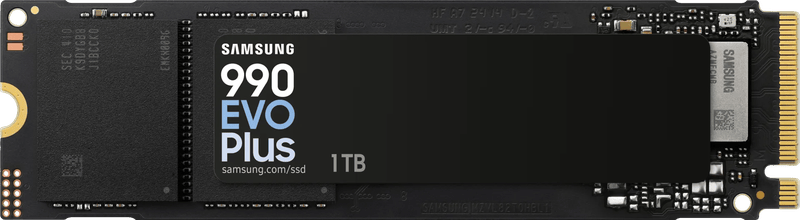
Samsung 990 Evo Plus
No DRAM, HMB instead. That makes the Evo Plus a sensible choice for a PC when games and programs are mainly read. We would not put it in the PS5, because Sony explicitly does not support HMB.
Samsung 9100 Pro
According to the data sheet, Samsung’s Gen5 model ranges from 1 to 8 TB, with 4,800 TBW at 8 TB. It reads at up to 14,800 MB/s. That makes sense for video editing with large raw files on a current motherboard. If you only game, you are primarily paying for benchmark numbers.
WD_Black SN850X
The gaming line now belongs to Sandisk, and the data sheet is published there. Every capacity from 1 to 8 TB is also available with a heatsink, and only these models are listed by Sandisk for the PS5. At 4 and 8 TB, the heatsink version is 10.31 mm high, at 1 and 2 TB 8.9 mm. So check it against Sony’s height requirement before installing.
WD_Black SN8100
According to the manufacturer, the Gen5 sibling reads at up to 14,900 MB/s. For writing, the 1 TB version manages up to 11,000 MB/s and the larger ones up to 14,000 MB/s. TBW and warranty match the SN850X. Wasted without a Gen5 slot.
Kingston Fury Renegade with heatsink
Kingston describes the heatsink version as „PS5 ready“ and specifies a height of 10.5 mm. The endurance is remarkable: 1.0 PB at 1 TB, 4.0 PB at 4 TB. The warranty runs for five years or until the wear indicator „Percentage Used“ reaches 100. Under heavy write loads, there is headroom here.
Lexar NM790
Up to 8 TB, with a heatsink up to 4 TB (9.7 mm high). Lexar specifies 1,000 TBW at 1 TB and 6,000 TBW at 8 TB, and the drive works with HMB instead of DRAM. Lexar does advertise the NM790 as PS5-compatible. Because of Sony’s note on HMB, we still see it more in a PC, where lots of space is needed.
And Crucial?
In December 2025, Micron announced that it would give up the Crucial consumer brand; shipments to retailers were set to end at the end of February 2026. Crucial SSDs such as the P310 still turn up as remaining stock. That is why they are missing here.
Which SSD for which computer
For the PS5, we would go with the Samsung 990 Pro with heatsink or the Kingston Fury Renegade with heatsink, each with at least 2 TB. In a Gen4 gaming PC, the Samsung 990 Pro and the WD_Black SN850X are the obvious picks; more speed does nothing there.
It is different with a new Gen5 system and lots of video editing. There, the Samsung 9100 Pro or the WD_Black SN8100 are a good fit, ideally with 4 TB right away. If you want lots of space at a low price, the Samsung 990 Evo Plus or the Lexar NM790 are options for a PC. And if you want to take your data with you, an external SSD is the better choice.
If a new computer is due anyway, the SSD belongs in the same planning as the motherboard and processor. Only then is it clear whether there is a Gen5 slot at all.
Frequently asked questions
Is a PCIe 5.0 SSD worth it?
Only with a matching motherboard and matching work. In a PCIe 4.0 slot, a Gen5 SSD only runs at that slot's speed. According to their data sheets, Gen4 SSDs read at around 7,000 to 7,450 MB/s, Gen5 models at up to 14,900 MB/s. That makes sense for video editing with large raw files; if you only game, you are mostly paying for benchmark numbers.
Which SSD fits in the PS5?
Sony requires an M.2 NVMe SSD with PCIe Gen4 x4, 250 GB to 8 TB, and recommends at least 5,500 MB/s read speed. Cooling is mandatory, and the total thickness must not exceed 11.25 mm. Good candidates are the Samsung 990 Pro or the Kingston Fury Renegade with heatsink, each with at least 2 TB.
What is the difference between DRAM and HMB?
SSDs with their own DRAM cache manage their data themselves, while models with a Host Memory Buffer borrow system memory from the computer for this. On a PC, you usually do not notice any difference. According to Sony, the PS5 does not support HMB, which can lead to lower performance. That is why HMB models such as the 990 Evo Plus are better suited to a PC.
What does TBW mean for an SSD?
TBW stands for terabytes written, the amount of data the manufacturer covers over the warranty period. Samsung and WD specify 600 TBW per terabyte, Kingston 1,000. Mathematically, you could write around 330 GB to a 1 TB SSD every day for five years. That matters for video editing, hardly at all for a game library.
How much storage should an internal SSD have?
Below 2 TB, things quickly get tight with current game libraries. If you edit video, plan for 4 TB instead. The warranty ends after a set time or amount of data written, whichever comes first.
Why are Crucial SSDs missing?
In December 2025, Micron announced that it would give up the Crucial consumer brand, with shipments to retailers set to end at the end of February 2026. Models such as the P310 still turn up as remaining stock, which is why they are not in the comparison.
Sources
- PlayStation Support: M.2 SSD in the PS5
- Samsung: 990 Pro data sheet
- Samsung: 990 Pro Heatsink
- Samsung: 990 Evo Plus data sheet
- Samsung: 9100 Pro data sheet
- Sandisk: WD_Black SN850X data sheet
- Sandisk: WD_Black SN8100 data sheet
- Kingston: Fury Renegade with heatsink data sheet
- Lexar: NM790 product sheet
- Lexar: NM790 with heatsink product sheet
- Borns IT-Blog: Micron discontinues Crucial for consumers (in German)
Where to buy
- Samsung 990 Pro (1 TB, ohne Kühlkörper)Check price at Amazon.deCheck price at Amazon.co.ukCheck price at Amazon.nlCheck price at Amazon.com.beCheck price at Amazon.frCheck price at Amazon.itCheck price at Amazon.esCheck price at Amazon.plCheck price at Amazon.seAvailable in Germany: Amazon.de
- Samsung 990 Pro HeatsinkCheck price at Amazon.deCheck price at Amazon.co.ukCheck price at Amazon.nlCheck price at Amazon.com.beCheck price at Amazon.frCheck price at Amazon.itCheck price at Amazon.esCheck price at Amazon.plCheck price at Amazon.seAvailable in Germany: Amazon.de
- Samsung 990 Evo PlusView at CoolblueAvailable in Germany: CoolblueCheck price at Amazon.deCheck price at Amazon.co.ukCheck price at Amazon.nlCheck price at Amazon.com.beCheck price at Amazon.frCheck price at Amazon.itCheck price at Amazon.esCheck price at Amazon.plCheck price at Amazon.seAvailable in Germany: Amazon.de
- Samsung 9100 ProView at CoolblueAvailable in Germany: CoolblueCheck price at Amazon.deCheck price at Amazon.co.ukCheck price at Amazon.nlCheck price at Amazon.com.beCheck price at Amazon.frCheck price at Amazon.itCheck price at Amazon.esCheck price at Amazon.plCheck price at Amazon.seAvailable in Germany: Amazon.de
- WD_Black SN850XCheck price at Amazon.deCheck price at Amazon.co.ukCheck price at Amazon.nlCheck price at Amazon.com.beCheck price at Amazon.frCheck price at Amazon.itCheck price at Amazon.esCheck price at Amazon.plCheck price at Amazon.seAvailable in Germany: Amazon.deView at CoolblueAvailable in Germany: Coolblue
- WD_Black SN8100View at CoolblueAvailable in Germany: CoolblueCheck price at Amazon.deCheck price at Amazon.co.ukCheck price at Amazon.nlCheck price at Amazon.com.beCheck price at Amazon.frCheck price at Amazon.itCheck price at Amazon.esCheck price at Amazon.plCheck price at Amazon.seAvailable in Germany: Amazon.de
- Kingston Fury Renegade mit KühlkörperCheck price at Amazon.deCheck price at Amazon.co.ukCheck price at Amazon.nlCheck price at Amazon.com.beCheck price at Amazon.frCheck price at Amazon.itCheck price at Amazon.esCheck price at Amazon.plCheck price at Amazon.seAvailable in Germany: Amazon.de
- Lexar NM790View at CoolblueAvailable in Germany: CoolblueCheck price at Amazon.deCheck price at Amazon.co.ukCheck price at Amazon.nlCheck price at Amazon.com.beCheck price at Amazon.frCheck price at Amazon.itCheck price at Amazon.esCheck price at Amazon.plCheck price at Amazon.seAvailable in Germany: Amazon.de