Contents14 sections
This guide was first published in German on handgetestet.de.
A NAS on its own is not a complete backup. That sentence is at the top on purpose. It is the point most often lost when people buy one.
For a large photo and video collection at home, a NAS with two or four bays, two mirrored NAS hard drives and a photo app for your phone is the right foundation, and it always needs a second copy at another location. Beginners are well served by the Synology DS225+ or the UGREEN NASync DXP2800. If you edit a lot of video or need more space, compare the Synology DS925+, UGREEN DXP4800 Plus and QNAP TS-464.
Why two mirrored drives are not enough
RAID protects against the failure of one hard drive. Nothing more. It does not help against accidental deletion, ransomware, power surges, theft or fire, because a deleted photo is gone from both mirrored drives instantly.
That is why the German Federal Office for Information Security (BSI) recommends the 3-2-1 rule: three copies of important data, on two different media, with at least one of them at another location. For a photo archive, it could look like this. The originals sit on your computer or phone, one copy on the NAS and the third on an external hard drive with relatives or encrypted in cloud storage. The BSI also calls for regularly checking whether backed-up data can actually be restored. That is exactly the step many people skip.
Bays and RAID levels
Two bays are enough for mirroring (RAID 1). With four bays, you can expand later and use RAID 5 or 6. Video archives grow faster than you think. That is why we usually advise filmmakers to go for the larger enclosure.
What the network has to deliver
2.5-gigabit LAN is now standard on many devices and noticeably faster than 1 gigabit. Editing large video files directly from the NAS, on the other hand, calls for 10-gigabit LAN, and then your computer and switch have to keep up as well. Otherwise the fast port is just an expensive label.
Processing power and RAM are needed above all for face and object recognition in photo apps. For Synology, object recognition in Synology Photos requires at least 4 GB of RAM, according to the manufacturer. Additional M.2 SSDs serve as cache or fast storage. For a pure backup, you can do without them.
How to back up your phone and Mac to the NAS
All four manufacturers offer an app that automatically uploads photos and videos from your smartphone to the NAS: Synology Photos, QNAP QuMagie, the UGREEN NAS app and ASUSTOR AiFoto. Be careful with iPhones set to „Optimize iPhone Storage.“ The originals are then often only in iCloud, and according to UGREEN the backup may capture smaller copies. Check this before you delete anything on the phone.
Apple recommends SMB as the network destination for Time Machine; according to Apple, AFP is no longer supported from macOS 27 onward. All four manufacturers list Time Machine as a supported Mac backup. Create a dedicated folder with a quota for it. Otherwise the backup will eventually fill the entire NAS.
Hard drives: continuous operation, CMR and compatibility lists
What you need are drives built for continuous operation with CMR technology. According to Western Digital, the WD Red Plus is designed for up to 8 bays and a workload of up to 180 TB per year, with a 3-year warranty. The WD Red Pro targets larger systems, rated for up to 550 TB per year and backed by a 5-year warranty. Seagate rates the IronWolf at up to 180 TB per year and gives the IronWolf Pro a 5-year warranty. According to Seagate, both IronWolf lines include a three-year data recovery service, though it is not available in every country.
Our assessment: for a home NAS with two to four bays, Red Plus or IronWolf is usually enough. The Pro lines are more about peace of mind than necessity here.
With Synology, there is also the question of compatibility. The manufacturer only guarantees full functionality for drives from its own compatibility list. Since DSM 7.3, however, according to Synology, third-party hard drives can also be installed in the 2025 Plus models and used to create storage pools. For M.2 storage pools and cache, the list still applies.
Six NAS units for photo and video archives
| Model | Bays | Processor / RAM | Network | Best for |
|---|---|---|---|---|
| Synology DS225+ | 2 | Intel Celeron J4125 / 2 GB (up to 6 GB) | 1 × 1 GbE, 1 × 2.5 GbE | Beginners with a Mac and iPhone |
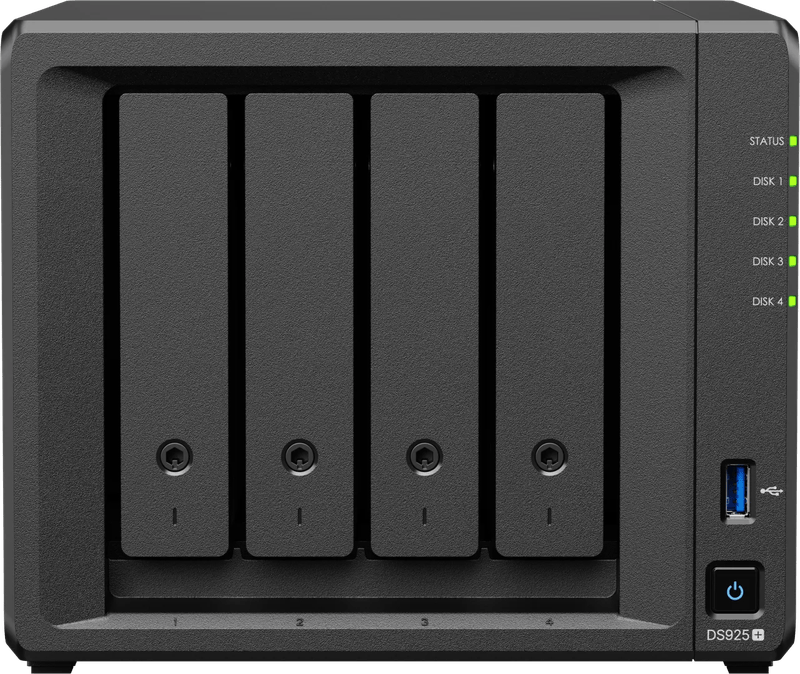
| Synology DS925+ | 4 + 2 × M.2 | AMD Ryzen V1500B / 4 GB ECC (up to 32 GB) | 2 × 2.5 GbE | large family archives |
| UGREEN NASync DXP2800 | 2 + 2 × M.2 | Intel N100 / 8 GB DDR5 (up to 16 GB) | 1 × 2.5 GbE | affordable entry with plenty of RAM |
| UGREEN NASync DXP4800 Plus | 4 + 2 × M.2 | Intel Pentium Gold 8505 / 8 GB DDR5 (up to 64 GB) | 1 × 10 GbE, 1 × 2.5 GbE | video editing over the network |
| QNAP TS-464 | 4 + 2 × M.2 | Intel Celeron N5095 / 4 or 8 GB (up to 16 GB) | 2 × 2.5 GbE | tinkerers who want to expand |
| ASUSTOR Drivestor 4 Pro Gen2 (AS3304T v2) | 4 | Realtek RTD1619B / 2 GB (fixed) | 1 × 2.5 GbE | pure data dump on a small budget |
Synology DS225+: a solid start, but with too little RAM
The two-bay model runs the mature DSM operating system and the Synology Photos app, connected via a 2.5-gigabit port. The 2 GB of memory is enough for backups. If you want to use object recognition in Synology Photos, you should upgrade to at least 4 GB. According to Synology, the warranty is 3 years, extendable to 5 years in Europe with „Extended Warranty Plus.“
Synology DS925+: room for a family archive
Four bays, two M.2 slots, two 2.5-gigabit ports. With the DX525 expansion unit, the DS925+ grows to nine bays according to the manufacturer, and the ECC memory can be expanded to 32 GB.
UGREEN NASync DXP2800: a lot of hardware for the money
Straight out of the box, it comes with 8 GB of DDR5 memory, two M.2 slots and a 2.5-gigabit port. The UGOS operating system includes its own photo app and, according to UGREEN, supports Time Machine via SMB. With two bays, you can choose between RAID 0 and RAID 1. For photos, only RAID 1 makes sense.
UGREEN NASync DXP4800 Plus: built for video footage
The reason for this device is the 10-gigabit port next to the 2.5-gigabit port. It lets you open video footage directly from the NAS. The operating system sits on a built-in 128 GB SSD, leaving all four bays free for data. According to UGREEN, you can expand the memory to 64 GB.
QNAP TS-464: lots of options, more of a learning curve
Four bays, two M.2 slots and two 2.5-gigabit ports. According to QNAP, a PCIe slot lets you add a 5- or 10-gigabit card to the TS-464. QNAP describes Time Machine via SMB 3 and phone backup with QuMagie. The QTS operating system can do a great deal. But it also takes more getting used to than DSM.
ASUSTOR Drivestor 4 Pro Gen2 (AS3304T v2): only as a backup target
Among the four-bay devices here, it is the most basic, with an ARM processor and 2 GB of soldered memory. According to ASUSTOR, it supports RAID 0, 1, 5, 6 and 10 as well as Btrfs. Photos from your phone are backed up by the AiFoto app, and Macs back up via Time Machine. It is too weak for demanding photo recognition or video editing. As a pure backup target, it does the job.
Which NAS for which household
For getting started with a Mac and iPhone, the Synology DS225+ with two WD Red Plus or IronWolf drives is a good fit, with the memory upgraded to at least 4 GB. The UGREEN NASync DXP2800 is affordable yet powerful. The Synology DS925+ or QNAP TS-464 offer room for a large family archive that is still meant to grow.
If you edit video over the network, take the UGREEN NASync DXP4800 Plus with 10-gigabit LAN; the screen to go with it is covered in our article on the monitor for photo and video editing. As a pure backup target on a tight budget, the ASUSTOR Drivestor 4 Pro Gen2 remains.
And whichever device you choose: plan for a third copy off-site and test restoring regularly.
Which computer edits the projects before they are backed up is covered in the guide to the laptop for video editing and photo editing.
Which device is a good fit for this backup, from two to four bays, is compared in the guide Buying a NAS.
Why even a NAS needs a second backup is shown in our review of the KFD replacement power supply for Synology: after 25 months, the device no longer worked properly.
Frequently asked questions
Is a NAS with RAID enough as a photo backup?
No. RAID only protects against the failure of one hard drive, not against accidental deletion, ransomware, power surges, theft or fire. A deleted photo is gone from both mirrored drives instantly. That is why the BSI (Germany's Federal Office for Information Security) recommends the 3-2-1 rule with one copy at another location.
What does the 3-2-1 backup rule mean?
Three copies of important data, on two different media, with at least one of them at another location. For a photo archive, the originals sit on your computer or phone, one copy on the NAS and the third off-site with relatives or encrypted in the cloud. Check regularly that the data can actually be restored.
What should I watch for when backing up an iPhone to a NAS?
If "Optimize iPhone Storage" is enabled, the originals are often only in iCloud, and according to UGREEN the backup may then capture smaller copies. Check this before you delete anything on the phone. All four manufacturers offer an app for automatic photo backup.
How do I set up Time Machine on a NAS?
Apple recommends SMB as the network destination; according to Apple, AFP is no longer supported from macOS 27 onward. All four manufacturers list Time Machine as a supported Mac backup. Create a dedicated folder with a quota, otherwise the backup will eventually fill the entire NAS.
Which hard drives are enough for a home NAS?
For two to four bays, WD Red Plus or Seagate IronWolf are usually enough, both designed for continuous operation with a workload of up to 180 TB per year. The Pro lines with a 5-year warranty are more about peace of mind than necessity here. CMR technology is what matters.
Which NAS is suitable for video editing over the network?
The UGREEN NASync DXP4800 Plus, with a 10-gigabit port next to its 2.5-gigabit port. It lets you open video footage directly from the NAS, provided your computer and switch can keep up. The operating system sits on a built-in 128 GB SSD, leaving all four bays free for data.
Sources
- Synology: DS225+
- Synology: DS925+
- Synology: DSM 7.3 and third-party drives
- Synology: Synology Photos for iPhone
- UGREEN: NASync DXP2800
- UGREEN: NASync DXP4800 Plus
- UGREEN: Time Machine with a UGREEN NAS
- QNAP: TS-464 hardware
- QNAP: Time Machine via SMB 3
- ASUSTOR: Drivestor 4 Pro Gen2
- Apple: Backup volumes for Time Machine
- Western Digital: NAS hard drives
- Seagate: IronWolf
- BSI (German Federal Office for Information Security): Proposals for business continuity strategies (3-2-1 rule)
Where to buy
- Synology DS225+View at CoolblueAvailable in Germany: CoolblueCheck price at Amazon.deAvailable in Germany: Amazon.de
- Synology DS925+View at CoolblueAvailable in Germany: CoolblueCheck price at Amazon.deAvailable in Germany: Amazon.de
- UGREEN NASync DXP2800View at CoolblueAvailable in Germany: CoolblueCheck price at Amazon.deAvailable in Germany: Amazon.de
- UGREEN NASync DXP4800 PlusView at CoolblueAvailable in Germany: CoolblueCheck price at Amazon.deAvailable in Germany: Amazon.de
- QNAP TS-464View at CoolblueAvailable in Germany: CoolblueCheck price at Amazon.deAvailable in Germany: Amazon.de
- ASUSTOR Drivestor 4 Pro Gen2 AS3304T v2Check price at Amazon.deAvailable in Germany: Amazon.de
- WD Red PlusCheck price at Amazon.deAvailable in Germany: Amazon.de
- WD Red ProCheck price at Amazon.deAvailable in Germany: Amazon.de
- Seagate IronWolfCheck price at Amazon.deAvailable in Germany: Amazon.de
- Seagate IronWolf ProCheck price at Amazon.deAvailable in Germany: Amazon.de