Contents15 sections
This guide was first published in German on handgetestet.de.
The robot sits in the hallway, and the app keeps searching and searching. Before you start doubting the device, check the router, the dock’s location and the default settings. Among the devices compared here, our pick for getting started is the DEEBOT T90 PRO OMNI, because its manual provides for pairing via Bluetooth and explicitly allows a mixed 2.4 and 5 GHz network. If you are firmly counting on Apple Home or Matter, take a closer look before buying, because Ecovacs does not list Matter for the T90 PRO.
Why does the robot insist on 2.4 GHz?
Because many models cannot do anything else. The manual for the Kärcher RVC 3 series puts it briefly: only 2.4 GHz networks are supported. eufy says the same for the Omni C20. Ecovacs allows 2.4 GHz or a mixed network, but the T30e OMNI manual makes clear that the robot itself cannot handle 5 GHz. So the 2.4 GHz band must be switched on at the router (in German).
The Ecovacs manuals also list conditions you will not find in any brochure:
- no VPN and no proxy, no hidden network
- WPA2 enabled on the router; WPA3 does not appear in the list
- repeaters with the same network name and password as the main network
- for the T30e, no special characters such as ! @ # & % / in the network name
In a mesh Wi-Fi (in German) network, follow the repeater rule. The BSI (German Federal Office for Information Security) also advises putting connected robot vacuums on a guest network. Decide this before setup, because with Kärcher you have to reset the Wi-Fi connection after a new router or password.
The dock’s location comes before the app
Once the map is finished, moving the dock becomes a hassle. eufy explicitly calls the base the reference point for navigation and warns that moving it can make the floor plan inaccurate. For the T90 PRO, Ecovacs requires 5 cm of clearance on each side and 80 cm in front, plus strong Wi-Fi and no direct sunlight. A detail hardly anyone expects: mirrors or glossy baseboards next to the dock should be covered on the bottom 14 cm. So check the reception where the dock will stand, not from the couch.
The first mapping run: tidy up first, then start
Open all doors; Ecovacs and eufy both say so. Cables, toys and small furniture come off the floor. Tuck rug fringes under the rug. And stay out of narrow hallways, otherwise, according to Ecovacs, you block the navigation module.
Walk along on the first run. Ecovacs asks you to follow the device because it can get stuck under furniture. Low pieces should be raised, covered at the bottom or excluded with a virtual boundary. eufy goes a step further and recommends physically blocking off restricted areas at first and setting the zones only after mapping. iRobot quotes ten minutes for the Roomba Max 875 Combo, based on 93 m². Your chair legs do not know that number.
No-go zones are for order, not protection
In the C20 manual, eufy writes that the zones only serve to divide areas for cleaning and not to block off hazardous areas. Ecovacs requires a real barrier at stairs and steps. A line in the app is no substitute for a stair gate.
So what are zones good for? For the high-pile rug, which Ecovacs recommends as a no-go zone, for the pet bowl spot and for the cable corner at the desk. eufy also offers zones where only mopping is skipped.
Schedule set, but the robot stays put?
Then check the quiet hours. The RVC 3 series manual states that Do Not Disturb mode is enabled by default, and while it is active, the robot does not run scheduled cleanings or resume interrupted ones. It can be switched off in the app. On the T30e, the dock does not empty in this mode. A Deebot from the T90 and X12 series that sits outside the dock for more than ten hours goes into deep sleep and has to be switched off and on again.
Set the first schedule for a time when someone is home. Only once two runs have gone through cleanly should the device head out on its own. Be careful with the RESET button on the T90 PRO: a short press starts network setup, holding it for five seconds deletes maps and settings.
Alexa, Google, Matter: what is behind them?
Voice assistants are usually connected through the manufacturer account. Ecovacs describes the route via an Alexa skill and, in Google Home, via „Works with Google“, and states on its US site that all Deebots work with both. German manuals do not confirm this individually for the T90 PRO. eufy guides you through Profile and Smart Integrations in the app. Which smart speaker (in German) suits you is a separate question.
Matter is something else: a shared standard meant to let devices from different brands work together. Robot vacuums have been part of it since version 1.2. The Connectivity Standards Alliance lists start, cleaning modes and status messages; Google’s list includes operating mode, cleaning mode and state. Maps and no-go zones are not on it. So expect to keep the manufacturer’s app even with Matter. Apple lists robot vacuums as an accessory type for Home.
And the devices themselves? In November 2025, Ecovacs announced a phased rollout of Matter 1.4 for the X2, X2 Combo, T50, T50 Max and X8. The T90, T30e and X12 series are not on that list, and the store pages do not mention Matter either. Roborock promises it for the Curv 2 Flow only via a future update. So buy only what works today. More on the standard is in our guide to the smart home starter set (in German).
Six devices, six ways to set them up
| Model | Wi-Fi | Maps and zones | Voice and Matter | Best for |
|---|---|---|---|---|
| DEEBOT T90 PRO OMNI | 2.4 GHz or mixed, pairing via Bluetooth | virtual boundaries, no-go zones | Alexa and Google according to Ecovacs, Matter not mentioned | mixed home network, little patience for router menus |
| DEEBOT T30e OMNI | 2.4 GHz or mixed, no 5 GHz | virtual boundaries | Alexa and Google according to Ecovacs, Matter not mentioned | dock without a camera |
| Kärcher RVC 3 Comfort Extra | 2.4 GHz only according to the series manual | multiple maps, no-go zones | no assistant mentioned in the data sheet | operation by button too |
| Roborock Qrevo Curv 2 Flow | up to 5 saved networks | up to four floors | Alexa, Siri Shortcuts, Google Home; Matter announced | multiple routers, voice control |
| eufy Omni C20 | 2.4 GHz only | no-go and no-mop zones | Alexa and Google Assistant | simple network, small apartment |
| Roomba Max 875 Combo | not specified | up to 3 maps | Alexa, Siri, Google Assistant | Apple household with Siri |
DEEBOT T90 PRO OMNI
According to the manual, pairing runs via Bluetooth, with a Wi-Fi route as a fallback. On the other hand, it has a camera and microphone on board, and you have to accept the privacy policy before the app features work. The manual lists Wi-Fi as a requirement while also saying basic functions work manually. After the 2024 incident, which Ecovacs attributes to stolen login credentials, this device deserves its own password.
DEEBOT T30e OMNI
It fits if you do not want a camera. Its manual is the clearest on network requirements. For Alexa and Google, there is only Ecovacs’s general statement.
Kärcher RVC 3 Comfort Extra
Buttons on the device are enough for basic operation, and Kärcher promises software updates until the end of 2032. At 2.4 GHz, the Wi-Fi is the tightest constraint, and you need to pay attention with the app: the manual mentions „Indoor Robots“ and „Home Robots“ side by side, while the product page refers to the Home & Garden app.
Roborock Qrevo Curv 2 Flow
According to the manufacturer, it remembers up to five Wi-Fi profiles, which helps in homes with several routers, and it understands its own voice command even offline. Matter remains a promise until the update arrives. The product page does not state the Wi-Fi band.
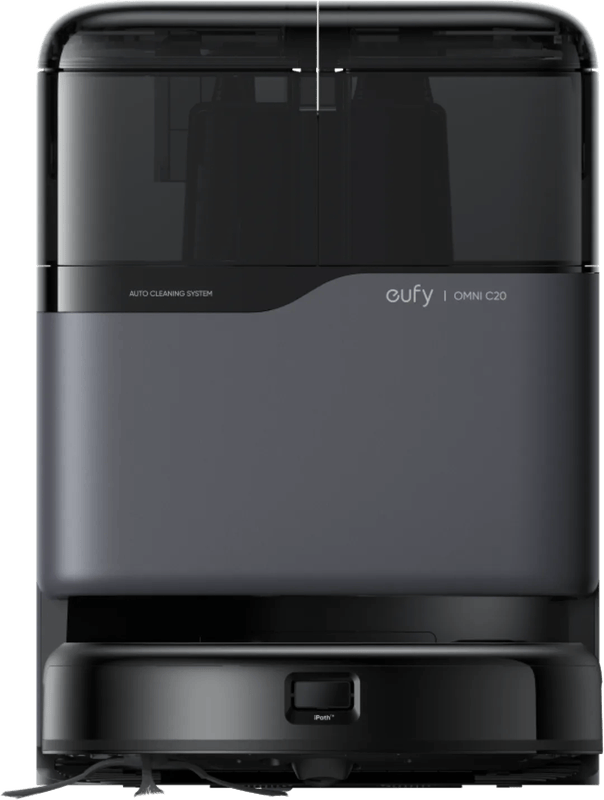
eufy Omni C20
2.4 GHz only, and eufy says so openly. In return, its manual is the most useful in this field when it comes to mapping. It does not mention Matter.
Roomba Max 875 Combo
iRobot explicitly lists Siri alongside Alexa and Google, which sets it apart for Apple households. Matter is not on the product page. Since January 2026, iRobot has belonged to the manufacturer Picea; how this will affect services remains open.
What your home network dictates
- One network name for both bands, no appetite for settings: DEEBOT T90 PRO OMNI.
- No camera, dock with mop washing: DEEBOT T30e OMNI.
- Small budget, buttons instead of an app as a fallback: Kärcher RVC 3 Comfort Extra, but check the 2.4 GHz band first.
- Siri in everyday life: Roomba Max 875 Combo or Roborock Qrevo Curv 2 Flow.
- Matter as a must: none of these six devices verifiably supports it today. Ask the manufacturer before you order.
The basics of mopping functions and docks are covered in the buying guide for robot vacuums with mopping (in German).
Frequently asked questions
Why does a robot vacuum need 2.4 GHz?
Because many models cannot do anything else. According to their manuals, Kärcher and eufy support only 2.4 GHz networks, and the T30e cannot handle 5 GHz itself. The 2.4 GHz band must therefore be switched on at the router. Ecovacs also lists: no VPN, no hidden network, WPA2 enabled.
Where should the robot vacuum's dock go?
In a fixed spot with strong Wi-Fi and no direct sunlight, because according to eufy the base is the reference point for navigation. For the T90 PRO, Ecovacs requires 5 cm of clearance on each side and 80 cm in front. Reflective baseboards should be covered on the bottom 14 cm.
How do you get the first mapping run right?
Open all doors, take cables, toys and small furniture off the floor, and tuck rug fringes under. Walk along on the first run, because the device can get stuck under furniture. eufy recommends physically blocking off restricted areas at first and setting zones only after mapping.
Do no-go zones protect against stairs?
No. eufy writes that the zones only serve to divide areas for cleaning, not to block off hazardous areas. Ecovacs requires a real barrier at stairs. Zones are useful for a high-pile rug, the pet bowl spot or the cable corner at the desk.
Why doesn't the robot vacuum start despite a schedule?
Often because of quiet hours. On the RVC 3 series, Do Not Disturb mode is enabled by default, and no scheduled cleanings run while it is on. A Deebot from the T90 and X12 series that sits outside the dock for more than ten hours goes into deep sleep and has to be switched back on.
What does Matter offer for robot vacuums?
Since version 1.2, robot vacuums have been part of the standard, with start, cleaning modes and status messages. Maps and no-go zones are not included, so you still need the manufacturer's app. None of the six devices compared verifiably supports Matter today, so check with the manufacturer before ordering.
Sources
- Ecovacs: DEEBOT T90 PRO OMNI manual
- Ecovacs: DEEBOT T30e OMNI manual
- Ecovacs: announcement on Matter
- Ecovacs: setting up Alexa
- Ecovacs: setting up Google Home
- Kärcher: RVC 3 operating manual
- Kärcher: RVC 3 Comfort Extra
- eufy: Omni C20 manual
- iRobot: Roomba Max 875 Combo
- Roborock: Qrevo Curv 2 Flow
- Connectivity Standards Alliance: Matter 1.2
- Google Home: supported Matter device types
- Apple: accessories for Home
- BSI: using robot vacuums safely
Where to buy
- DEEBOT T90 PRO OMNIView at EcovacsAvailable in Germany: EcovacsCheck price at Amazon.deAvailable in Germany: Amazon.de
- DEEBOT T30e OMNIView at EcovacsAvailable in Germany: EcovacsCheck price at Amazon.deAvailable in Germany: Amazon.de
- Kärcher RVC 3 Comfort ExtraCheck price at Amazon.deAvailable in Germany: Amazon.de
- Roborock Qrevo Curv 2 FlowCheck price at Amazon.deAvailable in Germany: Amazon.de
- eufy Omni C20View at CoolblueAvailable in Germany: CoolblueCheck price at Amazon.deAvailable in Germany: Amazon.de
- Roomba Max 875 ComboCheck price at Amazon.deAvailable in Germany: Amazon.de