Contents12 sections
This guide was first published in German on handgetestet.de.
A Mac Studio whose power is never needed. A Mac mini that still requires an expensive monitor. Both happen surprisingly often with desktop Macs. For family, office and working from home, we recommend the new iMac with M6, because the screen, camera, speakers, keyboard and mouse are already included. If there is already a good monitor on your desk, the Mac mini M6 will save you money.
This guide covers desktop Macs only. Still torn between a desktop and a laptop? Then our MacBook comparison (in German) will help.
Step one: what is already on your desk?
Chips come last in the comparison. Before that, the screen matters, and more depends on it than on any benchmark figure. The iMac comes with a 24-inch display with 4.5K resolution and 218 ppi. Apple, on the other hand, ships the Mac mini and Mac Studio with nothing but a power cord; you buy the screen, keyboard and mouse separately.
Then the memory. It is built in. You cannot upgrade it later, so the decision has to be right at purchase: 16 GB is enough for office work, photos and family use, and if you are planning several years with many open apps, go for 24 GB. Storage is tighter. The iMac and the smaller Mac mini start at 256 GB, which gets tight as soon as a photo library is added. An external SSD is often the cheaper route compared with the factory upgrade; our external SSD guide (in German) gives an overview.
When it comes to ports, the models differ clearly. The iMac with the 10-core chip has only two Thunderbolt ports and no Ethernet as standard. The Mac mini has two USB-C ports on the front and HDMI and Ethernet on the back, and the Mac Studio adds USB-A and an SD card reader. External monitors? The smaller iMac drives one additional display, the Mac mini a maximum of three, and the Mac Studio with M5 Ultra, according to Apple, a maximum of eight.
Six desktop Macs Apple currently offers
| Model | Chip | Memory / SSD | Ports | Best for |
|---|---|---|---|---|
| iMac 24 (M6, 10-core) | 10-core CPU, 10-core GPU | 16–24 GB / 256 GB–1 TB | 2× Thunderbolt/USB 4, Ethernet optional | Family, office, school |
| iMac 24 (M6, 12-core) | 12-core CPU, 12-core GPU | 16–32 GB / 256 GB–2 TB | 4× Thunderbolt 4, 2.5 Gbit Ethernet | Photos, working from home, second monitor |
| Mac mini (M6) | 12-core CPU, 12-core GPU | 16–32 GB / 256 GB–2 TB | 3× Thunderbolt 4, HDMI, 2× USB-C on the front | If you already have a monitor |
| Mac mini (M5 Pro) | 15- or 18-core CPU, 16- or 20-core GPU | 24–64 GB / 512 GB–8 TB | 3× Thunderbolt 5, HDMI, 2× USB-C on the front | Developers, music, photographers |
| Mac Studio (M5 Max) | 18-core CPU, 32- or 40-core GPU | 36–128 GB / 512 GB–8 TB | 4× Thunderbolt 5, 10 Gbit Ethernet, SD | Video, 3D, large projects |
| Mac Studio (M5 Ultra) | 30- or 36-core CPU, 64- or 80-core GPU | 96–512 GB / 1–16 TB | 6× Thunderbolt 5, 10 Gbit Ethernet, SD | Studios, very large models and scenes |
On its comparison page, Apple now lists the Mac Pro only among older models. For a new purchase, it is out.
For the family desk: iMac 24 with M6 (10-core)
The entry-level model. According to Apple, the display has 500 nits, the 12 MP camera supports Center Stage, and six speakers are built in. The ports are the weak point: two Thunderbolt ports are not many, and Ethernet costs extra. Keyboard and mouse are included, but Touch ID is only optional on this version.
For working from home with a second monitor: iMac 24 with M6 (12-core)
Of the two iMacs, we consider this one the more sensible choice. You get two more processor cores, four Thunderbolt ports, 2.5 Gbit Ethernet as standard and the keyboard with Touch ID. Only here can you choose 32 GB of memory and the anti-glare nano-texture glass. Two external monitors are possible. A manageable extra cost for a noticeably more convenient everyday experience.
Monitor already on hand: Mac mini with M6
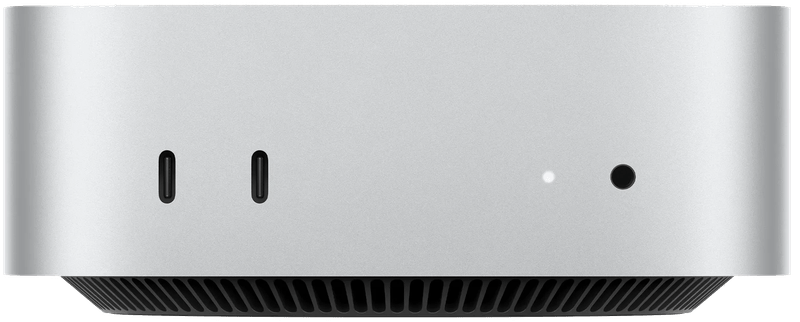
There is no cheaper way into the Mac world, as long as a usable monitor is already there. According to Apple, the enclosure measures 12.7 by 12.7 centimeters and weighs 0.67 kg. On the back are HDMI, three Thunderbolt 4 ports and 2.5 Gbit Ethernet, and on the front two USB-C ports and the headphone jack. You still have to do the math honestly, though. Once a new 5K monitor, keyboard and mouse are added, the price advantage over the iMac quickly disappears.
For code, music and fast drives: Mac mini with M5 Pro
According to Apple, the Pro chip delivers 307 GB/s of memory bandwidth instead of 153 to 170 GB/s, plus Thunderbolt 5 with up to 120 Gbit/s. Developers benefit from that, as do music producers working with many tracks and anyone who uses fast external drives. It can be configured with up to 64 GB of memory and an 8 TB SSD. Nobody needs this tier for office work and photos.
When it earns money: Mac Studio with M5 Max
From here on, it is about work, not hobbies. The Mac Studio starts with 36 GB of memory and, according to Apple, goes up to 128 GB. It has two video encode engines, a UHS-II card reader on the front and 10 Gbit Ethernet, and up to five external monitors are possible. For video editing, 3D rendering or very large amounts of data, this is where the extra cost over the Mac mini makes sense.
Only in exceptional cases: Mac Studio with M5 Ultra
According to Apple, the Ultra offers up to 36 CPU cores, 80 GPU cores, 1.2 TB/s of memory bandwidth and up to 512 GB of memory. Thunderbolt 5 is then available on the front as well. The machine weighs 3.6 kg, and Apple gives a maximum power consumption of 480 watts for the Mac Studio. We advise the vast majority of buyers against it. It only makes sense once the Max’s memory demonstrably is no longer enough.
And the screen? The Studio Display
For the Mac mini and Mac Studio, Apple offers the Studio Display: 27 inches, 5K, 218 ppi as on the iMac, 600 nits and 60 Hz. A camera, six speakers and microphones are built in. Via Thunderbolt 5, it charges a connected MacBook at a maximum of 96 watts. As standard, the stand only tilts; height adjustment costs extra. For HDR video editing, there is the Studio Display XDR with mini-LED, 2,304 dimming zones and 120 Hz. Less expensive 5K and 6K alternatives from other manufacturers are presented in our Mac monitor guide.
The decision path in brief
No monitor on hand, used for family, office or working from home: iMac 24 with M6, and if the budget allows, the 12-core model for its ports. If a good monitor is already there, it is the Mac mini with M6, ideally with 24 GB of memory.
- Programming, music, fast external drives: Mac mini with M5 Pro.
- Video editing, 3D, several large monitors: Mac Studio with M5 Max.
- Only if 128 GB is not enough: Mac Studio with M5 Ultra.
One more note on buying. At the time of writing this guide, the iMac with M6 was only available for pre-order from Apple. Check with the retailer that it really is the model with M6 being offered and not its M4 predecessor. Retailers and manufacturers are liable for products, delivery and warranty.
If the Mac needs to travel with you, the guide to the laptop for video editing compares the MacBook Air and MacBook Pro by memory and display.
Black Friday: with a Mac, the configuration is what counts
Around Black Friday on November 27, retailers also discount Macs. Compare the complete configuration when you do. The iMac with M6 comes with 10 or 12 processor cores, 16 to 32 GB of memory and various SSD sizes. Memory and internal SSD cannot be upgraded after purchase, so a discount on the smallest configuration only helps if it is enough for you.
If you are giving a Mac mini as a gift, remember the monitor, keyboard and mouse; Apple ships it with only a power cord. If a retailer in Germany advertises a price reduction, it must state the lowest price of the last 30 days (§ 11 of the German Price Indication Ordinance, Preisangabenverordnung). For our pick, the iMac 24 with M6, you can set a price alert above; our partner Coolblue also lists the Mac mini and Studio Display with prices. How a Mac Studio holds up in everyday editing is shown in our own review of the Mac Studio M1 Max, and which dock brings many devices to a Mac in our review of the CalDigit TS5 Plus. More deals are collected on the Black Friday 2026 (in German) page.
If you are looking for a Windows computer with a built-in display instead of the iMac, the all-in-one PC guide (in German) presents six models from Dell, HP, Lenovo and ASUS.
Frequently asked questions
iMac or Mac mini with your own monitor: which is better for working from home?
Without a monitor on the desk, the iMac 24 with M6 is the simpler choice, since display, camera, keyboard and mouse are included. If you already have a good monitor, the Mac mini M6 is cheaper. If a new 5K monitor and accessories have to be added, that advantage shrinks quickly.
How much memory does a desktop Mac need?
The memory is built in and cannot be upgraded later. For office work, photos and family use, 16 GB is enough. If you are planning several years with many open apps, go for 24 GB.
Is a 256 GB SSD enough in the iMac or Mac mini?
It gets tight as soon as a photo library is added. The iMac and the smaller Mac mini start at 256 GB. An external SSD is often the cheaper route compared with the factory storage upgrade.
Which iMac with M6 is the more sensible choice?
The 12-core model. It brings two more processor cores, four Thunderbolt ports, 2.5 Gbit Ethernet as standard and the keyboard with Touch ID. Only this model offers 32 GB of memory, nano-texture glass and two external monitors. The 10-core model has only two Thunderbolt ports.
Who is a Mac Studio worth it for?
For video editing, 3D rendering and very large amounts of data, in other words when the machine is used to earn money. The M5 Max starts at 36 GB and goes up to 128 GB of memory. We only recommend the M5 Ultra if the Max's memory demonstrably is not enough.
How many monitors can a Mac drive?
The smaller iMac drives one additional display, the 12-core model two. The Mac mini supports a maximum of three, the Mac Studio with M5 Max up to five and, according to Apple, the M5 Ultra a maximum of eight.
Can I upgrade the memory in an iMac or Mac mini later?
No. In the iMac, Mac mini and Mac Studio with Apple silicon, the memory sits in the chip package and cannot be expanded after purchase, and replacing the internal SSD is not intended either. So choose your configuration at purchase with some headroom. Storage can be added with a fast external SSD.
Sources
- Apple: iMac, technical specifications
- Apple: Mac mini, technical specifications
- Apple: Mac Studio, technical specifications
- Apple: Studio Display, technical specifications
- Apple: Studio Display XDR, technical specifications
- Apple: Compare Mac models
- German Price Indication Ordinance (PAngV) § 11: Price reductions
Where to buy
- Apple iMac 24 (M6, 10-Core)View at CoolblueAvailable in Germany: CoolblueCheck price at Amazon.deCheck price at Amazon.co.ukCheck price at Amazon.nlCheck price at Amazon.com.beCheck price at Amazon.frCheck price at Amazon.itCheck price at Amazon.esCheck price at Amazon.plCheck price at Amazon.seAvailable in Germany: Amazon.de
- Apple Mac mini (M6)View at CoolblueAvailable in Germany: CoolblueCheck price at Amazon.deCheck price at Amazon.co.ukCheck price at Amazon.nlCheck price at Amazon.com.beCheck price at Amazon.frCheck price at Amazon.itCheck price at Amazon.esCheck price at Amazon.plCheck price at Amazon.seAvailable in Germany: Amazon.de
- Apple Mac mini (M5 Pro)View at CoolblueAvailable in Germany: CoolblueCheck price at Amazon.deCheck price at Amazon.co.ukCheck price at Amazon.nlCheck price at Amazon.com.beCheck price at Amazon.frCheck price at Amazon.itCheck price at Amazon.esCheck price at Amazon.plCheck price at Amazon.seAvailable in Germany: Amazon.de
- Apple Mac Studio (M5 Max)Check price at Amazon.deCheck price at Amazon.co.ukCheck price at Amazon.nlCheck price at Amazon.com.beCheck price at Amazon.frCheck price at Amazon.itCheck price at Amazon.esCheck price at Amazon.plCheck price at Amazon.seAvailable in Germany: Amazon.deView at CoolblueAvailable in Germany: Coolblue
- Apple Studio Display (2026)View at CoolblueAvailable in Germany: CoolblueCheck price at Amazon.deCheck price at Amazon.co.ukCheck price at Amazon.nlCheck price at Amazon.com.beCheck price at Amazon.frCheck price at Amazon.itCheck price at Amazon.esCheck price at Amazon.plCheck price at Amazon.seAvailable in Germany: Amazon.de
- Apple iMac 24 (M6, 12-Core)View at CoolblueAvailable in Germany: Coolblue