Contents12 sections
This guide was first published in German on handgetestet.de.
A flatbed device looks cheap, and after all, „it scans too.“ That is exactly why it often ends up on the desks of people who actually wanted to go paperless. For that, you need a sheet-fed scanner that captures front and back in one pass and saves a searchable PDF at the end. For home and small office use, a desktop device with a large feeder such as the Ricoh ScanSnap iX2500 is a solid choice. Rarely scan, little space? Then a compact model is enough.
Seven sheet-fed scanners on Amazon.de
| Model | Design and feeder | Speed and connection (manufacturer specs) | Best for |
|---|---|---|---|
| Ricoh ScanSnap iX2500 | Desktop, duplex, 100 sheets | 45 pages/min duplex; USB-C, Wi-Fi 6, Bluetooth | Large backlog of old files, daily mail |
| Ricoh ScanSnap iX1300 | Compact, duplex, 20 sheets plus single-sheet path | 30 pages/min; USB, Wi-Fi | Desks with little space |
| Ricoh ScanSnap iX100 | Mobile, single-sided, single sheet, battery | approx. 12 pages/min; USB, Wi-Fi | On the go, individual receipts |
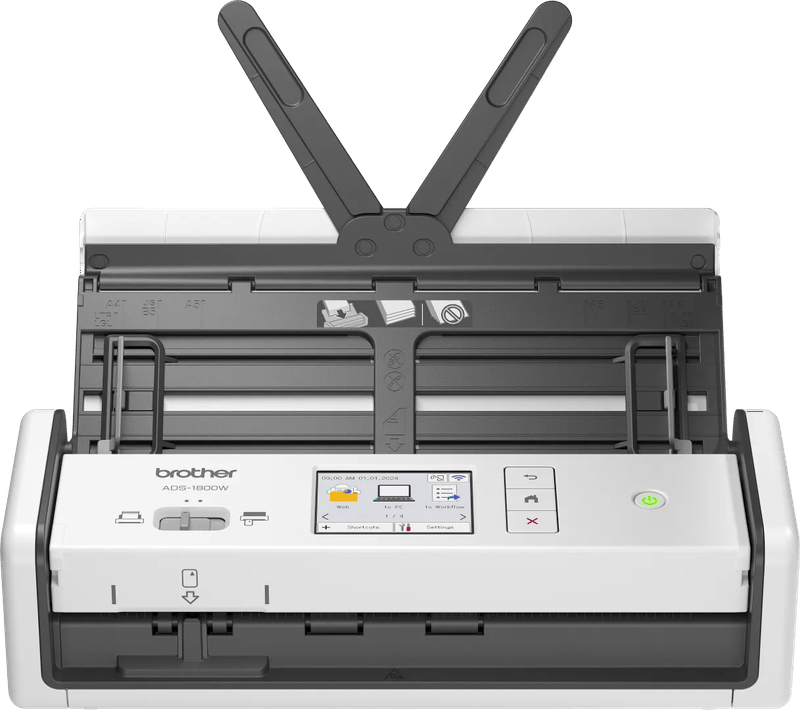
| Brother ADS-1800W | Compact, duplex, 20 sheets | 30 pages/min; USB-C, Wi-Fi, touchscreen | Small offices without a fixed PC spot |
| Brother ADS-4300N | Desktop, duplex, 80 sheets | 40 pages/min; USB 3.0, LAN | Several users on the network |
| Epson WorkForce ES-C320W | Compact, duplex, 20 sheets | 30 pages/min; USB, Wi-Fi Direct | Home offices with moderate volume |
| Canon imageFORMULA DR-C230 | Desktop, duplex, 60 sheets | 30 pages/min; USB | Fixed workstation, lots of paper |
The table roughly splits into three groups: mobile, compact with 20 sheets, and desktop with 60 sheets or more. Which one fits depends above all on the stack of paper waiting for you.
What the numbers mean in practice
A multifunction printer with a scanner glass is enough for the occasional letter. For the stack of binders from the attic, it is not. If you are still wondering whether an all-in-one device will do, you will find the other perspective in our article on inkjet printers and in our overview of laser printers.
An all-in-one device with a duplex feeder can do more. The Kyocera ECOSYS M5526cdw we tested feeds up to 50 sheets and scans double-sided originals, which is enough for the occasional stack of documents.
For the feeder, 20 sheets are enough for daily mail. If you are digitizing old files, you will notice the difference compared with 60 or 100 sheets after the first evening. Duplex saves you from turning pages by hand; all the desktop devices here can do it, the mobile iX100 cannot. Text recognition (OCR) is what turns images into searchable PDFs, and only if the bundled software supports it, not merely the driver.
USB is enough at a fixed workstation. Wi-Fi or a network connection only helps if several people scan or the scanner sits far from the computer.
Ultrasonic double-feed detection is underrated. It reports when two sheets stick together. Without it, a page will eventually be missing from your archive, and nobody will notice.
Then there is storage. A folder on your laptop is not an archive. If you have to keep receipts for years, consider a backup on your own storage; our NAS comparison fits that topic.
Can the paper go afterward? What the German AO and GoBD say
For documents subject to retention requirements under German tax law, Section 147 of the German Fiscal Code (Abgabenordnung, AO) sets the periods: ten years for books, inventories and annual financial statements, eight years for accounting vouchers, and six years for business letters received and sent. As a rule, the documents may be kept as a reproduction on a data storage medium. For letters and vouchers, the image must match the original, remain available for the entire period and be machine-readable. Exceptions include annual financial statements and the opening balance sheet.
The corresponding administrative principles are set out in the GoBD, the German Federal Ministry of Finance’s principles for proper digital bookkeeping (Section 9.3). According to them, the scanning process must be documented, for example who scans, when, and how legibility is checked. Color is required where it serves as evidence, for example with negative amounts printed in red. A full text created by OCR must be kept as well after it has been checked and corrected. Paper may be destroyed after capture unless other regulations require the original to be kept. How this applies in your own case is best clarified with your tax advisor. The scanner itself does not make any process GoBD-compliant.
Ricoh ScanSnap iX2500
The current flagship of the ScanSnap series, which used to be sold under the Fujitsu name. According to Ricoh, the feeder holds 100 sheets, it manages 45 pages per minute in duplex mode, and it detects double feeds by ultrasound. It is operated via a 5-inch touchscreen and connects via USB-C, Wi-Fi 6 or Bluetooth. The ScanSnap software creates searchable PDFs directly, PDF/A only on Windows. If you only scan occasionally, you are buying far more than you need here.
Ricoh ScanSnap iX1300
The small one with two paper paths. Alongside the 20-sheet feeder, it has a return path for cards up to 1.4 mm thick, folded sheets or single pages. Just under 30 cm wide. Ricoh states 30 pages per minute, USB and Wi-Fi in the 2.4 GHz band. For a mountain of binders, the feeder is on the small side.
Ricoh ScanSnap iX100
A 400-gram wand scanner with a battery that, according to Ricoh, manages around 140 pages per charge. It reads only one side per pass and needs about five seconds for an A4 sheet. That is enough for restaurant receipts at the hotel. You would not want to digitize ten years of bank statements with it.
Brother ADS-1800W
Compact, a light 1.42 kg and with a small color touchscreen. Brother specifies a 20-sheet feeder, Wi-Fi and USB-C; according to the data sheet, a power adapter is an optional accessory, otherwise power comes via a USB-C cable. The interesting part is saving directly to the network, to email or to a USB stick, without a computer running. Brother states a speed of 30 pages per minute.
Brother ADS-4300N
A workhorse for small offices: an 80-sheet feeder, network cable and USB 3.0, plus scan to USB stick. Wi-Fi and a display only come with the sister model ADS-4700W. Brother states 40 pages per minute. In a single-person household, the network connection usually goes unused.
Epson WorkForce ES-C320W
Epson’s compact duplex scanner comes with a 20-sheet feeder, 30 pages per minute, USB and Wi-Fi Direct. Epson gives the recommended daily volume as 3,500 sheets. That is enough for any home office. The bundled software includes Presto! Page Manager, among others. Whether its text recognition covers your workflow is something you should clarify beforehand.
Canon imageFORMULA DR-C230
For the DR-C230, Canon specifies a 60-sheet feeder, 30 pages or 60 images per minute and a recommended daily volume of around 3,500 scans. It connects via USB. There is no wireless option. With a fixed spot next to the PC and lots of paper, you get a bigger feeder here than with the compact models.
Plustek also offers sheet-fed scanners in its SmartOffice series. We were unable to reliably verify current manufacturer data for them, which is why the brand is missing from the table.
Which scanner suits which paper mountain
If the paper mountain is to disappear for good, it is the ScanSnap iX2500. The large feeder and the double-feed detection make the difference, not the display. With little space and little mail, the ScanSnap iX1300 or the Epson ES-C320W is enough, although 20 sheets quickly become a nuisance with old files.
If several people share one device, the Brother ADS-4300N belongs on the network. Scanning without the computer switched on works with the Brother ADS-1800W and its saving to network folders or a USB stick. At a fixed PC with lots of paper and no need for Wi-Fi, the Canon DR-C230 is the right fit.
And the ScanSnap iX100? Only for on the go. It is too slow for everything else.
One last piece of advice, before you even buy: decide how files will be named and stored. The fastest scanner is of little use if you end up with 3,000 files called „Scan_0001.pdf“ in your downloads folder.
Paper photos, albums and slides are covered together in the guide Digitizing photos (in German), with time estimates and service providers.
Frequently asked questions
Is a flatbed scanner enough to go paperless?
For the occasional letter, a multifunction printer with a scanner glass is enough. For the stack of binders from the attic, it is not. That takes a sheet-fed scanner with duplex that captures both sides in one pass, and software with text recognition that creates searchable PDFs.
How large should a document scanner's feeder be?
For daily mail, 20 sheets are enough. If you are digitizing old files, you will notice the difference compared with 60 or 100 sheets after the first evening. Compact devices such as the ScanSnap iX1300 or the Brother ADS-1800W hold 20 sheets, desktop devices such as the Canon DR-C230 60 or more.
What does ultrasonic double-feed detection do?
It reports when two sheets stick together. Without it, a page will eventually be missing from your archive, and nobody will notice. According to the manufacturer, the Ricoh ScanSnap iX2500 has it, and along with the large feeder it is the real reason to buy this device.
Can you throw receipts away after scanning?
Under the GoBD, the German principles for proper digital bookkeeping, paper may generally be destroyed after capture unless other regulations require the original to be kept. The scanning process must be documented, and color is required where it serves as evidence. The scanner alone does not make a process GoBD-compliant; your tax advisor can clarify your own case.
How long do scanned documents have to be kept?
Section 147 of the German Fiscal Code (Abgabenordnung) specifies ten years for books, inventories and annual financial statements, eight years for accounting vouchers and six years for business letters. The image must match the original, remain available for the entire period and be machine-readable. A backup on your own storage makes sense.
Do I need a scanner with Wi-Fi?
USB is enough at a fixed workstation. Wi-Fi or a network connection only helps if several people scan or the scanner sits far from the computer. The Brother ADS-1800W saves scans directly to the network, to email or to a USB stick, without a computer running.
Sources
- Ricoh: ScanSnap iX2500, brochure with technical data
- Ricoh: ScanSnap iX1300, product page
- Ricoh: ScanSnap iX100, product page
- Brother: Technical data ADS-1300, ADS-1350W, ADS-1800W
- Brother: Specifications ADS-4300N
- Brother: Data sheet ADS-1800W
- Epson: WorkForce ES-C320W, specifications
- Canon: imageFORMULA DR-C230, specifications
- Section 147 of the German Fiscal Code (Abgabenordnung), rules on retaining documents
- German Federal Ministry of Finance: GoBD in the official AO handbook 2024
Where to buy
- Ricoh ScanSnap iX2500Check price at Amazon.deCheck price at Amazon.co.ukCheck price at Amazon.nlCheck price at Amazon.com.beCheck price at Amazon.frCheck price at Amazon.itCheck price at Amazon.esCheck price at Amazon.plCheck price at Amazon.seAvailable in Germany: Amazon.de
- Ricoh ScanSnap iX1300 (schwarz)Check price at Amazon.deCheck price at Amazon.co.ukCheck price at Amazon.nlCheck price at Amazon.com.beCheck price at Amazon.frCheck price at Amazon.itCheck price at Amazon.esCheck price at Amazon.plCheck price at Amazon.seAvailable in Germany: Amazon.de
- Ricoh ScanSnap iX100Check price at Amazon.deCheck price at Amazon.co.ukCheck price at Amazon.nlCheck price at Amazon.com.beCheck price at Amazon.frCheck price at Amazon.itCheck price at Amazon.esCheck price at Amazon.plCheck price at Amazon.seAvailable in Germany: Amazon.de
- Brother ADS-1800WCheck price at Amazon.deCheck price at Amazon.co.ukCheck price at Amazon.nlCheck price at Amazon.com.beCheck price at Amazon.frCheck price at Amazon.itCheck price at Amazon.esCheck price at Amazon.plCheck price at Amazon.seAvailable in Germany: Amazon.deView at CoolblueAvailable in Germany: Coolblue
- Brother ADS-4300NCheck price at Amazon.deCheck price at Amazon.co.ukCheck price at Amazon.nlCheck price at Amazon.com.beCheck price at Amazon.frCheck price at Amazon.itCheck price at Amazon.esCheck price at Amazon.plCheck price at Amazon.seAvailable in Germany: Amazon.de
- Epson WorkForce ES-C320WCheck price at Amazon.deCheck price at Amazon.co.ukCheck price at Amazon.nlCheck price at Amazon.com.beCheck price at Amazon.frCheck price at Amazon.itCheck price at Amazon.esCheck price at Amazon.plCheck price at Amazon.seAvailable in Germany: Amazon.de
- Canon imageFORMULA DR-C230Check price at Amazon.deCheck price at Amazon.co.ukCheck price at Amazon.nlCheck price at Amazon.com.beCheck price at Amazon.frCheck price at Amazon.itCheck price at Amazon.esCheck price at Amazon.plCheck price at Amazon.seAvailable in Germany: Amazon.de