Contents12 sections
This guide was first published in German on handgetestet.de.
A MIDI keyboard does not make a single sound. It only sends commands to the music software, and that is exactly why the deciding factor when buying is not the sound but how well keys, controls and software work together. For most home studios, a model with 49 keys, pads and ready-made DAW integration such as the Novation Launchkey 49 MK4 is the sensible middle ground. If you produce on the go, go smaller. If you play piano, you need more keys.
How many keys do I really need?
Think in octaves. 25 keys are a good two octaves, 37 keys three, 49 keys four and 61 keys five. For bass lines, drums and single melodies, two octaves are perfectly fine, because the range can be shifted at the push of a button. But as soon as you want to play chords with your left hand and a melody with your right, 25 keys get cramped. From 49 keys up, both hands have room.
Often, the desk is the sticking point. According to Novation, the Launchkey 49 MK4 is 73 cm wide, and according to the manufacturer the M-Audio Keystation 61 MK3 is 99.5 cm. In front of a monitor with a computer keyboard, there is often no room left. So measure the free space first, then choose the number of keys.
Piano players should be honest with themselves. Semi-weighted keys feel firmer than light synth keys but do not replace a hammer action. If you practice classical music, you are better served by an instrument from our guide to digital pianos.
Pads, knobs, aftertouch: which of them matter?
Pads are the rubber surfaces for playing in drums and samples. Eight are enough for a drum kit; sixteen also let you trigger clips and chords. Endless rotary encoders have an advantage over potentiometers with end stops: when you switch between plug-ins, no value suddenly jumps to the knob position. Faders are worthwhile mainly if you mix the volume of several tracks at once or control organ drawbars.
Aftertouch is often confused. With channel aftertouch, pressure after the key strike affects all held notes equally; with polyphonic aftertouch, it affects each key individually. Native Instruments builds polyphonic aftertouch into the keybed of the Kontrol S49 MK3. Novation offers it on the pads of the Launchkey MK4. With strings and pads, that makes an audible difference. For beats, it is a side issue.
DAW integration: the part you notice every day
Every MIDI keyboard plays notes in any music software. The difference lies in the scripts that make transport, mixer and plug-in controls work without manual mapping. Before buying, check whether your software is explicitly named. For the Launchkey MK4, Novation lists dedicated scripts for Ableton Live, Logic, Cubase, Reason, FL Studio and Ardour; for the MPK Mini IV, Akai lists Logic Pro, GarageBand and FL Studio, among others. If your DAW is not among them, you are usually left with the detour via Mackie Control or HUI. That works, but with less convenience.
One more look at the back panel. A 5-pin MIDI port controls older synthesizers directly; the small models use a 3.5 mm jack for this and need an adapter. You hear the sound through the computer, that is, via an audio interface for the home studio and suitable studio monitors. The keyboard itself has no audio output.
6 MIDI keyboards compared
| Model | Keys | Pads and controls | Connections | Best for |
|---|---|---|---|---|
| Novation Launchkey 49 MK4 | 49, semi-weighted | 16 pads with polyphonic aftertouch, 8 endless encoders, faders | USB-C, MIDI Out (5-pin), sustain | Home studio with Ableton, Logic, FL Studio |
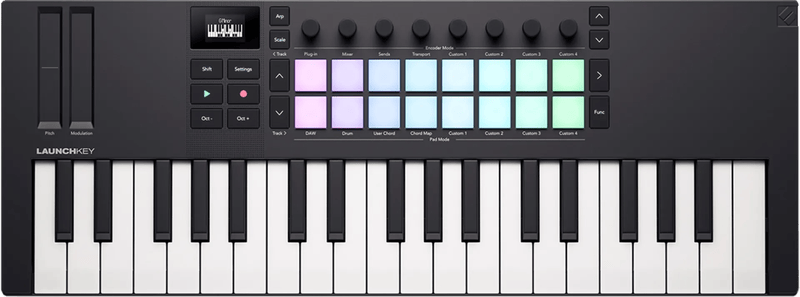
| Novation Launchkey Mini 37 MK4 | 37 mini keys | 16 pads, 8 endless encoders, touch strips | USB-C, MIDI Out (3.5 mm), sustain | Laptop on the go, small desk |
| Akai MPK Mini IV | 25, velocity-sensitive | 8 pads, 8 endless encoders, real wheels | USB-C, MIDI Out (5-pin) | Beats, getting started, backpack |
| Arturia KeyLab Essential 61 mk3 | 61, semi-weighted | 8 pads, 9 knobs, 9 faders | USB-C, MIDI Out (5-pin), pedal | Two-handed chords, mixing with faders |
| Native Instruments Kontrol S49 MK3 | 49, Fatar, polyphonic aftertouch | 8 touch-sensitive knobs, Light Guide | USB-C, MIDI In/Out, 4 pedals | Working with NKS instruments, expressive playing |
| M-Audio Keystation 61 MK3 | 61, semi-weighted | 1 fader, transport buttons | USB, MIDI Out (5-pin), sustain | If you mainly want to play |
Novation Launchkey 49 MK4
Four octaves of semi-weighted keys, 16 pads with polyphonic aftertouch, eight endless encoders and a row of faders: for producers, that is a well-balanced package. According to Novation, there is also a chord mode, 30 scales and an arpeggiator with a step editor. From this size up, the keyboard can be split into zones, such as bass on the left and piano on the right. At 4.08 kg and 73 cm wide, it remains a device for a fixed spot.
Novation Launchkey Mini 37 MK4
Just under 48 cm wide and a light 0.98 kg. Instead of wheels, there are touch strips for pitch and modulation; the pads and encoders match those of its bigger siblings. Three octaves of mini keys are a compromise. For sketching ideas on the train, they are enough.
Akai MPK Mini IV
According to Akai, the fourth generation adds real pitch and modulation wheels, a color display, transport buttons and a 5-pin MIDI output compared with its predecessor. The eight pads are velocity-sensitive. With 25 keys, it remains a tool for beats and sketches, not an instrument for playing pieces through. According to the manufacturer, the included software does not run on iPad or Android, but the keyboard still works there as a simple MIDI device.
Arturia KeyLab Essential 61 mk3
Five octaves, nine faders with 30 mm of travel and nine knobs make the KeyLab Essential the choice for anyone who mixes arrangements by hand, track by track. Arturia lists scripts for FL Studio, Logic Pro, Ableton Live, Cubase and Bitwig. The pedal input can be set as sustain, expression or footswitch. With only eight pads, it is a little limited for pure beatmakers.
Native Instruments Kontrol S49 MK3
Here you get a semi-weighted Fatar keybed with polyphonic aftertouch, and above it the Light Guide uses color to show which keys an instrument occupies. None of the other six models has four pedal jacks plus MIDI In and Out. If the power from the computer is not enough, a second USB-C port takes a power supply. If you do not work with NI instruments or NKS plug-ins, you will leave a large part of it unused.
M-Audio Keystation 61 MK3
The counterpoint to all those pads. 61 semi-weighted keys, one fader, wheels, transport buttons, nothing more. According to M-Audio, it works with an iPad via Apple’s camera adapter. For pianists and songwriters who mainly record notes, that is more honest than a control surface full of buttons that never get used.
How we would decide
- Producing at a fixed desk with Ableton, Logic or FL Studio: Novation Launchkey 49 MK4.
- Laptop in the backpack, little space: Launchkey Mini 37 MK4, and for pure beats also the Akai MPK Mini IV.
- Playing with both hands and mixing a lot with faders: Arturia KeyLab Essential 61 mk3.
- Expressive playing with NI instruments: Native Instruments Kontrol S49 MK3.
- Just recording notes, without pads: M-Audio Keystation 61 MK3.
Before you order, check the list of supported DAWs. If your software is not on it, even the nicest control surface is worth only half as much.
If you are looking for an instrument with its own sounds and a hammer action, you will find our experience in the review of the Kawai CN39 digital piano.
Frequently asked questions
How many keys does a MIDI keyboard need?
Think in octaves: 25 keys are a good two octaves, 49 keys four. For bass lines, drums and single melodies, two octaves are enough because the range can be shifted. For chords on the left and melody on the right, both hands have room from 49 keys up.
Does a semi-weighted MIDI keyboard replace a piano?
No. Semi-weighted keys feel firmer than light synth keys but do not replace a hammer action. If you practice classical music, you are better served by a digital piano. For pianists who mainly record notes, the M-Audio Keystation 61 MK3 at least offers five octaves.
What is the difference between channel and polyphonic aftertouch?
With channel aftertouch, pressure after the key strike affects all held notes equally; with polyphonic aftertouch, it affects each key individually. Native Instruments builds it into the keybed of the Kontrol S49 MK3, Novation into the pads on the Launchkey MK4. With strings and pads, it is audible; for beats, it is a side issue.
Why is DAW integration so important?
Every MIDI keyboard plays notes in any software. The difference lies in the scripts that make transport, mixer and plug-in controls work without manual mapping. If your DAW is missing from the list, you are usually left with Mackie Control or HUI, with less convenience.
Does a MIDI keyboard have its own sound?
No, it only sends commands to the music software and has no audio output. You hear the sound through the computer, that is, via an audio interface and suitable studio monitors. Older synthesizers can be controlled directly via the MIDI port.
Which MIDI keyboard is suitable for mixing with faders?
The Arturia KeyLab Essential 61 mk3 offers five octaves, nine faders with 30 mm of travel and nine knobs. That lets you mix arrangements by hand, track by track. With only eight pads, it is a little limited for pure beatmakers.
Sources
- Novation: Launchkey MK4, model overview
- Novation: Launchkey 49 MK4, technical specifications
- Novation: Launchkey Mini 37 MK4, technical specifications
- Akai Professional: MPK Mini IV, frequently asked questions
- Arturia: KeyLab Essential mk3
- Native Instruments: Kontrol S-Series MK3, manual (Keyboard Overview)
- Native Instruments: Kontrol S-Series MK3, manual (DAW Control)
- M-Audio: Keystation 61 MK3
Where to buy
- Novation Launchkey 49 MK4Check price at Amazon.deAvailable in Germany: Amazon.de
- Novation Launchkey Mini 37 MK4Check price at Amazon.deAvailable in Germany: Amazon.deTry a sample at CoolblueTry a sample at Coolblue
- Akai MPK Mini IVCheck price at Amazon.deAvailable in Germany: Amazon.de
- Arturia KeyLab Essential 61 mk3 (schwarz)Check price at Amazon.deAvailable in Germany: Amazon.de
- Native Instruments Kontrol S49 MK3Check price at Amazon.deAvailable in Germany: Amazon.de
- M-Audio Keystation 61 MK3Check price at Amazon.deAvailable in Germany: Amazon.de