Contents15 sections
This guide was first published in German on handgetestet.de.
A switch is the most inconspicuous device in a home network, and yet it is often the wrong one that gets bought. For a new purchase in 2026, we recommend a fanless unmanaged model with eight 2.5 Gbit ports, such as the TP-Link TL-SG108-M2. If Gigabit is enough for you, the much cheaper TL-SG108 will do. You only need management and PoE for cameras, access points or separate networks.
Count first, then upgrade
Before you compare data sheets, count your cables. TV, console, PC, printer, maybe a NAS. If the router doesn’t have enough LAN ports for all of them, the switch connects directly to it and distributes the signal further. Five ports fill up faster than you think, because one always goes to the router, and by the time a second console or an access point comes along next year at the latest, you are re-plugging cables again. That is why eight is the sensible size.
When it comes to speed, the weakest link decides. A 2.5 Gbit switch only helps if your router, NAS or PC also has a 2.5 Gbit port. We have compiled which current routers come with such a port in our overview of DSL and fiber routers, and if you are thinking about a fast storage device, you will find suitable models in our NAS comparison.
- Unmanaged means plug in and done. No interface, no settings.
- Managed or „Easy Smart“ allows VLANs, meaning separate networks for guests or smart devices, and priority for specific ports.
- PoE powers cameras, access points or phones over the network cable. The total power budget in watts is what matters.
- Fanless operation is standard on all seven devices below. So in the living room or home office, you won’t hear a thing.
Cables, range, power consumption
Switching to 2.5 Gbit/s usually doesn’t require new cables. For the TL-SG108-M2, TP-Link states that existing Cat5e or better cabling is sufficient. The ports negotiate the speed on their own, so older devices keep running at 1 Gbit/s or 100 Mbit/s. For Gigabit, TP-Link specifies Category 5 cables or better and a maximum length of 100 meters per run for the TL-SG108PE.
A switch runs around the clock. That is why it is worth looking at power consumption. A sample calculation using the manufacturers‘ maximum values: the TL-SG108 at 3.31 watts would come to just under 29 kilowatt-hours over a year, the TL-SG108-M2 at 15.65 watts to around 137. In everyday use, consumption is usually lower, because these are maximum values. The gap does show, however, why 2.5 Gbit/s only makes sense if you actually use the speed.
Planning PoE properly
According to TP-Link, the four PoE ports of the TL-SG108PE comply with the IEEE 802.3af and 802.3at standards, with up to 30 watts per port and 64 watts in total. The manufacturer emphasizes that these budget figures come from lab tests. So calculate like this: add up the power ratings of all cameras and access points and stay well below the total budget. With no PoE devices connected, the switch draws 4.43 watts according to the data sheet. Which cameras can be powered via PoE is shown in our guide to outdoor security cameras.
Seven switches side by side
| Model | Ports | Management and PoE | For whom |
|---|---|---|---|
| TP-Link TL-SG108 | 8 × 1 Gbit/s | unmanaged, no PoE | TV, console and PC on a Gigabit connection |
| Netgear GS308E | 8 × 1 Gbit/s | Easy Smart, up to 64 VLANs, no PoE | Separate guest network without much effort |
| TP-Link TL-SG108PE | 8 × 1 Gbit/s | Easy Smart, 4 × PoE+, 64 W total | Two to three cameras or access points |
| TP-Link TL-SG108-M2 | 8 × 2.5 Gbit/s | unmanaged, no PoE | NAS and router with a 2.5 Gbit port |
| D-Link DMS-108 | 8 × 2.5 Gbit/s | unmanaged, no PoE | Alternative to the TL-SG108-M2 |
| Zyxel XMG-108 | 8 × 2.5 Gbit/s, 1 × 10G SFP+ | unmanaged, no PoE | Fast uplink to a server or 10 Gbit NAS |
| Ubiquiti UniFi USW-Lite-8-PoE | 8 × 1 Gbit/s | managed via UniFi, 4 × PoE+, 52 W total | Networks already running UniFi |
TP-Link TL-SG108
The classic in a metal housing. According to the manufacturer, it draws a maximum of 3.31 watts and fits on a desk, but it can also be wall-mounted. There is hardly anything more you need to know about it.
Netgear GS308E
On the outside, a plain Gigabit switch. Inside, there is a web interface with up to 64 VLANs and two link aggregation groups. Netgear states a maximum power consumption of 3.7 watts and offers a limited lifetime hardware warranty. Want to separate smart plugs and cameras from the rest of the network? It is completely sufficient for that.
TP-Link TL-SG108PE
Four of the eight ports deliver power according to 802.3af/at, up to 30 watts per port and 64 watts in total, according to TP-Link. The manufacturer itself notes that this budget is based on lab values. So plan with a margin. VLANs and priority rules are included as well.
TP-Link TL-SG108-M2
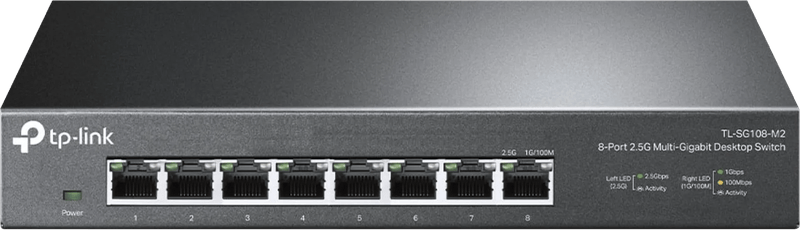
Eight ports at 2.5 Gbit/s each, 40 Gbit/s switching capacity, no fan. TP-Link states that existing Cat5e cables are sufficient for 2.5 Gbit/s, which allows the upgrade in many homes without new cabling. At a maximum of 15.65 watts, it uses noticeably more power than a Gigabit device. For us, it is still the most sensible purchase if your router or NAS already supports 2.5 Gbit/s.
D-Link DMS-108
Technically almost identical to the TP-Link: eight 2.5 Gbit ports, metal housing, fanless, 40 Gbit/s. It can also be wall-mounted. Choose between the two based on price and availability.
Zyxel XMG-108
In addition to the eight 2.5 Gbit ports, there is an SFP+ slot for 10 Gbit/s. It takes a matching module or a direct-attach cable, for example to a server with a 10 Gbit card. Without such a counterpart, you are paying for a slot that stays empty. As the XMG-108HP, it is also available with PoE++.
Ubiquiti UniFi USW-Lite-8-PoE
Four PoE+ ports with 52 watts combined; a 60-watt power supply is included. It is set up via the UniFi Network software, version 7.2.94 or later according to the data sheet. That fits if Ubiquiti access points are already installed in the house. As the only UniFi device on the network, it would be too much effort for us.
Three bad buys you can avoid
The first: a 2.5 Gbit switch even though not a single device in the house supports 2.5 Gbit/s. Then you pay for more power at the same speed. The second: a PoE switch whose budget is already exhausted by three cameras. The third: an unmanaged switch when a separate guest network was actually what you wanted. VLANs start with Easy Smart. According to TP-Link, the TL-SG108PE manages up to 32 VLANs at the same time and includes loop detection.
Frequently asked questions
Will a switch make my internet faster?
No. The switch only distributes the connection within the house. How fast your internet is depends on your connection. If too little is coming through, our guide internet too slow (in German) can help.
Do I need crossover cables?
No. According to TP-Link, the TL-SG108-M2 detects the wiring on its own (Auto-MDI/MDIX); normal patch cables are enough.
What do jumbo frames do?
They allow larger data packets, for example for copies between a PC and a NAS. According to the manufacturer, the TL-SG108-M2 supports up to 10 KB. However, every device along the path has to support the setting.
Can the switch be mounted on the wall?
According to TP-Link, the TL-SG108 and TL-SG108-M2 can be wall-mounted, and so can the D-Link DMS-108, according to its manufacturer.
How we would decide
- Just a few devices on a Gigabit router: TP-Link TL-SG108.
- NAS or router with a 2.5 Gbit port: TP-Link TL-SG108-M2 or D-Link DMS-108.
- Separating the guest network and smart devices: Netgear GS308E.
- Security cameras or ceiling-mounted access points: TP-Link TL-SG108PE, or the USW-Lite-8-PoE on a UniFi network.
- 10 Gbit server in the basement: Zyxel XMG-108.
No cable running to the home office? Then even an expensive switch won’t help. Our powerline guide explains how to get the network there over the power line.
Frequently asked questions
How many ports does a switch need?
Eight is the sensible size. Five ports fill up faster than you think, because one always goes to the router, and when a second console or an access point comes along later, you are re-plugging cables again. Count your cables before you buy.
Is a 2.5 Gbit switch worth it?
Only if your router, NAS or PC also has a 2.5 Gbit port, because the weakest link determines the speed. TP-Link states that existing Cat5e cables are sufficient for 2.5 Gbit/s. At a maximum of 15.65 watts, however, the TL-SG108-M2 uses noticeably more power than a Gigabit device.
What is the difference between managed and unmanaged?
Unmanaged means plug in and done, with no interface and no settings. Managed or Easy Smart allows VLANs, meaning separate networks for guests or smart devices, and priority for specific ports. The Netgear GS308E offers this with up to 64 VLANs.
What should I look for in a PoE switch?
The total power budget in watts is what matters. According to the manufacturer, the TP-Link TL-SG108PE delivers up to 30 watts per port and 64 watts in total, based on lab values, so plan with a margin. For networks running UniFi, the USW-Lite-8-PoE with 52 watts combined is the right fit.
When do you need a switch with a 10 Gbit port?
When there is a server or NAS with a 10 Gbit card in the house. For that, the Zyxel XMG-108 has an SFP+ slot alongside eight 2.5 Gbit ports, which takes a module or a direct-attach cable. Without such a counterpart, you are paying for a slot that stays empty.
Sources
- TP-Link: TL-SG108
- TP-Link: TL-SG108PE
- TP-Link: TL-SG108-M2
- Netgear: GS308E
- D-Link: DMS-108
- Zyxel: XMG100 series
- Ubiquiti: USW-Lite-8-PoE, technical specifications
Where to buy
- TP-Link TL-SG108-M2View at CoolblueAvailable in Germany: CoolblueCheck price at Amazon.deCheck price at Amazon.co.ukCheck price at Amazon.nlCheck price at Amazon.com.beCheck price at Amazon.frCheck price at Amazon.itCheck price at Amazon.esCheck price at Amazon.plCheck price at Amazon.seAvailable in Germany: Amazon.de
- TP-Link TL-SG108View at CoolblueAvailable in Germany: CoolblueCheck price at Amazon.deCheck price at Amazon.co.ukCheck price at Amazon.nlCheck price at Amazon.com.beCheck price at Amazon.frCheck price at Amazon.itCheck price at Amazon.esCheck price at Amazon.plCheck price at Amazon.seAvailable in Germany: Amazon.de
- Netgear GS308ECheck price at Amazon.deCheck price at Amazon.co.ukCheck price at Amazon.nlCheck price at Amazon.com.beCheck price at Amazon.frCheck price at Amazon.itCheck price at Amazon.esCheck price at Amazon.plCheck price at Amazon.seAvailable in Germany: Amazon.de
- TP-Link TL-SG108PEView at CoolblueAvailable in Germany: CoolblueCheck price at Amazon.deCheck price at Amazon.co.ukCheck price at Amazon.nlCheck price at Amazon.com.beCheck price at Amazon.frCheck price at Amazon.itCheck price at Amazon.esCheck price at Amazon.plCheck price at Amazon.seAvailable in Germany: Amazon.de
- D-Link DMS-108Check price at Amazon.deCheck price at Amazon.co.ukCheck price at Amazon.nlCheck price at Amazon.com.beCheck price at Amazon.frCheck price at Amazon.itCheck price at Amazon.esCheck price at Amazon.plCheck price at Amazon.seAvailable in Germany: Amazon.de
- Zyxel XMG-108Check price at Amazon.deCheck price at Amazon.co.ukCheck price at Amazon.nlCheck price at Amazon.com.beCheck price at Amazon.frCheck price at Amazon.itCheck price at Amazon.esCheck price at Amazon.plCheck price at Amazon.seAvailable in Germany: Amazon.de
- Ubiquiti UniFi USW-Lite-8-PoEView at CoolblueAvailable in Germany: CoolblueCheck price at Amazon.deCheck price at Amazon.co.ukCheck price at Amazon.nlCheck price at Amazon.com.beCheck price at Amazon.frCheck price at Amazon.itCheck price at Amazon.esCheck price at Amazon.plCheck price at Amazon.seAvailable in Germany: Amazon.de