Contents13 sections
This guide was first published in German on handgetestet.de.
Whether a powerline adapter is any good depends less on the spec sheet than on the wiring in your walls. If you need strong Wi-Fi at the other end, the devolo Magic 2 WiFi 6 next Starter Kit serves you best. If all you want is to connect a TV, a console or a computer by cable, the FRITZ!Powerline 1220 Set is enough or, considerably cheaper, the TP-Link TL-PA7017P KIT. Before ordering, though, a quick look at how the technology works pays off. It explains why two neighbors with the same set can have completely different experiences.
How data travels through the power line
Your home wiring carries alternating current at 50 hertz. A powerline adapter places an additional, much faster signal on the same copper wires. The AVM manual specifies a frequency range of 2 to 68 MHz; according to its data sheet, devolo works with 2 to 86 MHz. The partner adapter in another outlet reads this signal back out and passes it on as an ordinary network via a LAN port or Wi-Fi. With all the manufacturers named here, the link is encrypted with 128-bit AES.
The standard is what matters most when buying. AVM and TP-Link rely on HomePlug AV2, while devolo builds its Magic series on G.hn, a method from the International Telecommunication Union. The two worlds do not talk to each other. According to the manual, even older devolo dLAN adapters do not work with the Magic devices. If you already have adapters in the house, it is better to stick with that family.
Why so little is left of 2,400 Mbps
The big numbers are gross rates. AVM says so openly in its manual: the achievable net data rate is lower, and the power grid and surroundings can reduce it further. TP-Link explicitly calls its figures physical rates with no guarantee of actual throughput. Then there is a simple limit. Every LAN port on these adapters is Gigabit Ethernet, so a connected device can never get more than 1,000 Mbps, no matter what the line could theoretically handle.
Is that a problem? Rarely. A 4K stream gets by with a small fraction of it. Far more important than the peak figure is that the connection does not collapse in the evening, when lamps and chargers are plugged in in the next room.
Older buildings: where the wiring sets the pace
Modern adapters use all three wires of a circuit, meaning live, neutral and protective earth. This is called MIMO and roughly doubles the possible rate. Devolo specifies 2,400 Mbps in MIMO mode for the WiFi 6 next; without MIMO it is 1,200 Mbps. As early as 2014, heise reported that HomePlug AV2 adapters in older buildings where only two wires reach the outlet fall back to simple operation at half the rate. So in an apartment from 1955 with two-wire cabling, you buy a gigabit set according to the label and get the speed of the previous generation.
As far as safety goes, this applies in any case: the devolo manual requires an outlet with a connected protective earth conductor. In old installations without protective earth, what the house needs is an electrician, not a network adapter.
Almost all older buildings have further brakes. Long cable runs through several junction boxes dampen the signal. If sender and receiver are on different phases, the signal has to jump across the meter cabinet. Devolo stresses that its technology works independently of fuses and phases, but concedes that electricity meters dampen the signal. A household with two separate meters for the ground floor and a granny flat is therefore considered a typical shaky candidate.
The third group is sources of interference. According to devolo, electronic devices with power supplies, such as lamps or chargers, can noticeably impair the signal. Devolo advises connecting such devices via the adapter’s built-in outlet, because it contains a line filter, and switching off lamp power supplies as a test if problems occur. And one more thing surprises many people: if you have DSL, you can interfere with your own internet, because powerline and VDSL use neighboring frequencies. The devolo adapters offer dedicated profiles for VDSL 17a and 35b. Which router belongs with which connection is covered in our overview of DSL and fiber routers.
Outlet, Wi-Fi and power consumption
- Pass-through outlet: It does not take up a wall socket and filters interference from the connected devices. AVM does warn, however, against plugging heavy plug-in power supplies into it, and both manufacturers want the adapter plugged directly into the wall, never into a power strip.
- Wi-Fi at the far end: This is where the sets differ most. The FRITZ!Powerline 1240 AX transmits only in the 2.4 GHz band at up to 600 Mbps, while the devolo WiFi 6 next additionally offers up to 2,402 Mbps in the 5 GHz band.
- Mesh: AVM tailors the feature to the FRITZ!Box, TP-Link relies on OneMesh and EasyMesh, devolo on its own system. If you want wireless coverage for the whole house, read the mesh Wi-Fi guide first.
- Continuous consumption: The devices run around the clock. At a typical 9.2 watts, the devolo WiFi 6 next comes to about 80 kWh a year; a FRITZ!Powerline 1220 needs about 2 watts according to AVM.
Six sets compared
| Model | Standard and rate (gross) | At the far end | Outlet | Best for |
|---|---|---|---|---|
| devolo Magic 2 WiFi 6 next Starter Kit | G.hn, 2,400 Mbps (MIMO) | Dual-band Wi-Fi 6, 2 × Gigabit LAN | yes | Wi-Fi in distant rooms, upper price range |
| devolo Magic 2 LAN triple Starter Kit | G.hn, 2,400 Mbps | 3 × Gigabit LAN | on the Magic 2 LAN counterpart | TV corner with TV, console and receiver |
| FRITZ!Powerline 1240 AX WLAN Set | HomePlug AV2, 1,200 Mbps | Wi-Fi 6 2.4 GHz only, 2 × Gigabit LAN | yes | FRITZ!Box households, mid price range |
| FRITZ!Powerline 1220 Set | HomePlug AV2, 1,200 Mbps | 2 × Gigabit LAN per adapter | yes | Wired devices, economical continuous operation |
| TP-Link TL-WPA8631P KIT | HomePlug AV2, 1,300 Mbps | Dual-band Wi-Fi 5, 3 × Gigabit LAN | yes | Dual-band Wi-Fi at a mid-range price |
| TP-Link TL-PA7017P KIT | HomePlug AV2, 1,000 Mbps | 1 × Gigabit LAN | yes | a single device, lower price range |
devolo Magic 2 WiFi 6 next Starter Kit
The set consists of the Wi-Fi adapter and a Magic 2 LAN for the router. According to the data sheet, the far-end adapter transmits Wi-Fi 6 on 2.4 and 5 GHz, supports WPA3, a guest network and scheduling, and has two gigabit ports. It is expensive, and at a typical 9.2 watts not economical either. In return, it is the only set here that creates full dual-band Wi-Fi 6 at the far end.
devolo Magic 2 LAN triple Starter Kit
Three gigabit ports at the far end, no Wi-Fi. That fits behind the TV, where smart TV, console and receiver compete for connections and a small switch would otherwise be needed. However, it only works with other Magic adapters.
FRITZ!Powerline 1240 AX WLAN Set
AVM pairs the 1240 AX with the small 1210 as the counterpart at the router. The far-end adapter brings two gigabit ports and Wi-Fi 6, but only in the 2.4 GHz band. That is enough for phones, printers and smart home devices; if you expect fast wireless downloads at the far end, the missing 5 GHz band will disappoint you. With a FRITZ!Box, the device joins the mesh, and according to the manual it also works with older HomePlug adapters in the 200, 500 and 1200 Mbps classes.
FRITZ!Powerline 1220 Set
Two identical adapters, each with two gigabit ports and an outlet, average power draw about 2 watts according to AVM. Unspectacular. That is exactly why it suits a desk or TV that always stays in the same place and needs no Wi-Fi. The older sister set, the FRITZ!Powerline 1260 with dual-band Wi-Fi 5, can still be found in stores.
TP-Link TL-WPA8631P KIT
The set of TL-WPA8631P and TL-PA8010P offers three gigabit ports at the far end, dual-band Wi-Fi 5 at 867 Mbps on 5 GHz and a pass-through outlet. At the press of a button, it takes over the network name and password from the router, and it is controlled via the tpPLC app. If you have no FRITZ! environment and are looking for dual-band wireless at a mid-range price, this is where you end up.
TP-Link TL-PA7017P KIT
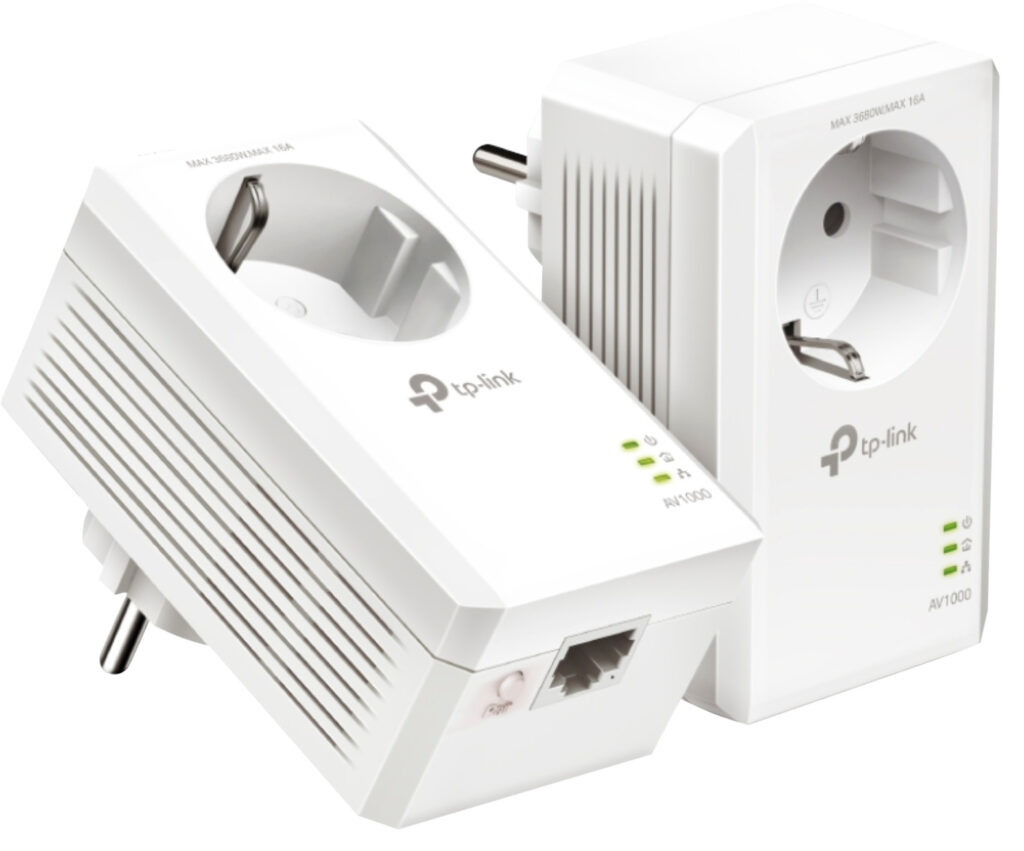
Two plain adapters, each with one gigabit port and an outlet rated up to 16 amps. TP-Link gives a typical consumption of 2.3 watts. That is entirely sufficient to supply a single TV or PC. And if the wiring turns out to be too weak, this is where you lose the least money.
How we would decide
- One device by cable, tight budget: TP-Link TL-PA7017P KIT.
- Fixed workstation or TV corner with a FRITZ!Box: FRITZ!Powerline 1220 Set; for more than two devices, the devolo Magic 2 LAN triple.
- Wi-Fi in the attic or garden shed that should also be fast on 5 GHz: devolo Magic 2 WiFi 6 next, or the TP-Link TL-WPA8631P KIT as the cheaper route.
- Only phones and smart home devices in the next room, FRITZ!Box in place: FRITZ!Powerline 1240 AX WLAN Set.
In an older building, buy the cheapest suitable set first and measure at different outlets. The FRITZ! interface shows the data rate for each outlet, which makes comparison easy. If the connection stays weak, a wireless route is often the better answer. What a good repeater can do is shown in our comparison of Wi-Fi repeaters (in German).
Is the problem not the device at all, but the line? How to find the right connection and switch providers without downtime is explained in our guide to switching internet providers (in German). If your street is currently being connected, the fiber connection (in German) guide will help you decide.
Frequently asked questions
Why does a powerline adapter never reach its advertised speed?
The big numbers are gross rates, as AVM and TP-Link openly state. The power grid and surroundings reduce the rate further. On top of that, every LAN port is Gigabit Ethernet, so a connected device never gets more than 1,000 Mbps. A 4K stream needs only a small fraction of that.
Does powerline work in older buildings?
Often only to a limited extent. Modern adapters use all three wires via MIMO; if only two reach the outlet, the rate drops to roughly half, according to heise. Long cable runs, different phases and separate electricity meters dampen the signal further. Without a protective earth conductor, the first call should be to an electrician.
Can you mix devolo and FRITZ! adapters?
No. AVM and TP-Link rely on HomePlug AV2, devolo builds its Magic series on G.hn, and the two worlds do not talk to each other. Even older devolo dLAN adapters do not work with Magic devices. If you already have adapters in the house, it is better to stick with that family.
Can a powerline adapter go into a power strip?
Both manufacturers want the adapter plugged directly into the wall, never into a power strip. The pass-through outlet filters interference from connected devices, such as lamp power supplies or chargers. AVM does warn, however, against plugging heavy plug-in power supplies into it.
How much power does a powerline adapter use?
The devices run around the clock. At a typical 9.2 watts, the devolo WiFi 6 next comes to about 80 kWh a year. A FRITZ!Powerline 1220 needs about 2 watts according to AVM, and TP-Link gives a typical 2.3 watts for the TL-PA7017P.
Does powerline interfere with DSL?
It can, because powerline and VDSL use neighboring frequencies. The devolo adapters offer dedicated profiles for VDSL 17a and 35b. According to devolo, sources of interference in the home network, such as lamps or chargers, are better connected via the adapter's filtered outlet.
Sources
- devolo: Magic 2 WiFi 6 next Starter Kit
- devolo: Magic 2 WiFi 6 next data sheet
- devolo: Magic 2 LAN triple
- devolo: Magic 2 LAN manual
- devolo: Powerline glossary
- devolo: Expanding a powerline network
- devolo: Powerline FAQ
- AVM: FRITZ!Powerline 1240 AX manual
- AVM: FRITZ!Powerline 1220 manual
- TP-Link: TL-WPA8631P KIT
- TP-Link: TL-PA7017P KIT
- heise online: Gigabit powerline with MIMO technology on the horizon (2014)
Where to buy
- devolo Magic 2 WiFi 6 next Starter KitCheck price at Amazon.deCheck price at Amazon.co.ukCheck price at Amazon.nlCheck price at Amazon.com.beCheck price at Amazon.frCheck price at Amazon.itCheck price at Amazon.esCheck price at Amazon.plCheck price at Amazon.seAvailable in Germany: Amazon.de
- devolo Magic 2 LAN triple Starter KitCheck price at Amazon.deCheck price at Amazon.co.ukCheck price at Amazon.nlCheck price at Amazon.com.beCheck price at Amazon.frCheck price at Amazon.itCheck price at Amazon.esCheck price at Amazon.plCheck price at Amazon.seAvailable in Germany: Amazon.de
- FRITZ!Powerline 1240 AX WLAN SetCheck price at Amazon.deCheck price at Amazon.co.ukCheck price at Amazon.nlCheck price at Amazon.com.beCheck price at Amazon.frCheck price at Amazon.itCheck price at Amazon.esCheck price at Amazon.plCheck price at Amazon.seAvailable in Germany: Amazon.de
- FRITZ!Powerline 1220 SetCheck price at Amazon.deCheck price at Amazon.co.ukCheck price at Amazon.nlCheck price at Amazon.com.beCheck price at Amazon.frCheck price at Amazon.itCheck price at Amazon.esCheck price at Amazon.plCheck price at Amazon.seAvailable in Germany: Amazon.de
- TP-Link TL-WPA8631P KITCheck price at Amazon.deCheck price at Amazon.co.ukCheck price at Amazon.nlCheck price at Amazon.com.beCheck price at Amazon.frCheck price at Amazon.itCheck price at Amazon.esCheck price at Amazon.plCheck price at Amazon.seAvailable in Germany: Amazon.de
- TP-Link TL-PA7017P KITCheck price at Amazon.deCheck price at Amazon.co.ukCheck price at Amazon.nlCheck price at Amazon.com.beCheck price at Amazon.frCheck price at Amazon.itCheck price at Amazon.esCheck price at Amazon.plCheck price at Amazon.seAvailable in Germany: Amazon.de