Contents12 sections
This guide was first published in German on handgetestet.de.
Lots of wattage in the advertising, no temperature control in the handle: that is how many a soldering project gets off to a bad start. The iron gets hot, but nobody knows how hot. For electronics and model building, your bench needs a temperature-controlled station with adjustable temperature, plus a tip system that will still be around in ten years. We see the Hakko FX-888DX as a sensible middle ground for most hobbyists. If you solder rarely or work on the go, a USB-C soldering iron such as the Miniware TS101 saves you a good deal of money.
The Weller WE 1010 and Ersa i-CON Nano already appear in our overview of model building tools (in German) as part of the basic kit. This article goes deeper: temperature control, tips, power supplies, and the question of where the smoke goes.
Six soldering stations and soldering irons compared
| Model | Type and power | Temperature | Best for |
|---|---|---|---|
| Hakko FX-888DX | Station, 65 W iron, T18 tips | 50 to 480 °C | Electronics and model building at a fixed workspace |
| Weller WE 1010 | Station, 70 W iron, ET tips, ESD | 100 to 450 °C | Workbench, school, occasional solderers |
| Ersa i-CON Nano MK2 | Station, 80 W, 142 series, antistatic | 150 to 450 °C | Lots of soldering, quick tip changes |
| Ersa i-CON Pico MK2 | Station, 80 W, 142 series, not antistatic | up to 450 °C (iron) | Hobby use without ESD requirements |
| Pine64 Pinecil V2 | USB-C/DC, up to 88 W at 24 V | no manufacturer specification found | On the go, drones, hobbyists with a power supply |
| Miniware TS101 | USB-C 45 W, DC 65 W, TS100 tips | 50 to 400 °C | Occasional solderers, small budget |
Temperature control beats wattage
A soldering station measures the temperature close to the tip and reheats as soon as a joint draws heat away. How quickly that happens determines whether you get clean connections. The power rating, on the other hand, mainly tells you about reserves. A thin wire on a receiver needs hardly any energy. A thick battery connector with copper stranded wire needs a lot. That is where more watts help, but only together with a suitable tip.
The stations in the table reach 450 °C or more, the TS101 up to 400 °C. The temperature your solder requires is printed on the spool or in the data sheet. For tips, Hakko uses T18, Weller ET and Ersa the 142 series. You should check in advance whether fine conical tips and wide chisel tips are available for the system; for connectors and stranded wire, the wide chisel tip is the more important part.
Preset temperatures and a lock are handy when several people solder at one workspace or when you often switch between fine and coarse work. ESD protection makes sense for sensitive semiconductors on circuit boards, and not every station has an antistatic design. A standby mode protects the tip while the iron rests in its holder.
USB-C soldering irons: only as good as the power supply behind them
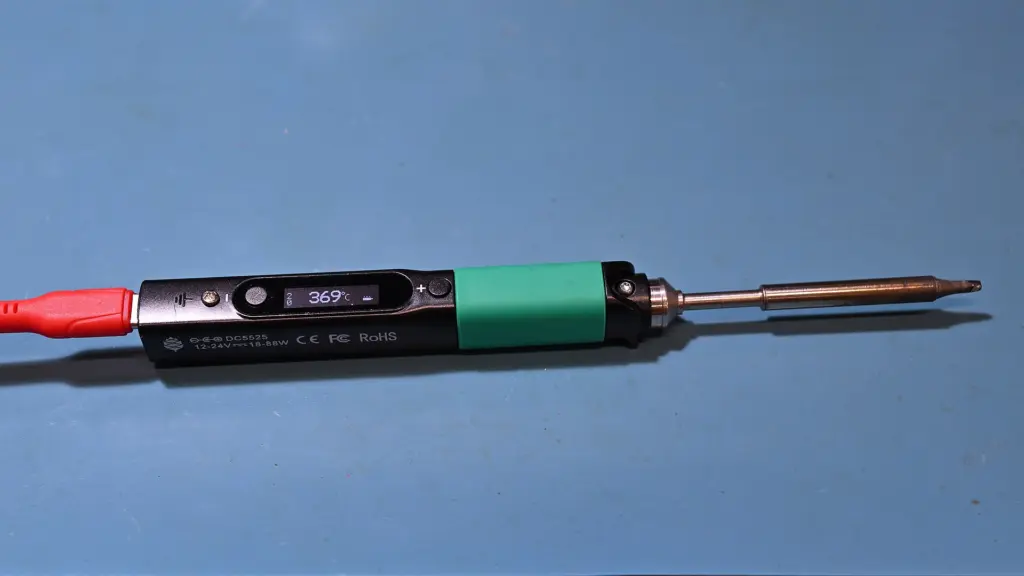
The Pinecil and TS101 are hardly bigger than a thick felt-tip pen. They draw their power via USB-C Power Delivery or a barrel connector. That sounds like freedom, and it is. But everything depends on the power supply. For the Pinecil, Pine64 recommends one with 65 W at 20 V and explicitly advises against 12 V phone fast chargers, because these usually only deliver around 1.5 A. With the TS101, the retailer data sheet states a maximum of 45 W via USB-C PD 3.0. The basics of choosing the right power supply are covered in our article on USB-C chargers (in German).
SMD components, servo cables, repairs: a pen-style iron like this is enough for that. On large thermal masses such as an XT90 connector on thick stranded wire, working with a station, a holder and a heavy iron is more comfortable.
What the smoke contains and what helps against it
The visible smoke comes mainly from the flux in the solder wire. DGUV Information 213-725 from the German Social Accident Insurance (DGUV) names resins such as rosin as a common ingredient and lists rosin as a skin sensitizer. For businesses, the German Technical Rule for Hazardous Substances TRGS 528 requires soldering fumes to be extracted at the source; the extracted air may only return to the room after thorough cleaning, meaning through particle and activated carbon filters. According to the DGUV, benchtop units that merely draw the smoke through a filter do not remove it effectively enough.
These rules apply to workplaces, not to the hobby basement. They still work as a benchmark. If you only solder a few connectors now and then, you should at least ventilate well and keep your head out of the plume. If you solder regularly, plan for a real extraction system close to the joint with both filter stages.
Hakko FX-888DX
According to the Hakko manual, the station regulates from 50 to 480 °C and stores up to five preset temperatures, which can be called up with the rotary knob. If you like, a password locks the settings. The FX-8801 iron delivers 65 W and accepts the entire T18 tip range. Several variants are listed on Amazon; if you need 230 V, look for the suffix -31 in the model name.
Weller WE 1010
85 W for the station, 70 W for the WEP70 iron, as Weller states, plus ESD protection, standby and password protection. The tip is changed without tools. According to the manufacturer, it takes about 28 seconds to go from 50 to 350 °C. More leisurely than the Ersa. For connectors and stranded wire in model building, the reserve is sufficient; more on that in our model building guide.
Ersa i-CON Nano MK2
About 9 seconds to 350 °C, antistatic design: that is how Ersa describes the Nano. The 142 series tips sit in a bayonet mount and change with a twist. Three preset temperatures can only be set up via the free PC software or an optional microSD card, which is more cumbersome than with Hakko. In price, it sits one level above the FX-888DX.
Ersa i-CON Pico MK2
Ersa positions the Pico as an entry into professional soldering and lists it in its category for hobbyists. According to the catalog, it shares 80 W and a heat-up time of around 9 seconds with the Nano. It is not antistatic. For cables, connectors and kits, that does not matter, but on expensive boards with sensitive chips the Nano is the safer choice.
Pine64 Pinecil V2
The Pinecil runs the open IronOS firmware, and according to Pine64 it detects on its own which type of tip is fitted. Officially, it delivers up to 88 W at 24 V via the barrel connector, and around 64 W on a 20 V USB-C power supply according to the power table. It takes TS100 tips. On Amazon, it is mostly sold by retailers such as Fraos; the designation V2 should appear in the listing.
Miniware TS101
The TS101 succeeds the TS100, weighing 33 g including the tip according to the retailer data sheet, with temperature control from 50 to 400 °C. Up to 65 W is possible via the barrel connector, up to 45 W via USB-C PD 3.0. The often advertised 90 W only becomes available after a firmware update and exclusively with a PD 3.1 power supply. It handles fine work. With thick battery connectors, it gets tight.
Which device for which bench?
For a fixed hobby workspace with mixed electronics and model building, we recommend the Hakko FX-888DX: five preset temperatures on the unit and a large tip selection, without moving into Ersa’s price range. If you solder a lot on sensitive circuit boards, go for the Ersa i-CON Nano MK2, which is fast and antistatic but more expensive. If Weller tips are already in the workshop cabinet, it is the Weller WE 1010.
For occasional soldering at a small price, the Miniware TS101 bundled with a power supply serves you well, though it is rather too weak for battery connectors on LiPo batteries (in German). And on the go, at the flying field, with your own 65 W power supply: the Pinecil V2.
Regardless of the device, if you solder frequently, an extraction system with particle and activated carbon filters belongs on the shopping list. A fan with a filter mat is no substitute.
Once the circuit is soldered, troubleshooting follows. Which oscilloscope is suitable for that is covered in the guide to the oscilloscope for beginners.
Components without freely accessible pins need hot air; see the guide to the SMD soldering station.
If you solder battery connectors and speed controllers yourself in model building, the guide to RC boats shows which drives and batteries suit beginners.
Frequently asked questions
Why is a temperature-controlled soldering station more important than high wattage?
A soldering station measures the temperature close to the tip and reheats as soon as a joint draws heat away. How quickly that happens determines whether you get clean connections. The wattage mainly tells you about reserves; more watts only help with thick connectors when combined with a suitable tip.
Is a USB-C soldering iron good enough for electronics?
For SMD components, servo cables and repairs, a pen-style iron like this is enough. But everything depends on the power supply: for the Pinecil, Pine64 recommends one with 65 W at 20 V and advises against 12 V phone fast chargers. On large thermal masses such as an XT90 connector, working with a station is more comfortable.
Do I need an antistatic soldering station?
ESD protection makes sense for sensitive semiconductors on circuit boards. The Ersa i-CON Nano MK2 has an antistatic design; the cheaper Pico MK2 does not. For cables, connectors and kits, that does not matter, but on expensive boards with sensitive chips the Nano is the safer choice.
Is soldering smoke harmful to your health?
The visible smoke comes mainly from the flux. The DGUV (German Social Accident Insurance) lists rosin as a skin sensitizer. For businesses, the German technical rule TRGS 528 requires extraction at the source with particle and activated carbon filters. At home, you should at least ventilate well and keep your head out of the plume.
What should you look for in soldering tips?
Every manufacturer has its own system: Hakko uses T18, Weller ET and Ersa the 142 series. Check in advance whether fine conical tips and wide chisel tips are available for it. For connectors and stranded wire, the wide chisel tip is the more important part.
Hakko FX-888DX or Weller WE 1010?
According to the manual, the Hakko regulates from 50 to 480 °C and stores up to five preset temperatures. The Weller WE 1010 offers ESD protection, standby and tool-free tip changes, but heats up more leisurely. If you already have Weller tips in the workshop, that speaks for the Weller.
Sources
- Hakko: FX-888DX user manual
- Weller: WE1010 Set 230V
- Ersa-Shop: i-CON Nano MK2
- Ersa-Shop: i-TOOL Pico MK2
- Ersa: Soldering tools catalog 2026
- Pine64 Wiki: Pinecil
- Welectron (German retailer): Miniware TS101 data sheet
- DGUV Information 213-725 (German Social Accident Insurance): Manual soldering with lead-free solder alloys
- BAuA (German Federal Institute for Occupational Safety and Health): TRGS 528 Welding work
Where to buy
- Hakko FX-888DXCheck price at Amazon.deAvailable in Germany: Amazon.de
- Miniware TS101Check price at Amazon.deAvailable in Germany: Amazon.de
- Weller WE 1010 (T0053298699)Check price at Amazon.deAvailable in Germany: Amazon.de
- Ersa i-CON Nano MK2Check price at Amazon.deAvailable in Germany: Amazon.de
- Ersa i-CON Pico MK2Check price at Amazon.deAvailable in Germany: Amazon.de
- Pine64 Pinecil V2Check price at Amazon.deAvailable in Germany: Amazon.de