Contents20 sections
This guide was first published in German on handgetestet.de.
When people shop for a VR headset, they look at resolution and field of view first. That’s understandable, but it often leads you astray. Something else decides the choice, namely the device the headset will be connected to. For the PlayStation 5 there is exactly one headset, the PS VR2. On a Windows PC the choice is wide; on a Mac it is narrow. And if you have no suitable computer at all, you reach for a standalone headset such as the Meta Quest 3S, which is a good choice for most beginners.
This guide therefore goes platform by platform. Only after that do we get to spec sheets, prices and the question of how much headset you really need.
Platform first, then the headset
The following overview shows which currently sold headset works with which device. A yes means the manufacturer officially supports that setup. Workarounds via third-party software are covered in the text.
| Model | PS5 | Windows PC | Mac | Standalone |
|---|---|---|---|---|
| Meta Quest 3S | no | yes, cable or Wi-Fi | desktop streaming only | yes |
| Meta Quest 3 | no | yes, cable or Wi-Fi | desktop streaming only | yes |
| Sony PlayStation VR2 | yes | yes, with PC adapter | no | no |
| Pico 4 Ultra | no | yes, streaming | no | yes |
| HTC Vive Focus Vision | no | yes, Wi-Fi or DisplayPort | no | yes |
| Pimax Crystal Light | no | yes, DisplayPort | no | no |
PlayStation 5: It comes down to the PS VR2
On a PS5 hooked up to the TV, there is no way around it. Sony built the PS VR2 for the console; Quest, Pico or Vive headsets cannot be connected there. Conversely, the original PS VR for the PS4 is no shortcut: games for the PS VR2 do not run on it, and according to Sony neither the Move controllers nor the first-generation Aim controller work with the new headset.
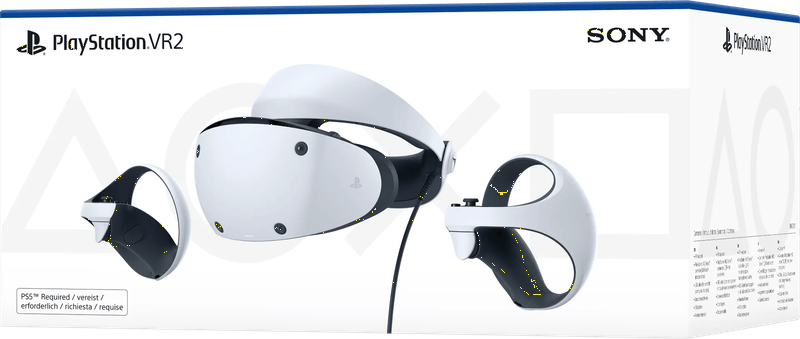
Technically, the PS VR2 plays near the top of the field. OLED displays with 2,000 × 2,040 pixels per eye, 90 or 120 Hz, a field of view of around 110 degrees and eye tracking with one infrared camera per eye. Four cameras in the housing track your head and the controllers; according to Sony, no external camera is needed. The processing happens in the console. That is why a lot of things look better than on a standalone headset.
What the console needs
Not much. Sony lists a PlayStation 5 as the requirement; the headset is compatible with the PS5 consoles. It connects via a single USB-C cable about 4.5 meters long. For the initial setup you also need a DualSense controller and the TV. With the cable it weighs more; without the cable, about 560 grams according to Sony. If you play often, you’ll find suitable charging stations and stands in our article on PS5 accessories. If you’re still wondering which TV shows the console at its best, the guide TVs for the PS5 (in German) will help.
The PC adapter: a second platform, with compromises
Since 2024, Sony has sold an adapter that lets the PS VR2 display SteamVR games on a Windows PC. That’s real added value. It doesn’t come entirely without compromises, though. According to Sony, the PC lacks HDR, headset vibration, eye tracking, and the adaptive triggers and haptic feedback of the Sense controllers. Basic vibration remains.
The computer has to be up to it, too. Sony requires 64-bit Windows 10 or 11, at least an Intel Core i5-7600 or AMD Ryzen 3 3100 and 8 GB of RAM. As for the graphics card, Sony says a GTX 1650 or RX 5500 XT is enough, with an RTX 3060 or RX 6600 XT recommended. One detail is crucial. The graphics card needs its own DisplayPort output with DisplayPort 1.4. According to Sony, DisplayPort over USB-C is not enough. That rules out many laptops. On top of that, you need a USB 3.0 port directly on the computer and Bluetooth 4.0 or newer. The DisplayPort cable is not included.
Windows PC: three routes into PC VR
On a Windows computer the choice is the widest, and the decision the most confusing. Broadly, there are three groups. Standalone headsets that also run on a PC. Pure PC headsets that show nothing without a computer. And the PS VR2 with its adapter, which we covered above.
Standalone headset via cable or Wi-Fi
For most PC gamers, this is the sensible route. Meta connects the Quest 3 and Quest 3S to Windows 10 or 11 via the Meta Horizon Link app, either with a USB-C cable or wirelessly via Air Link. For the cable, Meta specifies USB-C 3.2 with at least 5 Gbps on a USB 3.2 port. For Air Link, the computer should be connected to the router with a network cable; the headset then transmits in the 5 GHz band. If the Wi-Fi is the problem, the cause often lies with the router; our article on mesh Wi-Fi gives an overview of better networks.
There is also Virtual Desktop, a paid app from the headset’s store. It streams SteamVR games from a Windows PC to Quest and Pico headsets, among others. PICO itself relies on its own PICO Connect software and Wi-Fi 7 for the Pico 4 Ultra. The HTC Vive Focus Vision goes one step further: with the separately sold Wired Streaming Kit, it receives the picture via DisplayPort, without compression. According to HTC, 120 Hz is only available in this mode, as a beta.
Pure PC headsets for simulations
Flight simulator, racing seat, multiple screens in the cockpit. Here sharpness and field of view matter more than anything else, and this is where pure PC headsets play to their strengths. The Pimax Crystal Light is one example: 2,880 × 2,880 pixels per eye, QLED displays with mini-LED backlighting and local dimming, up to 120 Hz. It connects to the computer via DisplayPort 1.4a and USB 3.0, needs no base stations and, according to Pimax, weighs 815 grams. Hardly lightweight.
At the other end is the Bigscreen Beyond 2. According to the manufacturer it weighs just 107 grams, the Beyond 2e variant with eye tracking one gram more, and its micro-OLED displays show 2,560 × 2,560 pixels per eye. The price of that lightness is a cumbersome purchase. Bigscreen sells only direct, and controllers and base stations are not included. According to Bigscreen, at least one SteamVR base station is mandatory, and two are recommended. The Beyond is mainly worthwhile for simulation fans who already have Lighthouse tracking in the room.
And HTC? HTC’s German online store no longer carries the Vive Pro 2, nor the Vive XR Elite. What is available there is the Vive Focus Vision, which runs standalone and adds eye tracking on the PC.
Valve: Index on clearance, Steam Frame by reservation
According to Valve, the Valve Index is no longer being produced. Steam is selling remaining stock at reduced prices while supplies last, and existing devices will continue to be supported. As a new purchase, we would only recommend it to tinkerers who want to add Index controllers or base stations.
Its successor is called Steam Frame. Valve also sells it in Germany, but only via a reservation in the Steam store: when your turn comes, you get a notification and have 72 hours to buy. So it can’t be delivered right away. According to Valve, it contains a Snapdragon 8 Gen 3 and 16 GB of RAM, the LCD displays show 2,160 × 2,160 pixels per eye, and it weighs 440 grams with the head strap. Games run standalone under SteamOS or wirelessly from the PC, with eye tracking transmitting the area you are looking at in sharper detail. According to Valve, a power adapter is not included.
Which graphics card is enough for PC VR?
The honest answer: more than the minimum requirements suggest. The graphics card renders every frame twice, once per eye, at 90 or more frames per second. When the frame rate drops, you notice it far more clearly in VR than on a monitor.
A few reference points from the manufacturers‘ specifications. For Meta Horizon Link, Meta recommends cards from NVIDIA’s RTX 20 series or AMD’s RX 6000 series onward; Link does not support the RTX 2050 or Intel Arc. Sony recommends an RTX 3060 for the PS VR2 on a PC. For the Crystal Light, Pimax lists an RTX 2070 or RX 5700 XT as the minimum and recommends cards between the RTX 3080 and RTX 4070. If you want to fly flight simulators at high resolution, you quickly end up in the high-end class.
Our advice: first check what’s in your computer, then choose the headset. With a mid-range card, a Quest 3 on a cable is the better-matched combination than a high-resolution Pimax whose pixels the card can’t even fill. Our graphics card guide (in German) compares suitable cards, and our article on the gaming PC (in German) covers complete systems.
Mac: the most difficult platform for VR
Only plain talk helps here. SteamVR does not run on the Mac. Valve ended macOS support in 2020, and the SteamVR page on Steam only lists requirements for Windows. Meta Horizon Link is also Windows-only. The big PC VR games therefore remain off-limits to a Mac, no matter how fast its chip is.
What does work is the desktop. Virtual Desktop offers its streamer for macOS and mirrors the Mac screen into the Quest. For SteamVR games, however, the developer explicitly points to a Windows PC. For movies, working on a virtual big screen, or games that run directly on the Quest, it’s usable.
That leaves Apple itself. The Apple Vision Pro with the M5 chip shows a Mac’s screen as a virtual display, wirelessly. According to Apple, this works with any Mac running macOS 14 Sonoma or later; the wide and ultrawide formats with up to 5,120 × 1,440 points require a Mac with Apple silicon and macOS Sequoia 15.2. Both devices need the same Apple Account with two-factor authentication. Apple brings PC games to the headset via streaming apps such as Steam Link; Apple does not promise real SteamVR.
The Vision Pro is more a computer for your head than a gaming device. Micro-OLED with a combined 23 million pixels, 16 GB of RAM, a weight of 750 to 800 grams plus a 353-gram battery on a cable, up to 2.5 hours of runtime. Apple sells it directly in Germany, with prices starting at €3,699. That’s too much money for gaming. If you work on a Mac and watch movies, on the other hand, this is the most coherent overall package. We compare which Mac fits in our article on Mac desktops (in German).
Xbox and Switch: the short answer
There is no VR headset for the Xbox. Neither Microsoft nor any other manufacturer offers one. The Windows Mixed Reality headsets for the PC are history as well, since Microsoft removed support with Windows 11 version 24H2. In 2019, Nintendo offered the Labo VR Kit for the original Switch, a cardboard headset you slot the console into. A craft project for children aged seven and up, and according to Nintendo not for the Switch Lite. It has little to do with a real VR headset. Our game console guide (in German) helps you figure out which console suits you.
No computer at all: the standalone headsets
No console, no powerful PC? Then a standalone headset is the obvious choice. Processor, storage and battery sit in the housing, and games come from the manufacturer’s store. With most models, you can add a PC later.
Meta has the largest game catalog. The Pico 4 Ultra is the alternative for anyone who doesn’t want a Meta account. With its price, the Vive Focus Vision is aimed more at people who also play seriously on a PC. Samsung has so far only sold its Galaxy XR in other countries, not in Germany. And Meta has not announced a Quest 4 to this day. So if you are waiting for a successor, you are waiting on nothing concrete.
Six VR headsets compared on specs
All specifications come from the manufacturers. Prices are rounded ranges based on the manufacturer’s store or retailer offers, as of November 2026. They change frequently.
| Model | Resolution per eye | Display and lenses | Refresh rate | Field of view |
|---|---|---|---|---|
| Meta Quest 3S | 1,832 × 1,920 | LCD, Fresnel | 72–120 Hz | 96° horizontal |
| Meta Quest 3 | 2,064 × 2,208 | LCD, pancake | up to 120 Hz | 110° horizontal |
| Sony PlayStation VR2 | 2,000 × 2,040 | OLED with HDR | 90 / 120 Hz | approx. 110° |
| Pico 4 Ultra | 2,160 × 2,160 | Pancake | 90 Hz | 105° |
| HTC Vive Focus Vision | 2,448 × 2,448 | LCD | 90 Hz, 120 Hz via DisplayPort (beta) | up to 120° |
| Pimax Crystal Light | 2,880 × 2,880 | QLED with mini-LED, glass lenses | 72–120 Hz | 110° horizontal |
| Model | Tracking | Weight | Connection | Price range |
|---|---|---|---|---|
| Meta Quest 3S | Cameras on the headset | approx. 515 g | USB-C, Wi-Fi | around €350–470 |
| Meta Quest 3 | Cameras on the headset | approx. 515 g | USB-C, Wi-Fi | around €600–620 |
| Sony PlayStation VR2 | 4 cameras, eye tracking | approx. 560 g without cable | USB-C to the PS5, PC via adapter | around €440–450, adapter around €60 |
| Pico 4 Ultra | 4 cameras, depth sensor | approx. 580 g | USB-C, Wi-Fi 7 | around €600–650 |
| HTC Vive Focus Vision | 4 cameras, eye tracking | not specified | USB-C with DisplayPort, Wi-Fi 6E | around €1,350 |
| Pimax Crystal Light | Cameras, base stations optional | 815 g | DisplayPort 1.4a, USB 3.0 | around €850 |
Meta Quest 3S
There is no cheaper serious way into VR. According to Meta, inside is a Snapdragon XR2 Gen 2 with 8 GB of RAM, plus 128 or 256 GB of storage. The savings came from the optics: Fresnel lenses, a 96-degree field of view, and only three settings for lens spacing. Meta states the battery life at about 2.5 hours on average. It suits families and newcomers, and on a PC it runs via Link just like its more expensive sibling. If you want to install a lot of big games, take the 256 GB version.
Meta Quest 3
Same software, better window. Pancake lenses, continuously adjustable lens spacing, a 110-degree field of view according to Meta, and 512 GB of storage. For occasional gamers the extra cost is hard to justify. If you spend time in the headset every day, read text or play a lot on a PC, you are more likely to notice the sharper optics. According to Meta, battery life is up to 2.2 hours, so slightly less than the 3S.
Sony PlayStation VR2
A must for PS5 owners who want VR, and thanks to a lowered list price, cheaper than at launch. No other headset in our comparison offers OLED, HDR and eye tracking together in this price class. The downsides are the cable to the console and being tied to the couch and the TV. Without a PS5 or the PC adapter, it is useless. Sony sells the adapter in its own store.
Pico 4 Ultra
If you’re looking for a serious alternative to Meta, this is where you end up. 12 GB of RAM, 256 GB of storage, pancake lenses and a battery at the back of the head as a counterweight; of the roughly 580 grams, 304 sit on the front according to PICO. For playing from a PC, PICO specifies Wi-Fi 7. The catch: games come from the PICO Store, which is smaller than Meta’s catalog. Check beforehand whether the titles you want are available there.
HTC Vive Focus Vision
Two headsets in one housing. Standalone with a Snapdragon XR2, 12 GB of RAM and 128 GB of storage, and on a PC via Wi-Fi or DisplayPort. Add to that eye tracking at 120 Hz and a battery that, according to HTC, can be hot-swapped during use. HTC states the battery life at up to two hours. For pure gamers it is expensive. It becomes interesting for anyone looking for one device for PC VR and mobile use who wants to do without Meta.
Pimax Crystal Light
The highest resolution among the six headsets in the table. It only runs on a Windows PC and demands a powerful graphics card. According to Pimax, the lens spacing ranges from 58 to 72 millimeters; there is no eye tracking. At 815 grams, it’s more suited to a simulator seat than to walking around. Pay attention to the configuration when buying: retailers offer bundles with and without controllers, as well as versions with installment payments where an unlock fee becomes due later.
How much space does VR need?
Less than many people think. For seated or standing play, Sony says an area of about 1 × 1 meter is enough, as long as your arms can swing freely. If you want to move around the room, Meta and Sony say you need at least 2 × 2 meters of clear space. Some games want more.
The headsets draw a virtual boundary and warn you when you get too close to it. That protects you from the coffee table, not from the ceiling light when you swing out. Clear away loose rugs and cables, keep pets and children out of the play area, and don’t leave the headset in the sun: light focused through the lenses can damage the display, as Sony warns in the PS VR2 manual, for example. We have rounded up accessories such as more comfortable head straps and extra batteries in our VR accessories guide (in German).
Wearing glasses in the headset
Glasses wearers have three options. Meta includes a spacer with the Quest 3S, and according to the package contents PICO does the same with the Pico 4 Ultra. Sony writes that glasses wearers were taken into account during the development of the PS VR2, but very wide or unusually shaped frames may not fit. Measure your frames before buying, and make sure your glasses lenses don’t touch the headset lenses. Scratches on the lenses stay in the picture forever.
The Apple Vision Pro is different. According to Apple, it cannot be worn over glasses. If you need vision correction, you order ZEISS Optical Inserts with a valid prescription; for reading glasses only, there are inserts in three strength ranges. According to Apple, soft contact lenses also work.
From what age? What the manufacturers themselves say
There is no legal age limit for VR headsets, but there are manufacturer guidelines. They are stricter than many parents assume.
- Meta Quest: A Meta account is mandatory. Children must be at least 10 years old; from 10 to 12, parents set up and manage the account (approving apps, limiting screen time). From 13, users manage the account themselves.
- PlayStation VR2: According to Sony, not suitable for children under 12; parental controls are available.
- PICO: According to the safety information, not for children under 12, and older children only under adult supervision.
- Apple Vision Pro: According to Apple, for people aged 13 and older; teenagers should be supervised.
Account and privacy: who sees what the cameras see?
The cameras of a VR headset capture your hands and your room. With all standalone headsets, games come from the manufacturer’s store, and that doesn’t work without an account. With Meta, the account is even a prerequisite for using the device. According to Meta’s privacy notice, camera images of your hands are processed on the device and not stored on Meta’s servers, but the estimated hand size is, for up to 90 days. Websites only receive room data such as walls and furniture with your consent.
Apple emphasizes that information about where you are looking is not shared with Apple, apps or websites. Apps only get hand data with permission. For the PS VR2, Sony requires a PlayStation account to redeem the game voucher in the bundle; according to Sony, account holders must be 16 or older, and under 18 with parental consent. On a PC, a Steam account comes on top. Our advice: check the permissions of every app after setup.
How we would decide
- First VR headset, no suitable PC: Meta Quest 3S. If optics matter more to you than price, the Quest 3.
- You already have a PlayStation 5: PS VR2, possibly later with the PC adapter, provided the graphics card has a real DisplayPort output.
- Windows PC with a mid-range card: Quest 3 on a cable or via Air Link.
- Flight and racing simulation with a powerful graphics card: Pimax Crystal Light; if you want something light and have base stations, the Bigscreen Beyond 2.
- No Meta account wanted: Pico 4 Ultra, provided the games you want are in the PICO Store. With PC ambitions, the Vive Focus Vision.
- Mac household: for gaming, a standalone Quest is what’s left. For working with the Mac and watching movies, the Vision Pro, if the budget allows.
- Children under 12: only Meta with a parent account, and only from age 10.
Frequently asked questions
Which VR headset works with the PS5?
Only Sony's PlayStation VR2. It connects to the console with a USB-C cable and, according to Sony, needs no external camera. Quest, Pico or Vive headsets cannot be used with the PS5, and games for the original PS VR do not run on the PS VR2.
Can you use the PS VR2 on a PC?
Yes, with Sony's PC adapter and SteamVR. The graphics card needs a dedicated DisplayPort 1.4 output; according to Sony, DisplayPort over USB-C is not enough. On the PC you lose HDR, eye tracking, headset vibration, and the adaptive triggers and haptics of the controllers.
Does a VR headset work with a Mac?
Only to a limited extent. SteamVR and Meta Horizon Link are not available for macOS, so PC VR games do not run. You can stream the Mac's screen into a Quest with Virtual Desktop. The Apple Vision Pro shows a Mac as a virtual display, in ultrawide format if you like.
Is there a VR headset for Xbox or Switch?
Not for the Xbox. For the original Switch there was the cardboard Nintendo Labo VR Kit in 2019, intended by Nintendo for children aged seven and up and not for the Switch Lite. It doesn't compare to a real VR headset.
Which graphics card do I need for PC VR?
For Horizon Link, Meta recommends cards from the RTX 20 or RX 6000 series; for the PS VR2 on a PC, Sony recommends an RTX 3060. High-resolution headsets such as the Pimax Crystal Light require at least an RTX 2070 according to Pimax, with an RTX 3080 to RTX 4070 recommended.
Is the Meta Quest 3 worth it over the Quest 3S?
The software is the same; the difference is the optics: pancake lenses instead of Fresnel, continuously adjustable lens spacing, a 110- instead of 96-degree field of view according to Meta, and 512 GB of storage. For occasional gamers the extra cost is hard to justify; if you spend time in the headset every day or play on a PC, you are more likely to notice the sharper optics.
How much space do you need for VR?
For seated or standing play, Sony says an area of about 1 × 1 meter is enough. For games where you move around the room, Meta and Sony specify at least 2 × 2 meters of clear space.
Can you wear a VR headset with glasses?
Meta includes a spacer with the Quest 3S, and PICO does the same with the Pico 4 Ultra. With the PS VR2, very wide frames may not fit, so measure first. According to Apple, the Apple Vision Pro cannot be worn over glasses; you need ZEISS Optical Inserts with a prescription.
At what age is a VR headset allowed?
There is no legal age limit, but there are manufacturer guidelines. For Meta Quest the minimum is 10 years, with a parent-managed account up to age 12. Sony says the PS VR2 is not suitable for children under 12, and PICO says the same. According to Apple, the Apple Vision Pro is for people aged 13 and older.
What data does a VR headset collect?
The cameras capture your hands and your room, and none of the standalone headsets work without an account. According to Meta, camera images of your hands are processed on the device, but the estimated hand size is stored for up to 90 days. Apple says it does not share where you are looking. After setup, check the permissions of every app.
Sources
- Meta: Quest 3S and Quest 3 compared
- Meta: The right account for your age
- Meta: Connecting Quest to a PC
- Meta: System requirements for Meta Horizon Link
- Meta: Space requirements for roomscale
- Meta: Hand and body tracking privacy notice
- Sony: PlayStation VR2
- Sony: PS VR2 tech specs
- Sony: PS VR2 compatibility
- Sony: PS VR2 PC adapter
- Sony: Preparing your PC for the PS VR2
- PlayStation Blog: PS VR2 FAQ
- PICO: Pico 4 Ultra
- PICO: Pico 4 Ultra specs
- PICO: Health and safety warnings
- HTC: Vive Focus Vision specs
- Pimax: Crystal Light
- Bigscreen: Beyond 2 and Beyond 2e
- Valve: Steam Frame
- Valve: Valve Index
- Steam: SteamVR
- Valve: Supported SteamVR platforms
- Virtual Desktop
- Microsoft: Removed features in Windows
- Nintendo: VR mode of the Labo VR Kit
- Apple: Vision Pro tech specs
- Apple: Mac Virtual Display with the Vision Pro
- Apple: Using the Vision Pro with vision correction
- Apple: Eyes, hands and privacy
Where to buy
- Meta Quest 3S (128 GB)View at CoolblueAvailable in Germany: Coolblue
- Meta Quest 3 (512 GB)View at CoolblueAvailable in Germany: Coolblue
- Sony PlayStation VR2View at CoolblueAvailable in Germany: Coolblue
- Pico 4 UltraCheck price at Amazon.deCheck price at Amazon.co.ukCheck price at Amazon.nlCheck price at Amazon.com.beCheck price at Amazon.frCheck price at Amazon.itCheck price at Amazon.esCheck price at Amazon.plCheck price at Amazon.seAvailable in Germany: Amazon.de
- HTC Vive Focus VisionCheck price at Amazon.deCheck price at Amazon.co.ukCheck price at Amazon.nlCheck price at Amazon.com.beCheck price at Amazon.frCheck price at Amazon.itCheck price at Amazon.esCheck price at Amazon.plCheck price at Amazon.seAvailable in Germany: Amazon.de
- Pimax Crystal LightCheck price at Amazon.deCheck price at Amazon.co.ukCheck price at Amazon.nlCheck price at Amazon.com.beCheck price at Amazon.frCheck price at Amazon.itCheck price at Amazon.esCheck price at Amazon.plCheck price at Amazon.seAvailable in Germany: Amazon.de