Contents10 sections
This guide was first published in German on handgetestet.de.
The shoebox is rarely the real problem. It gets difficult because next to the loose prints there are also three albums with glued-in photos and a tray full of slides, and no device handles everything equally well. That is why there is no one-size-fits-all answer here, but a calculation instead: for up to about a thousand mixed pictures without archival ambitions, a combo device such as the dnt SlideCopy PRO is the obvious choice. Many thousands of loose prints call for a feed scanner or a scanning service straight away. If you only have a few pictures, it is best to buy nothing at all.
First, a frank word. We are not aware of any independent measurements of the current devices. The most recent freely available comparison of scanners and scanning services by Stiftung Warentest, the German consumer testing organization, dates from 2010; the basic rules still apply, the models from back then do not.
How many pictures are there really?
Count before you order. A sample from one box, extrapolated to all of them, is enough. Then estimate the time. For our sample calculation, we assume 1,000 paper photos; these are assumptions, not manufacturer specs:
- Combo device: 20 seconds per photo for inserting, aligning and capturing adds up to around five and a half hours.
- Flatbed: four prints per scan, 90 seconds per pass including cropping, adds up to just over six hours.
- Feed scanner: 28 stacks of 36 photos, three minutes per stack including sorting, adds up to just under an hour and a half.
With 300 slides in the combo device at 15 seconds per frame, another 75 minutes are added. Sounds doable? On a Saturday, perhaps. The effort, however, is not in the scanning but in sorting, naming and editing. Feel free to plan on the same amount of time again for that.
How much resolution does a paper photo need?
The brochures exaggerate. A 10 × 15 centimeter print yields around 2 megapixels at 300 dpi and just over 8 at 600 dpi. At 600 dpi, you can later reorder the picture at 20 × 30 centimeters and still have 300 dpi in print. For family photos, that is usually enough, and the file stays manageable.
Slides are in a different league because they are small. A 35 mm slide measures 36 × 24 millimeters; 3,200 dpi yields just under 14 megapixels here. That number only tells you how many pixels are created. How much sharpness they actually contain is determined by the optics and sensor, and 22 megapixels „interpolated“ are upscaled. The details are in our guide to the slide scanner.
For typical users, Stiftung Warentest considers 24-bit color depth sufficient. As for the format: JPEG saves space and visibly loses quality at high compression, while TIFF is usually lossless and needs more storage. If you only get JPEG, choose the highest quality setting.
Four ways to a digital collection
| Model | Type | Paper photos | Slides and negatives | Best for |
|---|---|---|---|---|
| dnt SlideCopy PRO | Combo device with camera sensor, no PC needed | up to 10.6 × 15.3 cm in the holder, 700 dpi, also in the album | yes, 3,200 dpi | Mixed collections, albums with glued-in photos |
| Epson FastFoto FF-680W | Feed scanner, stacks of up to 36 photos | up to 600 dpi optical | no | Thousands of loose prints |
| Canon CanoScan LiDE 400 | A4 flatbed, USB-powered | 4,800 dpi according to Canon | no | A few prints, documents on the side |
| Epson Perfection V39 II | A4 flatbed, removable lid | 4,800 dpi according to the listing | no | Albums and books on the glass |
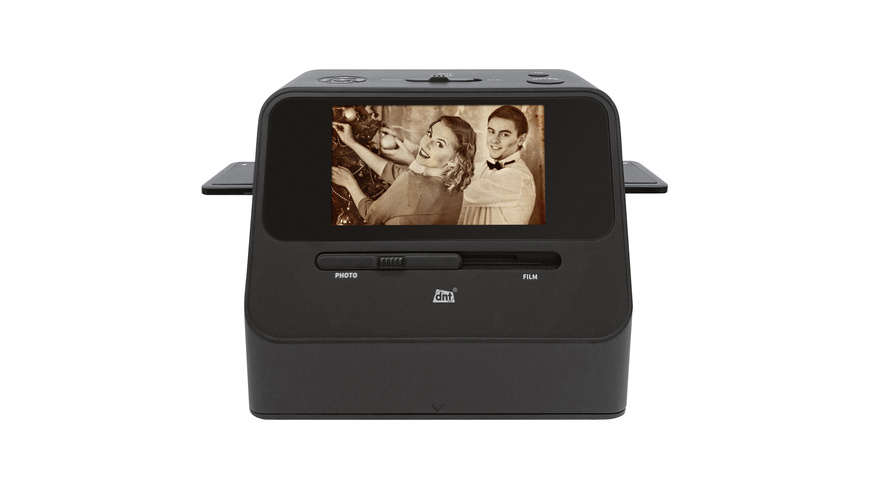
dnt SlideCopy PRO
The only device in this comparison that takes every kind of original. Inside, a 14-megapixel fixed-focus sensor does the work, images are saved as JPEG to an SD card, and according to ELV (German retailer), no PC is needed. Film goes in via holders, types 135, 126 and 110, and slides with frames up to 3.2 millimeters thick. For photos, the housing is placed on a frame or directly on the album page. That solves a real worry: glued-in pictures do not have to be torn out.
The limitations are just as clear. According to ELV, the edges are cropped during the scan, so the digital area is smaller than the original. Larger prints do not fit. There is no TIFF, and buyers report colors that are sometimes too bright. Exposure can be corrected by ±2 steps. For the family archive, that may be enough. If you are serious about preserving slides, stick with a film scanner.
Epson FastFoto FF-680W
Speed is its argument. According to Epson, up to 80 photos per minute in 10 × 15 format at 300 dpi, 36 prints in the feeder, 600 dpi optical, plus USB and Wi-Fi. It belongs in the upper price range, which only pays off with truly large collections or when several families share the device. It does not take slides or negatives. Nor glued-in photos. Epson limits the thickness in the stack to 0.23 millimeters and includes carrier sheets. Even so, we would not send old, curled or brittle prints through a feeder.
Canon CanoScan LiDE 400
A slim A4 scanner that draws power and data over a single USB cable. Canon specifies 4,800 dpi; for prints, you need one eighth of that. Flatbeds are the gentlest solution for delicate originals because nothing runs through rollers, and they handle certificates and letters on the side. For large piles of paper, a document scanner is faster. This device cannot do slides; it lacks the transparency unit for that.
Epson Perfection V39 II
The same class as the Canon, also with 4,800 dpi and USB power according to the listing at Amazon. For albums, the removable lid is interesting, because thick volumes can lie flat on the glass. According to the listing, there is also a correction for faded colors. This model has no transparency adapter either.
When a scanning service is the better choice
More often than many people think. In 2010, Stiftung Warentest had two providers do sample work, and both delivered results similar to the better scanners in the comparison. Its advice: if you have very few pictures, do not buy a scanner; if you have a great many, you save a lot of time. The comparison also shows what matters:
- Read the price per original type and resolution. There were surcharges for image optimization, for sorting loose slides and for storage media.
- Ask about turnaround time. Back then, it ranged from one week to over a month between providers.
- Start with a sample. With one provider, the slides came back mirror-inverted.
We would not send off irreplaceable pictures all at once. Split the shipment, insure it and scan the ten most important photos yourself beforehand, with your smartphone if need be. We are not aware of any current independent comparisons of scanning services, so do not rely on star ratings but on your own sample.
What suits which box?
- Up to 100 pictures: a scanning service or an existing scanner, no new purchase.
- Up to about 1,000 mixed pictures, including albums and slides: dnt SlideCopy PRO.
- Paper only, delicate or glued in: Canon CanoScan LiDE 400 or Epson Perfection V39 II.
- Several thousand loose prints: Epson FastFoto FF-680W or a scanning service.
- Many slides with high standards: a film scanner or a scanning service.
And afterwards? A copy is not a backup. Store the collection on a NAS and additionally on an external SSD kept in a different location. If there are still cassettes in the cupboard, our guide to digitizing VHS can help. Keep the originals.
Frequently asked questions
What resolution do you need to digitize photos?
For paper prints, 600 dpi is usually enough: a 10 × 15 print then yields just over 8 megapixels and can later be reordered at 20 × 30 centimeters. Slides are smaller and need more; 3,200 dpi yields just under 14 megapixels for a 35 mm slide. Upscaled, interpolated values do not add any sharpness.
How long does it take to digitize 1,000 photos?
In our sample calculation, around five and a half hours with the combo device, just over six hours on a flatbed and just under an hour and a half with the feed scanner. The real effort, however, lies in sorting, naming and editing. Plan on the same amount of time again for that.
Can you digitize photos glued into an album?
Yes, without tearing them out. You place the dnt SlideCopy PRO directly on the album page. A flatbed such as the Epson Perfection V39 II with a removable lid also takes thick volumes flat. A feed scanner such as the FastFoto is out of the question for glued-in photos.
Is a photo scanning service worth it?
More often than you might think. In a comparison by Stiftung Warentest, the German consumer testing organization, two providers delivered results similar to the better scanners. Read the price per original type, ask about turnaround time and start with a sample. Send irreplaceable pictures in batches, insured, and scan the most important ones yourself beforehand.
JPEG or TIFF when scanning photos?
JPEG saves space but visibly loses quality at high compression. TIFF is usually lossless and needs more storage. If you only get JPEG, as with the dnt SlideCopy PRO, choose the highest quality setting. For typical users, Stiftung Warentest considers 24-bit color depth sufficient.
How do you back up digitized photos?
A copy is not a backup. Store the collection on a NAS and additionally on an external SSD kept in a different location. Keep the originals anyway.
Sources
- Stiftung Warentest: Digitizing pictures, bringing photos back to life (2010)
- Stiftung Warentest: Our advice (2010)
- Stiftung Warentest: Analog and digital pictures (2010)
- Stiftung Warentest: Scanning as a service (2010)
- ELV: dnt SlideCopy PRO
- Epson: FastFoto FF-680W specifications
Where to buy
- dnt SlideCopy PROView at ELVAvailable in Germany: ELVCheck price at Amazon.deCheck price at Amazon.co.ukCheck price at Amazon.nlCheck price at Amazon.com.beCheck price at Amazon.frCheck price at Amazon.itCheck price at Amazon.esCheck price at Amazon.plCheck price at Amazon.seAvailable in Germany: Amazon.de
- Epson FastFoto FF-680WCheck price at Amazon.deCheck price at Amazon.co.ukCheck price at Amazon.nlCheck price at Amazon.com.beCheck price at Amazon.frCheck price at Amazon.itCheck price at Amazon.esCheck price at Amazon.plCheck price at Amazon.seAvailable in Germany: Amazon.deView at CoolblueAvailable in Germany: Coolblue
- Canon CanoScan LiDE 400Check price at Amazon.deCheck price at Amazon.co.ukCheck price at Amazon.nlCheck price at Amazon.com.beCheck price at Amazon.frCheck price at Amazon.itCheck price at Amazon.esCheck price at Amazon.plCheck price at Amazon.seAvailable in Germany: Amazon.de
- Epson Perfection V39 IICheck price at Amazon.deCheck price at Amazon.co.ukCheck price at Amazon.nlCheck price at Amazon.com.beCheck price at Amazon.frCheck price at Amazon.itCheck price at Amazon.esCheck price at Amazon.plCheck price at Amazon.seAvailable in Germany: Amazon.de