Contents10 sections
This guide was first published in German on handgetestet.de.
Two colors or four? More money hinges on that question than on any print speed. For three or four colors in PLA and PETG, our recommendation among the printers compared here is the Bambu Lab A1 Combo, because a specialist publication put it through its paces with its own prints and reached a clear verdict. Color is still not cheap. You pay with filament and with time.
Build volume, enclosures and materials are compared in our guide to buying a 3D printer. This article explains the technology behind color and works out what it costs.
Why a single nozzle swallows so much filament
Almost every filament unit feeds several filaments into the same nozzle. Before the new color, the old one has to come out, otherwise it shows through in the model. This purge ends up as a waste strand next to the bed or in a purge tower on the plate. It does not happen once per print but with every color change, which often means in every layer.
The order of colors plays a role too. According to filament manufacturer Polymaker, going from black to white takes roughly four times the purge volume of going from white to black. Light colors next to dark ones are therefore expensive.
Let’s work through a figure. Our assumption: 40 millimeters tall, 0.2 millimeter layer height, so 200 layers, two changes per layer, 0.4 grams of purge per change. That adds up to 400 changes and 160 grams of waste. If the figure itself weighs 60 grams, almost three times that amount goes in the bin. These numbers are an example, not a measurement. The slicer shows you the real value before you start, and that is exactly where you should look.
Then there is the time. Tom’s Hardware printed the same model on the Bambu Lab A1 in one color and in three colors. In one color, it took 2 hours 40 minutes; in three colors, 6 hours 46 minutes. That is a good two and a half times as long, and the editors describe the material consumption as an astonishing amount.
Four ways to get color
The cheapest way costs nothing. The slicer pauses the print at a chosen layer, and you swap the spool by hand. Prusa describes this as a color change for signs and key chains. It does not allow several colors in the same layer, but for lettering on a plate it is often enough.
A filament unit automates the swap for a single nozzle. Bambu Lab calls it AMS, Creality CFS, Anycubic ACE Pro. More spools do not reduce waste; they only allow more colors.
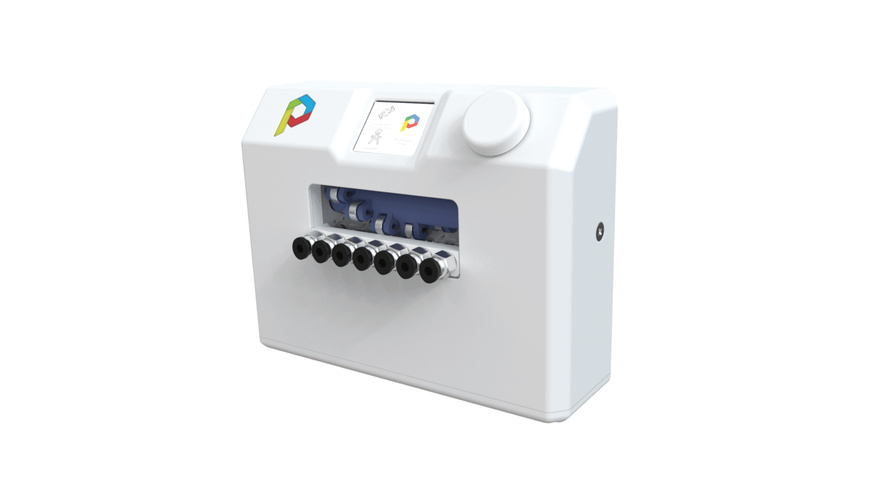
Add-on modules such as the Co Print do the same job on an existing printer. The principle stays the same, and so does the purging effort.
IDEX stands for two independent extruders. Each filament stays in its own hotend. Polymaker therefore calls printers with multiple nozzles the most effective way to reduce purge waste, and that comes from a manufacturer that would profit from the extra consumption. Tool changers such as the Prusa XL take this further with up to five heads. There is no IDEX printer in the comparison below, because we currently cannot name one that is available.
Four solutions compared
| Model | Principle | Colors per print | Purging on change | Best for |
|---|---|---|---|---|
| Bambu Lab A1 Combo | single nozzle, AMS lite | 4 | yes | Figures in PLA and PETG |
| Creality K2 Combo | single nozzle, CFS | 4, expandable to 16 | yes | Many colors in an enclosure |
| Anycubic Kobra 3 Combo | single nozzle, ACE Pro | 4, 8 with a second unit | yes | Alternative to the A1 Combo |
| Co Print multi-filament module | Add-on for Bowden printers | up to 7 | yes, purge tower | Tinkerers with a suitable printer |
Bambu Lab A1 Combo: four colors for PLA and PETG
256 millimeters per side, four spools on the AMS lite. Tom’s Hardware describes a reliable, quiet printer with a unit that is not very prone to jamming. The weaknesses are in the same review. The AMS lite takes up a lot of space, flings the waste out to the side and cannot handle TPU. It only fits the A1 series. There is no enclosure for the A1.
Why does it still come out on top? The editors printed PLA, PETG and TPU with it and in the end call the combo package a very good choice for anyone who wants speed and color and sticks to simple filament such as PLA and PETG. That very condition applies to us as well. The review dates from December 2023; we do not have a more recent independent comparison with the K2 Combo or the Kobra 3 Combo. If you want to print ABS or ASA, the A1 is the wrong choice, and you will find the alternatives in the buying guide.
Creality K2 Combo: when four colors are not enough
According to the Amazon listing, one CFS unit holds four spools, and four units together 16 colors. The build volume measures 260 millimeters per side. The listing names TPU and damp PVA as unsuitable. 16 colors sound great, but they also mean 16 ways to purge filament through the same nozzle. Check in the slicer what a typical model really consumes.
Anycubic Kobra 3 Combo: pay attention to the unit
The combo package includes one ACE Pro unit for four colors; according to the Amazon listing, a second one is supposed to make eight possible. We have not found independent measurements of the waste for this printer. We therefore list it as an alternative, not as a recommendation.
Co Print multi-filament module: seven spools, some tinkering required
Seven filaments on an existing printer sounds like the cheapest way. The documentation dampens that. You swap the tubes, mount an end stop on the X axis and load two files in parallel, one for the printer and one for the module. The manufacturer names PrusaSlicer as the slicer. Flexible filaments do not work, and according to the manual, a purge tower must be printed along with every job.
Be careful with the obvious order. The data sheet and the retailer name Bowden printers as the intended use, but according to ELV (German retailer), the Creality Ender-3 S1, which ELV also carries, has direct drive. We would not buy this combination without confirmation from the retailer.
How to keep more filament in the model
Some levers work with every single-nozzle printer. Polymaker names batching first. Several parts on one plate cost no additional waste, because the change happens for all of them at the same time. Ten key chains at once therefore save filament compared with ten separate prints.
You can also purge into the infill, provided the outer walls are opaque, or into a sacrificial object. You should fine-tune the purge volumes for each color pair in the slicer and start with a factor of around 0.6, as Polymaker suggests. That takes patience. Too little purge volume comes back to bite you with color mixing in the model, something Co Print warns about as well. Which type of filament is worth it for this is covered in the guide to filament (in German). According to Bambu Lab, you should dispose of the waste itself in accordance with local regulations.
Which solution fits which project?
- Signs, lettering, colored top surfaces: no new printer, change colors by hand.
- Two materials or soluble supports: look for a printer with two nozzles and check before buying whether the manufacturer still carries it.
- Figures with three or four colors in PLA or PETG: Bambu Lab A1 Combo, plan for waste.
- More than four colors: Creality K2 Combo.
- An existing Bowden printer and a taste for tinkering: Co Print multi-filament module.
And if color is just decoration? Then a model from a resin printer, painted by hand, may end up looking better in the end.
Frequently asked questions
Why does multicolor 3D printing use so much filament?
Almost every filament unit feeds several filaments into the same nozzle. Before each new color, the old one has to be purged, often several times per layer. In our example of a 60-gram figure, 160 grams end up as waste. According to Polymaker, going from black to white takes roughly four times the purge volume of going from white to black.
How much longer does a multicolor 3D print take?
Considerably longer. Tom’s Hardware printed the same model on the Bambu Lab A1 in one color in 2 hours 40 minutes and in three colors in 6 hours 46 minutes, a good two and a half times as long. The editors describe the material consumption as an astonishing amount.
What are the ways to print in multiple colors?
Four: changing colors by hand at a chosen layer, a filament unit for a single nozzle such as AMS, CFS or ACE Pro, an add-on module such as Co Print, or IDEX with two independent extruders. Polymaker calls printers with multiple nozzles the most effective way to reduce purge waste.
Who is the Bambu Lab A1 Combo not right for?
Anyone who wants to print ABS or ASA, because there is no enclosure for the A1. According to Tom’s Hardware, the AMS lite cannot handle TPU, takes up a lot of space and flings the waste out to the side. It only fits the A1 series.
How can purge waste be reduced in multicolor printing?
Print several parts on one plate, because the change happens for all of them at once. Purging into the infill or into a sacrificial object also helps. Fine-tune the purge volumes for each color pair in the slicer and start with a factor of around 0.6. Too little purge volume leads to color mixing in the model.
Is the Co Print add-on module worth it?
Only for tinkerers with a suitable Bowden printer. It offers seven filaments but requires swapping tubes, an end stop on the X axis and two files loaded in parallel. Flexible filaments do not work, and a purge tower is mandatory. On the Ender-3 S1 with direct drive, we would not buy it without confirmation from the retailer.
Sources
- ELV: Co Print multi-filament module (retailer information)
- Co Print: data sheet
- Co Print: operating manual
- ELV: Creality Ender-3 S1 (retailer information)
- Tom’s Hardware: Bambu Lab A1 Review
- Polymaker Wiki: Reduce Purge Waste
- Bambu Lab Wiki: Handling the waste generated from the purging process
- Prusa: multicolor printing, an introduction
Where to buy
- Bambu Lab A1 ComboCheck price at Amazon.deCheck price at Amazon.co.ukCheck price at Amazon.nlCheck price at Amazon.com.beCheck price at Amazon.frCheck price at Amazon.itCheck price at Amazon.esCheck price at Amazon.plCheck price at Amazon.seAvailable in Germany: Amazon.de
- Creality K2 ComboCheck price at Amazon.deCheck price at Amazon.co.ukCheck price at Amazon.nlCheck price at Amazon.com.beCheck price at Amazon.frCheck price at Amazon.itCheck price at Amazon.esCheck price at Amazon.plCheck price at Amazon.seAvailable in Germany: Amazon.de
- Anycubic Kobra 3 ComboCheck price at Amazon.deCheck price at Amazon.co.ukCheck price at Amazon.nlCheck price at Amazon.com.beCheck price at Amazon.frCheck price at Amazon.itCheck price at Amazon.esCheck price at Amazon.plCheck price at Amazon.seAvailable in Germany: Amazon.de
- Co Print Multifilament-ModulView at ELVAvailable in Germany: ELV