Contents13 sections
This guide was first published in German on handgetestet.de.
Many people buy PC speakers based on the wattage on the box and later end up annoyed by the cable. For a typical desk, we would go for the Creative Pebble X Plus. It connects to the computer with a single USB-C cable, comes with a small subwoofer and also accepts your phone via Bluetooth. If you take music more seriously and have room for two proper bookshelf speakers, take a look at the Edifier R1280DBs.
First, figure out how the sound gets out of the computer
There are three ways. Over USB, the speakers receive the signal digitally and convert it themselves; the sound card in the PC then no longer matters. The 3.5 mm jack is analog and works with almost any computer. Bluetooth is meant for phones, tablets and consoles.
With small USB speakers, the port also determines the volume. For the Pebble V3, Creative only specifies the full 8 watts of continuous power on a USB-C port with 10 watts or on a power adapter with 5 V and 2 A. According to the manufacturer, the Pebble X Plus manages 15 watts on the PC’s USB-C port; double the power is only available with a USB PD power adapter of 30 watts or more. That is not included in the box.
Another typical mistake involves cables. In the Z407 manual, Logitech explicitly states that the USB cable is not included. The subwoofer has a Micro-USB port. If you only have USB-C cables at home, you will be without digital sound on the first evening.
What the wattage really tells you
Two figures often appear side by side. RMS means the power the amplifier delivers continuously. Peak is a brief maximum value. Creative specifies 8 watts RMS and up to 16 watts peak for the Pebble V3, and Logitech 120 watts RMS and 240 watts peak for the G560, double in both cases. So only compare RMS with RMS.
At a desk, you usually sit less than a meter from the speakers. You do not need party-level power there. Bass extension and driver size matter more. According to the data sheet, the Edifier R1280DBs reaches down to 51 Hz, the Pebble V3 only to 100 Hz. You hear the difference mainly with film scores.
2.0 or 2.1?
A 2.1 system separates the bass and sends it to its own box under the desk. That keeps the two small satellites compact, and the monitor does not have to move aside. In return, there is another device plus cable in the footwell, where vacuum cleaners and feet tend to catch it.
A good 2.0 pair with four-inch woofers does without an extra box. It does need space, though: according to the manufacturer, an Edifier R1280DBs is 23.4 cm tall and almost 20 cm deep. On a 60 cm deep desk with a monitor stand, that gets tight. An in-between solution is a bookshelf pair with a subwoofer output, to which you can add a bass box later. Which ones are suitable is covered in our subwoofer guide (in German).
Six PC speakers compared
Creative Pebble X Plus
Two 2.75-inch drivers up top, a subwoofer with a 3.5-inch driver and two passive radiators below. Creative specifies 45 Hz as the lower limit, which is deep for satellites of this size. A button switches between USB, Bluetooth 5.3 and the 3.5 mm jack. There are also separate jacks for headphones and a microphone. The RGB rings can be dimmed. For full output, you need a separate USB PD power adapter with at least 30 watts.
Creative Pebble V3
The small spheres are a good twelve centimeters across and need just one USB-C cable for power and sound. A USB-A adapter is included. Bluetooth only works as long as the speakers are connected to USB power. That is enough for video calls, YouTube and quiet background music. If you want bass, you will not be happy here.
Edifier R1280DBs
This is more of a small stereo system than a PC accessory. Each side has a four-inch woofer and a silk dome tweeter, plus optical and coaxial digital inputs, two RCA inputs, a remote control and control knobs on the side. There is no USB. So on a computer, you connect the speakers to the 3.5 mm jack or an optical output. A second RCA input remains free, for example for a turntable with a preamp.
Logitech Z407
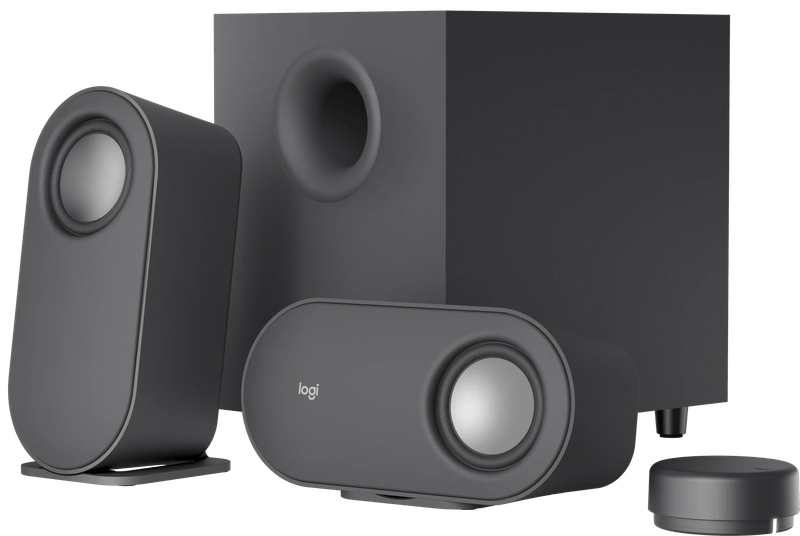
The round wireless control dial is the real idea here. It sits loose on the desk and, according to Logitech, controls volume, bass and playback from around 20 meters away. Bluetooth, Micro-USB and the 3.5 mm jack can be connected at the same time; you switch with a button. The satellites stand upright or lie flat under the monitor. Remember the missing USB cable.
Logitech G560
The gaming set from Logitech G combines two satellites with a downward-firing subwoofer. Lighting zones on the front and back of the satellites react to on-screen content via the G HUB software. That only works over USB. Via 3.5 mm jack or Bluetooth, the system plays music, but without the lighting control. According to the manual, Bluetooth can be turned off entirely in case roommates connect by accident.
Razer Nommo V2 X
Two 3-inch full-range drivers with bass reflex ports on the back, no subwoofer. Razer specifies a maximum sound pressure of 96 dB. Via USB, the speakers work with PC, PS4 and PS5, and via Bluetooth with phones and the Switch. Virtual 7.1 from THX Spatial Audio is only available on Windows with the Synapse software. On a console, it stays stereo.
And what about gaming?
We consider virtual surround sound from two speakers a compromise. It widens the soundstage, nothing more. For shooters where every direction counts, we would rather use a gaming headset (in German) and keep the speakers for racing games, adventures and movies. If you play at night, the decision falls on headphones anyway. The Pebble X Plus has its own headphone jack for this, so the headset connects to the speaker instead of the back of the PC.
How we would decide
- Typical desk, PC with USB-C: Creative Pebble X Plus. Compact, subwoofer, three inputs. If you want it louder, order a 30-watt power adapter at the same time.
- Laptop, home office, little space: Creative Pebble V3. Do not expect more than speech and quiet music.
- Music first: Edifier R1280DBs, if the desk is deep enough. A subwoofer can be added later.
- Controlling movies from the couch: Logitech Z407 with its wireless dial.
- Game night with lights and punch: Logitech G560. Without a bass box under the desk: Razer Nommo V2 X.
If the pair is meant to serve the TV or the turntable in the living room instead, a larger active pair is the better choice. Our guide to active hi-fi speakers covers that.
Frequently asked questions
USB, 3.5 mm jack or Bluetooth: how should PC speakers be connected?
Over USB, the speakers receive the signal digitally and convert it themselves, so the sound card no longer matters. The 3.5 mm jack is analog and works with almost any computer. Bluetooth is meant for phones, tablets and consoles. With small USB speakers, the port also determines the volume.
What does the wattage of PC speakers tell you?
RMS means the power the amplifier delivers continuously; peak is a brief maximum value, often double. Only compare RMS with RMS. At a desk, you usually sit less than a meter from the speakers, so bass extension and driver size matter more than power.
Which is better for a desk, 2.0 or 2.1?
A 2.1 system sends the bass to a separate box under the desk, keeping the satellites compact. In return, there is another device plus cable in the footwell. A good 2.0 pair with four-inch woofers does without an extra box but needs space: the Edifier R1280DBs is almost 20 cm deep.
What pitfalls are there when connecting PC speakers?
According to the manual, the Logitech Z407 does not come with a USB cable, and the subwoofer has a Micro-USB port. The Creative Pebble X Plus only delivers double the power with a USB PD power adapter of 30 watts or more, which is not included. The Edifier R1280DBs has no USB at all; it connects via 3.5 mm jack or optical output.
Are PC speakers with virtual surround sound good for gaming?
We consider virtual surround sound from two speakers a compromise: it widens the soundstage, nothing more. For shooters where every direction counts, a gaming headset is the better fit. On the Razer Nommo V2 X, virtual 7.1 is only available on Windows with Synapse; on a console it stays stereo.
Which PC speakers suit a laptop in a home office?
The Creative Pebble V3 needs just one USB-C cable for power and sound, and a USB-A adapter is included. That is enough for video calls, YouTube and quiet background music. Do not expect bass, and Bluetooth only works as long as the speakers are connected to USB power.
Sources
- Creative: Pebble X Plus, technical specifications
- Creative: Pebble V3, technical specifications
- Edifier: R1280DBs
- Logitech: Z407 product page
- Logitech: Z407 manual (PDF)
- Logitech G: G560 product page
- Logitech G: G560 manual (PDF)
- Razer: Nommo V2 X
Where to buy
- Creative Pebble X PlusCheck price at Amazon.deCheck price at Amazon.co.ukCheck price at Amazon.nlCheck price at Amazon.com.beCheck price at Amazon.frCheck price at Amazon.itCheck price at Amazon.esCheck price at Amazon.plCheck price at Amazon.seAvailable in Germany: Amazon.de
- Creative Pebble V3 (schwarz)Check price at Amazon.deCheck price at Amazon.co.ukCheck price at Amazon.nlCheck price at Amazon.com.beCheck price at Amazon.frCheck price at Amazon.itCheck price at Amazon.esCheck price at Amazon.plCheck price at Amazon.seAvailable in Germany: Amazon.de
- Edifier R1280DBs (Holzoptik)Check price at Amazon.deCheck price at Amazon.co.ukCheck price at Amazon.nlCheck price at Amazon.com.beCheck price at Amazon.frCheck price at Amazon.itCheck price at Amazon.esCheck price at Amazon.plCheck price at Amazon.seAvailable in Germany: Amazon.de
- Logitech Z407Check price at Amazon.deCheck price at Amazon.co.ukCheck price at Amazon.nlCheck price at Amazon.com.beCheck price at Amazon.frCheck price at Amazon.itCheck price at Amazon.esCheck price at Amazon.plCheck price at Amazon.seAvailable in Germany: Amazon.de
- Logitech G560Check price at Amazon.deCheck price at Amazon.co.ukCheck price at Amazon.nlCheck price at Amazon.com.beCheck price at Amazon.frCheck price at Amazon.itCheck price at Amazon.esCheck price at Amazon.plCheck price at Amazon.seAvailable in Germany: Amazon.deView at CoolblueAvailable in Germany: Coolblue
- Razer Nommo V2 XCheck price at Amazon.deCheck price at Amazon.co.ukCheck price at Amazon.nlCheck price at Amazon.com.beCheck price at Amazon.frCheck price at Amazon.itCheck price at Amazon.esCheck price at Amazon.plCheck price at Amazon.seAvailable in Germany: Amazon.de
Still undecided?
Keep comparing at your own pace – every article in this category is checked monthly for new and discontinued models.