Contents12 sections
This guide was first published in German on handgetestet.de.
With a TV, setting up a soundbar takes five minutes. With a projector, the same purchase often fails because of a single port, since not every projector passes the sound on cleanly. That is why we reverse the order: the source device connects to the soundbar, which merely passes the picture through to the projector. For that, it needs a real HDMI input, ideally several, and adjustable audio delay. The JBL Bar 1000MK2 offers both.
First question: where do your movies play from?
Everything else depends on this.
If Netflix and the like run on a stick, a player or a console, the situation is simple. The device plugs into the soundbar, and a long HDMI cable runs from there to the projector. The sound never has to travel back. For TVs without eARC, JBL describes exactly this route and advises connecting source devices to the soundbar’s HDMI inputs instead of the screen. With a projector, that applies all the more. According to JBL, set the audio output on the source device to bitstream. Which streaming stick (in German) passes Atmos through is covered in our dedicated guide.
Things look different if the apps run on the projector itself. Then the sound has to come out of the projector, and what counts is what its data sheet offers: HDMI with ARC or eARC, an optical output, an analog jack or Bluetooth. Without ARC, you are often left with the second-best option.
ARC, optical, Bluetooth: what gets lost?
According to Denon, eARC also carries multichannel PCM, Dolby TrueHD and Dolby Atmos, which plain ARC cannot transport. With projectors, it is therefore worth taking a close look: if the port only says ARC, expect compressed multichannel sound. JBL and Denon also recommend HDMI over an optical cable. Use the optical route if there is no other.
Bluetooth comes last. Denon lists only the SBC codec for the DHT-S517, and Samsung does the same for the HW-Q810GH. That is enough for music. For movies, we would only use it if the delay can be compensated.
Why the lips do not match the sound
Projectors compute. Image processing takes time, and meanwhile the sound may already have arrived. The mouth then moves after the word. The remedy is audio delay, which deliberately shifts the audio signal back.
This is exactly where the field splits. The JBL offers this function via the remote control and the app. In the manual for the Denon DHT-S517, by contrast, we find no such setting, and Samsung’s data sheets do not list one either. Before buying an adapter, first try the obvious: switch off picture enhancers on the projector and select game mode, if available.
The distance itself, incidentally, hardly matters. At 343 meters per second, sound needs about 12 milliseconds to travel four meters to the sofa.
Placement: below the screen, but how far?
A worked example. A 100-inch screen in 16:9 format is about 2.21 meters wide and 1.25 meters high. The Bar 1000MK2 measures 1.20 meters when assembled, the HW-Q810GH 1.11 meters. So it covers about half the picture width and sits far below the center of the picture if the TV stand is low. Voices then audibly come from below. So place the soundbar as high as you can without it protruding into the picture, and as close as possible to the bottom edge.
Then the cable. Let’s assume the projector hangs four meters from the wall on a 2.50-meter-high ceiling: with the route along the wall and ceiling plus some slack, that adds up to about eight meters. For 4K, our guide to HDMI cables, which also covers fiber optic cables, will help. How to choose the screen itself is explained in the guide to projector screens.
One more tip for short-throw projectors: if the projector itself sits on the TV stand, the soundbar belongs in front of it or below it so that it does not get into the light path.
Five soundbars for use with a projector
| Model | HDMI in / out | Audio delay | Best for |
|---|---|---|---|
| JBL Bar 1000MK2 | 3 / 1 (eARC) | yes, remote control and app | Several source devices, projectors without ARC |
| Samsung HW-Q810GH | 1 / 1 (eARC) | not mentioned in the data sheet | One source device, 4K at 60 Hz |
| Denon DHT-S517 | 1 / 1 (eARC) | not mentioned in the manual | One source device, clear speech |
| Samsung HW-B760GF | 1 / 1 (ARC) | not mentioned in the data sheet | Entry level without Atmos |
| Sonos Beam Ultra | 0 / 1 (eARC) | not mentioned in the manufacturer’s specifications | Only projectors with ARC or eARC |
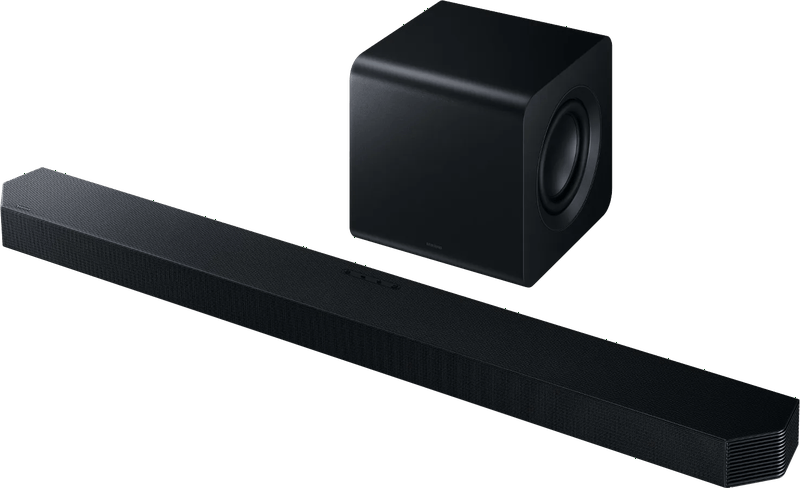
JBL Bar 1000MK2
Three HDMI inputs: with a projector, that is the decisive figure. Stick, player and console all connect without a switcher. On top of that come audio delay, an optical input and, according to JBL, Dolby Vision and HDR10+ passthrough. The measurement-based review site RTINGS praises the versatile connections and the available room calibration. According to JBL, the detachable rear speakers run for up to ten hours on battery.
Now the drawbacks. The batteries need charging, RTINGS criticizes a delay of the rear speakers relative to the bar and subwoofer with Atmos, and the height effect there is rather weak. If you only have one source device, you are paying for two ports you will never use.
Samsung HW-Q810GH
One input, one output, plus, according to the data sheet, 4K at 60 hertz and HDR10+ passthrough as well as an optical input. That is enough for the one stick on the projector. You should not pass consoles running at 120 hertz through this one. We did not find audio delay in the documentation, and with projectors that is this model’s risk.
Denon DHT-S517
Denon includes both HDMI and optical cables and explicitly provides for use with a screen without ARC. There is also a three-level dialogue enhancement. With a projector, the weakness remains that the manual does not mention audio delay.
Samsung HW-B760GF
The simplest solution. It has an HDMI input and ARC, but no eARC and no Atmos, and Samsung does not mention 4K passthrough in the data sheet. With a Full HD projector, that is not an issue. With a 4K projector, we would check before buying whether the picture gets through.
Sonos Beam Ultra
It is included here as an example of the typical bad buy. Sonos only provides for connection to an HDMI eARC/ARC port; an optical adapter is available separately. There is no input for source devices. If your projector has ARC or eARC, that does not matter.
If it does not, the soundbar stays silent.
Which route suits your projector?
Projector without ARC and several source devices: JBL Bar 1000MK2. Just one stick and a tighter budget: Denon DHT-S517 or Samsung HW-Q810GH, knowing that the sound cannot be readjusted. With an HDMI switch, you can expand the single input.
Projector with eARC and built-in apps: Sonos Beam Ultra. The German consumer testing organization Stiftung Warentest also names the soundbar as a companion to a projector. That leaves the question of whether it has to be a soundbar at all. If you sit in a dedicated home theater, you are often better off with an AV receiver, because it offers more inputs. The basics of projectors are covered in our guide Buying a projector (in German), and soundbars in general in our soundbar overview.
Frequently asked questions
How do I connect a soundbar to a projector?
If your movies play from a stick, player or console, the device plugs into the soundbar, and a long HDMI cable runs from there to the projector. The sound never has to travel back. If the apps run on the projector itself, the sound has to come out of the projector, and then its data sheet is what counts: HDMI with ARC or eARC, optical, analog jack or Bluetooth.
What is the difference between ARC and eARC on a projector?
According to Denon, eARC also carries multichannel PCM, Dolby TrueHD and Dolby Atmos, which plain ARC cannot transport. If the projector only says ARC, expect compressed multichannel sound. JBL and Denon also recommend HDMI over an optical cable, with Bluetooth coming last.
Why is the sound on my projector out of sync with the lips?
Projectors need time for image processing, while the sound is already there. The remedy is audio delay, which the JBL Bar 1000MK2 offers via remote control and app. No such setting is mentioned for Denon and Samsung. First try switching off picture enhancers and selecting game mode.
Where do I place the soundbar below the screen?
As high as possible without protruding into the picture, and close to the bottom edge. A 100-inch screen is about 2.21 meters wide, and at 1.20 meters the Bar 1000MK2 covers roughly half the picture width. If a short-throw projector sits on the TV stand, the soundbar belongs in front of it or below it, out of the light path.
Does the Sonos Beam Ultra work with every projector?
No. Sonos only provides for connection to an HDMI eARC or ARC port; there is no input for source devices. If your projector has ARC or eARC, that does not matter. If it does not, the soundbar stays silent. An optical adapter is available separately.
Sources
- JBL: Bar 1000MK2 manual
- RTINGS: JBL Bar 1000MK2
- Denon: DHT-S517 manual
- Samsung: HW-Q810GH
- Samsung: HW-B760GF
- Sonos: Beam Ultra
- Stiftung Warentest: Soundbars tested
- Stiftung Warentest: Projectors tested
Where to buy
- JBL Bar 1000MK2Check price at Amazon.deCheck price at Amazon.co.ukCheck price at Amazon.nlCheck price at Amazon.com.beCheck price at Amazon.frCheck price at Amazon.itCheck price at Amazon.esCheck price at Amazon.plCheck price at Amazon.seAvailable in Germany: Amazon.de
- Samsung HW-Q810GHCheck price at Amazon.deCheck price at Amazon.co.ukCheck price at Amazon.nlCheck price at Amazon.com.beCheck price at Amazon.frCheck price at Amazon.itCheck price at Amazon.esCheck price at Amazon.plCheck price at Amazon.seAvailable in Germany: Amazon.deView at CoolblueAvailable in Germany: Coolblue
- Denon DHT-S517View at CoolblueAvailable in Germany: CoolblueCheck price at Amazon.deCheck price at Amazon.co.ukCheck price at Amazon.nlCheck price at Amazon.com.beCheck price at Amazon.frCheck price at Amazon.itCheck price at Amazon.esCheck price at Amazon.plCheck price at Amazon.seAvailable in Germany: Amazon.de
- Samsung HW-B760GFView at CoolblueAvailable in Germany: CoolblueCheck price at Amazon.deCheck price at Amazon.co.ukCheck price at Amazon.nlCheck price at Amazon.com.beCheck price at Amazon.frCheck price at Amazon.itCheck price at Amazon.esCheck price at Amazon.plCheck price at Amazon.seAvailable in Germany: Amazon.de
- Sonos Beam UltraCheck price at Amazon.deCheck price at Amazon.co.ukCheck price at Amazon.nlCheck price at Amazon.com.beCheck price at Amazon.frCheck price at Amazon.itCheck price at Amazon.esCheck price at Amazon.plCheck price at Amazon.seAvailable in Germany: Amazon.deView at CoolblueAvailable in Germany: Coolblue