Contents14 sections
This guide was first published in German on handgetestet.de.
With a NAS, the hard drives are usually the last thing people choose, in five minutes. Yet they decide whether the unit hums in your home office, how much power it draws and whether it will be full in three years. For a home NAS with two to four bays, we recommend the WD Red Plus WD80EFPX with 8 TB, which according to its data sheet is among the quietest drives in this selection. If you are starting on a tight budget, take the WD Red Plus WD40EFZZ with 4 TB, and in a new Synology DiskStation, the company’s own Plus series with 12 TB is the most convenient route.
The basics of CMR, SMR and workload ratings are explained in our guide to internal hard drives (in German). This guide is about what comes next. What capacity? How loud?
Do the math first, then order
Two drives in a mirror (RAID 1) give you exactly the capacity of one drive. So two times 8 TB becomes 8 TB, and the NAS shows less of that than you expect. Like all manufacturers, Western Digital counts 1 TB as one trillion bytes, while the operating system calculates in powers of two. Of 8 TB, around 7.3 TiB remain in the display, of 12 TB just under 10.9.
An example. Around 2 TB of photos and videos are currently scattered across phones and laptops, plus the backups of two computers at 1 TB each. That makes 4 TB before a single new vacation video is added. With two 4 TB drives, this NAS would be full on day one. With 8 TB, there is room to spare.
A mirror is no substitute for a backup. How to additionally store photos off-site following the 3-2-1 rule is explained in our article on the NAS as a photo and video backup.
What you hear in the home office
The NAS runs around the clock. Data sheets give two values: idle and access. The WD80EFPX spins at 5,640 rpm and, according to Western Digital, reaches 24 dBA at idle and 28 dBA when seeking. The WD Red Pro WD8005FFBX of the same size, at 7,200 rpm, comes in at 29 and 36 dBA. Sounds like little. But because the decibel scale is logarithmic, eight dBA more sounds noticeably louder, including at night during the backup.
With the large helium-filled Pro drives, the picture is mixed. At idle, at 20 dBA, they are even quieter than any Red Plus, but for the 16 TB drive Western Digital states 36 dBA when seeking. If your NAS sits in the bedroom or an open living area, the Red Plus is the quieter choice.
Plus or Pro: the number of bays
Western Digital approves the Red Plus for NAS systems with up to eight bays, with a workload of 180 TB per year and a three-year warranty. The Red Pro may go into systems with any number of bays, has rotational vibration sensors, handles 550 TB per year and comes with a five-year warranty. In a two-bay unit at home, what you mainly pay for with the Pro is the two extra years of warranty. In an office where ten people access project folders at the same time, things look different.
Synology: own drives or third-party?
For the 2025 DiskStation models in the Plus series, such as the DS925+, Synology initially wanted to allow only its own or verified drives. With DSM 7.3, the manufacturer relaxed this in October 2025. According to the Synology blog, hard drives from other brands can now be used there as well; they show up as „Healthy,“ and warnings in case of problems remain. According to Synology, this does not affect the NAS warranty. However, support will not help with faults caused directly by a third-party drive. For storage pools and cache on M.2 SSDs, the compatibility list still applies.
Our take: a WD Red Plus now runs in the DS925+ without workarounds. The Synology drive has one advantage: its firmware can be updated directly in DSM. If you switch NAS brands later, WD keeps you more flexible.
Power: one watt adds up to almost nine kilowatt hours a year
A drive running all year amounts to 8,760 hours. The WD80EFPX is rated at 3.4 watts at idle, which comes to just under 30 kWh a year. The WD8005FFBX is at 4.9 watts and thus around 43 kWh. With four drives, the difference adds up to a good 50 kWh. If the NAS spins the drives down at night, it is less.
No drive protects against power outages. That is what a UPS for PC and NAS is for.
Six NAS hard drives compared
| Model | Capacity / speed | Idle / access according to manufacturer | Warranty / workload | Best for |
|---|---|---|---|---|
| WD Red Plus WD80EFPX 8TB | 8 TB, 5,640 rpm, 256 MB cache | 24 / 28 dBA, 3.4 W at idle | 3 years, 180 TB/year | Family NAS with 2 to 4 bays |
| WD Red Plus WD40EFZZ 4 TB | 4 TB, 5,400 rpm, 128 MB cache | 24 / 27 dBA, 2.9 W | 3 years, 180 TB/year | Small start, little data |
| Synology Plus Series HDD 12TB (HAT3310-12T) | 12 TB, 7,200 rpm | no noise rating, 3.3 W | 3 years, 180 TB/year | Synology NAS, firmware via DSM |
| WD Red Pro WD8005FFBX 8TB | 8 TB, 7,200 rpm, 256 MB cache | 29 / 36 dBA, 4.9 W | 5 years, 550 TB/year | Office NAS with heavy access |
| WD Red Pro WD161KFGX 16TB | 16 TB, 7,200 rpm, helium | 20 / 36 dBA, 3.6 W | 5 years, 550 TB/year | Large archives, video editing |
| WD Red Pro WD221KFGX 22 TB | 22 TB, 7,200 rpm, helium | 20 / 32 dBA, 3.4 W | 5 years, 550 TB/year | Lots of space in few bays |
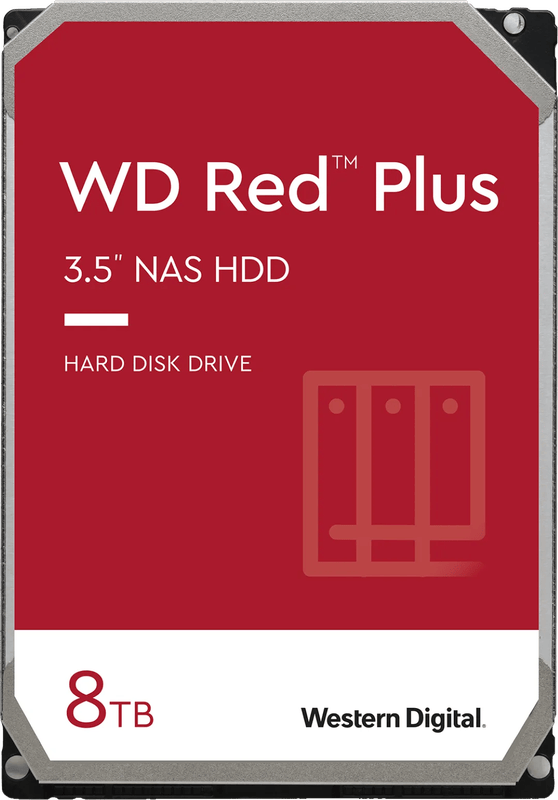
WD Red Plus WD80EFPX 8TB
The drive we recommend to most households. According to Western Digital, it uses CMR recording, reaches up to 215 MB/s and draws 5.2 watts when reading and writing. That is easily enough for a gigabit network.
WD Red Plus WD40EFZZ 4 TB
With 4 TB, 5,400 rpm and 180 MB/s, it is the most frugal drive here. It makes sense for a two-bay NAS that mainly backs up a couple’s documents and phone photos. If you shoot videos, go straight for 8 TB.
Synology Plus Series HDD 12TB
The HAT3310-12T spins at 7,200 rpm; Synology states up to 281 MB/s and 3.3 watts at idle. According to the manufacturer, it also offers CMR, a three-year warranty and an MTBF of up to 1.2 million hours. The manufacturer’s page gives no noise rating, and the operating range ends at 60 degrees instead of 65 as with WD. In a ventilated enclosure, that does not matter.
WD Red Pro WD8005FFBX 8TB
Same capacity as our recommendation, but built for continuous load. Western Digital states up to 267 MB/s and two million hours MTBF. Meant for the office. At home, you are more likely to hear the difference than to need it.
WD Red Pro WD161KFGX 16TB
Helium-filled, with 512 MB cache and up to 259 MB/s. Two of these drives in a mirror give you 16 TB, enough for a video archive that receives new footage every week. Western Digital states 2.5 million hours MTBF.
WD Red Pro WD221KFGX 22 TB
According to Western Digital, the largest drive in this selection additionally uses built-in flash memory (OptiNAND) for internal housekeeping tasks. When accessed, at 32 dBA it is quieter than its 16 TB sibling. One drawback of large drives remains. If one fails, rebuilding the mirror takes many hours, during which the second drive carries the data alone.
Which drive for which NAS
- Two or four bays in the living area: WD Red Plus WD80EFPX, two of them in a mirror.
- Tight budget, little data: WD Red Plus WD40EFZZ, knowing that you will upgrade later.
- New Synology with DSM 7.3: Plus Series 12 TB if you want convenient firmware updates in DSM, otherwise the Red Plus as well.
- Office with many users or more than eight bays: WD Red Pro, with 8, 16 or 22 TB depending on the amount of data.
Which enclosure suits your drives is sorted out in our NAS comparison for home and office.
It is not only hard drives that fail: in our review of the KFD replacement power supply for Synology NAS, the power supply was to blame after 25 months.
Frequently asked questions
How much storage do I need in a NAS?
Do the math first. Two mirrored drives give you the capacity of one drive, and of 8 TB the system shows around 7.3 TiB. If you have 2 TB of photos plus two computer backups of 1 TB each, that comes to 4 TB. With two 4 TB drives, the NAS would be full on day one.
How loud is a NAS hard drive?
According to Western Digital, the WD Red Plus WD80EFPX is rated at 24 dBA at idle and 28 dBA when seeking, the Red Pro WD8005FFBX of the same size at 29 and 36 dBA. Because the decibel scale is logarithmic, eight dBA more sounds noticeably louder. In a bedroom or living area, the Red Plus is the quieter choice.
WD Red Plus or Red Pro: which do I need?
The Red Plus is approved for NAS systems with up to eight bays, with a workload of 180 TB per year and a three-year warranty. The Pro handles 550 TB, has rotational vibration sensors and a five-year warranty. In a two-bay unit at home, what you mainly pay for with the Pro is the two extra years of warranty.
Can I use third-party hard drives in a Synology DS925+?
Yes. With DSM 7.3, Synology relaxed its policy in October 2025, and hard drives from other brands show up as Healthy. According to Synology, this does not affect the NAS warranty, but support will not help with faults caused directly by a third-party drive. For M.2 SSDs, the compatibility list still applies.
How much power does a NAS hard drive use per year?
One watt adds up to almost nine kilowatt hours a year. The WD80EFPX is rated at 3.4 watts at idle, just under 30 kWh a year, the WD8005FFBX at 4.9 watts and around 43 kWh. With four drives, the difference adds up to a good 50 kWh. Spinning down at night lowers the figure.
Sources
- Western Digital: WD Red Plus data sheet (September 2025)
- Western Digital: WD Red Pro data sheet
- Synology: Plus Series 3.5″ SATA HDD
- Synology: HAT3310-12T, specifications
- Synology blog: drive compatibility updates in DSM 7.3 (October 10, 2025)
Where to buy
- WD Red Plus WD80EFPX 8TBView at CoolblueAvailable in Germany: Coolblue
- WD Red Plus WD40EFZZ 4 TBView at CoolblueAvailable in Germany: Coolblue
- Synology Plus Series HDD 12TBView at CoolblueAvailable in Germany: Coolblue
- WD Red Pro WD8005FFBX 8TBView at CoolblueAvailable in Germany: Coolblue
- WD Red Pro WD161KFGX 16TBView at CoolblueAvailable in Germany: Coolblue
- WD Red Pro WD221KFGX 22 TBView at CoolblueAvailable in Germany: Coolblue