Contents13 sections
This guide was first published in German on handgetestet.de.
A hard drive enclosure with RAID is no substitute for a backup, and a cloning dock is not a device for continuous operation. If you keep these two things apart, you will almost automatically buy the right thing. For reading old drives and copying to a new drive, an open dock with two bays and a clone button is enough, such as the Orico 6626C3-C with USB-C. A closed enclosure with a fan is only worth it if drives stay connected to the computer for months.
Dock or enclosure: how long does the drive stay in?
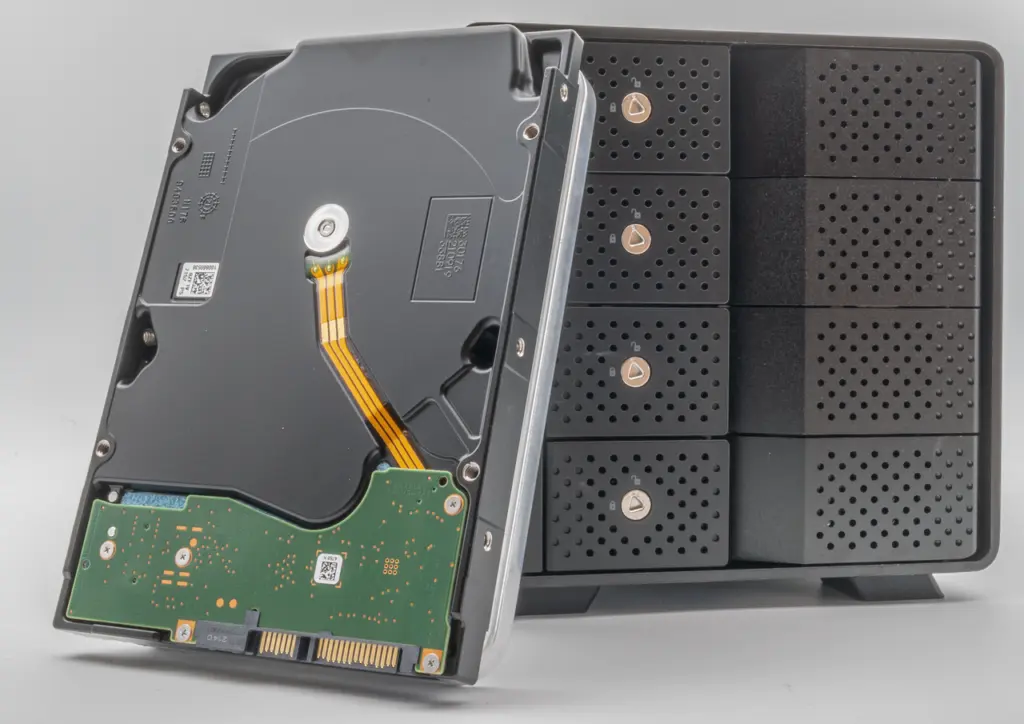
A dock is an open station. The drive is inserted upright from above into the bay, the label stays visible, and swapping takes seconds. For drives dug out of old computers, backup drives kept in a cabinet and cloning, that is exactly right.
An enclosure, on the other hand, encloses the drives and cools them. Fantec builds a 60 mm fan into the QB-X2U31R, controlled in three stages by a temperature sensor; according to the manual, it spins at 1,000 to 1,400 rpm below 45 °C and at up to 2,800 above 55 °C. That suits archives that run every day. We consider running bare 3.5-inch drives permanently in an open dock the worse solution.
What the specs on the box really tell you
- USB 3.2 Gen 1 stands for 5 Gbit/s, Gen 2 for 10 Gbit/s. With SATA drives, however, there is a SATA connection behind it with a maximum of 6 Gbit/s. Mathematically, 5 Gbit/s corresponds to a good 600 MB/s gross. Whether that is a bottleneck is revealed by the drive’s data sheet, not the dock’s. The difference is mainly noticeable with SSDs.
- The capacity limit per bay is stated in the data sheet and varies considerably: Orico gives up to 22 TB for the 6626C3-C-V1 and up to 16 TB per drive for the NS400RC3.
- „USB-C“ does not always mean a USB-C to USB-C cable is included. Orico includes with its three docks here a cable with USB-C on one end and either C or A on the other.
- The 6626C3-C, 8828C3-C and QB-X2U31R come with a 12 V, 3 A power supply, the four-bay NS400RC3 with one rated at 6.5 A.
One-button cloning: what gets lost
Offline cloning is convenient. Insert the drives, press the button. Fantec describes the process for the DS-X2U3-Glanz precisely: source in the front bay „HDD A,“ target in the rear bay „HDD B,“ USB cable unplugged, then hold the clone button for five seconds. Four LEDs show the progress in 25 percent steps.
The manual explicitly names two conditions. All data on the target drive is lost as soon as cloning begins. And the target must be exactly the same size down to the byte or larger than the source. So if you mix up the bays, you overwrite your original. And if in doubt, compare the exact byte count of both drives in Disk Management, not just the label. If space is left over after cloning, according to Fantec it can be set up as a new partition.
If you want to move an old system drive to an SSD, you will find suitable target drives in our guide to internal SSDs (in German).
RAID in a USB enclosure: protection against failure, not against mistakes
The German Federal Office for Information Security (BSI) is clear on this. In its IT baseline protection standard (IT-Grundschutz), RAID mirroring does not count as a backup, because the mirrored data is changed at the same time. It helps if a single drive fails. It does not help against accidental overwriting or malware. A deleted file is gone from both drives at once.
Then there are the quirks of the enclosures. With RAID 1, the usable space equals that of the smallest drive; with RAID 0, according to Fantec, all data is lost if one drive fails. According to Fantec’s manual, changing the RAID mode generally leads to data loss, and for the array, the manufacturer recommends drives of the same capacity, brand and model number. Slide in two old drives that already contain data and switch the mode? Then their contents are gone. For a network archive accessed by several devices, a NAS is the more suitable choice; see our NAS comparison. Which drives belong in enclosures and NAS units is explained in our guide to internal hard drives (in German).
Six docks and enclosures with their key specs
Orico 6626C3-C
A dock made of aluminum and plastic for two SATA drives with a cloning function that works without a computer. For the current version V1, Orico gives up to 22 TB per bay, USB-C at 5 Gbit/s and a 12 V, 3 A power supply. The older version without V1, as described in the Amazon listing behind our buy button, is rated for 2 × 18 TB and a 12 V, 2 A power supply. If you want to use drives larger than 18 TB, look for the V1 designation. For reading old drives and occasional copies, we recommend this dock.
Orico 8828C3-C
Also two bays with offline cloning, but with 10 Gbit/s via USB-C and up to 20 TB per bay. The housing is made of plastic and has colored lighting with 14 modes that can be switched off with a long press of the button. Useful if SATA SSDs are connected regularly. Behind the USB port, however, it is still SATA at 6 Gbit/s.
Fantec DS-X2U3-Glanz
The dock made of high-gloss plastic clones sector by sector without a computer and shows the progress via LEDs. The connection runs via USB 3.2 Gen 1 at 5 Gbit/s; Fantec does not mention USB-C. The manual is detailed and in German, and according to the manufacturer, the warranty is 24 months.
Orico IT28E-C
This dock combines an M.2 slot for NVMe SSDs with a bay for 2.5- and 3.5-inch SATA drives. Orico states 10 Gbit/s via USB-C and a housing made of metal and plastic. Interesting for anyone who wants to read an NVMe SSD from a laptop and use the same station for hard drives.
Fantec QB-X2U31R
A metal enclosure for two 3.5-inch drives with 10 Gbit/s via USB-C, RAID 0 and 1 as well as the Single and Big modes. The fan regulates itself, and a sync mode switches the enclosure off together with the computer. The drives can also be addressed individually. For a two-drive archive at the workstation, it is the well-rounded solution, provided you set the RAID mode before filling it.
Orico NS400RC3
Four bays, a magnetic door, tool-free installation and RAID up to level 10. Orico states 5 Gbit/s and up to 16 TB per drive; the power supply delivers 12 V and 6.5 A. According to the manual, the array is set up with the Windows program HW RAID Manager. If you only work on a Mac, keep that in mind before buying. If a drive fails, the new one must be at least as large as the defective one.
Which device suits which task
- Reading old drives and occasional cloning: Orico 6626C3-C.
- Frequently connecting SATA SSDs, with a 10 Gbit/s port available: Orico 8828C3-C.
- Computer with USB-A only and a preference for a German-language manual: Fantec DS-X2U3-Glanz.
- Alternating between an NVMe SSD and a SATA drive: Orico IT28E-C.
- Two drives permanently connected to the computer, cooled: Fantec QB-X2U31R, with a separate backup.
- Four drives on a Windows PC: Orico NS400RC3. If you want to serve several devices in the home, a NAS is the better choice.
Frequently asked questions
What is the difference between a hard drive dock and an enclosure?
In a dock, the drive sits exposed and upright in the bay, and swapping takes seconds. That suits drives you have dug out, backup drives and cloning. An enclosure encloses the drives and cools them, for example with a temperature-controlled fan, and is suitable for archives that run every day.
Does a RAID in a USB enclosure replace a backup?
No. According to the BSI (German Federal Office for Information Security), RAID mirroring does not count as a backup, because the mirrored data is changed at the same time. It helps if one drive fails, but not against accidental overwriting or malware. A deleted file is gone from both drives at once.
What should you watch for with one-button cloning?
All data on the target drive is lost as soon as cloning begins, and the target must be exactly the same size down to the byte or larger than the source. If you mix up the bays, you overwrite your original. If in doubt, compare the exact byte count in Disk Management.
Does USB at 10 Gbit/s make SATA drives faster?
Only to a limited extent. Behind the USB port sits a SATA connection with a maximum of 6 Gbit/s; whether that is a bottleneck is revealed by the drive's data sheet. The difference between 5 and 10 Gbit/s is mainly noticeable with SSDs.
Can I put drives that already contain data into a RAID enclosure and switch the mode?
The manuals advise against it. According to Fantec, changing the RAID mode generally leads to data loss, and the contents of the drives are then gone. For the array, the manufacturer recommends drives of the same capacity, brand and model number. So set the mode before filling the drives.
Which dock reads NVMe SSDs and SATA drives?
The Orico IT28E-C combines an M.2 slot for NVMe SSDs with a bay for 2.5- and 3.5-inch SATA drives, connected via USB-C at 10 Gbit/s. That lets you read a laptop SSD and use the same station for hard drives.
Sources
- Orico: 6626C3-C-V1, technical specifications
- Orico: 8828C3-C, technical specifications
- Orico: IT28E-C, technical specifications
- Orico: NS400RC3, product page
- Orico: Manual for the NS RAID series with Type-C (PDF)
- Fantec: DS-X2U3-Glanz, product page
- Fantec: DS-X2U3-Glanz manual (PDF)
- Fantec: QB-X2U31R, product page
- Fantec: QB-X2U31R manual (PDF)
- BSI (German Federal Office for Information Security): IT-Grundschutz module CON.3 Backup concept (PDF)
Where to buy
- Orico 6626C3-CCheck price at Amazon.deCheck price at Amazon.co.ukCheck price at Amazon.nlCheck price at Amazon.com.beCheck price at Amazon.frCheck price at Amazon.itCheck price at Amazon.esCheck price at Amazon.plCheck price at Amazon.seAvailable in Germany: Amazon.de
- Orico 8828C3-CCheck price at Amazon.deCheck price at Amazon.co.ukCheck price at Amazon.nlCheck price at Amazon.com.beCheck price at Amazon.frCheck price at Amazon.itCheck price at Amazon.esCheck price at Amazon.plCheck price at Amazon.seAvailable in Germany: Amazon.de
- Fantec DS-X2U3-GlanzCheck price at Amazon.deCheck price at Amazon.co.ukCheck price at Amazon.nlCheck price at Amazon.com.beCheck price at Amazon.frCheck price at Amazon.itCheck price at Amazon.esCheck price at Amazon.plCheck price at Amazon.seAvailable in Germany: Amazon.de
- Orico IT28E-CCheck price at Amazon.deCheck price at Amazon.co.ukCheck price at Amazon.nlCheck price at Amazon.com.beCheck price at Amazon.frCheck price at Amazon.itCheck price at Amazon.esCheck price at Amazon.plCheck price at Amazon.seAvailable in Germany: Amazon.de
- Fantec QB-X2U31RCheck price at Amazon.deCheck price at Amazon.co.ukCheck price at Amazon.nlCheck price at Amazon.com.beCheck price at Amazon.frCheck price at Amazon.itCheck price at Amazon.esCheck price at Amazon.plCheck price at Amazon.seAvailable in Germany: Amazon.de
- Orico NS400RC3Check price at Amazon.deCheck price at Amazon.co.ukCheck price at Amazon.nlCheck price at Amazon.com.beCheck price at Amazon.frCheck price at Amazon.itCheck price at Amazon.esCheck price at Amazon.plCheck price at Amazon.seAvailable in Germany: Amazon.de
Still undecided?
Keep comparing at your own pace – every article in this category is checked monthly for new and discontinued models.