Price dropping? We'll let you know
Contents11 sections
This guide was first published in German on handgetestet.de.
The entire timeline in your editing software in view, no scrolling. The quote on the left, the cost calculation on the right, and the spreadsheet finally shows every column. That is the real appeal of a 21:9 screen: it replaces two regular monitors, just without the distracting bezel in between.
Where the purchase usually goes wrong is somewhere else. A wide 34-inch screen that does not suit your computer is of little use.
For typical office and editing setups, we consider a 34-inch model with 3440 × 1440 pixels and Thunderbolt the sensible middle ground, such as the Dell UltraSharp U3425WE. Gamers are better served by a QD-OLED, and if you want more sharpness, you end up at 40 inches with 5K2K.
It starts with the cable
Before inches and hertz count, you need to know how the notebook will dock. Power also flows over USB-C or Thunderbolt. 65 watts is enough for ordinary office notebooks. Powerful editing laptops need more like 90 to 140 watts; otherwise the battery slowly drains under load despite the cable.
With a network port, KVM switch and additional USB ports, the monitor itself becomes the docking station. A separate docking station is then often no longer needed.
Sharpness, panel, curvature
Mathematically, 34 inches at 3440 × 1440 pixels works out to around 110 pixels per inch. At 40 inches and 5120 × 2160, it is around 140. You can see it in the text, which looks noticeably finer on the larger panel. According to the manufacturers, IPS Black achieves a contrast of around 2000:1. VA is cheaper and has more contrast than classic IPS. QD-OLED offers true black and very short response times but comes with the risk of burn-in.
And the curvature? Overrated. At 34 inches, values usually range from 1500R to 1900R, with smaller numbers meaning a stronger curve. Graphics work with straight lines gets along better with a gentle curve; for gaming, it can be more.
Six ultrawide monitors available in 2026
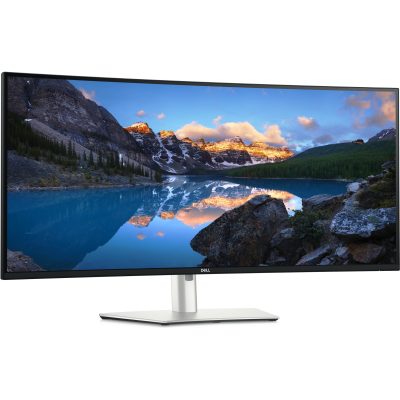
Dell UltraSharp U3425WE
An IPS Black panel, 120 Hz and a complete docking section. According to Dell, the Thunderbolt 4 input delivers a maximum of 90 watts, plus there is a Thunderbolt output for a second monitor, 2.5-gigabit LAN and a KVM switch. At 300 cd/m², the brightness is sufficient for normal offices; Dell did not have HDR content in mind here.
If you want to connect your notebook with a single cable, this model gives you, in our view, the most coherent package.
Dell UltraSharp U4025QW
The big brother. 5120 × 2160 pixels spread across 39.7 inches, and according to Dell, Thunderbolt 4 charges at a maximum of 140 watts, enough even for power-hungry editing notebooks.
Get out the tape measure first. A 40-inch monitor with its stand takes up considerably more desk space than two small monitors. For pure email and office work, you are paying for area here that hardly gets used.
LG UltraFine 40WT95UF-W
LG builds Thunderbolt 5 with a maximum of 96 watts of charging power into its 40-inch model, plus DisplayPort 2.1, two HDMI 2.1 inputs, LAN and KVM. According to LG, full resolution at 120 Hz requires a source with Thunderbolt 5 or DisplayPort 2.1.
Older notebooks therefore get only limited benefit from it. Compared with the Dell U4025QW, it mainly appeals to people whose computer is brand new.
MSI MAG 341CQP QD-OLED
Clearly a gaming monitor. QD-OLED, 175 Hz, a 0.03 ms response time according to MSI and DisplayHDR True Black 400 certification. The USB-C input does carry the picture, but it charges at only 15 watts. Too little for a work notebook. To counter burn-in, MSI relies on care features called OLED Care 2.0; according to the data sheet, the warranty is 36 months.
Samsung Odyssey OLED G8 G85SD
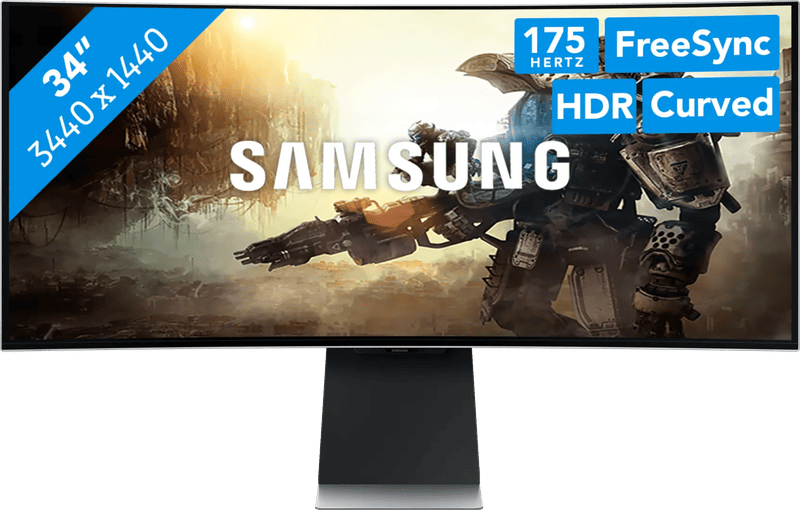
Panel and refresh rate are similar to the MSI, also 175 Hz. What differs is the smart part: Samsung integrates the Tizen operating system with streaming apps, Wi-Fi and Bluetooth. According to the data sheet, USB-C is missing entirely. The model is currently not available in Samsung’s online store, while Amazon.de still offers it. So make sure you are getting a new unit.
AOC CU34P3CV
A lot of features for an entry-level price. AOC lists a VA panel with 100 Hz, USB-C with 65 watts, Gigabit LAN, KVM and a stand with 150 millimeters of height adjustment. That covers office work. Color work less so, as the brightness is 300 cd/m² and AOC does not advertise an extended color gamut.
Which ultrawide belongs on which desk
Office, notebook, one cable: Dell U3425WE.
If it has to be cheaper and 65 watts is enough, the AOC CU34P3CV will do. For video editing and photos, the Dell U4025QW leads, thanks to its 140 watts and high pixel density. If you already have a computer with Thunderbolt 5 on your desk, the LG 40WT95UF-W is the more future-proof choice. In front of a gaming PC, the MSI MAG 341CQP belongs. The Samsung G85SD is only worth it for people who actually use its streaming apps.
Mac owners are better off with 40 inches and 5K2K than with 34 inches, because macOS scales less sharply at around 110 ppi. Details are in our article on the Mac monitor.
Still unsure whether 21:9 suits your work at all? Classic 16:9 models are collected in the article on office monitors. Fast shooters with high frame rates are a topic for the gaming monitor guide. After all, 175 Hz is a lot for an ultrawide but only average for 27 inches.
Frequently asked questions
How much charging power does an ultrawide monitor with USB-C need?
65 watts is enough for ordinary office notebooks. Powerful editing laptops need more like 90 to 140 watts; otherwise the battery slowly drains under load despite the cable. According to Dell, the Dell U4025QW delivers up to 140 watts, the AOC CU34P3CV 65 watts.
What is the difference between a 34-inch and a 40-inch ultrawide?
34 inches at 3440 × 1440 pixels works out to around 110 pixels per inch, 40 inches at 5120 × 2160 to around 140. Text looks noticeably finer on the larger panel. A 40-inch model with its stand takes up considerably more desk space, though, and for pure office work you pay for area you barely use.
What curvature makes sense on an ultrawide monitor?
Curvature is overrated. At 34 inches, values usually range from 1500R to 1900R; smaller numbers mean a stronger curve. Graphics work with straight lines gets along better with a gentle curve; for gaming, it can be more.
Which ultrawide monitor is good for gaming?
For a gaming PC, the MSI MAG 341CQP QD-OLED with 175 Hz and, according to MSI, a 0.03 ms response time is the right fit. QD-OLED offers true black but comes with the risk of burn-in. Its USB-C input charges at only 15 watts, too little for a work notebook.
Which ultrawide suits a Mac?
Mac owners are better off with 40 inches and 5K2K than with 34 inches, because macOS scales less sharply at around 110 ppi. If you already have a computer with Thunderbolt 5 on your desk, the LG 40WT95UF-W is the more future-proof choice; otherwise, the Dell U4025QW.
Is there an affordable ultrawide monitor for the office?
According to the manufacturer, the AOC CU34P3CV offers a VA panel with 100 Hz, USB-C with 65 watts, Gigabit LAN, KVM and 150 millimeters of height adjustment. That covers office work; it is less suited to color work, as AOC does not advertise an extended color gamut.
Sources
- Dell: UltraSharp U3425WE
- Dell: UltraSharp U4025QW
- LG: UltraFine 40WT95UF-W
- LG: 40WT95UF-W data sheet (PDF)
- MSI: MAG 341CQP QD-OLED data sheet (PDF)
- Samsung: Odyssey OLED G8 G85SD
- Samsung: LS34DG850SUXEN data sheet (PDF)
- AOC: CU34P3CV
Where to buy
- Dell UltraSharp U3425WECheck price at Amazon.deCheck price at Amazon.co.ukCheck price at Amazon.nlCheck price at Amazon.com.beCheck price at Amazon.frCheck price at Amazon.itCheck price at Amazon.esCheck price at Amazon.plCheck price at Amazon.seCheck price at Amazon.comCheck price at Amazon.ca
- AOC CU34P3CVCheck price at Amazon.deCheck price at Amazon.co.ukCheck price at Amazon.nlCheck price at Amazon.com.beCheck price at Amazon.frCheck price at Amazon.itCheck price at Amazon.esCheck price at Amazon.plCheck price at Amazon.seAvailable in Germany: Amazon.de
 Dell UltraSharp U4025QW€1,634.00≈ £1,365.71≈ CHF 1,513.41≈ PLN 7,217.38≈ SEK 18,214.20≈ DKK 12,212.84≈ NOK 17,398.02≈ CZK 39,913.72≈ HUF 603,649≈ RON 8,737.49≈ ISK 224,185≈ $1,796.09≈ CA$2,568.48 at Coolblue · As of 20.11.View at CoolblueAvailable in Germany: CoolblueCheck price at Amazon.deCheck price at Amazon.co.ukCheck price at Amazon.nlCheck price at Amazon.com.beCheck price at Amazon.frCheck price at Amazon.itCheck price at Amazon.esCheck price at Amazon.plCheck price at Amazon.seAvailable in Germany: Amazon.deCheck price at Amazon.ca
- LG UltraFine 40WT95UF-WCheck price at Amazon.deCheck price at Amazon.co.ukCheck price at Amazon.nlCheck price at Amazon.com.beCheck price at Amazon.frCheck price at Amazon.itCheck price at Amazon.esCheck price at Amazon.plCheck price at Amazon.seAvailable in Germany: Amazon.de
 MSI MAG 341CQP QD-OLED€605.90≈ £506.42≈ CHF 561.18≈ PLN 2,676.26≈ SEK 6,753.97≈ DKK 4,528.62≈ NOK 6,451.32≈ CZK 14,800.32≈ HUF 223,838≈ RON 3,239.93≈ ISK 83,129≈ $666.01≈ CA$952.41 at Coolblue · As of 20.11.View at CoolblueAvailable in Germany: CoolblueCheck price at Amazon.deCheck price at Amazon.co.ukCheck price at Amazon.nlCheck price at Amazon.com.beCheck price at Amazon.frCheck price at Amazon.itCheck price at Amazon.esCheck price at Amazon.plCheck price at Amazon.seCheck price at Amazon.comCheck price at Amazon.ca
- Samsung Odyssey OLED G8 G85SDView at CoolblueAvailable in Germany: CoolblueCheck price at Amazon.deCheck price at Amazon.co.ukCheck price at Amazon.nlCheck price at Amazon.com.beCheck price at Amazon.frCheck price at Amazon.itCheck price at Amazon.esCheck price at Amazon.plCheck price at Amazon.seAvailable in Germany: Amazon.de
Still undecided?
Keep comparing at your own pace – every article in this category is checked monthly for new and discontinued models.