Contents13 sections
This guide was first published in German on handgetestet.de.
The new laptop only has USB-C, the office printer only USB-A, and the phone should be able to offload photos on the side as well. For exactly this situation, our advice for 2026 is a drive with both connectors, such as the SanDisk Ultra Dual Drive Luxe. If you carry around data belonging to customers, patients or clients, on the other hand, you don’t need a faster drive but one with a keypad and hardware encryption.
Is USB-A still fine, or does it have to be USB-C?
Take a moment to count the devices the drive really needs to plug into. Older PCs, TVs, car stereos and many printers have only the wide USB-A port. Current notebooks, tablets, Android phones and iPhones with USB-C, by contrast, often do without it. A USB-A-only drive forces you to use an adapter there, and that adapter is usually missing exactly when you need it.
Hence the dual drive. Two connectors on one housing, usually with a rotating metal cap. In return, the housing is a bit bulkier, and not every dual drive is fast. If you only ever work on an older Windows computer anyway, keep using a slim USB-A drive and skip the second connector.
How fast is fast enough?
The package almost always states the read speed. It sounds impressive but says little about how long copying to the drive takes. Samsung, for example, gives up to 400 MB/s read for the BAR Plus but no write speed in its product announcement. So always ask for both figures. Kingston states them openly for the DataTraveler Max: up to 1,000 MB/s read and 900 MB/s write according to the manufacturer, although it needs a USB 3.2 Gen 2 port for that.
The port slows things down more often than the drive. The IronKey Keypad 200 data sheet shows this clearly: up to 280 MB/s on USB 3.2 Gen 1, but only 30 MB/s read on an old USB 2.0 port. Capacity matters too. With several manufacturers, small versions with 32 or 64 GB are noticeably slower than their bigger siblings in the same series.
Moving entire video projects or photo archives back and forth every day? Then a flash drive is the wrong tool. An external SSD is meant for volumes like that. Which models are worth considering is covered in our guide to external SSDs (in German).
Is a password enough, or do you need hardware encryption?
This is where two worlds part ways. Some dual drives come with a program that creates a password-protected vault on the drive; on the Lexar D400 it is called Data Shield. That is better than nothing. But it requires the software to run on the device in question.
Drives with their own keypad work differently. According to the manufacturers, they encrypt in the device itself with AES-256 and are unlocked with the PIN on the drive, with no software on the computer at all. Verbatim emphasizes that with the Keypad Secure, no password is stored on the computer. Kingston goes further: the Keypad 200 series is validated by the US NIST to FIPS 140-3 Level 3, certificate 5133 from January 2026. If you need to prove a certified solution at work, you can look up this number. For a private folder of ID documents, the simpler keypad solution is enough in our view.
What does a drive for your phone need?
On an Android phone, a USB-C connector is all you need. On an iPhone with USB-C, the file system also matters. For external storage, Apple specifies a single data partition and the formats APFS, APFS encrypted, macOS Extended, exFAT or FAT. The Files app can reformat a drive itself. For switching between iPhone, Mac and Windows PC, exFAT is the practical middle ground. Several drives on one phone or tablet? Then a hub helps; suitable models are in our guide to USB-C hubs.
Six USB flash drives side by side
SanDisk Ultra Dual Drive Luxe
A metal housing that rotates to expose one of the two connectors at a time. SanDisk states up to 400 MB/s read from 64 GB upward; according to the manufacturer, the 32 GB version only manages 150 MB/s. Available from 32 GB to 2 TB, with a five-year warranty. The data sheet does not reveal a write speed, and that is the weak spot. For everyday use between phone and laptop, we still consider it the most sensible choice in this roundup.
Lexar JumpDrive Dual Drive D400
Also two connectors and a rotating metal housing, but considerably more leisurely: Lexar specifies up to 130 MB/s for 64 to 256 GB; only the 512 GB version reaches 170 MB/s according to the manufacturer. On top of that comes the Data Shield software vault. Five-year warranty. If you only occasionally pull vacation photos off your phone, you will barely notice the difference in speed.
Samsung BAR Plus
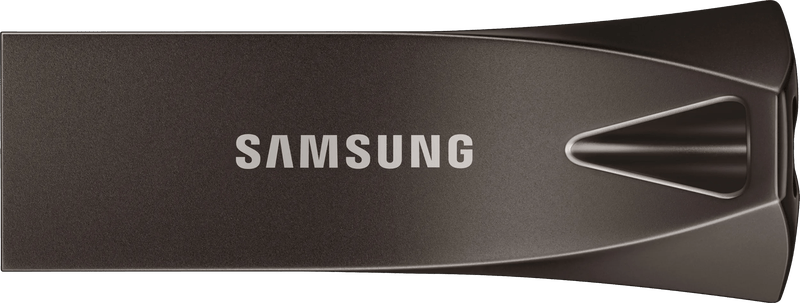
The classic for the USB-A port. Samsung states up to 400 MB/s read for 128, 256 and 512 GB, and up to 300 MB/s for 64 GB. The metal housing has an eyelet for a key ring and, according to Samsung, is watertight in seawater for up to 72 hours. Five-year limited warranty. It only fits an iPhone with an adapter.
Kingston DataTraveler Max
With up to 1,000 MB/s read and 900 MB/s write according to Kingston, this drive plays in a league of its own, with 256 GB to 1 TB. These figures only apply on a USB 3.2 Gen 2 port; on older ports, considerably less gets through. At just over 8 cm, the housing is quite long. That is a nuisance on a phone, hardly an issue on a notebook. The fastest option here for video clips and large installation files, overkill for text documents.
Kingston IronKey Keypad 200C
An alphanumeric keypad on the drive, XTS-AES-256 in hardware and FIPS validation to Level 3. According to Kingston, it works independently of the operating system, so also on devices where no software may be installed. Protected against water and dust to IP68. The NIST certificate lists the USB-C versions up to 256 GB. So if you need the certification, check the capacity. Three-year warranty.
Verbatim Keypad Secure USB-C
The simpler variant with a numeric keypad: a PIN of up to twelve digits, AES-256 in hardware, and after 20 failed attempts the drive locks itself and has to be reformatted. Verbatim states up to 160 MB/s read and 130 MB/s write for 32 GB. On the product page, the manufacturer points to a security update that should be installed as soon as possible. Do that before using it for the first time.
Which drive suits whom?
- Laptop with USB-C, office PC with USB-A, plus your phone: SanDisk Ultra Dual Drive Luxe, 64 GB and up.
- Only occasional photos from your phone, speed doesn’t matter: Lexar D400.
- TV, car stereo, older computers: Samsung BAR Plus.
- Large files on a current notebook with a fast port: Kingston DataTraveler Max. For daily use, go straight for an external SSD.
- Work data with a duty to provide proof: Kingston IronKey Keypad 200C up to 256 GB.
- Private folder with copies of ID documents and contracts: Verbatim Keypad Secure, after the update.
Frequently asked questions
USB-A or USB-C: which connector should it be?
Older PCs, TVs, car stereos and many printers only have USB-A, while current notebooks, tablets and phones often only have USB-C. A dual drive with both connectors saves you the adapter. If you only work on an older Windows computer, stick with a slim USB-A drive.
Why is my USB flash drive slower than advertised?
The package usually only states the read speed; writing often takes longer. The port is often the bottleneck too: the IronKey Keypad 200 reaches up to 280 MB/s on USB 3.2 Gen 1 but only 30 MB/s on USB 2.0. Small versions with 32 or 64 GB are also often slower.
Is a password on the USB flash drive enough?
A software vault such as Data Shield on the Lexar D400 is better than nothing, but it requires the software to run on the device in question. Drives with their own keypad encrypt in the device itself with AES-256 according to the manufacturer and are unlocked with the PIN on the drive, with no software on the computer at all.
Which USB flash drive works with the iPhone?
An iPhone with USB-C needs a USB-C connector and a compatible file system. Apple lists APFS, macOS Extended, exFAT or FAT. For switching between iPhone, Mac and Windows PC, exFAT is the practical middle ground; the Files app can reformat the drive itself.
When is an external SSD a better choice than a USB flash drive?
When you move entire video projects or photo archives back and forth every day. For volumes like that, a flash drive is the wrong tool. Even with the fast Kingston DataTraveler Max, for daily use the advice is: go straight for an external SSD.
Which encrypted USB flash drive is suitable for work?
Kingston's Keypad 200 series is validated by the US NIST to FIPS 140-3 Level 3. The certificate lists the USB-C versions up to 256 GB, so if you need the certification, check the capacity. For private documents, the Verbatim Keypad Secure is sufficient once the security update has been installed.
Sources
- SanDisk: Ultra Dual Drive Luxe USB Type-C data sheet
- Lexar: JumpDrive Dual Drive D400
- Samsung Newsroom: BAR Plus and FIT Plus with 512 GB
- Kingston: DataTraveler Max data sheet
- Kingston: IronKey Keypad 200 series data sheet
- NIST: FIPS 140-3 certificate 5133
- Verbatim: Keypad Secure USB-C Drive
- Apple: Connect external storage devices to iPhone
Where to buy
- SanDisk Ultra Dual Drive Luxe (128 GB)Check price at Amazon.deCheck price at Amazon.co.ukCheck price at Amazon.nlCheck price at Amazon.com.beCheck price at Amazon.frCheck price at Amazon.itCheck price at Amazon.esCheck price at Amazon.plCheck price at Amazon.seAvailable in Germany: Amazon.de
- Lexar JumpDrive Dual Drive D400Check price at Amazon.deCheck price at Amazon.co.ukCheck price at Amazon.nlCheck price at Amazon.com.beCheck price at Amazon.frCheck price at Amazon.itCheck price at Amazon.esCheck price at Amazon.plCheck price at Amazon.seAvailable in Germany: Amazon.de
- Samsung BAR PlusCheck price at Amazon.deCheck price at Amazon.co.ukCheck price at Amazon.nlCheck price at Amazon.com.beCheck price at Amazon.frCheck price at Amazon.itCheck price at Amazon.esCheck price at Amazon.plCheck price at Amazon.seAvailable in Germany: Amazon.deView at CoolblueAvailable in Germany: Coolblue
- Kingston DataTraveler MaxCheck price at Amazon.deCheck price at Amazon.co.ukCheck price at Amazon.nlCheck price at Amazon.com.beCheck price at Amazon.frCheck price at Amazon.itCheck price at Amazon.esCheck price at Amazon.plCheck price at Amazon.seAvailable in Germany: Amazon.de
- Kingston IronKey Keypad 200CCheck price at Amazon.deCheck price at Amazon.co.ukCheck price at Amazon.nlCheck price at Amazon.com.beCheck price at Amazon.frCheck price at Amazon.itCheck price at Amazon.esCheck price at Amazon.plCheck price at Amazon.seAvailable in Germany: Amazon.de
- Verbatim Keypad Secure USB-CCheck price at Amazon.deCheck price at Amazon.co.ukCheck price at Amazon.nlCheck price at Amazon.com.beCheck price at Amazon.frCheck price at Amazon.itCheck price at Amazon.esCheck price at Amazon.plCheck price at Amazon.seAvailable in Germany: Amazon.de
Still undecided?
Keep comparing at your own pace – every article in this category is checked monthly for new and discontinued models.