Contents15 sections
This guide was first published in German on handgetestet.de.
A capture card has two jobs, and many buyers only look at one. It records the picture, yes. But it also passes it on to the TV or monitor, and that is exactly where it is decided whether your PS5 suddenly runs at only 60 instead of 120 frames after you plug it in. For console gamers with a modern screen, we therefore recommend the Elgato 4K X: HDMI 2.1, USB-C, and according to the manufacturer it runs on Windows and on a Mac. If you play at 60 Hz anyway, the less expensive Elgato 4K S will do.
A capture card is not a switch. If several consoles need to connect to one TV, a device from our HDMI switch guide is the right choice.
What is the difference between recording and passthrough?
The console connects to the input, the screen to the output, and a copy goes to the computer via USB or PCIe. That is the principle. The path to the screen is called passthrough, the path to the computer recording. Each has its own limits.
An example from the data sheets: the Elgato 4K S passes through at most 4K60, 1440p120 or 1080p240. A 4K TV with 120 Hz therefore never gets 4K120 through it, even if the PS5 could deliver it. According to Elgato, the 4K X passes through up to 4K144, up to 4K120 on screens with Display Stream Compression, plus VRR and HDR10. If you already own a fast TV, this is the line in the data sheet to look at first. Recording is often the smaller issue. Hardly anyone needs videos in 4K144; Twitch and YouTube are usually fed with considerably less.
Will I feel the lag while gaming?
Not if you wire it correctly. Elgato describes the passthrough of its cards as lag-free; the signal passes through before the computer even processes it. The preview in the recording software, on the other hand, always lags a little behind. That is why the gaming screen belongs on the card’s HDMI output; never play in the OBS preview window. For shooters and racing games, this is the decisive step.
Internal via PCIe or external via USB?
A PCIe card sits permanently in a desktop PC and occupies an x4 slot there. That rules out laptops, and Macs too: the Elgato 4K Pro and AVerMedia Live Gamer 4K 2.1 list only Windows as their operating system. External devices, by contrast, move between desk, notebook and living room.
With USB, the port matters. The 4K X and the AVerMedia Live Gamer Ultra 2.1 need USB 3.2 Gen 2 at 10 Gbit/s. On a 5 Gbit/s port, according to Elgato, the 4K X records only at reduced resolution. A typical bad buy: the expensive HDMI 2.1 device on the front case port that only supports Gen 1. Check the port in your motherboard manual beforehand.
Why does the PS5 picture stay black?
Almost always because of HDCP, a copy protection for HDMI. Elgato explicitly lists the inputs of its cards as unencrypted. The PS5 has HDCP switched on by default. AVerMedia describes how to turn it off: Settings, System, HDMI, switch off „Enable HDCP“ there, and restart the console if necessary. For Blu-ray and DVD, according to PlayStation, the switch has to be turned back on. On the Xbox Series X|S and Switch, according to AVerMedia, HDCP kicks in as soon as apps such as Netflix or Disney+ are running; close the app, otherwise restart. Protected movies and shows cannot be recorded in any case.
For the Switch 2 in docked mode, Elgato gives up to 4K60 and 120 frames per second in 1080p or 1440p, with HDR10 in supported games. VRR is only available in handheld mode, so it plays no role with the card. If there is no sound, Elgato recommends the „Stereo“ setting on the console.
And if I connect a camera instead of a console?
Then a simple converter without passthrough is enough. However, the camera must output a clean HDMI signal, meaning without focus area, battery indicator and menus. Elgato explicitly names this as a requirement for the Cam Link 4K. Whether your camera can do that is in its manual under HDMI output or info display. Many entry-level cameras shut off after 30 minutes or overlay icons that cannot be turned off. A look at the manual takes five minutes. Without it, you may end up buying a converter that never sees a usable picture.
Which cards are worth considering?
| Model | Connection | Passthrough / recording (max.) | Mac | Best for |
|---|---|---|---|---|
| Elgato 4K X | USB-C 3.2 Gen 2, HDMI 2.1 | 4K144 / 4K144, VRR, HDR10 | yes, from macOS 11 | PS5 or Xbox on a 120 Hz TV |
| Elgato 4K S | USB-C 3.2 Gen 1, HDMI 2.0 | 4K60 (1440p120) / 4K60 | yes, from macOS 14.2 | Gaming at 60 Hz, Switch 2 |
| AVerMedia Live Gamer Ultra 2.1 (GC553G2) | USB-C 3.2 Gen 2, HDMI 2.1 | 4K144 / 4K144 (Windows), 4K60 (Mac) | yes, from macOS 13 | Alternative to the 4K X |
| Elgato 4K Pro | PCIe 2.0 x4, HDMI 2.1 | 8K60 / 4K60, HDR10 | no | Desktop PC, dual-PC setup |
| AVerMedia Live Gamer 4K 2.1 (GC575) | PCIe 3.0 x4, HDMI 2.1 | 4K144 / 4K144 (Streaming Center only) | no | Desktop PC with high frame rates |
| Elgato Cam Link 4K | USB 3.0 | no passthrough / 4K30, 1080p60 | yes, from macOS 13 | Mirrorless or video camera as a webcam |
Elgato 4K X
This is our recommendation for consoles on fast screens. HDMI 2.1 on both sides, recording up to 4K144, and according to Elgato VRR and ALLM pass through. It records HDR only under Windows, and then up to 4K30. On a Mac, it needs macOS 11 and an M1 or an Intel quad-core.
Elgato 4K S
The sensible choice if your TV tops out at 60 Hz anyway. Recording up to 4K60, HDR recording up to 1080p60 under Windows, plus a 3.5 mm input for party chat. Elgato no longer sells the older HD60 X; the 4K S now occupies this class.
AVerMedia Live Gamer Ultra 2.1 (GC553G2)
Technically close to the 4K X, and with passthrough even at 1440p240 and 1080p360. According to AVerMedia, full recording at 144 frames only works in its own Streaming Center under Windows. On a Mac, 4K60 is possible, but as MJPEG only from the M1 Ultra or newer. The manufacturer has confirmed compatibility with the Switch 2.
Elgato 4K Pro
The internal card for the desktop. It passes through up to 8K60 and records 4K60 in HDR10, and up to 240 frames in 1080p. Makes sense in a streaming PC with a free slot. Unsuitable for laptops and Macs.
AVerMedia Live Gamer 4K 2.1 (GC575)
The PCIe counterpart to the Ultra 2.1 with the same passthrough values. It records 4K144 only in Streaming Center, otherwise up to 4K60. 5.1 surround sound is only available under Windows.
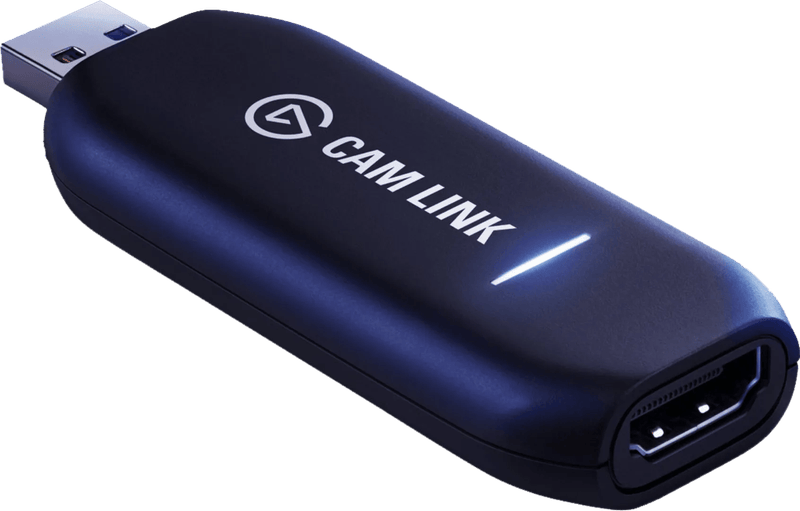
Elgato Cam Link 4K
The small stick turns a camera with a clean HDMI output into a webcam, in 4K30 or 1080p60. 4K60 is only available as MJPEG, with a suitable camera and the latest firmware. It is no good for consoles, since it has no output to the screen. The Magewell USB Capture HDMI 4K Plus works more professionally and with a passthrough output; according to the manufacturer, it runs under Windows, macOS, Linux and Chrome OS.
What software do I need?
Usually nothing extra. All the devices mentioned work with OBS Studio. Elgato also supplies Elgato Studio as a free program; the manufacturer now lists the former 4K Capture Utility only for individual models. AVerMedia relies on Streaming Center, which is only available for Windows, and an OBS plug-in. If you record on a Mac, plan on using OBS.
A few additions to the setup are worthwhile. Scenes and recording can be controlled conveniently with a Stream Deck (in German), a good webcam (in German) is often enough for your own picture, and your voice sounds much clearer with a USB microphone for streaming (in German) than through the headset.
Which card suits me?
- PS5 or Xbox Series X on a 4K TV with 120 Hz, recorded on a laptop or Mac: Elgato 4K X.
- TV or monitor with 60 Hz, Switch 2, smaller budget: Elgato 4K S.
- You want passthrough at more than 144 frames on your computer and use Windows: AVerMedia Live Gamer Ultra 2.1.
- Dedicated streaming PC with a free slot: Elgato 4K Pro or, for 4K144 recording, AVerMedia Live Gamer 4K 2.1.
- Camera instead of console: Elgato Cam Link 4K; check the clean HDMI output in the manual first.
Buying a card with HDMI 2.1 that then hangs on a slow USB port is pointless. Sort out port and screen first. Then the device.
Analog sources such as a VCR require different devices; see our guide to digitizing VHS.
Frequently asked questions
What does passthrough mean on a capture card?
Passthrough is the path of the picture to the TV or monitor; recording is the path to the computer. Each has its own limits. The Elgato 4K S passes through at most 4K60, so a 120 Hz TV never gets 4K120 through it. According to Elgato, the 4K X passes through up to 4K144.
Will I notice lag while gaming because of the capture card?
Not if it is wired correctly. Elgato describes the passthrough as lag-free; the signal passes through before the computer processes it. The preview in the recording software, on the other hand, lags behind. The gaming screen therefore belongs on the card's HDMI output; never play in the OBS preview window.
Why does the PS5 picture stay black on the capture card?
Almost always because of HDCP, a copy protection for HDMI that the PS5 has switched on by default. It can be turned off under Settings, System, HDMI. For Blu-ray and DVD, the switch has to be turned back on. Protected movies and shows cannot be recorded in any case.
Which is better: a USB or PCIe capture card?
A PCIe card sits permanently in a desktop PC and occupies an x4 slot, which rules out laptops and Macs. External USB devices move between desk, notebook and living room. The 4K X and Live Gamer Ultra 2.1 need USB 3.2 Gen 2 at 10 Gbit/s; on slower ports, the recording resolution drops.
Can I use a camera as a webcam via a capture card?
Yes, a converter without passthrough such as the Elgato Cam Link 4K is enough for that. However, the camera must output a clean HDMI signal without focus area, battery indicator and menus. Whether it can do that is in its manual under HDMI output or info display.
What software do I need for a capture card?
Usually nothing extra; all the devices mentioned work with OBS Studio. Elgato supplies Elgato Studio as a free program, while AVerMedia relies on Streaming Center, which is only available for Windows. On a Mac, plan on using OBS.
Sources
- Elgato: Game Capture 4K X, technical specifications
- Elgato: Game Capture 4K S, technical specifications
- Elgato: Game Capture 4K Pro, technical specifications
- Elgato: Cam Link 4K
- Elgato: HD60 X (no longer available)
- Elgato: Difference between 4K S and 4K X
- Elgato: Recording and streaming the Switch 2
- AVerMedia: Live Gamer Ultra 2.1 (GC553G2)
- AVerMedia: Live Gamer 4K 2.1 (GC575)
- AVerMedia: HDCP on PlayStation, Xbox and Switch
- PlayStation Blog: PS5 HDCP setting
- Magewell: USB Capture HDMI 4K Plus
Where to buy
- Elgato 4K XCheck price at Amazon.deCheck price at Amazon.co.ukCheck price at Amazon.nlCheck price at Amazon.com.beCheck price at Amazon.frCheck price at Amazon.itCheck price at Amazon.esCheck price at Amazon.plCheck price at Amazon.seAvailable in Germany: Amazon.de
- Elgato 4K SCheck price at Amazon.deCheck price at Amazon.co.ukCheck price at Amazon.nlCheck price at Amazon.com.beCheck price at Amazon.frCheck price at Amazon.itCheck price at Amazon.esCheck price at Amazon.plCheck price at Amazon.seAvailable in Germany: Amazon.de
- AVerMedia Live Gamer Ultra 2.1 GC553G2Check price at Amazon.deCheck price at Amazon.co.ukCheck price at Amazon.nlCheck price at Amazon.com.beCheck price at Amazon.frCheck price at Amazon.itCheck price at Amazon.esCheck price at Amazon.plCheck price at Amazon.seAvailable in Germany: Amazon.de
- Elgato 4K ProCheck price at Amazon.deCheck price at Amazon.co.ukCheck price at Amazon.nlCheck price at Amazon.com.beCheck price at Amazon.frCheck price at Amazon.itCheck price at Amazon.esCheck price at Amazon.plCheck price at Amazon.seAvailable in Germany: Amazon.de
- AVerMedia Live Gamer 4K 2.1 GC575Check price at Amazon.deCheck price at Amazon.co.ukCheck price at Amazon.nlCheck price at Amazon.com.beCheck price at Amazon.frCheck price at Amazon.itCheck price at Amazon.esCheck price at Amazon.plCheck price at Amazon.seAvailable in Germany: Amazon.de
- Elgato Cam Link 4KCheck price at Amazon.deCheck price at Amazon.co.ukCheck price at Amazon.nlCheck price at Amazon.com.beCheck price at Amazon.frCheck price at Amazon.itCheck price at Amazon.esCheck price at Amazon.plCheck price at Amazon.seAvailable in Germany: Amazon.de
- Elgato Game Capture 4K SView at CoolblueAvailable in Germany: Coolblue