Contents14 sections
This guide was first published in German on handgetestet.de.
With iPad accessories, it is rarely the brand that goes wrong. Usually it is the generation. If you type a lot, take the matching Apple Magic Keyboard for the iPad Air or iPad Pro, or the considerably less expensive Logitech Combo Touch, and the Magic Keyboard Folio for the iPad (A16). If all you need is protection for the display and back, a Smart Folio or a rugged Zugu case is enough. And for the new iPad mini (A20 Pro), Apple does not offer a keyboard of its own.
Sounds trivial. It is not, because the housings change by millimeters from one generation to the next, and that is exactly where many orders go wrong.
Step one: Which iPad do you have in front of you?
The exact name appears under Settings › General › About. An „iPad Air 11-inch (M4)“ is not the same as an „iPad Pro 11-inch (M5)“, even though both are 11 inches. The iPad Air and iPad Pro also come in 11 and 13 inches, and each size has its own cases and keyboards. Mix them up once, and the package goes back.
Next comes the power question. According to Logitech, the Combo Touch draws its power from the iPad’s Smart Connector, so it never needs charging. Many inexpensive keyboard cases, such as those from ESR, work via Bluetooth with their own battery instead. For German typing, the layout should be QWERTZ with umlauts.
The iPad mini (A20 Pro) is a special case. In its model comparison, Apple only lists support for Bluetooth keyboards, so for the small tablet you are left with a protective case plus a separate keyboard. Which iPad suits you in the first place is covered in our iPad comparison with all current models (in German).
Seven cases and keyboards and where they fit
| Model | Fits, according to the manufacturer | Design | For whom |
|---|---|---|---|
| Apple Magic Keyboard for iPad Pro | iPad Pro 11 and 13 inches (M4, M5) | Floating holder, backlit keys, glass trackpad with haptic feedback | Anyone using the Pro as a laptop replacement |
| Apple Magic Keyboard for iPad Air | iPad Air 11 and 13 inches (M2, M3, M4), iPad Air 4th and 5th generation | Floating holder, 14 function keys, glass trackpad | Heavy typists with an iPad Air |
| Apple Magic Keyboard Folio | iPad (A16), iPad (10th generation) | Two-piece, detachable keyboard, kickstand on the back | School and college with the entry-level iPad |
| Apple Smart Folio | A separate version each for iPad (A16), iPad mini (A20 Pro), iPad Air (M4), iPad Pro (M5) | Thin folding cover without a keyboard | Anyone who only wants to protect the display and back |
| Logitech Combo Touch | Separate versions for iPad (A16), iPad Air (M2 to M4), iPad Pro (M4, M5) | Detachable backlit keyboard, trackpad, kickstand | The less expensive alternative to the Magic Keyboard |
| ESR Rebound Magnetic Keyboard Case | iPad Air 11 and 13 inches (M4) | Bluetooth keyboard with trackpad, 360 version with portrait mode | A small budget with an iPad Air |
| Zugu Case | Separate versions for iPad (A16), iPad Air (M2 to M4), iPad Pro (M4, M5) | Rugged protective case with magnetic stand and pencil holder | Families, kids, commuters |
All details according to the manufacturers‘ websites, as of October 31, 2026.
Step two: Should the iPad replace your laptop?
Then there is hardly any way around the Magic Keyboard. Or the Logitech alternative.
Apple Magic Keyboard for iPad Pro
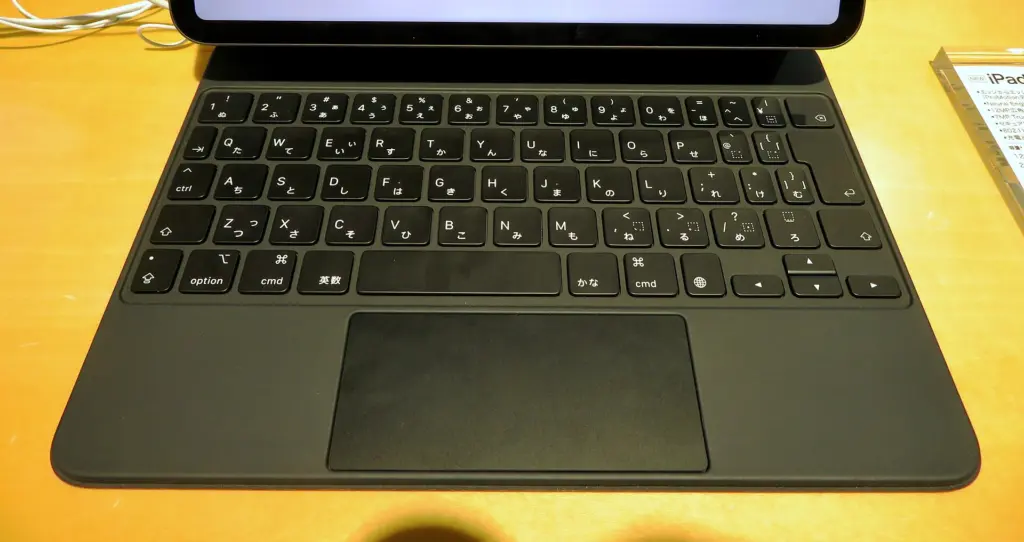
For the iPad Pro (M5), Apple lists only this Magic Keyboard, which arrived in 2024 with the M4 model; older keyboards for the iPad Pro are not on the list. Apple cites 14 function keys, backlit keys with 1 millimeter of travel, a larger glass trackpad with haptic feedback and a USB-C port that charges the iPad as well. No accessory in this overview costs more. It only makes sense if the Pro really is your work device.
Apple Magic Keyboard for iPad Air
According to Apple, this keyboard fits every iPad Air since the 4th generation, including the new Air with M4. If you upgrade, you can keep using the one you already have. 14 function keys, a large glass trackpad and, here too, USB-C for pass-through charging. Apple does not mention key backlighting for this model. On Amazon.de, the keyboard is sometimes still listed as the model for the „iPad Air (M3)“.
Logitech Combo Touch
If you do not want to pay Apple’s price, you almost inevitably end up here. Logitech describes a detachable, backlit full-size keyboard, a large multi-touch trackpad and a flexible kickstand; for the iPad (A16), according to Logitech, power and connection run via the Smart Connector. Unlike the Magic Keyboard, the Combo Touch encloses the entire iPad and also protects the edges. Choose the version carefully, because Logitech offers separate models for the iPad, iPad Air and iPad Pro, each in 11 and 13 inches.
ESR Rebound Magnetic Keyboard Case
For the iPad Air (M4), ESR offers its own keyboard cases in 11 and 13 inches, including a German layout. One version has a floating holder in the style of the Magic Keyboard, backlit keys and a trackpad. The 360 version comes with a detachable back shell that can also stand up in portrait orientation. It connects via Bluetooth, so the keyboard has to be charged. ESR explicitly advises buying the case for the M4 model, not the similarly sized one for the M3.
Step three: School, family, entry-level iPad
Here, protection and a sensible price matter more than the last bit of typing feel.
Apple Magic Keyboard Folio
For the iPad (A16), the Folio is the only Apple keyboard. Two pieces: a back panel with an adjustable kickstand and a detachable keyboard with 14 function keys and a trackpad. For reading or drawing, you take the keyboard off. That is enough for homework. On Amazon.de, it is sometimes still listed as the Folio for the 10th generation; according to Apple, it fits both models.
Zugu Case
Zugu does not make keyboards. It does make protective cases that are meant to withstand more than a Smart Folio. For the iPad Air 11-inch (M4), Zugu describes a shell made of TPU and polycarbonate, protection against drops from around 1.5 meters, a magnetic stand with eight angles and a side holder where the pencil keeps charging. Zugu also offers versions for the iPad (A16) and iPad Pro (M4, M5). So far, the manufacturer does not offer a case for the iPad mini (A20 Pro).
Step four: Protect only, no typing
That is a legitimate answer, too.
Apple Smart Folio
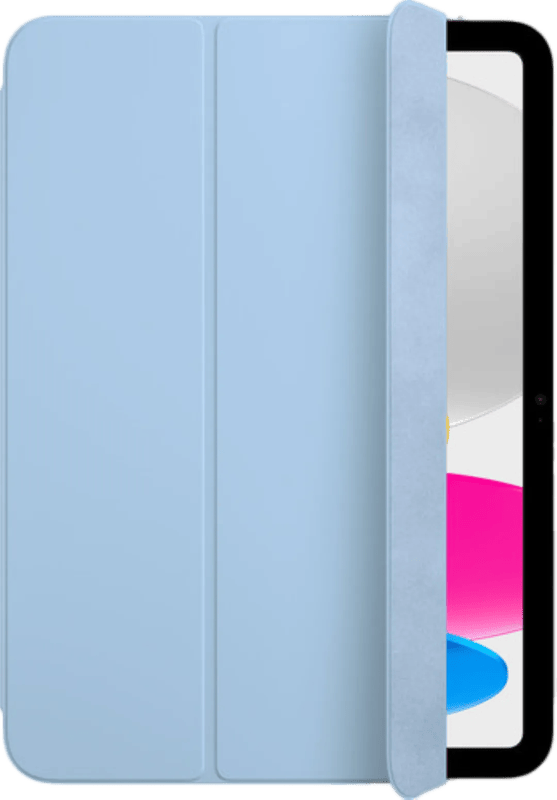
Front and back protected, folded into a stand. The Smart Folio is not meant to do more than that. Apple offers a separate version for every current iPad, including the iPad mini (A20 Pro). The thin cover does little against drops, but it does help against scratches.
How we would decide
- iPad (A16) for school and family: Zugu Case for protection, and for typing the Magic Keyboard Folio or the Combo Touch. The Logitech protects the edges better.
- iPad mini (A20 Pro): Smart Folio and, if needed, a small Bluetooth keyboard. There is no keyboard case from the manufacturer.
- iPad Air (M4) for work: Magic Keyboard for iPad Air, if typing feel matters. The Combo Touch is less expensive.
- iPad Air (M4), little money: ESR Rebound. In return, you accept charging by cable and a less refined typing feel.
- iPad Pro (M5): The Magic Keyboard for iPad Pro. Pairing a device of this class with a cheap case is saving in the wrong place.
If you only read and stream on the go, the Smart Folio is enough. In the living room in the evening, any keyboard just gets in the way.
Still unsure whether it should be an iPad at all? Our tablet guide with Android alternatives (in German) helps with the basic decision.
Without a keyboard, the tablet case guide (in German) will help.
Frequently asked questions
How do I find out which iPad I have?
The exact name appears under Settings › General › About. An iPad Air 11-inch (M4) is not the same as an iPad Pro 11-inch (M5), even though both are 11 inches. Each size and generation has its own cases and keyboards.
Magic Keyboard or Logitech Combo Touch?
The Magic Keyboard has a floating holder and a glass trackpad. The Combo Touch is considerably less expensive, encloses the entire iPad and also protects the edges; according to Logitech, it runs via the Smart Connector and never needs charging. Choose the version for your exact model.
Does the old Magic Keyboard fit the new iPad Air?
Yes. According to Apple, the Magic Keyboard for iPad Air fits every Air since the 4th generation, including the new Air with M4. You can keep using an existing keyboard when you upgrade. For the iPad Pro (M5), on the other hand, only the Magic Keyboard that arrived in 2024 with the M4 model fits.
Which keyboard is available for the iPad mini?
Apple does not offer its own keyboard for the iPad mini (A20 Pro) and only lists support for Bluetooth keyboards. That leaves a protective case such as the Smart Folio plus a separate small Bluetooth keyboard.
Which iPad case is suitable for kids and school?
For the iPad (A16), the Zugu Case works well as protection. Zugu describes a shell made of TPU and polycarbonate, protection against drops from around 1.5 meters and a magnetic stand. For typing, add the Magic Keyboard Folio or the Combo Touch.
What is the downside of inexpensive iPad keyboard cases?
Many inexpensive keyboard cases, such as the ESR Rebound, work via Bluetooth with their own battery and have to be charged by cable. On top of that, typing feels less refined. For German, look for a QWERTZ layout with umlauts.
Sources
- Apple: Compare iPad models
- Apple Support: Magic Keyboard for iPad Pro 11-inch, technical specifications
- Apple Support: Magic Keyboard for iPad Air 11-inch, technical specifications
- Apple Support: Magic Keyboard Folio, technical specifications
- Apple: Cases and protection for iPad
- Logitech: Combo Touch for iPad
- Logitech: Combo Touch for iPad Air
- Logitech: Combo Touch for iPad Pro
- ESR: Keyboard cases for iPad Air 11-inch (M4)
- Zugu: Cases for iPad Air
Where to buy
- Apple Magic Keyboard für iPad Pro (M5)Check price at Amazon.deCheck price at Amazon.co.ukCheck price at Amazon.nlCheck price at Amazon.com.beCheck price at Amazon.frCheck price at Amazon.itCheck price at Amazon.esCheck price at Amazon.plCheck price at Amazon.seAvailable in Germany: Amazon.de
- Apple Magic Keyboard für iPad Air (M4)Check price at Amazon.deCheck price at Amazon.co.ukCheck price at Amazon.nlCheck price at Amazon.com.beCheck price at Amazon.frCheck price at Amazon.itCheck price at Amazon.esCheck price at Amazon.plCheck price at Amazon.seAvailable in Germany: Amazon.de
- Apple Magic Keyboard Folio für iPad (A16)Check price at Amazon.deCheck price at Amazon.co.ukCheck price at Amazon.nlCheck price at Amazon.com.beCheck price at Amazon.frCheck price at Amazon.itCheck price at Amazon.esCheck price at Amazon.plCheck price at Amazon.seAvailable in Germany: Amazon.de
- Apple Smart FolioView at CoolblueAvailable in Germany: CoolblueCheck price at Amazon.deCheck price at Amazon.co.ukCheck price at Amazon.nlCheck price at Amazon.com.beCheck price at Amazon.frCheck price at Amazon.itCheck price at Amazon.esCheck price at Amazon.plCheck price at Amazon.seAvailable in Germany: Amazon.de
- Logitech Combo TouchCheck price at Amazon.deCheck price at Amazon.co.ukCheck price at Amazon.nlCheck price at Amazon.com.beCheck price at Amazon.frCheck price at Amazon.itCheck price at Amazon.esCheck price at Amazon.plCheck price at Amazon.seAvailable in Germany: Amazon.de
- ESR Rebound Magnetic Keyboard CaseCheck price at Amazon.deCheck price at Amazon.co.ukCheck price at Amazon.nlCheck price at Amazon.com.beCheck price at Amazon.frCheck price at Amazon.itCheck price at Amazon.esCheck price at Amazon.plCheck price at Amazon.seAvailable in Germany: Amazon.de
- Zugu CaseCheck price at Amazon.deCheck price at Amazon.co.ukCheck price at Amazon.nlCheck price at Amazon.com.beCheck price at Amazon.frCheck price at Amazon.itCheck price at Amazon.esCheck price at Amazon.plCheck price at Amazon.seAvailable in Germany: Amazon.de